一、创建工作空间
1.创建工作空间catkin_mbot
mkdir -p ~/catkin_mbot/src
cd ~/catkin_mbot/src
2.初始化工作空间
catkin_init_workspace
3.编译工作空间
cd ~/catkin_mbot
catkin_make
二、在src下新建mymbot_description功能包
1.创建功能包
cd ~/catkin_mbot/src
catkin_create_pkg mymbot_description xacro
在该功能包下创建三个.xacro文件,分别为:lidar_gazebo.xacro 用于存放激光雷达相关数据、mbot_base_gazebo.xacro 用于存放小车的相关数据、mbot_with_laser_gazebo.xacro 将激光雷达与小车合为一体。
2.lidar_gazebo.xacro
<?xml version="1.0"?>
<robot xmlns:xacro="http://www.ros.org/wiki/xacro" name="laser">

    <xacro:macro name="rplidar" params="prefix:=laser">
        <!-- Create laser reference frame -->
        <link name="${prefix}_link">
            <inertial>
                <mass value="0.1" />
                <origin xyz="0 0 0" />
                <inertia ixx="0.01" ixy="0.0" ixz="0.0"
                         iyy="0.01" iyz="0.0"
                         izz="0.01" />
            </inertial>

            <visual>
                <origin xyz=" 0 0 0 " rpy="0 0 0" />
                <geometry>
                    <cylinder length="0.05" radius="0.05"/>
                </geometry>
                <material name="black"/>
            </visual>

            <collision>
                <origin xyz="0.0 0.0 0.0" rpy="0 0 0" />
                <geometry>
                    <cylinder length="0.06" radius="0.05"/>
                </geometry>
            </collision>
        </link>
        <gazebo reference="${prefix}_link">
            <material>Gazebo/Black</material>
        </gazebo>

        <gazebo reference="${prefix}_link">
            <sensor type="ray" name="rplidar">
                <pose>0 0 0 0 0 0</pose>
                <visualize>false</visualize>
                <update_rate>5.5</update_rate>
                <ray>
                    <scan>
                      <horizontal>
                        <samples>360</samples>
                        <resolution>1</resolution>
                        <min_angle>-3</min_angle>
                        <max_angle>3</max_angle>
                      </horizontal>
                    </scan>
                    <range>
                      <min>0.10</min>
                      <max>6.0</max>
                      <resolution>0.01</resolution>
                    </range>
                    <noise>
                      <type>gaussian</type>
                      <mean>0.0</mean>
                      <stddev>0.01</stddev>
                    </noise>
                </ray>
                <plugin name="gazebo_rplidar" filename="libgazebo_ros_laser.so">
                    <topicName>/scan</topicName>
                    <frameName>laser_link</frameName>
                </plugin>
            </sensor>
        </gazebo>

    </xacro:macro>
</robot>
3.mbot_base_gazebo.xacro
<?xml version="1.0"?>
<robot name="mbot" xmlns:xacro="http://www.ros.org/wiki/xacro">

    <!-- PROPERTY LIST -->
    <xacro:property name="M_PI" value="3.1415926"/>
    <xacro:property name="base_mass"   value="20" />
    <xacro:property name="base_radius" value="0.20"/>
    <xacro:property name="base_length" value="0.16"/>

    <xacro:property name="wheel_mass"   value="2" />
    <xacro:property name="wheel_radius" value="0.06"/>
    <xacro:property name="wheel_length" value="0.025"/>
    <xacro:property name="wheel_joint_y" value="0.19"/>
    <xacro:property name="wheel_joint_z" value="0.05"/>

    <xacro:property name="caster_mass"    value="0.5" />
    <xacro:property name="caster_radius"  value="0.015"/> <!-- wheel_radius - ( base_length/2 - wheel_joint_z) -->
    <xacro:property name="caster_joint_x" value="0.18"/>

    <!-- Defining the colors used in this robot -->
    <material name="yellow">
        <color rgba="1 0.4 0 1"/>
    </material>
    <material name="black">
        <color rgba="0 0 0 0.95"/>
    </material>
    <material name="gray">
        <color rgba="0.75 0.75 0.75 1"/>
    </material>

    <!-- Macro for inertia matrix -->
    <xacro:macro name="sphere_inertial_matrix" params="m r">
        <inertial>
            <mass value="${m}" />
            <inertia ixx="${2*m*r*r/5}" ixy="0" ixz="0"
                iyy="${2*m*r*r/5}" iyz="0"
                izz="${2*m*r*r/5}" />
        </inertial>
    </xacro:macro>

    <xacro:macro name="cylinder_inertial_matrix" params="m r h">
        <inertial>
            <mass value="${m}" />
            <inertia ixx="${m*(3*r*r+h*h)/12}" ixy = "0" ixz = "0"
                iyy="${m*(3*r*r+h*h)/12}" iyz = "0"
                izz="${m*r*r/2}" />
        </inertial>
    </xacro:macro>

    <!-- Macro for robot wheel -->
    <xacro:macro name="wheel" params="prefix reflect">
        <joint name="${prefix}_wheel_joint" type="continuous">
            <origin xyz="0 ${reflect*wheel_joint_y} ${-wheel_joint_z}" rpy="0 0 0"/>
            <parent link="base_link"/>
            <child link="${prefix}_wheel_link"/>
            <axis xyz="0 1 0"/>
        </joint>

        <link name="${prefix}_wheel_link">
            <visual>
                <origin xyz="0 0 0" rpy="${M_PI/2} 0 0" />
                <geometry>
                    <cylinder radius="${wheel_radius}" length = "${wheel_length}"/>
                </geometry>
                <material name="gray" />
            </visual>
            <collision>
                <origin xyz="0 0 0" rpy="${M_PI/2} 0 0" />
                <geometry>
                    <cylinder radius="${wheel_radius}" length = "${wheel_length}"/>
                </geometry>
            </collision>
            <cylinder_inertial_matrix  m="${wheel_mass}" r="${wheel_radius}" h="${wheel_length}" />
        </link>

        <gazebo reference="${prefix}_wheel_link">
            <material>Gazebo/Gray</material>
        </gazebo>

        <!-- Transmission is important to link the joints and the controller -->
        <transmission name="${prefix}_wheel_joint_trans">
            <type>transmission_interface/SimpleTransmission</type>
            <joint name="${prefix}_wheel_joint" >
                <hardwareInterface>hardware_interface/VelocityJointInterface</hardwareInterface>
            </joint>
            <actuator name="${prefix}_wheel_joint_motor">
                <hardwareInterface>hardware_interface/VelocityJointInterface</hardwareInterface>
                <mechanicalReduction>1</mechanicalReduction>
            </actuator>
        </transmission>
    </xacro:macro>

    <!-- Macro for robot caster -->
    <xacro:macro name="caster" params="prefix reflect">
        <joint name="${prefix}_caster_joint" type="continuous">
            <origin xyz="${reflect*caster_joint_x} 0 ${-(base_length/2 + caster_radius)}" rpy="0 0 0"/>
            <parent link="base_link"/>
            <child link="${prefix}_caster_link"/>
            <axis xyz="0 1 0"/>
        </joint>

        <link name="${prefix}_caster_link">
            <visual>
                <origin xyz="0 0 0" rpy="0 0 0"/>
                <geometry>
                    <sphere radius="${caster_radius}" />
                </geometry>
                <material name="black" />
            </visual>
            <collision>
                <origin xyz="0 0 0" rpy="0 0 0"/>
                <geometry>
                    <sphere radius="${caster_radius}" />
                </geometry>
            </collision>
            <sphere_inertial_matrix  m="${caster_mass}" r="${caster_radius}" />
        </link>

        <gazebo reference="${prefix}_caster_link">
            <material>Gazebo/Black</material>
        </gazebo>
    </xacro:macro>

    <xacro:macro name="mbot_base_gazebo">
        <link name="base_footprint">
            <visual>
                <origin xyz="0 0 0" rpy="0 0 0" />
                <geometry>
                    <box size="0.001 0.001 0.001" />
                </geometry>
            </visual>
        </link>
        <gazebo reference="base_footprint">
            <turnGravityOff>false</turnGravityOff>
        </gazebo>

        <joint name="base_footprint_joint" type="fixed">
            <origin xyz="0 0 ${base_length/2 + caster_radius*2}" rpy="0 0 0" />
            <parent link="base_footprint"/>
            <child link="base_link" />
        </joint>

        <link name="base_link">
            <visual>
                <origin xyz=" 0 0 0" rpy="0 0 0" />
                <geometry>
                    <cylinder length="${base_length}" radius="${base_radius}"/>
                </geometry>
                <material name="yellow" />
            </visual>
            <collision>
                <origin xyz=" 0 0 0" rpy="0 0 0" />
                <geometry>
                    <cylinder length="${base_length}" radius="${base_radius}"/>
                </geometry>
            </collision>
            <cylinder_inertial_matrix  m="${base_mass}" r="${base_radius}" h="${base_length}" />
        </link>

        <gazebo reference="base_link">
            <material>Gazebo/Blue</material>
        </gazebo>

        <wheel prefix="left"  reflect="1"/>
        <wheel prefix="right" reflect="-1"/>

        <caster prefix="front" reflect="-1"/>
        <caster prefix="back"  reflect="1"/>

        <!-- controller -->
        <gazebo>
            <plugin name="differential_drive_controller"
                    filename="libgazebo_ros_diff_drive.so">
                <rosDebugLevel>Debug</rosDebugLevel>
                <publishWheelTF>true</publishWheelTF>
                <robotNamespace>/</robotNamespace>
                <publishTf>1</publishTf>
                <publishWheelJointState>true</publishWheelJointState>
                <alwaysOn>true</alwaysOn>
                <updateRate>100.0</updateRate>
                <legacyMode>true</legacyMode>
                <leftJoint>left_wheel_joint</leftJoint>
                <rightJoint>right_wheel_joint</rightJoint>
                <wheelSeparation>${wheel_joint_y*2}</wheelSeparation>
                <wheelDiameter>${2*wheel_radius}</wheelDiameter>
                <broadcastTF>1</broadcastTF>
                <wheelTorque>30</wheelTorque>
                <wheelAcceleration>1.8</wheelAcceleration>
                <commandTopic>cmd_vel</commandTopic>
                <odometryFrame>odom</odometryFrame>
                <odometryTopic>odom</odometryTopic>
                <robotBaseFrame>base_footprint</robotBaseFrame>
            </plugin>
        </gazebo>
    </xacro:macro>

</robot>
4.mbot_with_laser_gazebo.xacro
<?xml version="1.0"?>
<robot name="arm" xmlns:xacro="http://www.ros.org/wiki/xacro">

    <xacro:include filename="$(find mymbot_description)/mbot_base_gazebo.xacro" />
    <xacro:include filename="$(find mymbot_description)/lidar_gazebo.xacro" />

    <xacro:property name="lidar_offset_x" value="0" />
    <xacro:property name="lidar_offset_y" value="0" />
    <xacro:property name="lidar_offset_z" value="0.105" />

    <!-- lidar -->
    <joint name="lidar_joint" type="fixed">
        <origin xyz="${lidar_offset_x} ${lidar_offset_y} ${lidar_offset_z}" rpy="0 0 0" />
        <parent link="base_link"/>
        <child link="laser_link"/>
    </joint>

    <xacro:rplidar prefix="laser"/>

    <mbot_base_gazebo/>

</robot>
三、在src下建立mymbot_gazebo功能包
1.创建功能包
cd ~/catkin_mbot/src
catkin_create_pkg mymbot_gazebo gazebo_plugins gazebo_ros gazebo_ros_control
在该功能包下创建launch、worlds两个文件夹
2.launch文件夹下创建view_mbot_with_laser_gazebo.launch文件
<launch>

    <!-- 设置launch文件的参数 -->
    <arg name="world_name" value="$(find mymbot_gazebo)/worlds/easy.world"/>
    <arg name="paused" default="false"/>
    <arg name="use_sim_time" default="true"/>
    <arg name="gui" default="true"/>
    <arg name="headless" default="false"/>
    <arg name="debug" default="false"/>

    <!-- 运行gazebo仿真环境 -->
    <include file="$(find gazebo_ros)/launch/empty_world.launch">
        <arg name="world_name" value="$(arg world_name)" />
        <arg name="debug" value="$(arg debug)" />
        <arg name="gui" value="$(arg gui)" />
        <arg name="paused" value="$(arg paused)"/>
        <arg name="use_sim_time" value="$(arg use_sim_time)"/>
        <arg name="headless" value="$(arg headless)"/>
    </include>

    <!-- 加载机器人模型描述参数 -->
    <param name="robot_description" command="$(find xacro)/xacro --inorder '$(find mymbot_description)/mbot_with_laser_gazebo.xacro'" />

    <!-- 运行joint_state_publisher节点,发布机器人的关节状态  -->
    <node name="joint_state_publisher" pkg="joint_state_publisher" type="joint_state_publisher" ></node>

    <!-- 运行robot_state_publisher节点,发布tf  -->
    <node name="robot_state_publisher" pkg="robot_state_publisher" type="robot_state_publisher"  output="screen" >
        <param name="publish_frequency" type="double" value="50.0" />
    </node>

    <!-- 在gazebo中加载机器人模型-->
    <node name="urdf_spawner" pkg="gazebo_ros" type="spawn_model" respawn="false" output="screen"
          args="-urdf -model mbot -param robot_description"/>

</launch>
3.在worlds文件夹下创建easy.world文件
<sdf version='1.6'>
<world name='default'>
<light name='sun' type='directional'>
<cast_shadows>1</cast_shadows>
<pose frame=''>0 0 10 0 -0 0</pose>
<diffuse>0.8 0.8 0.8 1</diffuse>
<specular>0.2 0.2 0.2 1</specular>
<attenuation>
<range>1000</range>
<constant>0.9</constant>
<linear>0.01</linear>
<quadratic>0.001</quadratic>
</attenuation>
<direction>-0.5 0.1 -0.9</direction>
</light>
<model name='ground_plane'>
<static>1</static>
<link name='link'>
<collision name='collision'>
<geometry>
<plane>
<normal>0 0 1</normal>
<size>100 100</size>
</plane>
</geometry>
<surface>
<friction>
<ode>
<mu>100</mu>
<mu2>50</mu2>
</ode>
<torsional>
<ode/>
</torsional>
</friction>
<contact>
<ode/>
</contact>
<bounce/>
</surface>
<max_contacts>10</max_contacts>
</collision>
<visual name='visual'>
<cast_shadows>0</cast_shadows>
<geometry>
<plane>
<normal>0 0 1</normal>
<size>100 100</size>
</plane>
</geometry>
<material>
<script>
<uri>file://media/materials/scripts/gazebo.material</uri>
<name>Gazebo/Grey</name>
</script>
</material>
</visual>
<self_collide>0</self_collide>
<enable_wind>0</enable_wind>
<kinematic>0</kinematic>
</link>
</model>
<gravity>0 0 -9.8</gravity>
<magnetic_field>6e-06 2.3e-05 -4.2e-05</magnetic_field>
<atmosphere type='adiabatic'/>
<physics name='default_physics' default='0' type='ode'>
<max_step_size>0.001</max_step_size>
<real_time_factor>1</real_time_factor>
<real_time_update_rate>1000</real_time_update_rate>
</physics>
<scene>
<ambient>0.4 0.4 0.4 1</ambient>
<background>0.7 0.7 0.7 1</background>
<shadows>1</shadows>
</scene>
<audio>
<device>default</device>
</audio>
<wind/>
<spherical_coordinates>
<surface_model>EARTH_WGS84</surface_model>
<latitude_deg>0</latitude_deg>
<longitude_deg>0</longitude_deg>
<elevation>0</elevation>
<heading_deg>0</heading_deg>
</spherical_coordinates>
<model name='Untitled'>
<pose frame=''>1.485 0.01 0 0 -0 0</pose>
<link name='Wall_0'>
<collision name='Wall_0_Collision'>
<geometry>
<box>
<size>7 0.15 2.5</size>
</box>
</geometry>
<pose frame=''>0 0 1.25 0 -0 0</pose>
<max_contacts>10</max_contacts>
<surface>
<contact>
<ode/>
</contact>
<bounce/>
<friction>
<torsional>
<ode/>
</torsional>
<ode/>
</friction>
</surface>
</collision>
<visual name='Wall_0_Visual'>
<pose frame=''>0 0 1.25 0 -0 0</pose>
<geometry>
<box>
<size>7 0.15 2.5</size>
</box>
</geometry>
<material>
<script>
<uri>file://media/materials/scripts/gazebo.material</uri>
<name>Gazebo/Grey</name>
</script>
<ambient>1 1 1 1</ambient>
</material>
<meta>
<layer>0</layer>
</meta>
</visual>
<pose frame=''>0 -3.1 0 0 -0 0</pose>
<self_collide>0</self_collide>
<enable_wind>0</enable_wind>
<kinematic>0</kinematic>
</link>
<link name='Wall_1'>
<collision name='Wall_1_Collision'>
<geometry>
<box>
<size>4 0.15 2.5</size>
</box>
</geometry>
<pose frame=''>0 0 1.25 0 -0 0</pose>
<max_contacts>10</max_contacts>
<surface>
<contact>
<ode/>
</contact>
<bounce/>
<friction>
<torsional>
<ode/>
</torsional>
<ode/>
</friction>
</surface>
</collision>
<visual name='Wall_1_Visual'>
<pose frame=''>0 0 1.25 0 -0 0</pose>
<geometry>
<box>
<size>4 0.15 2.5</size>
</box>
</geometry>
<material>
<script>
<uri>file://media/materials/scripts/gazebo.material</uri>
<name>Gazebo/Grey</name>
</script>
<ambient>1 1 1 1</ambient>
</material>
<meta>
<layer>0</layer>
</meta>
</visual>
<pose frame=''>3.425 -1.175 0 0 -0 1.5708</pose>
<self_collide>0</self_collide>
<enable_wind>0</enable_wind>
<kinematic>0</kinematic>
</link>
<link name='Wall_2'>
<collision name='Wall_2_Collision'>
<geometry>
<box>
<size>2.5 0.15 2.5</size>
</box>
</geometry>
<pose frame=''>0 0 1.25 0 -0 0</pose>
<max_contacts>10</max_contacts>
<surface>
<contact>
<ode/>
</contact>
<bounce/>
<friction>
<torsional>
<ode/>
</torsional>
<ode/>
</friction>
</surface>
</collision>
<visual name='Wall_2_Visual'>
<pose frame=''>0 0 1.25 0 -0 0</pose>
<geometry>
<box>
<size>2.5 0.15 2.5</size>
</box>
</geometry>
<material>
<script>
<uri>file://media/materials/scripts/gazebo.material</uri>
<name>Gazebo/Grey</name>
</script>
<ambient>1 1 1 1</ambient>
</material>
<meta>
<layer>0</layer>
</meta>
</visual>
<pose frame=''>3.425 1.925 0 0 -0 1.5708</pose>
<self_collide>0</self_collide>
<enable_wind>0</enable_wind>
<kinematic>0</kinematic>
</link>
<link name='Wall_3'>
<collision name='Wall_3_Collision'>
<geometry>
<box>
<size>7 0.15 2.5</size>
</box>
</geometry>
<pose frame=''>0 0 1.25 0 -0 0</pose>
<max_contacts>10</max_contacts>
<surface>
<contact>
<ode/>
</contact>
<bounce/>
<friction>
<torsional>
<ode/>
</torsional>
<ode/>
</friction>
</surface>
</collision>
<visual name='Wall_3_Visual'>
<pose frame=''>0 0 1.25 0 -0 0</pose>
<geometry>
<box>
<size>7 0.15 2.5</size>
</box>
</geometry>
<material>
<script>
<uri>file://media/materials/scripts/gazebo.material</uri>
<name>Gazebo/Grey</name>
</script>
<ambient>1 1 1 1</ambient>
</material>
<meta>
<layer>0</layer>
</meta>
</visual>
<pose frame=''>0 3.1 0 0 -0 3.14159</pose>
<self_collide>0</self_collide>
<enable_wind>0</enable_wind>
<kinematic>0</kinematic>
</link>
<link name='Wall_4'>
<collision name='Wall_4_Collision'>
<geometry>
<box>
<size>6.35 0.15 2.5</size>
</box>
</geometry>
<pose frame=''>0 0 1.25 0 -0 0</pose>
<max_contacts>10</max_contacts>
<surface>
<contact>
<ode/>
</contact>
<bounce/>
<friction>
<torsional>
<ode/>
</torsional>
<ode/>
</friction>
</surface>
</collision>
<visual name='Wall_4_Visual'>
<pose frame=''>0 0 1.25 0 -0 0</pose>
<geometry>
<box>
<size>6.35 0.15 2.5</size>
</box>
</geometry>
<material>
<script>
<uri>file://media/materials/scripts/gazebo.material</uri>
<name>Gazebo/Grey</name>
</script>
<ambient>1 1 1 1</ambient>
</material>
<meta>
<layer>0</layer>
</meta>
</visual>
<pose frame=''>-3.425 0 0 0 -0 -1.5708</pose>
<self_collide>0</self_collide>
<enable_wind>0</enable_wind>
<kinematic>0</kinematic>
</link>
<static>1</static>
</model>
<model name='control_console'>
<static>1</static>
<link name='link'>
<visual name='visual'>
<geometry>
<mesh>
<uri>model://control_console/meshes/console.dae</uri>
</mesh>
</geometry>
</visual>
<visual name='backvisual'>
<pose frame=''>0 0.29388 1.30113 0 -0 0</pose>
<geometry>
<box>
<size>1.78 0.05 2.60225</size>
</box>
</geometry>
</visual>
<collision name='back_collision'>
<pose frame=''>0 0.29388 1.30113 0 -0 0</pose>
<geometry>
<box>
<size>1.78 0.05 2.60225</size>
</box>
</geometry>
<max_contacts>10</max_contacts>
<surface>
<contact>
<ode/>
</contact>
<bounce/>
<friction>
<torsional>
<ode/>
</torsional>
<ode/>
</friction>
</surface>
</collision>
<collision name='base_collision'>
<pose frame=''>0 -0.14669 0.4128 0 -0 0</pose>
<geometry>
<box>
<size>1.78872 0.97373 0.8256</size>
</box>
</geometry>
<max_contacts>10</max_contacts>
<surface>
<contact>
<ode/>
</contact>
<bounce/>
<friction>
<torsional>
<ode/>
</torsional>
<ode/>
</friction>
</surface>
</collision>
<collision name='mid_collision'>
<pose frame=''>0 0.04268 1.48248 0 -0 0</pose>
<geometry>
<box>
<size>1.70162 0.51806 1.5</size>
</box>
</geometry>
<max_contacts>10</max_contacts>
<surface>
<contact>
<ode/>
</contact>
<bounce/>
<friction>
<torsional>
<ode/>
</torsional>
<ode/>
</friction>
</surface>
</collision>
<collision name='top_collision'>
<pose frame=''>0 -0.15709 2.31203 0 -0 0</pose>
<geometry>
<box>
<size>1.78872 0.95292 0.62632</size>
</box>
</geometry>
<max_contacts>10</max_contacts>
<surface>
<contact>
<ode/>
</contact>
<bounce/>
<friction>
<torsional>
<ode/>
</torsional>
<ode/>
</friction>
</surface>
</collision>
<collision name='panel_collision'>
<pose frame=''>0 -0.36311 0.90329 0.428775 -0 0</pose>
<geometry>
<box>
<size>1.33522 0.550273 0.1</size>
</box>
</geometry>
<max_contacts>10</max_contacts>
<surface>
<contact>
<ode/>
</contact>
<bounce/>
<friction>
<torsional>
<ode/>
</torsional>
<ode/>
</friction>
</surface>
</collision>
<collision name='left_lower_shoulder_collision'>
<pose frame=''>-0.7435 -0.19848 0.87 0.520485 -0 0</pose>
<geometry>
<box>
<size>0.30172 0.7 0.5</size>
</box>
</geometry>
<max_contacts>10</max_contacts>
<surface>
<contact>
<ode/>
</contact>
<bounce/>
<friction>
<torsional>
<ode/>
</torsional>
<ode/>
</friction>
</surface>
</collision>
<collision name='right_lower_shoulder_collision'>
<pose frame=''>0.7435 -0.19848 0.87 0.520485 -0 0</pose>
<geometry>
<box>
<size>0.30172 0.7 0.5</size>
</box>
</geometry>
<max_contacts>10</max_contacts>
<surface>
<contact>
<ode/>
</contact>
<bounce/>
<friction>
<torsional>
<ode/>
</torsional>
<ode/>
</friction>
</surface>
</collision>
<collision name='left_upper_shoulder_collision'>
<pose frame=''>-0.7435 -0.19152 1.99244 -0.620645 0 0</pose>
<geometry>
<box>
<size>0.30172 0.7 0.5</size>
</box>
</geometry>
<max_contacts>10</max_contacts>
<surface>
<contact>
<ode/>
</contact>
<bounce/>
<friction>
<torsional>
<ode/>
</torsional>
<ode/>
</friction>
</surface>
</collision>
<collision name='right_upper_shoulder_collision'>
<pose frame=''>0.7435 -0.19152 1.99244 -0.620645 0 0</pose>
<geometry>
<box>
<size>0.30172 0.7 0.5</size>
</box>
</geometry>
<max_contacts>10</max_contacts>
<surface>
<contact>
<ode/>
</contact>
<bounce/>
<friction>
<torsional>
<ode/>
</torsional>
<ode/>
</friction>
</surface>
</collision>
<self_collide>0</self_collide>
<enable_wind>0</enable_wind>
<kinematic>0</kinematic>
</link>
<pose frame=''>1.12417 2.74992 0 0 -0 0</pose>
</model>
<model name='number5'>
<pose frame=''>4.48715 -0.132796 0.4 0 -0 0</pose>
<static>1</static>
<link name='link'>
<visual name='visual'>
<geometry>
<mesh>
<uri>model://number1/meshes/number.dae</uri>
</mesh>
</geometry>
<material>
<script>
<uri>model://number5/materials/scripts</uri>
<uri>model://number5/materials/textures</uri>
<name>Number/Five</name>
</script>
</material>
</visual>
<self_collide>0</self_collide>
<enable_wind>0</enable_wind>
<kinematic>0</kinematic>
</link>
</model>
<state world_name='default'>
<sim_time>151 774000000</sim_time>
<real_time>154 256918546</real_time>
<wall_time>1649152266 204573612</wall_time>
<iterations>151774</iterations>
<model name='Untitled'>
<pose frame=''>1.485 0.01 0 0 -0 0</pose>
<scale>1 1 1</scale>
<link name='Wall_0'>
<pose frame=''>1.485 -3.09 0 0 -0 0</pose>
<velocity>0 0 0 0 -0 0</velocity>
<acceleration>0 0 0 0 -0 0</acceleration>
<wrench>0 0 0 0 -0 0</wrench>
</link>
<link name='Wall_1'>
<pose frame=''>4.91 -1.165 0 0 -0 1.5708</pose>
<velocity>0 0 0 0 -0 0</velocity>
<acceleration>0 0 0 0 -0 0</acceleration>
<wrench>0 0 0 0 -0 0</wrench>
</link>
<link name='Wall_2'>
<pose frame=''>4.91 1.935 0 0 -0 1.5708</pose>
<velocity>0 0 0 0 -0 0</velocity>
<acceleration>0 0 0 0 -0 0</acceleration>
<wrench>0 0 0 0 -0 0</wrench>
</link>
<link name='Wall_3'>
<pose frame=''>1.485 3.11 0 0 -0 3.14159</pose>
<velocity>0 0 0 0 -0 0</velocity>
<acceleration>0 0 0 0 -0 0</acceleration>
<wrench>0 0 0 0 -0 0</wrench>
</link>
<link name='Wall_4'>
<pose frame=''>-1.94 0.01 0 0 0 -1.5708</pose>
<velocity>0 0 0 0 -0 0</velocity>
<acceleration>0 0 0 0 -0 0</acceleration>
<wrench>0 0 0 0 -0 0</wrench>
</link>
</model>
<model name='control_console'>
<pose frame=''>1.12417 2.74992 0 0 -0 0</pose>
<scale>1 1 1</scale>
<link name='link'>
<pose frame=''>1.12417 2.74992 0 0 -0 0</pose>
<velocity>0 0 0 0 -0 0</velocity>
<acceleration>0 0 0 0 -0 0</acceleration>
<wrench>0 0 0 0 -0 0</wrench>
</link>
</model>
<model name='ground_plane'>
<pose frame=''>0 0 0 0 -0 0</pose>
<scale>1 1 1</scale>
<link name='link'>
<pose frame=''>0 0 0 0 -0 0</pose>
<velocity>0 0 0 0 -0 0</velocity>
<acceleration>0 0 0 0 -0 0</acceleration>
<wrench>0 0 0 0 -0 0</wrench>
</link>
</model>
<model name='number5'>
<pose frame=''>4.48715 -0.132796 0.4 0 -0 0</pose>
<scale>1 1 1</scale>
<link name='link'>
<pose frame=''>4.48715 -0.132796 0.4 0 -0 0</pose>
<velocity>0 0 0 0 -0 0</velocity>
<acceleration>0 0 0 0 -0 0</acceleration>
<wrench>0 0 0 0 -0 0</wrench>
</link>
</model>
<light name='sun'>
<pose frame=''>0 0 10 0 -0 0</pose>
</light>
</state>
<gui fullscreen='0'>
<camera name='user_camera'>
<pose frame=''>4.11801 -5.09183 19.1974 -0 1.33564 1.5642</pose>
<view_controller>orbit</view_controller>
<projection_type>perspective</projection_type>
</camera>
</gui>
</world>
</sdf>以上两个文件夹可以实现在gazebo中创建一个仿真环境,并启动仿真小车
4.编译
cd ~/catkin_mbot
catkin_make
5.测试
source ~/catkin_mbot/devel/setup.bash
roslaunch mymbot_gazebo view_mbot_with_laser_gazebo.launch
6. 创建新的地图
source ~/catkin_mbot/devel/setup.bash
roslaunch mymbot_gazebo view_mbot_with_laser_gazebo.launch
打开gazebo仿真后在insert一栏可以添加新的物体,其中诸多模型文件会以资源形式上传

删除所有的墙体,以及物体后如图

点击Edit中的Building Editor
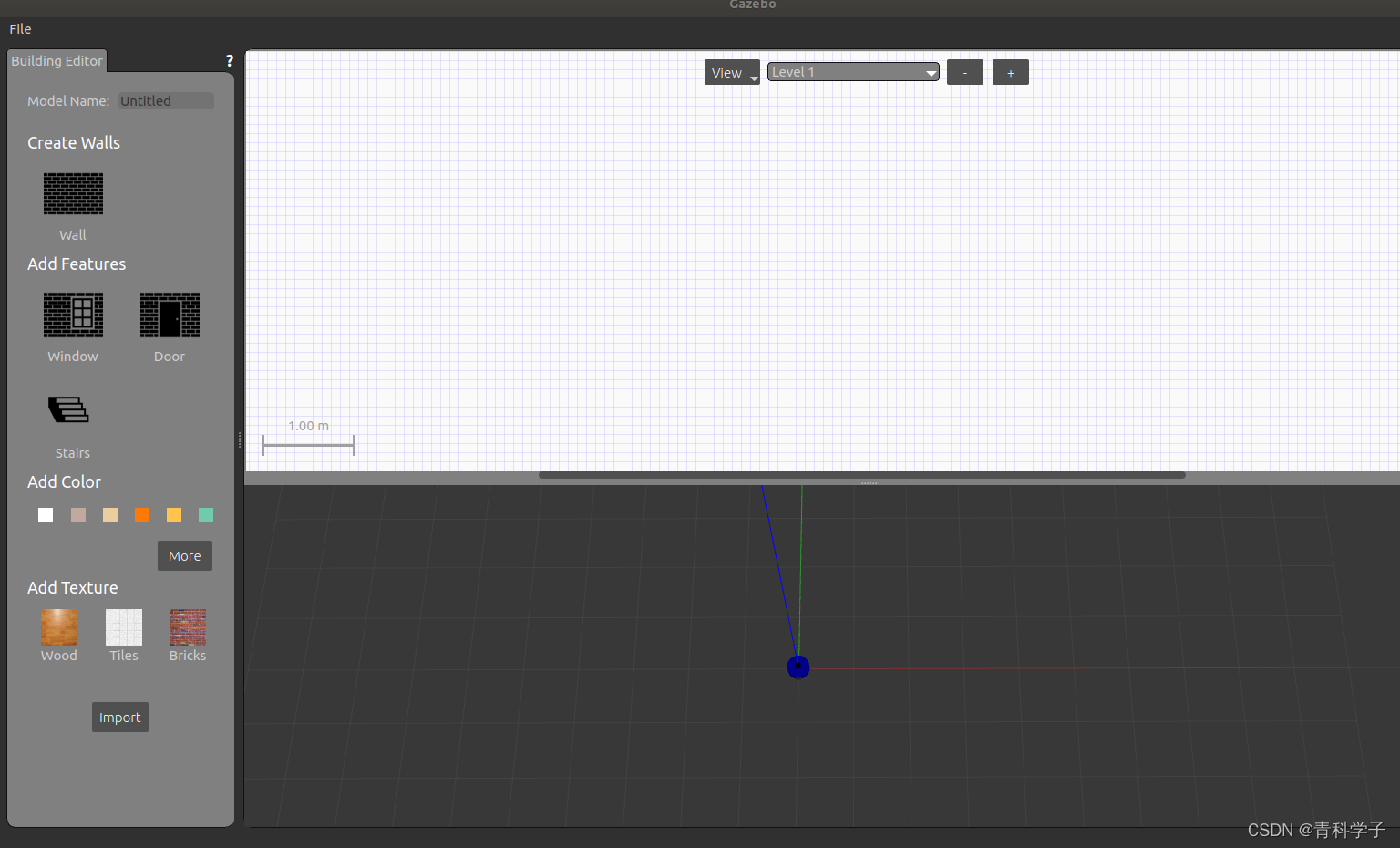
创建墙体
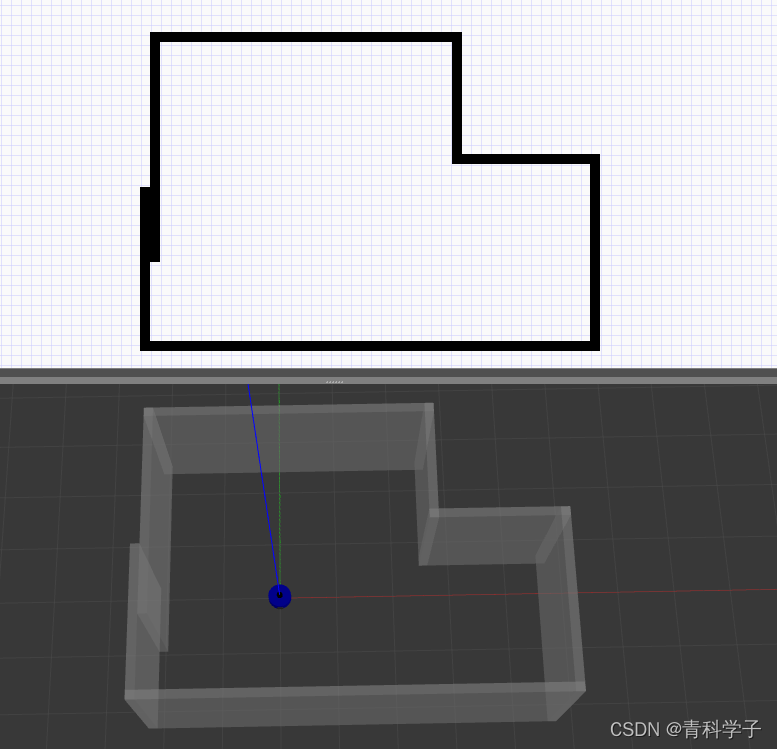
保存后退出

点击FIle中的 Save World As,以world_1.world为名保存到map文件夹中
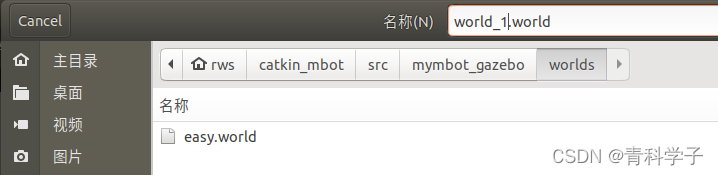
修改view_mbot_with_laser_gazebo.launch文件中的内容

将easy.world修改为world_1.world
测试:
运行gazebo仿真
source ~/catkin_mbot/devel/setup.bash
roslaunch mymbot_gazebo view_mbot_with_laser_gazebo.launch 
测试成功后将launch中的world改为easy.world
四、引入键盘控制功能,在src下建立mbot_teleop功能包
1.新建功能包
cd ~/catkin_mbot/src
catkin_create_pkg mbot_teleop geometry_msgs rospy
在该功能包下创建launch、scripts两个文件夹
2.launch中新建mbot_teleop.launch文件
<launch>
  <node name="mbot_teleop" pkg="mbot_teleop" type="mbot_teleop.py" output="screen">
    <param name="scale_linear" value="0.1" type="double"/>
    <param name="scale_angular" value="0.4" type="double"/>
  </node>
</launch>
3.scripts中新建mbot_teleop.py文件
#!/usr/bin/env python
# -*- coding: utf-8 -*-

import rospy
from geometry_msgs.msg import Twist
import sys, select, termios, tty

msg = """
Control mbot!
---------------------------
Moving around:
   u    i    o
   j    k    l
   m    ,    .

q/z : increase/decrease max speeds by 10%
w/x : increase/decrease only linear speed by 10%
e/c : increase/decrease only angular speed by 10%
space key, k : force stop
anything else : stop smoothly

CTRL-C to quit
"""

moveBindings = {
        'i':(1,0),
        'o':(1,-1),
        'j':(0,1),
        'l':(0,-1),
        'u':(1,1),
        ',':(-1,0),
        '.':(-1,1),
        'm':(-1,-1),
           }

speedBindings={
        'q':(1.1,1.1),
        'z':(.9,.9),
        'w':(1.1,1),
        'x':(.9,1),
        'e':(1,1.1),
        'c':(1,.9),
          }

def getKey():
    tty.setraw(sys.stdin.fileno())
    rlist, _, _ = select.select([sys.stdin], [], [], 0.1)
    if rlist:
        key = sys.stdin.read(1)
    else:
        key = ''

    termios.tcsetattr(sys.stdin, termios.TCSADRAIN, settings)
    return key

speed = .2
turn = 1

def vels(speed,turn):
    return "currently:\tspeed %s\tturn %s " % (speed,turn)

if __name__=="__main__":
    settings = termios.tcgetattr(sys.stdin)

    rospy.init_node('mbot_teleop')
    pub = rospy.Publisher('/cmd_vel', Twist, queue_size=5)

    x = 0
    th = 0
    status = 0
    count = 0
    acc = 0.1
    target_speed = 0
    target_turn = 0
    control_speed = 0
    control_turn = 0
    try:
        print msg
        print vels(speed,turn)
        while(1):
            key = getKey()
            # 运动控制方向键(1:正方向,-1负方向)
            if key in moveBindings.keys():
                x = moveBindings[key][0]
                th = moveBindings[key][1]
                count = 0
            # 速度修改键
            elif key in speedBindings.keys():
                speed = speed * speedBindings[key][0]  # 线速度增加0.1倍
                turn = turn * speedBindings[key][1]    # 角速度增加0.1倍
                count = 0

                print vels(speed,turn)
                if (status == 14):
                    print msg
                status = (status + 1) % 15
            # 停止键
            elif key == ' ' or key == 'k' :
                x = 0
                th = 0
                control_speed = 0
                control_turn = 0
            else:
                count = count + 1
                if count > 4:
                    x = 0
                    th = 0
                if (key == '\x03'):
                    break

            # 目标速度=速度值*方向值
            target_speed = speed * x
            target_turn = turn * th

            # 速度限位,防止速度增减过快
            if target_speed > control_speed:
                control_speed = min( target_speed, control_speed + 0.02 )
            elif target_speed < control_speed:
                control_speed = max( target_speed, control_speed - 0.02 )
            else:
                control_speed = target_speed

            if target_turn > control_turn:
                control_turn = min( target_turn, control_turn + 0.1 )
            elif target_turn < control_turn:
                control_turn = max( target_turn, control_turn - 0.1 )
            else:
                control_turn = target_turn

            # 创建并发布twist消息
            twist = Twist()
            twist.linear.x = control_speed;
            twist.linear.y = 0;
            twist.linear.z = 0
            twist.angular.x = 0;
            twist.angular.y = 0;
            twist.angular.z = control_turn
            pub.publish(twist)

    except:
        print e

    finally:
        twist = Twist()
        twist.linear.x = 0; twist.linear.y = 0; twist.linear.z = 0
        twist.angular.x = 0; twist.angular.y = 0; twist.angular.z = 0
        pub.publish(twist)

    termios.tcsetattr(sys.stdin, termios.TCSADRAIN, settings)
删掉该功能包下的src文件夹即可
4.编译
cd ~/catkin_mbot
catkin_make
五、配置导航功能包
1.创建功能包
sudo apt-get install ros-melodic-navigation2.在src下创建mbot_navigation功能包
cd ~/catkin_mbot/src
catkin_create_pkg mbot_navigation geometry_msgs move_base_msgs
在该功能包下创建config、launch、maps、rviz四个文件夹
config文件夹下创建mbot文件夹,在mbot中创建base_local_planner_params.yaml、costmap_common_params.yaml、global_costmap_params.yaml、local_costmap_params.yaml
3.base_local_planner_params.yaml
controller_frequency: 3.0
recovery_behavior_enabled: false
clearing_rotation_allowed: false

TrajectoryPlannerROS:
   max_vel_x: 0.5
   min_vel_x: 0.1
   max_vel_y: 0.0  # zero for a differential drive robot
   min_vel_y: 0.0
   max_vel_theta: 1.0
   min_vel_theta: -1.0
   min_in_place_vel_theta: 0.5
   escape_vel: -0.1
   acc_lim_x: 1.5
   acc_lim_y: 0.0 # zero for a differential drive robot
   acc_lim_theta: 1.2

   holonomic_robot: false
   yaw_goal_tolerance: 0.1 # about 6 degrees
   xy_goal_tolerance: 0.1  # 10 cm
   latch_xy_goal_tolerance: false
   pdist_scale: 0.9
   gdist_scale: 0.6
   meter_scoring: true

   heading_lookahead: 0.325
   heading_scoring: false
   heading_scoring_timestep: 0.8
   occdist_scale: 0.1
   oscillation_reset_dist: 0.05
   publish_cost_grid_pc: false
   prune_plan: true

   sim_time: 1.0
   sim_granularity: 0.025
   angular_sim_granularity: 0.025
   vx_samples: 8
   vy_samples: 0 # zero for a differential drive robot
   vtheta_samples: 20
   dwa: true
   simple_attractor: false
4.costmap_common_params.yaml
obstacle_range: 2.5
raytrace_range: 3.0
footprint: [[0.175, 0.175], [0.175, -0.175], [-0.175, -0.175], [-0.175, 0.175]]
footprint_inflation: 0.01
robot_radius: 0.175
inflation_radius: 0.15
max_obstacle_height: 0.6
min_obstacle_height: 0.0
observation_sources: scan
scan: {data_type: LaserScan, topic: /scan, marking: true, clearing: true, expected_update_rate: 0}
5.global_costmap_params.yaml
global_costmap:
   global_frame: map
   robot_base_frame: base_footprint
   update_frequency: 1.0
   publish_frequency: 1.0
   static_map: true
   rolling_window: false
   resolution: 0.01
   transform_tolerance: 1.0
   map_type: costmap
6.local_costmap_params.yaml
local_costmap:
   global_frame: odom
   robot_base_frame: base_footprint
   update_frequency: 3.0
   publish_frequency: 1.0
   static_map: true
   rolling_window: false
   width: 6.0
   height: 6.0
   resolution: 0.01
   transform_tolerance: 1.0
launch文件夹下存放以下三个文件:
7.amcl.launch
<launch>
    <arg name="use_map_topic" default="false"/>
    <arg name="scan_topic" default="scan"/>

    <node pkg="amcl" type="amcl" name="amcl" clear_params="true">
        <param name="use_map_topic" value="$(arg use_map_topic)"/>
        <!-- Publish scans from best pose at a max of 10 Hz -->
        <param name="odom_model_type" value="diff"/>
        <param name="odom_alpha5" value="0.1"/>
        <param name="gui_publish_rate" value="10.0"/>
        <param name="laser_max_beams" value="60"/>
        <param name="laser_max_range" value="12.0"/>
        <param name="min_particles" value="500"/>
        <param name="max_particles" value="2000"/>
        <param name="kld_err" value="0.05"/>
        <param name="kld_z" value="0.99"/>
        <param name="odom_alpha1" value="0.2"/>
        <param name="odom_alpha2" value="0.2"/>
        <!-- translation std dev, m -->
        <param name="odom_alpha3" value="0.2"/>
        <param name="odom_alpha4" value="0.2"/>
        <param name="laser_z_hit" value="0.5"/>
        <param name="laser_z_short" value="0.05"/>
        <param name="laser_z_max" value="0.05"/>
        <param name="laser_z_rand" value="0.5"/>
        <param name="laser_sigma_hit" value="0.2"/>
        <param name="laser_lambda_short" value="0.1"/>
        <param name="laser_model_type" value="likelihood_field"/>
        <!-- <param name="laser_model_type" value="beam"/> -->
        <param name="laser_likelihood_max_dist" value="2.0"/>
        <param name="update_min_d" value="0.25"/>
        <param name="update_min_a" value="0.2"/>
        <param name="odom_frame_id" value="odom"/>
        <param name="resample_interval" value="1"/>
        <!-- Increase tolerance because the computer can get quite busy -->
        <param name="transform_tolerance" value="1.0"/>
        <param name="recovery_alpha_slow" value="0.0"/>
        <param name="recovery_alpha_fast" value="0.0"/>
        <remap from="scan" to="$(arg scan_topic)"/>
    </node>
</launch>
8.move_base.launch
<launch>

  <node pkg="move_base" type="move_base" respawn="false" name="move_base" output="screen" clear_params="true">
    <rosparam file="$(find mbot_navigation)/config/mbot/costmap_common_params.yaml" command="load" ns="global_costmap" />
    <rosparam file="$(find mbot_navigation)/config/mbot/costmap_common_params.yaml" command="load" ns="local_costmap" />
    <rosparam file="$(find mbot_navigation)/config/mbot/local_costmap_params.yaml" command="load" />
    <rosparam file="$(find mbot_navigation)/config/mbot/global_costmap_params.yaml" command="load" />
    <rosparam file="$(find mbot_navigation)/config/mbot/base_local_planner_params.yaml" command="load" />
  </node>

</launch>
9.nav_cloister_demo.launch
<launch>

    <!-- 设置地图的配置文件 -->
    <arg name="map" default="map.yaml" />

    <!-- 运行地图服务器,并且加载设置的地图-->
    <node name="map_server" pkg="map_server" type="map_server" args="$(find mbot_navigation)/maps/$(arg map)"/>

    <!-- 运行move_base节点 -->
    <include file="$(find mbot_navigation)/launch/move_base.launch"/>

    <!-- 启动AMCL节点 -->
    <include file="$(find mbot_navigation)/launch/amcl.launch" />

    <!-- 对于虚拟定位,需要设置一个/odom与/map之间的静态坐标变换 -->
    <node pkg="tf" type="static_transform_publisher" name="map_odom_broadcaster" args="0 0 0 0 0 0 /map /odom 100" />

    <!-- 运行rviz -->
    <node pkg="rviz" type="rviz" name="rviz" args="-d $(find mbot_navigation)/rviz/nav.rviz"/>

</launch>
10.map
map文件夹中的内容参考我发布的《在激光雷达仿真环境下使用古月居提供的cartographer算法SLAM,最终导出 .pgm 与 .yaml 地图文件全过程》注意修改.yaml文件中的地图路径!!!
我的是:image: /home/rws/catkin_mbot/src/mbot_navigation/maps/map.pgm

11.rviz文件夹中创建nav.rviz文件
Panels:
  - Class: rviz/Displays
    Help Height: 78
    Name: Displays
    Property Tree Widget:
      Expanded:
        - /Global Options1
        - /RobotModel1/Links1/base_footprint1
        - /Pose Array1
      Splitter Ratio: 0.652661026
    Tree Height: 691
  - Class: rviz/Selection
    Name: Selection
  - Class: rviz/Tool Properties
    Expanded:
      - /2D Pose Estimate1
      - /2D Nav Goal1
    Name: Tool Properties
    Splitter Ratio: 0.428570986
  - Class: rviz/Views
    Expanded:
      - /Current View1
    Name: Views
    Splitter Ratio: 0.5
  - Class: rviz/Time
    Experimental: false
    Name: Time
    SyncMode: 0
    SyncSource: LaserScan
Visualization Manager:
  Class: ""
  Displays:
    - Alpha: 0.5
      Cell Size: 0.5
      Class: rviz/Grid
      Color: 0; 0; 0
      Enabled: true
      Line Style:
        Line Width: 0.0299999993
        Value: Lines
      Name: Grid
      Normal Cell Count: 0
      Offset:
        X: 0
        Y: 0
        Z: 0
      Plane: XY
      Plane Cell Count: 80
      Reference Frame: odom
      Value: true
    - Angle Tolerance: 0.100000001
      Class: rviz/Odometry
      Covariance:
        Orientation:
          Alpha: 0.5
          Color: 255; 255; 127
          Color Style: Unique
          Frame: Local
          Offset: 1
          Scale: 1
          Value: true
        Position:
          Alpha: 0.300000012
          Color: 204; 51; 204
          Scale: 1
          Value: true
        Value: true
      Enabled: false
      Keep: 100
      Name: Odometry
      Position Tolerance: 0.100000001
      Shape:
        Alpha: 1
        Axes Length: 1
        Axes Radius: 0.100000001
        Color: 255; 25; 0
        Head Length: 0.300000012
        Head Radius: 0.100000001
        Shaft Length: 1
        Shaft Radius: 0.0500000007
        Value: Arrow
      Topic: /odom
      Unreliable: false
      Value: false
    - Angle Tolerance: 0.100000001
      Class: rviz/Odometry
      Covariance:
        Orientation:
          Alpha: 0.5
          Color: 255; 255; 127
          Color Style: Unique
          Frame: Local
          Offset: 1
          Scale: 1
          Value: true
        Position:
          Alpha: 0.300000012
          Color: 204; 51; 204
          Scale: 1
          Value: true
        Value: true
      Enabled: false
      Keep: 100
      Name: Odometry EKF
      Position Tolerance: 0.100000001
      Shape:
        Alpha: 1
        Axes Length: 1
        Axes Radius: 0.100000001
        Color: 255; 25; 0
        Head Length: 0.300000012
        Head Radius: 0.100000001
        Shaft Length: 1
        Shaft Radius: 0.0500000007
        Value: Arrow
      Topic: /odom
      Unreliable: false
      Value: false
    - Alpha: 1
      Class: rviz/RobotModel
      Collision Enabled: false
      Enabled: true
      Links:
        All Links Enabled: true
        Expand Joint Details: false
        Expand Link Details: false
        Expand Tree: false
        Link Tree Style: Links in Alphabetic Order
        back_caster_link:
          Alpha: 1
          Show Axes: false
          Show Trail: false
          Value: true
        base_footprint:
          Alpha: 1
          Show Axes: false
          Show Trail: false
          Value: true
        base_link:
          Alpha: 1
          Show Axes: false
          Show Trail: false
          Value: true
        front_caster_link:
          Alpha: 1
          Show Axes: false
          Show Trail: false
          Value: true
        laser_link:
          Alpha: 1
          Show Axes: false
          Show Trail: false
          Value: true
        left_wheel_link:
          Alpha: 1
          Show Axes: false
          Show Trail: false
          Value: true
        right_wheel_link:
          Alpha: 1
          Show Axes: false
          Show Trail: false
          Value: true
      Name: RobotModel
      Robot Description: robot_description
      TF Prefix: ""
      Update Interval: 0
      Value: true
      Visual Enabled: true
    - Alpha: 0.699999988
      Class: rviz/Map
      Color Scheme: map
      Draw Behind: true
      Enabled: true
      Name: Map
      Topic: /map
      Unreliable: false
      Use Timestamp: false
      Value: true
    - Alpha: 1
      Buffer Length: 1
      Class: rviz/Path
      Color: 255; 0; 0
      Enabled: true
      Head Diameter: 0.300000012
      Head Length: 0.200000003
      Length: 0.300000012
      Line Style: Lines
      Line Width: 0.0299999993
      Name: Local Plan
      Offset:
        X: 0
        Y: 0
        Z: 0
      Pose Color: 255; 85; 255
      Pose Style: None
      Radius: 0.0299999993
      Shaft Diameter: 0.100000001
      Shaft Length: 0.100000001
      Topic: /move_base/TrajectoryPlannerROS/local_plan
      Unreliable: false
      Value: true
    - Alpha: 1
      Buffer Length: 1
      Class: rviz/Path
      Color: 0; 213; 0
      Enabled: true
      Head Diameter: 0.300000012
      Head Length: 0.200000003
      Length: 0.300000012
      Line Style: Lines
      Line Width: 0.0299999993
      Name: Global Plan
      Offset:
        X: 0
        Y: 0
        Z: 0
      Pose Color: 255; 85; 255
      Pose Style: None
      Radius: 0.0299999993
      Shaft Diameter: 0.100000001
      Shaft Length: 0.100000001
      Topic: /move_base/TrajectoryPlannerROS/global_plan
      Unreliable: false
      Value: true
    - Alpha: 1
      Arrow Length: 0.300000012
      Axes Length: 0.300000012
      Axes Radius: 0.00999999978
      Class: rviz/PoseArray
      Color: 170; 255; 127
      Enabled: true
      Head Length: 0.0700000003
      Head Radius: 0.0299999993
      Name: Pose Array
      Shaft Length: 0.230000004
      Shaft Radius: 0.00999999978
      Shape: Arrow (Flat)
      Topic: /particlecloud
      Unreliable: false
      Value: true
    - Alpha: 1
      Autocompute Intensity Bounds: true
      Autocompute Value Bounds:
        Max Value: 0.30399999
        Min Value: 0.30399999
        Value: true
      Axis: Z
      Channel Name: intensity
      Class: rviz/LaserScan
      Color: 255; 0; 0
      Color Transformer: FlatColor
      Decay Time: 0
      Enabled: true
      Invert Rainbow: false
      Max Color: 255; 255; 255
      Max Intensity: 4096
      Min Color: 0; 0; 0
      Min Intensity: 0
      Name: LaserScan
      Position Transformer: XYZ
      Queue Size: 10
      Selectable: true
      Size (Pixels): 3
      Size (m): 0.00999999978
      Style: Points
      Topic: /scan
      Unreliable: false
      Use Fixed Frame: true
      Use rainbow: true
      Value: true
    - Alpha: 1
      Axes Length: 1
      Axes Radius: 0.100000001
      Class: rviz/Pose
      Color: 0; 255; 0
      Enabled: true
      Head Length: 0.100000001
      Head Radius: 0.150000006
      Name: Goal Pose
      Shaft Length: 0.5
      Shaft Radius: 0.0299999993
      Shape: Arrow
      Topic: /move_base_simple/goal
      Unreliable: false
      Value: true
    - Alpha: 0.699999988
      Class: rviz/Map
      Color Scheme: costmap
      Draw Behind: false
      Enabled: true
      Name: Inflated Obstacles
      Topic: /move_base/local_costmap/costmap
      Unreliable: false
      Use Timestamp: false
      Value: true
    - Class: rviz/Marker
      Enabled: true
      Marker Topic: /waypoint_markers
      Name: Marker
      Namespaces:
        {}
      Queue Size: 100
      Value: true
  Enabled: true
  Global Options:
    Background Color: 0; 0; 0
    Default Light: true
    Fixed Frame: map
    Frame Rate: 30
  Name: root
  Tools:
    - Class: rviz/MoveCamera
    - Class: rviz/Interact
      Hide Inactive Objects: true
    - Class: rviz/Select
    - Class: rviz/SetInitialPose
      Topic: /initialpose
    - Class: rviz/SetGoal
      Topic: /move_base_simple/goal
  Value: true
  Views:
    Current:
      Angle: -6.3000164
      Class: rviz/TopDownOrtho
      Enable Stereo Rendering:
        Stereo Eye Separation: 0.0599999987
        Stereo Focal Distance: 1
        Swap Stereo Eyes: false
        Value: false
      Invert Z Axis: false
      Name: Current View
      Near Clip Distance: 0.00999999978
      Scale: 52.4497948
      Target Frame: <Fixed Frame>
      Value: TopDownOrtho (rviz)
      X: 0.412709981
      Y: -2.02176332
    Saved: ~
Window Geometry:
  Displays:
    collapsed: false
  Height: 904
  Hide Left Dock: false
  Hide Right Dock: false
  QMainWindow State: 000000ff00000000fd00000004000000000000016a00000342fc0200000005fb0000001200530065006c0065006300740069006f006e00000001e10000009b0000006100fffffffb0000001e0054006f006f006c002000500072006f007000650072007400690065007302000001ed000001df00000198000000a3fb000000120056006900650077007300200054006f006f02000001df000002110000018500000122fb000000200054006f006f006c002000500072006f0070006500720074006900650073003203000002880000011d000002210000017afb000000100044006900730070006c006100790073010000002800000342000000d700ffffff000000010000010f00000270fc0200000003fb0000001e0054006f006f006c002000500072006f00700065007200740069006500730100000041000000780000000000000000fb0000000a00560069006500770073000000002800000270000000ad00fffffffb0000001200530065006c0065006300740069006f006e010000025a000000b200000000000000000000000200000490000000a9fc0100000001fb0000000a00560069006500770073030000004e00000080000002e10000019700000003000004a00000003efc0100000002fb0000000800540069006d00650000000000000004a00000030000fffffffb0000000800540069006d00650100000000000004500000000000000000000004280000034200000004000000040000000800000008fc0000000100000002000000010000000a0054006f006f006c00730100000000ffffffff0000000000000000
  Selection:
    collapsed: false
  Time:
    collapsed: false
  Tool Properties:
    collapsed: false
  Views:
    collapsed: false
  Width: 1432
  X: 2298
  Y: 239
12.编译
cd ~/catkin_mbot
catkin_make
六、 gazebo仿真中用到的模型以及本文整个工作空间以上传到如下链接
七、最终测试
source ~/catkin_mbot/devel/setup.bash
roslaunch mymbot_gazebo view_mbot_with_laser_gazebo.launch
source ~/catkin_mbot/devel/setup.bash
roslaunch mbot_navigation nav_cloister_demo.launch
差速小车路径规划仿真