日期:2021/6/28
1
报错
CMake Error at CMakeLists.txt:7 (find_package): By not providing "FindOpencv.cmake" in CMAKE_MODULE_PATH this project has asked CMake to find a package configuration file provided by "Opencv", but CMake did not find one.
Could not find a package configuration file provided by "Opencv" with any of the following names:
OpencvConfig.cmake
opencv-config.cmake
Add the installation prefix of "Opencv" to CMAKE_PREFIX_PATH or set "Opencv_DIR" to a directory containing one of the above files. If "Opencv" provides a separate development package or SDK, be sure it has been installed.
解决方法
在终端输入命令:
locate OpenCVConfig.cmake
其中有一个文件位置为:/usr/local/share/OpenCV/OpenCVConfig.cmake
在CmakeLists.txt文件中添加如下语句:
set(OpenCV_DIR /usr/local/share/OpenCV/OpenCVConfig.cmake)
2
报错
CMake Warning (dev) in CMakeLists.txt: No cmake_minimum_required command is present. A line of code such ascmake_minimum_required(VERSION 3.12)should be added at the top of the file. The version specified may be lowerif you wish to support older CMake versions for this project. For moreinformation run "cmake --help-policy CMP0000". This warning is for project developers. Use -Wno-dev to suppress it.
解决方法
在CmakeLists.txt文件中添加如下语句:
cmake_minimum_required(VERSION 3.12)
3
在终端输入如下命令:cmake ..
会有如下提示:Found OpenCV: /usr/local (found version "4.1.1")
从中可以看出,系统最先找到的是高版本的opencv.
4
报错
make时出现如下错误:
#error This file requires compiler and library support for the ISO C++ 2011 standard. This support must be enabled with the -std=c++11 or -std=gnu++11 compiler options.
原因分析
在CmakeLists.txt文件中语句set(CMAKE_CXX_FLAGS "-std=c++11")的CMAKE_CXX_FLAGS 和"-std=c++11"之间缺少空格。
5
报错
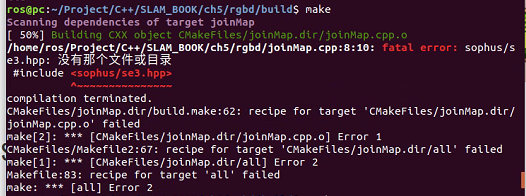
解决方法
mkdir build
cd build
cmake ..
make
sudo make install
报错
运行sudo make install出现问题:
CMake Error at cmake_install.cmake:64 (file): file cannot create directory: /usr/local/include/sophus. Maybe need administrative privileges.
解决方法
在/usr/local/include处建立文件夹sophus,再次执行sudo make install即可。
日期:2021/6/28
1
报错
CMakeFiles/joinMap.dir/joinMap.o:在函数‘showPointCloud(std::vector<Eigen::Matrix<double, 6, 1, 0, 6, 1>, Eigen::aligned_allocator<Eigen::Matrix<double, 6, 1, 0, 6, 1> > > const&)’中:
joinMap.cpp:(.text+0xbb5):对‘pangolin::CreateWindowAndBind(std::__cxx11::basic_string<char, std::char_traits<char>, std::allocator<char> >, int, int, pangolin::Params const&)’未定义的引用
joinMap.cpp:(.text+0xc52):对‘pangolin::ModelViewLookAt(double, double, double, double, double, double, double, double, double)’未定义的引用
joinMap.cpp:(.text+0xcc4):对‘pangolin::ProjectionMatrix(int, int, double, double, double, double, double, double)’未定义的引用
joinMap.cpp:(.text+0xce4):对‘pangolin::OpenGlRenderState::OpenGlRenderState(pangolin::OpenGlMatrix const&, pangolin::OpenGlMatrix const&)’未定义的引用
joinMap.cpp:(.text+0xd18):对‘pangolin::Handler3D::Handler3D(pangolin::OpenGlRenderState&, pangolin::AxisDirection, float, float)’未定义的引用
joinMap.cpp:(.text+0xd6b):对‘pangolin::CreateDisplay()’未定义的引用
joinMap.cpp:(.text+0xdaa):对‘pangolin::View::SetBounds(pangolin::Attach, pangolin::Attach, pangolin::Attach, pangolin::Attach, double)’未定义的引用
joinMap.cpp:(.text+0xdb5):对‘pangolin::View::SetHandler(pangolin::Handler*)’未定义的引用
joinMap.cpp:(.text+0xdc1):对‘pangolin::ShouldQuit()’未定义的引用
joinMap.cpp:(.text+0xdef):对‘pangolin::View::Activate(pangolin::OpenGlRenderState const&) const’未定义的引用
joinMap.cpp:(.text+0xfc6):对‘pangolin::FinishFrame()’未定义的引用
CMakeFiles/joinMap.dir/joinMap.o:在函数‘pangolin::_CheckGlDieOnError(char const*, int)’中:
joinMap.cpp:(.text._ZN8pangolin18_CheckGlDieOnErrorEPKci[_ZN8pangolin18_CheckGlDieOnErrorEPKci]+0x23):对‘pangolin::glErrorString(unsigned int)’未定义的引用
CMakeFiles/joinMap.dir/joinMap.o:在函数‘pangolin::GlTexture::~GlTexture()’中:
joinMap.cpp:(.text._ZN8pangolin9GlTextureD2Ev[_ZN8pangolin9GlTextureD5Ev]+0x2a):对‘pangolin::ShouldQuit()’未定义的引用
CMakeFiles/joinMap.dir/joinMap.o:在函数‘pangolin::Handler::~Handler()’中:
joinMap.cpp:(.text._ZN8pangolin7HandlerD2Ev[_ZN8pangolin7HandlerD5Ev]+0xf):对‘vtable for pangolin::Handler’未定义的引用
CMakeFiles/joinMap.dir/joinMap.o:(.data.rel+0x0):对‘vtable for pangolin::Handler’未定义的引用
CMakeFiles/joinMap.dir/joinMap.o:(.data.rel+0x8):对‘vtable for pangolin::HandlerScroll’未定义的引用
CMakeFiles/joinMap.dir/joinMap.o:在函数‘pangolin::HandlerScroll::~HandlerScroll()’中:
joinMap.cpp:(.text._ZN8pangolin13HandlerScrollD2Ev[_ZN8pangolin13HandlerScrollD5Ev]+0xf):对‘vtable for pangolin::HandlerScroll’未定义的引用
collect2: error: ld returned 1 exit status
CMakeFiles/joinMap.dir/build.make:341: recipe for target 'joinMap' failed
make[2]: *** [joinMap] Error 1
CMakeFiles/Makefile2:72: recipe for target 'CMakeFiles/joinMap.dir/all' failed
make[1]: *** [CMakeFiles/joinMap.dir/all] Error 2
Makefile:83: recipe for target 'all' failed
make: *** [all] Error 2
原因分析
CmakeLists.txt文件中关于 pangolin的部分写错了
解决方法
正确书写:
#pangolin
find_package(Pangolin)
include_directories( ${Pangolin_INCLUDE_DIRS} )
add_executable(joinMap joinMap.cpp)
target_link_libraries(joinMap ${OpenCV_LIBS} ${PCL_LIBRARIES} ${Pangolin_LIBRARIES})
2
报错
实践:拼接点云
运行程序:./joinMap
运行结果:
转换图像中: 1
转换图像中: 2
转换图像中: 3
转换图像中: 4
转换图像中: 5
点云共有0个点.
Point cloud is empty!
原因分析
运行程序时需要将pose文件和rgbd图片放到build文件夹中,也就是与joinMap放在一起。
日期:2021/6/30
今日任务——配置ros-realsense
1
报错
CMake Error at /opt/ros/kinetic/share/catkin/cmake/catkinConfig.cmake:83 (find_package):
Could not find a package configuration file provided by “cv_bridge” with any of the following names:
cv_bridgeConfig.cmake
cv_bridge-config.cmake
解决方法
下载vision_opencv包并编译
git clone https://github.com/ros-perception/vision_opencv.gitcd vision_opencv/cv_bridgesudo mkdir buildcd buildcmake ..makemake install
过程中报错
(1)CMake Error at /usr/share/cmake-3.5/Modules/FindBoost.cmake:1677 (message): Unable to find the requested Boost libraries.
 Boost version: 1.58.0
 Boost include path: /usr/include
 Could not find the following Boost libraries boost_python37
 No Boost libraries were found. You may need to set BOOST_LIBRARYDIR to the directory containing Boost libraries or BOOST_ROOT to the location of Boost.
 Call Stack (most recent call first):
 CMakeLists.txt:12 (find_package)
解决方法
1)安装boost库:
https://blog.csdn.net/zym1348010959/article/details/87821713
2)修改CMakeLists.txt文件
删除掉第12行:find_package(Boost REQUIRED python37),修改为:
set(boost_DIR /home/ouc/install/boost_1_69_0),后面是你安装的boost库所在路径。
(2)make 66%时出现问题

解决方法
修改/home/sun/version_opencv/cv_bridge/src/module.hpp(根据自己的路径),将最后一段(36~40)行改为
static void do_numpy_import( )
{
import_array( );
}
(一定要保证一模一样,void后面的*都要去掉)
2
报错
下载ros-realsense并且编译出现问题一,但是通过上述方式解决问题一之后,进行catkin_make时依然找不到cv_bridge。
解决方法
在CMakelist中set一下路径,找到该文件:

3
报错
catkin_make时还报了一个错误:缺少ros-kinetic-ddynamic-reconfigure包。
解决方法
通过sudo apt-get install ros-kinetic-ddynamic-reconfigure命令来进行安装,但是由于网络问题无法安装,此时可以采用从其他电脑复制的方式,但是该方法费事费力而且容易有遗漏,一定要谨慎。
日期:2021/7/1
1
报错
运行命令pip3 install pyrealsense2来安装python接口的时候,出现如下错误:
Traceback (most recent call last):
File "/home/sun/.local/bin/pip3", line 7, in <module>
from pip._internal.cli.main import main
File "/home/sun/.local/lib/python3.5/site-packages/pip/_internal/cli/main.py", line 60
sys.stderr.write(f"ERROR: {exc}")
^
SyntaxError: invalid syntax
解决方法
wget https://bootstrap.pypa.io/pip/3.5/get-pip.py
python3 get-pip.py
注意:wget https://bootstrap.pypa.io/pip/{version}/get-pip.py中的version需要修改成对应的版本号。
2
报错
/home/sun/ORB_SLAM2/Thirdparty/g2o/g2o/types/../cor/openmp_mutex.h:30:26: fatal error: ../../config.h:没有那个文件或目录 compilation terminated.
CMakeFiles/ORB_SLAM2.dir/build.make:62: recipe for target 'CMakeFiles/ORB_SLAM2.dir/src/System.cc.o' failed
make[2]: *** [CMakeFiles/ORB_SLAM2.dir/src/System.cc.o] Error 1CMakeFiles/Makefile2:183: recipe for target'CMakeFiles/ORB_SLAM2.dir/all' failed
make[1]: *** [CMakeFiles/ORB_SLAM2.dir/all] Error 2
Makefile:83: recipe for target 'all' failed
make: *** [all] Error 2
解决方法
这是因为g2o没有编译完整,进入ORB_SLAM2文件夹,重新执行 ./build.sh。
日期:2021/7/2
1
报错
orb_slam2运行./build_ros.sh的时候出现如下错误:
/usr/bin/ld: CMakeFiles/RGBD.dir/src/ros_rgbd.cc.o: undefined reference to symbol '_ZN5boost6system15system_categoryEv'
/usr/lib/x86_64-linux-gnu/libboost_system.so: error adding symbols: DSO missing from command line
collect2: error: ld returned 1 exit status
CMakeFiles/RGBD.dir/build.make:198: recipe for target '../RGBD' failed
make[2]: *** [../RGBD] Error 1
CMakeFiles/Makefile2:72: recipe for target 'CMakeFiles/RGBD.dir/all' failed
make[1]: *** [CMakeFiles/RGBD.dir/all] Error 2
make[1]: ***正在等待未完成的任务....
/usr/bin/ld: CMakeFiles/Stereo.dir/src/ros_stereo.cc.o: undefined reference to symbol '_ZN5boost6system15system_categoryEv'
/usr/lib/x86_64-linux-gnu/libboost_system.so: error adding symbols: DSO missing from command line
collect2: error: ld returned 1 exit status
CMakeFiles/Stereo.dir/build.make:198: recipe for target '../Stereo' failed
make[2]: *** [../Stereo] Error 1
CMakeFiles/Makefile2:109: recipe for target 'CMakeFiles/Stereo.dir/all' failed
make[1]: *** [CMakeFiles/Stereo.dir/all] Error 2
/usr/bin/ld: warning: libboost_filesystem.so.1.58.0, needed by /opt/ros/kinetic/lib/libroscpp.so, may conflict with libboost_filesystem.so.1.69.0
[ 55%] Built target Mono
/usr/bin/ld: warning: libboost_filesystem.so.1.58.0, needed by /opt/ros/kinetic/lib/libroscpp.so, may conflict with libboost_filesystem.so.1.69.0
[ 77%] Built target MonoAR
Makefile:129: recipe for target 'all' failed
make: *** [all] Error 2
原因分析
libboost_system.so与libboost_filesystem.so找不到链接目录
解决方法
将libboost_system.so与libboost_filesystem.so复制到ORB_SLAM2/lib下,并且将ORBSLAM2/Examples/ROS/ORBSLAM2下的Cmakelists.txt中加入库目录,具体为
在set(LIBS ${OpenCV_LIBS} ${EIGEN3_LIBS} ${Pangolin_LIBRARIES} ${PROJECT_SOURCE_DIR}/../../../Thirdparty/DBoW2/lib/libDBoW2.so ${PROJECT_SOURCE_DIR}/../../../Thirdparty/g2o/lib/libg2o.so ${PROJECT_SOURCE_DIR}/../../../lib/libORB_SLAM2.so
之后加入${PROJECT_SOURCE_DIR}/../../../lib/libboost_filesystem.so ${PROJECT_SOURCE_DIR}/../../../lib/libboost_system.so
问题得以解决
此时会出现另一个报错
[ 0%] Built target rospack_genmsg_libexe
[ 0%] Built target rosbuild_precompile
make[2]: *** No rule to make target '../../../../lib/libboost_filesystem.so', needed by '../RGBD'。 停止。
make[2]: *** No rule to make target '../../../../lib/libboost_filesystem.so', needed by '../Mono'。 停止。
CMakeFiles/Makefile2:72: recipe for target 'CMakeFiles/RGBD.dir/all' failed
make[1]: *** [CMakeFiles/RGBD.dir/all] Error 2
make[1]: ***正在等待未完成的任务....
CMakeFiles/Makefile2:723: recipe for target 'CMakeFiles/Mono.dir/all' failed
make[1]: *** [CMakeFiles/Mono.dir/all] Error 2
make[2]: *** No rule to make target '../../../../lib/libboost_filesystem.so', needed by '../Stereo'。 停止。
CMakeFiles/Makefile2:109: recipe for target 'CMakeFiles/Stereo.dir/all' failed
make[1]: *** [CMakeFiles/Stereo.dir/all] Error 2
make[2]: *** No rule to make target '../../../../lib/libboost_filesystem.so', needed by '../MonoAR'。 停止。
CMakeFiles/Makefile2:825: recipe for target 'CMakeFiles/MonoAR.dir/all' failed
make[1]: *** [CMakeFiles/MonoAR.dir/all] Error 2
Makefile:129: recipe for target 'all' failed
make: *** [all] Error 2
解决方法
把/usr/lib/x86_64-linux-gnu/libboost_system.so.1.58.0和/usr/lib/x86_64-linux-gnu/libboost_filesystem.so.1.58.0复制到ORB_SLAM2/lib下,其他无需修改,问题解决。
2
报错
orbslam2依赖cv_bridge包,但是它不存在。
解决方法
sudo apt-get install ros-kinetic-vision-opencv
3
ros使用realsense
sudo apt-get install ros-kinetic-rgbd-launch
roscore
roslaunch realsense2_camera rs_rgbd.launch
rivz
roslaunch realsense2_camera rs_camera.launch
roslaunch realsense2_camera rs_camera.launch filters:=pointcloud
左上角Displays中Fixed Frame选项中,下拉菜单选择camera_link,这时注意到Global Status变成了绿色;
点击该框中的Add ->上方点击By topic -> /depth_registered下的/points下的/PointCloud2;
点击该框中的Add ->上方点击By topic -> /color下的/image_raw下的image。
报错
如果不安装ros-kinetic-rgbd-launch,直接运行roslaunch realsense2_camera rs_rgbd.launch,会出现如下错误:
... logging to /home/sun/.ros/log/4da6ae40-db13-11eb-8c0e-b42e9916f18d/roslaunch-sun-Z370P-D3-14811.log
Checking log directory for disk usage. This may take awhile.
Press Ctrl-C to interrupt
Done checking log file disk usage. Usage is <1GB.
Traceback (most recent call last):
File "/opt/ros/kinetic/lib/python2.7/dist-packages/roslaunch/__init__.py", line 308, in main
p.start()
File "/opt/ros/kinetic/lib/python2.7/dist-packages/roslaunch/parent.py", line 268, in start
self._start_infrastructure()
File "/opt/ros/kinetic/lib/python2.7/dist-packages/roslaunch/parent.py", line 217, in _start_infrastructure
self._load_config()
File "/opt/ros/kinetic/lib/python2.7/dist-packages/roslaunch/parent.py", line 132, in _load_config
roslaunch_strs=self.roslaunch_strs, verbose=self.verbose)
File "/opt/ros/kinetic/lib/python2.7/dist-packages/roslaunch/config.py", line 451, in load_config_default
loader.load(f, config, verbose=verbose)
File "/opt/ros/kinetic/lib/python2.7/dist-packages/roslaunch/xmlloader.py", line 750, in load
self._load_launch(launch, ros_config, is_core=core, filename=filename, argv=argv, verbose=verbose)
File "/opt/ros/kinetic/lib/python2.7/dist-packages/roslaunch/xmlloader.py", line 722, in _load_launch
self._recurse_load(ros_config, launch.childNodes, self.root_context, None, is_core, verbose)
File "/opt/ros/kinetic/lib/python2.7/dist-packages/roslaunch/xmlloader.py", line 656, in _recurse_load
default_machine, is_core, verbose)
File "/opt/ros/kinetic/lib/python2.7/dist-packages/roslaunch/xmlloader.py", line 686, in _recurse_load
val = self._include_tag(tag, context, ros_config, default_machine, is_core, verbose)
File "/opt/ros/kinetic/lib/python2.7/dist-packages/roslaunch/xmlloader.py", line 95, in call
return f(*args, **kwds)
File "/opt/ros/kinetic/lib/python2.7/dist-packages/roslaunch/xmlloader.py", line 589, in _include_tag
inc_filename = self.resolve_args(tag.attributes['file'].value, context)
File "/opt/ros/kinetic/lib/python2.7/dist-packages/roslaunch/xmlloader.py", line 183, in resolve_args
return substitution_args.resolve_args(args, context=context.resolve_dict, resolve_anon=self.resolve_anon)
File "/opt/ros/kinetic/lib/python2.7/dist-packages/roslaunch/substitution_args.py", line 370, in resolve_args
resolved = _resolve_args(resolved, context, resolve_anon, commands)
File "/opt/ros/kinetic/lib/python2.7/dist-packages/roslaunch/substitution_args.py", line 383, in _resolve_args
resolved = commands[command](resolved, a, args, context)
File "/opt/ros/kinetic/lib/python2.7/dist-packages/roslaunch/substitution_args.py", line 151, in _find
source_path_to_packages=source_path_to_packages)
File "/opt/ros/kinetic/lib/python2.7/dist-packages/roslaunch/substitution_args.py", line 197, in _find_executable
full_path = _get_executable_path(rp.get_path(args[0]), path)
File "/usr/lib/python2.7/dist-packages/rospkg/rospack.py", line 207, in get_path
raise ResourceNotFound(name, ros_paths=self._ros_paths)
ResourceNotFound: rgbd_launch
ROS path [0]=/opt/ros/kinetic/share/ros
ROS path [1]=/home/sun/orbslam_ws/src/ORB_SLAM2/Examples/ROS/ORB_SLAM2
ROS path [2]=/home/sun/orbslam_ws/src
ROS path [3]=/home/sun/realsense_ws/src
ROS path [4]=/opt/ros/kinetic/share
日期:2021/7/10
今日任务——编译openmvs
1
报错
在生成OpenMVS库文件:sudo make -j2 && sudo make install的时候报错,报错是关于boost的,解决方法是升级boost==1.6.3。
在升级boost的时候,在升级完成之后,执行dpkg -S /usr/include/boost/version.hpp时,运行结果如下:
dpkg-query:警告:无法找到软件包libeigen3-dev 的文件名列表文件,现假定该软件包目前没有任何文件被安装在系统里。
libboost1.58-dev:amd64: /usr/include/boost/version.hpp
从上面可以看出,boost的版本似乎还是1.58,但是在实际编译的时候检测到的boost版本已经变成了1.63.0,因此上面的结果不需要care.
日期:2021/9/28
今日任务——编译Surgical_Scene_Reconstructor
1
报错
CMake Error at /opt/ros/kinetic/share/catkin/cmake/catkinConfig.cmake:83 (find_package):
Could not find a package configuration file provided by "usb_cam" with anyof the following names:
usb_camConfig.cmake
usb_cam-config.cmake
Add the installation prefix of "usb_cam" to CMAKE_PREFIX_PATH or set
"usb_cam_DIR" to a directory containing one of the above files. If
"usb_cam" provides a separate development package or SDK, be sure it has
been installed.
Call Stack (most recent call first):
Surgical_Scene_Reconstructor/CMakeLists.txt:10 (find_package)
-- Configuring incomplete, errors occurred!
See also "/home/sun/surgical_ws/build/CMakeFiles/CMakeOutput.log".
See also "/home/sun/surgical_ws/build/CMakeFiles/CMakeError.log".
Makefile:320: recipe for target 'cmake_check_build_system' failed
make: *** [cmake_check_build_system] Error 1
Invoking "make cmake_check_build_system" failed
解决方法
sudo apt-get install ros-kinetic-usb-cam
2
报错
CMake Error at /opt/ros/kinetic/share/pcl_ros/cmake/pcl_rosConfig.cmake:113 (message):
Project 'pcl_ros' specifies '/usr/include/eigen3' as an include dir, which is not found. It does neither exist as an absolute directory nor in
'${{prefix}}//usr/include/eigen3'. Check the issue tracker
'https://github.com/ros-perception/perception_pcl/issues' and consider
creating a ticket if the problem has not been reported yet.
Call Stack (most recent call first):
/opt/ros/kinetic/share/catkin/cmake/catkinConfig.cmake:76 (find_package)
Surgical_Scene_Reconstructor/CMakeLists.txt:10 (find_package)
-- Configuring incomplete, errors occurred!
See also "/home/sun/surgical_ws/build/CMakeFiles/CMakeOutput.log".
See also "/home/sun/surgical_ws/build/CMakeFiles/CMakeError.log".
Invoking "cmake" failed
解决方法
1)sudo locate eigen3定位eigen3的所在位置;
2)sudo cp -r /usr/local/include/eigen3 /usr/include复制eigen3一份到要求的位置。