主要功能有三个:
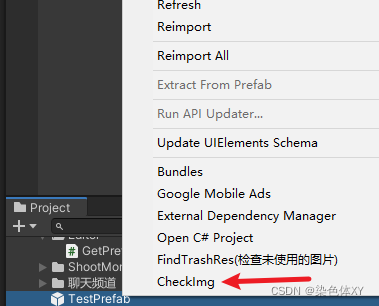
1.右键菜单自定义方法
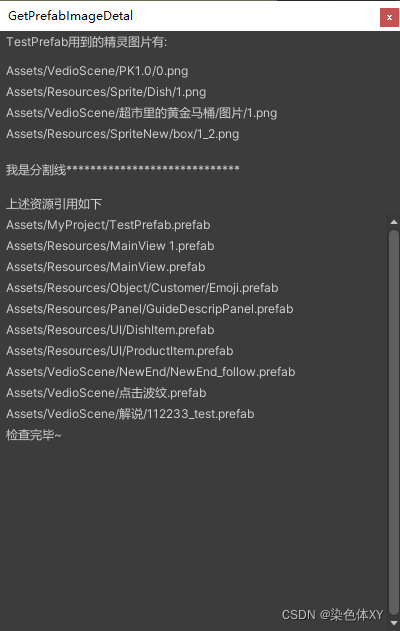
2.获取选中预制体内的所有Image图片引用(打印出了路径)
3.该预制体用到的图片资源,被其他预制体引用的情况(打印出了引用的预制体路径)
具体看代码,有注释
using System.Collections;
using System.Collections.Generic;
using UnityEngine;
using UnityEditor;
using UnityEngine.UI;
using System.IO;

public class GetPrefabImageDetal : EditorWindow
{
    static List<string> spritePath = new List<string>();
    static new string name = "";

    static List<string> checkGuids = new List<string>();
    static List<string> pList = new List<string>();

    static Vector2 srPos;
    bool isCheck = true;

    public static void Open()
    {
        var rect = new Rect(0, 0, 400, 600);
        GetWindowWithRect(typeof(GetPrefabImageDetal), rect, true);

    }

    //在Project下添加自定义功能
    [MenuItem("Assets/CheckImg", false)]
    public static void CheckImg()
    {
        GameObject go = Selection.activeObject as GameObject;
        if (go  == null)
        {
            Debug.Log("选取对象出错");
            return;
        }
        name = go.name;
        Debug.Log("当前选中:" + go.name);
        string assetPath = AssetDatabase.GetAssetPath(go);
        if (string.IsNullOrEmpty(assetPath))
        {
            Debug.Log("注意,这不是预制体");
            return;
        }
        //获取预制体内所有Image组件
        Image[] imgArr = go.GetComponentsInChildren<Image>();
        if (imgArr == null || imgArr.Length == 0)
        {
            Debug.Log("预制体里没有Image组件");
        }
        else
        {
            Debug.Log("当前预制体内有" + imgArr.Length + "个Image组件");

            foreach (var item in imgArr)
            {
                string path = AssetDatabase.GetAssetPath(item.sprite.GetInstanceID());

                if (!spritePath.Contains(path))
                {
                    spritePath.Add(path);
                }
                //得到GUId
                string guid = AssetDatabase.AssetPathToGUID(path);
                if (!checkGuids.Contains(guid))
                {
                    checkGuids.Add(guid);
                }

            }

            Open();

        }
    }

    //检查guid引用情况
    static void CheckAssetUsedPrefab(List<string> check)
    {
        //只检查prefab
        string[] guids = AssetDatabase.FindAssets("t:Prefab", new[] { "Assets" });
        Debug.Log("检查的资源文件个数:" + guids.Length);

        for (int i = 0; i < guids.Length; i++)
        {
            string filePath = AssetDatabase.GUIDToAssetPath(guids[i]);
            //进度条显示
            EditorUtility.DisplayCancelableProgressBar("资源检查中...", filePath, i / guids.Length * 1.0f);

            //info包含的是filePath对应文件的全部信息(作为text文本读取出来)
            string info = File.ReadAllText(filePath);
            Debug.Log("info:" + info);
            foreach (var item in check)
            {
                //检查预制体是否引用了该资源
                if (info.Contains(item) && !pList.Contains(filePath))
                {
                    //将引用过该资源的预制体路径加入列表(去重后的)
                    pList.Add(filePath);
                }
            }
        }
        EditorUtility.ClearProgressBar();

        if (pList.Count == 0)
        {
            Debug.Log("未找到相关引用");
        }
    }

    private void OnGUI()
    {
        GUILayout.BeginVertical();
        GUILayout.Label(name + "用到的精灵图片有:");
        GUILayout.Space(10);

        foreach (var item in spritePath)
        {
            GUILayout.Label(item);
            GUILayout.Space(2);
        }

        GUILayout.Space(15);

        if (isCheck)
        {
            isCheck = false;
            CheckAssetUsedPrefab(checkGuids);
        }

        GUILayout.Label("我是分割线*****************************");
        GUILayout.Space(15);

        GUILayout.Label("上述资源引用如下");
        //滚动列表
        GUILayout.BeginScrollView(srPos, false, true);

        foreach (var item in pList)
        {
            GUILayout.Label(item);
            GUILayout.Space(2);
        }

        GUILayout.Label("检查完毕~");

        GUILayout.EndVertical();

    }


}
运行结果如图:
版权声明:本文为xuxinyu100200原创文章,遵循CC 4.0 BY-SA版权协议,转载请附上原文出处链接和本声明。