前言
缓存击穿指的是高并发下请求的数据不存在与redis中,导致所有的请求去访问数据库给数据库服务器造成压垮性的压力。本文使用CountDownLatch来模拟高并发请求。
需求
有100个并发请求,第一个请求将会把数据库中的数据取出放入Redis中,其他的请求从Redis中获取数据。
普通实现(有缓存击穿的问题)
Redis工具类
@Service
public class RedisService {
    @Autowired
    private RedisTemplate redisTemplate;
    /**
     * 写入缓存
     * @param key
     * @param value
     * @return
     */
    public boolean set(final String key, Object value) {
        boolean result = false;
        try {
            ValueOperations<Serializable, Object> operations = redisTemplate.opsForValue();
            operations.set(key, value);
            result = true;
        } catch (Exception e) {
            e.printStackTrace();
        }
        return result;
    }
    /**
     * 写入缓存设置时效时间
     * @param key
     * @param value
     * @return
     */
    public boolean set(final String key, Object value, Long expireTime) {
        boolean result = false;
        try {
            ValueOperations<Serializable, Object> operations = redisTemplate.opsForValue();
            operations.set(key, value);
            redisTemplate.expire(key, expireTime, TimeUnit.SECONDS);
            result = true;
        } catch (Exception e) {
            e.printStackTrace();
        }
        return result;
    }
    /**
     * 判断缓存中是否有对应的value
     * @param key
     * @return
     */
    public boolean exists(final String key) {
        return redisTemplate.hasKey(key);
    }
    /**
     * 读取缓存
     * @param key
     * @return
     */
    public Object get(final String key) {
        Object result = null;
        ValueOperations<Serializable, Object> operations = redisTemplate.opsForValue();
        result = operations.get(key);
        return result;
    }
}
实现类
	@GetMapping("/redis")
    public void test(@RequestParam String username) {
    	//这里的并发量可以自己调整
        final CountDownLatch countDownLatch = new CountDownLatch(100);
        ExecutorService executorService = Executors.newFixedThreadPool(10);

        for (int i = 0; i < 100; i++) {
            executorService.submit(() -> {
                try {
                    countDownLatch.await(); //一直阻塞当前线程,直到计时器的值为0,保证同时并发

                    Object result = redisService.get(username);
                    if (result == null) {
	                     result = userService.findByUserName(username);
	                      System.out.println("从数据库中读取数据");
	                      //如果数据库中没有数据,也将空值放入redis中并设置一个时间,有效防止恶意攻击给数据库造成压力
	                      if (result == null) {
	                          redisService.set(username, JSONObject.toJSONString(result), 60L);
	                      } else {
	                      	  redisService.set(username, JSONObject.toJSONString(result));
	                      }
                    } else {
                        System.out.println("从缓存中读取数据");
                    }
                } catch (InterruptedException e) {
                    e.printStackTrace();
                }
            });
            countDownLatch.countDown();
        }
    }
运行结果
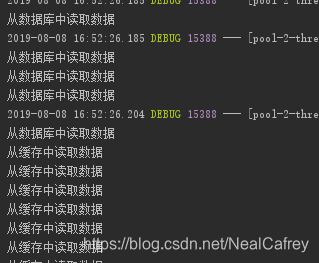
部份数据从数据库中读取
使用双重检测锁
实现类
	@GetMapping("/redis/right")
    public void test(@RequestParam String username) {
        //这里的并发量可以自己调整
        final CountDownLatch countDownLatch = new CountDownLatch(100);
        ExecutorService executorService = Executors.newFixedThreadPool(10);

        for (int i = 0; i < 100; i++) {
            executorService.submit(() -> {
                try {
                    countDownLatch.await(); //一直阻塞当前线程,直到计时器的值为0,保证同时并发

                    Object result = redisService.get(username);
                    if (result == null) {
                    	//加锁
                        synchronized (this) {
                            result = redisService.get(username);
                            if (result == null) {
                                result = userService.findByUserName(username);
                                System.out.println("从数据库中读取数据");
                                if (result == null) {
                                    redisService.set(username, JSONObject.toJSONString(result), 60L);
                                } else {
                                    redisService.set(username, JSONObject.toJSONString(result));
                                }
                            }
                        }
                    } else {
                        System.out.println("从缓存中读取数据");
                    }

                } catch (InterruptedException e) {
                    e.printStackTrace();
                }
            });
            countDownLatch.countDown();
        }
    }
运行结果
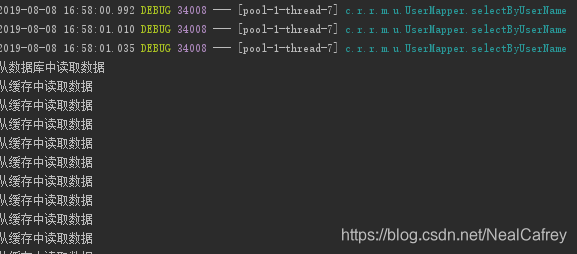
除了一次请求从数据库中获取数据并放入redis中,其他请求都从redis中获取数据
结束语
大致的思想就是这样,实际业务中不可能这么简单大家可以按照自己的需求写。
版权声明:本文为NealCafrey原创文章,遵循CC 4.0 BY-SA版权协议,转载请附上原文出处链接和本声明。