给EXSI虚拟机中linux硬盘扩容
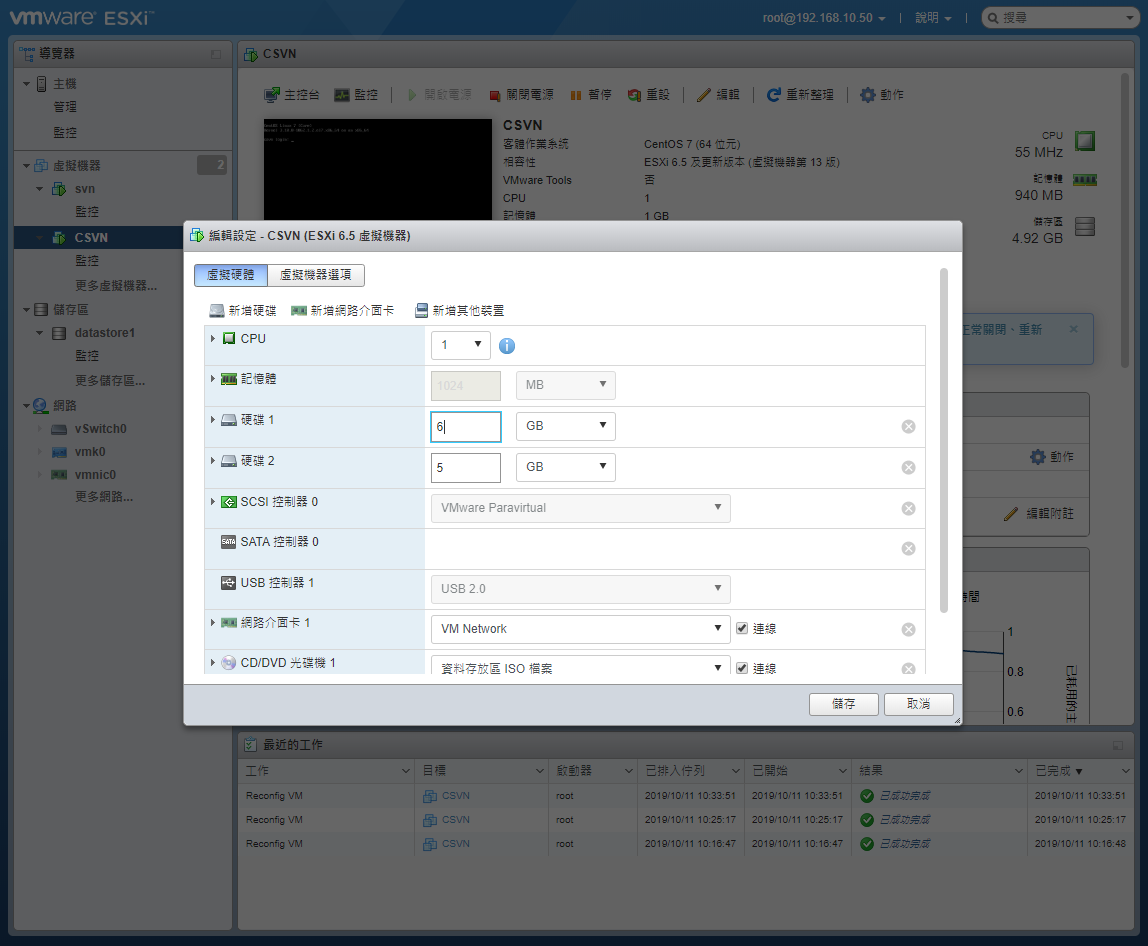
将硬盘1从6G扩充到10G
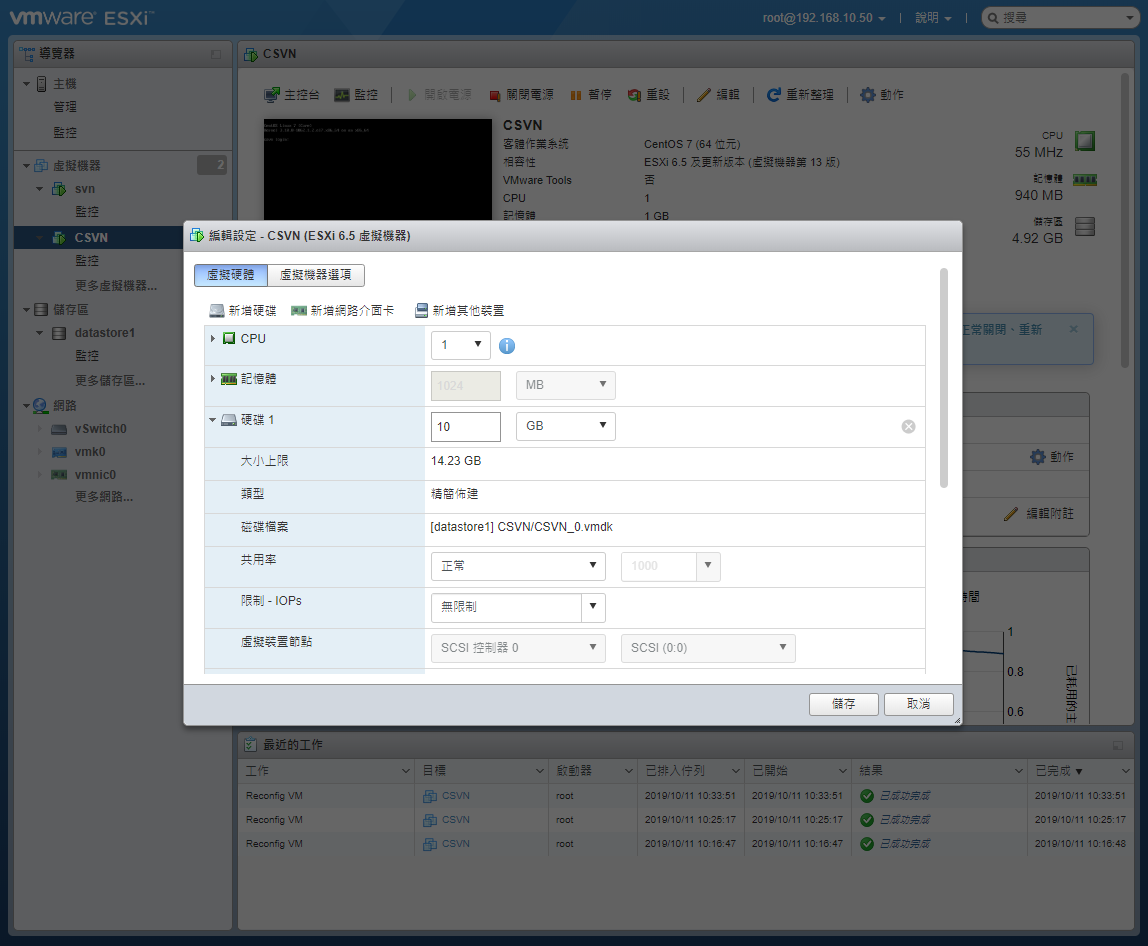
查看目前磁盘状态
[root@csvn ~]# df -h
Filesystem Size Used Avail Use%Mounted on
devtmpfs 484M0 484M 0% /dev
tmpfs 496M0 496M 0% /dev/shm
tmpfs 496M7.1M 489M 2% /run
tmpfs 496M0 496M 0% /sys/fs/cgroup/dev/mapper/centos-root 4.9G 2.9G 2.1G 59% /
/dev/sdb1 4.8G 21M 4.6G 1% /data/dev/sda1 497M 154M 344M 31% /boot
tmpfs 100M0 100M 0% /run/user/1001tmpfs 100M0 100M 0% /run/user/0
[root@csvn ~]# fdisk -l
Disk/dev/sda: 10.7 GB, 10737418240 bytes, 20971520sectors
Units= sectors of 1 * 512 = 512bytes
Sector size (logical/physical): 512 bytes / 512bytes
I/O size (minimum/optimal): 512 bytes / 512bytes
Disk label type: dos
Disk identifier:0x000c208bDevice Boot Start End Blocks Id System/dev/sda1 * 2048 1026047 512000 83Linux/dev/sda2 1026048 12582911 57784328e Linux LVM
Disk/dev/sdb: 5368 MB, 5368709120 bytes, 10485760sectors
Units= sectors of 1 * 512 = 512bytes
Sector size (logical/physical): 512 bytes / 512bytes
I/O size (minimum/optimal): 512 bytes / 512bytes
Disk label type: dos
Disk identifier:0xc42fca3dDevice Boot Start End Blocks Id System/dev/sdb1 2048 10485759 5241856 83Linux
Disk/dev/mapper/centos-root: 5226 MB, 5226102784 bytes, 10207232sectors
Units= sectors of 1 * 512 = 512bytes
Sector size (logical/physical): 512 bytes / 512bytes
I/O size (minimum/optimal): 512 bytes / 512bytes
Disk/dev/mapper/centos-swap: 645 MB, 645922816 bytes, 1261568sectors
Units= sectors of 1 * 512 = 512bytes
Sector size (logical/physical): 512 bytes / 512bytes
I/O size (minimum/optimal): 512 bytes / 512 bytes
可看到磁盘/dev/sda大小已经变成10.7GB
开始扩容
[root@csvn ~]# fdisk /dev/sda
Welcome to fdisk (util-linux 2.23.2).
Changes will remain in memory only, until you decide to write them.
Be careful before using the write command.
Command (m for help): n
Partition type:
p primary (2 primary, 0 extended, 2 free)
e extended
Select (default p): p
Partition number (3,4, default 3): 3
First sector (12582912-20971519, default 12582912):
Using default value 12582912
Last sector, +sectors or +size{K,M,G} (12582912-20971519, default 20971519):
Using default value 20971519
Partition 3 of type Linux and of size 4 GiB is set
Command (m for help): t (修改分区类型为 Linux LVM, 8e)
Partition number (1-3, default 3): 3
Hex code (type L to list all codes): 8e
Changed type of partition 'Linux' to 'Linux LVM'
Command (m for help): wq
The partition table has been altered!
Calling ioctl() to re-read partition table.
WARNING: Re-reading the partition table failed with error 16: Device or resource busy.
The kernel still uses the old table. The new table will be used at
the next reboot or after you run partprobe(8) or kpartx(8)
Syncing disks.
再次查看磁盘状态,可见新的sda3,表示为可用状态
[root@csvn ~]# fdisk -l
Disk/dev/sda: 10.7 GB, 10737418240 bytes, 20971520sectors
Units= sectors of 1 * 512 = 512bytes
Sector size (logical/physical): 512 bytes / 512bytes
I/O size (minimum/optimal): 512 bytes / 512bytes
Disk label type: dos
Disk identifier:0x000c208bDevice Boot Start End Blocks Id System/dev/sda1 * 2048 1026047 512000 83Linux/dev/sda2 1026048 12582911 57784328e Linux LVM/dev/sda3 12582912 20971519 4194304 8e Linux LVM
用partprobe重新读取分区信息
ps:使用fdisk工具只是将分区信息写到磁盘,如果需要mkfs磁盘分区则需要重启系统,而使用partprobe则可以使kernel重新读取分区信息,从而避免重启系统.
[root@csvn ~]# partprobe /dev/sda3
创建物理卷及加入组
[root@csvn ~]# pvcreate /dev/sda3
Physical volume"/dev/sda3"successfully created
[root@csvn~]# vgextend centos /dev/sda3
Volume group"centos" successfully extended
查看物理卷情况
[root@csvn ~]# lvextend
No command with matching syntax recognised. Run'lvextend --help' formore information.
[root@csvn~]#
[root@csvn~]# lvextend /dev/mapper/centos-root
No command with matching syntax recognised. Run'lvextend --help' formore information.
[root@csvn~]#
[root@csvn~]# vgdisplay--- Volume group ---VG Name centos
System ID
Format lvm2
Metadata Areas2Metadata Sequence No6VG Access read/write
VG Status resizable
MAX LV0Cur LV2Open LV2Max PV0Cur PV2Act PV2VG Size5.50GiB
PE Size4.00GiB
Total PE2433Alloc PE/ Size 2424 / <9.47GiB
Free PE/ Size 9 / 4.00GiB
VG UUID rQ55Rt-cdp0-Z177-4RaC-e5PN-7dU2-WTRCDO
扩容
[root@csvn ~]# lvresize -L +4G /dev/mapper/centos-root
Extending logical volume LogVol00 to8.9G GB
Logical volume/centos-root successfully resized
同步文件系统
[root@csvn ~]# xfs_growfs /dev/centos/root
meta-data=/dev/mapper/centos-root isize=256 agcount=4, agsize=318976blks= sectsz=512 attr=2, projid32bit=1
= crc=0 finobt=0 spinodes=0data= bsize=4096 blocks=1275904, imaxpct=25
= sunit=0 swidth=0blks
naming=version 2 bsize=4096 ascii-ci=0 ftype=0log=internal bsize=4096 blocks=2560, version=2
= sectsz=512 sunit=0 blks, lazy-count=1realtime=none extsz=4096 blocks=0, rtextents=0data blocks changedfrom 1275904 to 2324480
验证
[root@csvn ~]# df -h
Filesystem Size Used Avail Use%Mounted on
devtmpfs 484M0 484M 0% /dev
tmpfs 496M0 496M 0% /dev/shm
tmpfs 496M7.1M 489M 2% /run
tmpfs 496M0 496M 0% /sys/fs/cgroup/dev/mapper/centos-root 8.9G 2.9G 6.1G 33% /
/dev/sdb1 4.8G 21M 4.6G 1% /data/dev/sda1 497M 154M 344M 31% /boot
tmpfs 100M0 100M 0% /run/user/0tmpfs 100M0 100M 0% /run/user/1001
成功扩容
报错
Can't initialize physical volume(无法初始化的物理量)
[root@csvn ~]# pvcreate /dev/sda3
Can't initialize physical volume "/dev/sda3" of volume group "centos" without -ff
/dev/sda3: physical volume not initialized.
[root@csvn~]#
检查后得知,之前按照常规流程创建过LVM:/dev/centos/sda3,而没有卸载掉。
解决方法:
方法一:
按顺序先后卸载逻辑卷、卷组(必要时还要卸载物理卷):
lvremove /dev/...逻辑卷
vgremove 卷组
成功卸载后再重新执行sudo pvcreate /dev/cciss/c0d1p1,不再有错误发生。
接着执行后续动作来创建LVM。
方法二:
pvcreate -ff -y /dev/sda3
因为我是扩充根目录的,根目录卷组无法卸载,所以这个方法不适用。
[root@csvn ~]# partprobe
Warning: Unable to open/dev/sr0 read-write (Read-only file system). /dev/sr0 has been opened read-only.
/dev/sr0是你的光驱(CD Drive),因为你运行partprobe时没有指定设备,所以它会检查所有的块设备(block devices),由于光驱是read-only,所以报上述告警信息,其实避免这个错误也很简单,你只需要使用partprobe检查、扫描指定设备即可。
[root@csvn ~]# partprobe /dev/sda3
[root@csvn ~]# resize2fs /dev/mapper/centos-root
resize2fs1.42.9 (28-Dec-2013)
resize2fs: Bad magic numberin super-block while trying to open /dev/mapper/centos-root
Couldn't find valid filesystem superblock.
[root@csvn ~]#
resize2fs
调整ext2\ext3\ext4文件系统的大小,它可以放大或者缩小没有挂载的文件系统的大小。如果文件系统已经挂载,它可以扩大文件系统的大小,前提是内核支持在线调整大小。
扩容/目录后,df -h查看,却没有扩容到。重启也不行,百度说umout目录重新扩容试试,但根目录不可能umout的。
具体再百度发现,(由于CentOS6和CentOS7在默认根文件系统的文件系统格式存在差异,需要判断是否为xfs,如果是xfs则应该使用xfs_growfs而不是一味的使用resize2fs。)
Linux7文件系统格式是xfs,resize2fs命令是读取不了的。
所以要用xfs_growfs来同步文件系统。
[root@csvn ~]# df -h
Filesystem Size Used Avail Use%Mounted on
devtmpfs 484M0 484M 0% /dev
tmpfs 496M0 496M 0% /dev/shm
tmpfs 496M7.1M 489M 2% /run
tmpfs 496M0 496M 0% /sys/fs/cgroup/dev/mapper/centos-root 4.9G 2.9G 2.1G 59% /
/dev/sdb1 4.8G 21M 4.6G 1% /data/dev/sda1 497M 154M 344M 31% /boot
tmpfs 100M0 100M 0% /run/user/0tmpfs 100M0 100M 0% /run/user/1001[root@csvn~]#
[root@csvn~]#
[root@csvn~]#
[root@csvn~]# xfs_info /dev/centos/root
meta-data=/dev/mapper/centos-root isize=256 agcount=4, agsize=318976blks= sectsz=512 attr=2, projid32bit=1
= crc=0 finobt=0 spinodes=0data= bsize=4096 blocks=1275904, imaxpct=25
= sunit=0 swidth=0blks
naming=version 2 bsize=4096 ascii-ci=0 ftype=0log=internal bsize=4096 blocks=2560, version=2
= sectsz=512 sunit=0 blks, lazy-count=1realtime=none extsz=4096 blocks=0, rtextents=0[root@csvn~]#
用xfs_growfs来同步文件系
[root@csvn ~]# xfs_growfs /dev/centos/root
meta-data=/dev/mapper/centos-root isize=256 agcount=4, agsize=318976blks= sectsz=512 attr=2, projid32bit=1
= crc=0 finobt=0 spinodes=0data= bsize=4096 blocks=1275904, imaxpct=25
= sunit=0 swidth=0blks
naming=version 2 bsize=4096 ascii-ci=0 ftype=0log=internal bsize=4096 blocks=2560, version=2
= sectsz=512 sunit=0 blks, lazy-count=1realtime=none extsz=4096 blocks=0, rtextents=0data blocks changedfrom 1275904 to 2324480[root@csvn~]#
[root@csvn~]#
[root@csvn~]#
[root@csvn~]# df -h
Filesystem Size Used Avail Use%Mounted on
devtmpfs 484M0 484M 0% /dev
tmpfs 496M0 496M 0% /dev/shm
tmpfs 496M7.1M 489M 2% /run
tmpfs 496M0 496M 0% /sys/fs/cgroup/dev/mapper/centos-root 8.9G 2.9G 6.1G 33% /
/dev/sdb1 4.8G 21M 4.6G 1% /data/dev/sda1 497M 154M 344M 31% /boot
tmpfs 100M0 100M 0% /run/user/0tmpfs 100M0 100M 0% /run/user/1001[root@csvn~]#
可看到已成功扩容根目录。
附录:
xfs_admin: 调整 xfs 文件系统的各种参数
xfs_copy: 拷贝 xfs 文件系统的内容到一个或多个目标系统(并行方式)
xfs_db: 调试或检测 xfs 文件系统(查看文件系统碎片等)
xfs_check: 检测 xfs 文件系统的完整性
xfs_bmap: 查看一个文件的块映射
xfs_repair: 尝试修复受损的 xfs 文件系统
xfs_fsr: 碎片整理
xfs_quota: 管理 xfs 文件系统的磁盘配额
xfs_metadump: 将 xfs 文件系统的元数据 (metadata) 拷贝到一个文件中
xfs_mdrestore: 从一个文件中将元数据 (metadata) 恢复到 xfs 文件系统
xfs_growfs: 调整一个 xfs 文件系统大小(只能扩展)
xfs_freeze 暂停(-f)和恢复(-u)xfs 文件系统
xfs_logprint: 打印xfs文件系统的日志
xfs_mkfile: 创建xfs文件系统
xfs_info: 查询文件系统详细信息
xfs_ncheck: generate pathnames from i-numbers for XFS
xfs_rtcp: XFS实时拷贝命令
xfs_io: 调试xfs I/O路径