先上效果图
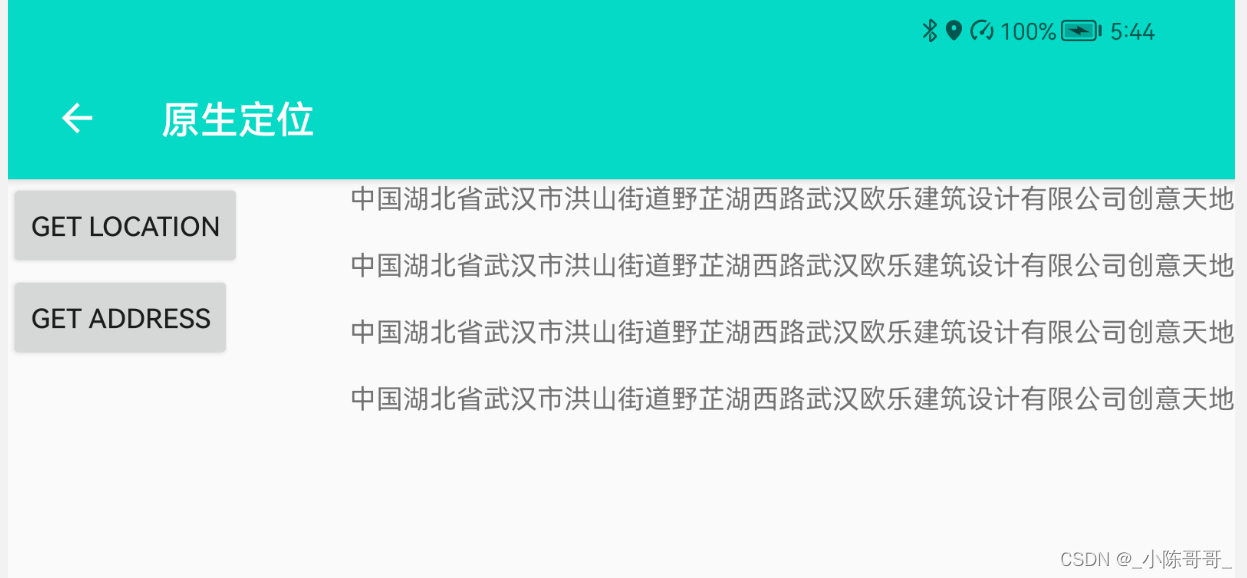


测试环境
- 可用设备系统:鸿蒙2.0、华为Android10+、小米Android10+(其他设备未测试)
- 开发工具:android studio 2020.3.1 Patch4
- 开发语言:kotlin
核心代码
逻辑代码
package cn.cb.andbase.activity

import android.annotation.SuppressLint
import android.content.Context
import android.content.Intent
import android.location.Geocoder
import android.location.Location
import android.location.LocationListener
import android.location.LocationManager
import android.net.Uri
import android.os.Bundle
import android.os.Handler
import android.os.Looper
import android.provider.Settings
import android.widget.Button
import android.widget.TextView
import androidx.activity.result.contract.ActivityResultContracts
import androidx.appcompat.app.AlertDialog
import cn.cb.andbase.R
import cn.cb.baselibrary.activity.BaseActivity
import cn.cb.baselibrary.utils.LogHelper
import com.hjq.toast.ToastUtils
import java.util.*

private const val TAG = "LocationActivity"

class LocationActivity : BaseActivity() {
    override fun onCreate(savedInstanceState: Bundle?) {
        super.onCreate(savedInstanceState)
        setContentView(R.layout.activity_location)
        initBarView()
        LocationHelper.instance.create(this)
        findViewById<Button>(R.id.location_default_get).setOnClickListener {
            LocationHelper.instance.getLocation()
        }

        findViewById<Button>(R.id.location_default_address).setOnClickListener {
            addMsg(getAddress(this, 114.31828880795926, 30.471368343906683))
        }
    }

    override fun onDestroy() {
        super.onDestroy()
        LocationHelper.instance.removeListener()
    }

    var resumeTimes = 0

    override fun onResume() {
        super.onResume()
        resumeTimes++
        if (resumeTimes < 3) launcher.launch(permission)
    }

    private val permission = arrayOf(
        android.Manifest.permission.ACCESS_FINE_LOCATION,
        android.Manifest.permission.ACCESS_COARSE_LOCATION
    )

    private val launcher =
        registerForActivityResult(ActivityResultContracts.RequestMultiplePermissions()) {
            for (v in it.values) if (!v) {
                AlertDialog.Builder(this)
                    .setMessage("权限不足!")
                    .setPositiveButton("去设置") { _, _ ->
                        goSettingActivity(this)
                    }.show()
                return@registerForActivityResult
            }
        }

    private fun goSettingActivity(context: Context) {
        val intent = Intent()
        intent.action = Settings.ACTION_APPLICATION_DETAILS_SETTINGS
        intent.data = Uri.parse("package:" + context.packageName)
        context.startActivity(intent)
    }

    private fun getAddress(context: Context, lnt: Double, lat: Double): String {
        val geocoder = Geocoder(context, Locale.CHINA)
        val flag = Geocoder.isPresent()
        if (!flag) {
            LogHelper.w(TAG, "Geocoder Present is $flag")
            return ""
        }
        val sb = StringBuilder()
        val addresses = geocoder.getFromLocation(lat, lnt, 1)
        if (addresses.isNullOrEmpty()) return ""
        for (address in addresses) {
            LogHelper.w(TAG, "address: $address")
            sb.append(address.countryName)
                .append(address.adminArea)
                .append(address.locality)
                .append(address.subAdminArea)
                .append(address.thoroughfare)
                .append(address.featureName)
        }
        return sb.toString()
    }

    class LocationHelper {
        private val tag = javaClass.simpleName
        private lateinit var locationManager: LocationManager

        companion object {
            val instance = LocationHelper()
        }

        fun create(context: Context) {
            locationManager = context.getSystemService(Context.LOCATION_SERVICE) as LocationManager
        }

        @SuppressLint("MissingPermission")
        fun getLocation() {
            val provides = locationManager.allProviders
            var provideStr = ""
            for (provide in provides) when (provide) {
                LocationManager.NETWORK_PROVIDER -> {
                    provideStr = LocationManager.NETWORK_PROVIDER
                    break
                }
                LocationManager.GPS_PROVIDER -> {
                    provideStr = LocationManager.GPS_PROVIDER
                    break
                }
                else -> provideStr = ""
            }
            if (provideStr.isBlank()) {
                ToastUtils.show("无法获取定位")
                return
            }
            val location = locationManager.getLastKnownLocation(provideStr)
            location?.also { setLocation(it) }
            locationManager.requestLocationUpdates(provideStr, 0L, 0F, listener)
        }

        private val listener = LocationListener {
            LogHelper.w(tag, "accuracy: ${it.accuracy}")
            setLocation(it)
        }

        fun setLocation(location: Location) {
            LogHelper.w(tag, "latitude: " + location.latitude + "\tlongitude:" + location.longitude)
        }

        fun removeListener() {
            locationManager.removeUpdates(listener)
        }
    }

    companion object {
        val handler = Handler(Looper.getMainLooper())
    }

    fun addMsg(msg: String) {
        val logTv = findViewById<TextView>(R.id.print_log)
        val handler = Handler(Looper.getMainLooper()) {
            val sb = StringBuilder().append(it.obj).appendLine().appendLine().append(logTv.text)
            logTv.text = sb.toString()
            return@Handler true
        }
        handler.post {
            handler.obtainMessage(0, 0, 0, msg).let { handler.dispatchMessage(it) }
        }
    }
}
布局代码
<?xml version="1.0" encoding="utf-8"?>
<androidx.constraintlayout.widget.ConstraintLayout xmlns:android="http://schemas.android.com/apk/res/android"
    xmlns:app="http://schemas.android.com/apk/res-auto"
    xmlns:tools="http://schemas.android.com/tools"
    android:layout_width="match_parent"
    android:layout_height="match_parent"
    tools:context=".activity.LocationActivity">

    <include layout="@layout/tool_bar" />

    <ScrollView
        android:layout_width="match_parent"
        android:layout_height="0dp"
        app:layout_constraintBottom_toBottomOf="parent"
        app:layout_constraintTop_toBottomOf="@id/tool_bar_view">

        <TextView
            android:id="@+id/print_log"
            android:layout_width="match_parent"
            android:layout_height="wrap_content"
            android:gravity="end" />

    </ScrollView>

    <Button
        android:id="@+id/location_default_get"
        android:layout_width="wrap_content"
        android:layout_height="wrap_content"
        android:text="get location"
        app:layout_constraintLeft_toLeftOf="parent"
        app:layout_constraintTop_toBottomOf="@id/tool_bar_view" />

    <Button
        android:id="@+id/location_default_address"
        android:layout_width="wrap_content"
        android:layout_height="wrap_content"
        android:text="get address"
        app:layout_constraintLeft_toLeftOf="parent"
        app:layout_constraintTop_toBottomOf="@id/location_default_get" />

</androidx.constraintlayout.widget.ConstraintLayout>
项目地址
源码地址gitee
文章地址:https://blog.csdn.net/qq471208499/article/details/121910319
赠人玫瑰,手有余香
假如你觉得项目有用,可以收藏点赞哦!!!
版权声明:本文为qq471208499原创文章,遵循CC 4.0 BY-SA版权协议,转载请附上原文出处链接和本声明。