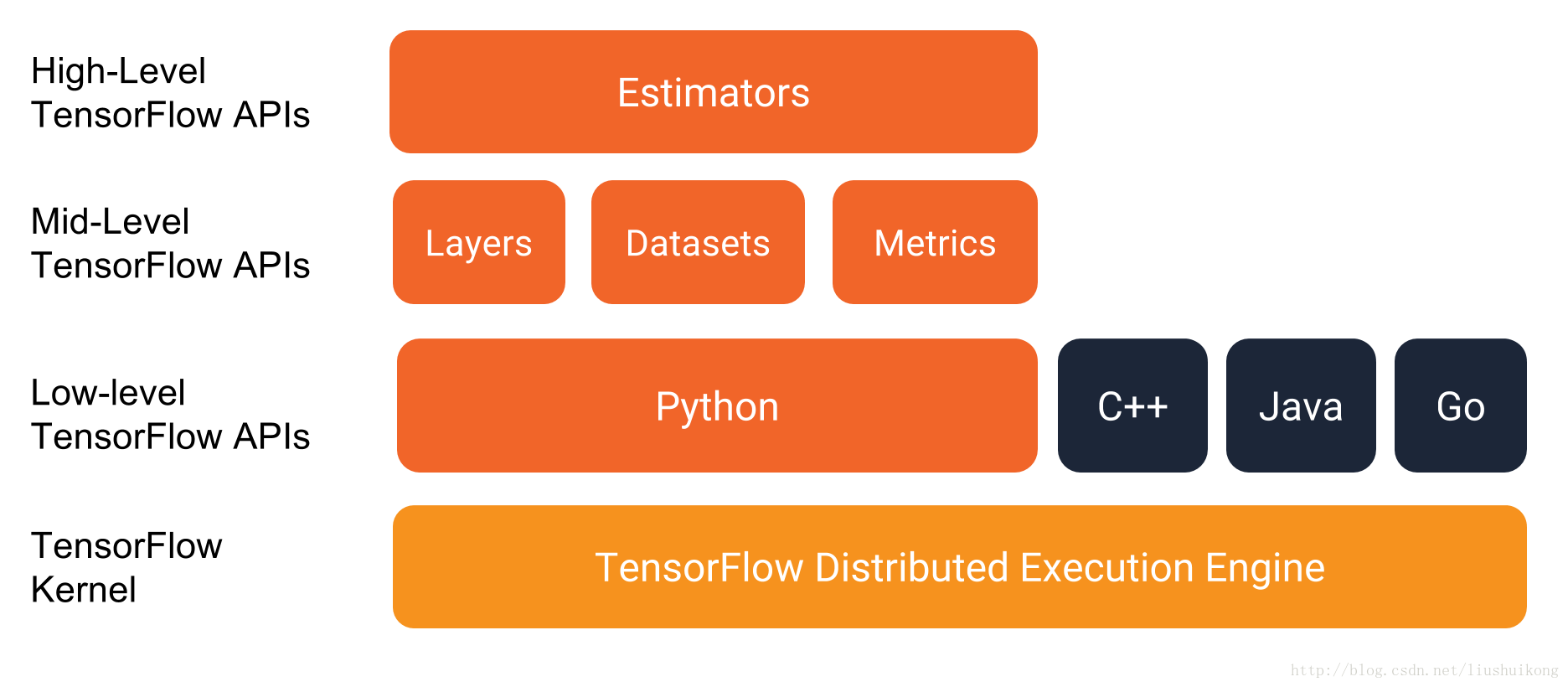
Tensorflow是一个十分受欢迎的深度学习框架。为了提高框架的性能和易使用性,随着版本的迭代,tensorflow逐步添加了许多高级API。这些高级API中,有一部分是对原来API的更高级封装,还有一部分就是为了提高性能(取代旧API)而开发出来的新API。其中,Dataset API和Estimator API是TensorFlow 1.3 中引入的高级API,官方文档也推荐用户使用它们创建模型。
- Datasets:一种为 TensorFlow 模型创建输入管道的新方式。The Dataset API has methods to load and manipulatedata,and feed it into your model. The Datasets API meshes well with the Estimators API.
- Estimators:用来表示一个完整的 TensorFlow 模型。The Estimator API provides methods to train the model, to judgethe model's accuracy, and to generate predictions.
下图是tensorflow API的完整架构图:
在TensorFlow 1.3以前的版本中总体来说有两种读取数据方法:
- 使用placeholder和feed_dict读内存中的数据
- 使用queue pipeline(队列式管道)读取硬盘中的数据(原理介绍可以参考这篇文章:十图详解tensorflow数据读取机制)
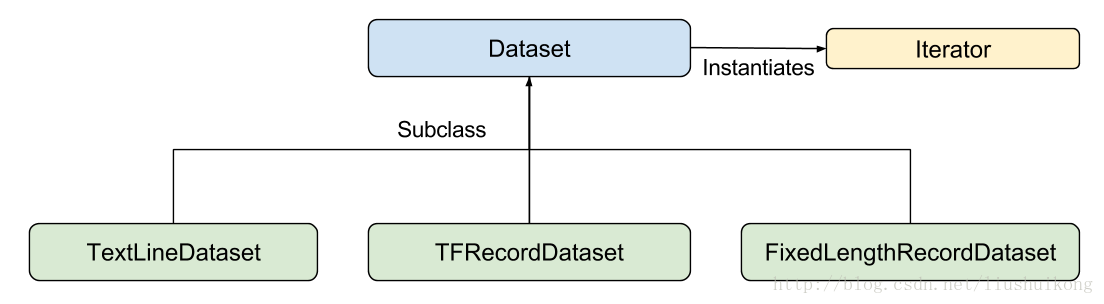
Datasets API是由以下图中所示的类组成:
其中:
- Dataset: Base class containing methods tocreate and transform datasets. Also allows you to initialize a dataset from data in memory, or from a Python generator.
- TextLineDataset: Reads lines from text files(txt,csv...).
- TFRecordDataset: Reads records from TFRecord files.
- FixedLengthRecordDataset: Reads fixed sizerecords from binary files.
- Iterator: Provides a way to access one data set element at a time.
1. 加载数据形成数据集
(1)从内存或迭代器中加载数据:
A single element of a Dataset contains one or more tf.Tensor objects, called components.Which may be a single tensor,
a tuple of tensors, or a nested tuple of tensors. And in addition to tuples, you can use collections.namedtuple or a dictionary
mapping strings to tensors to represent a single element of a Dataset.
#a single tensor :
dataset1 = tf.data.Dataset.from_tensor_slices(tf.random_uniform([4, 10]))

#a tuple of tensors:
dataset2 =    tf.data.Dataset.from_tensor_slices((tf.random_uniform([4]),tf.random_uniform([4,100])))

#a tuple of tensors, mnist_data是一个objection
images = mnist_data.train.images.reshape([-1, 28, 28, 1])
labels = mnist_data.train.labels
dataset = tf.contrib.data.Dataset.from_tensor_slices((images, labels))

#a nested tuple of tensors:
dataset3 = tf.data.Dataset.zip((dataset1, dataset2))

#a collections.namedtuple or a dictionary mapping strings to tensors
dataset = tf.data.Dataset.from_tensor_slices(
    {"a": tf.random_uniform([4]),"b": tf.random_uniform([4, 100], maxval=100, dtype=tf.int32)})
(2)文本文件:
filepaths = ["/var/data/file1.txt", "/var/data/file2.txt"]
dataset = tf.data.TextLineDataset(filepaths)
(3)tfrecords文件:
filepaths = ["/data/file1.tfrecord", "/data/file2.tfrecord"]
dataset = tf.data.TFRecordDataset(filepaths)filepaths = [os.path.join(data_dir, 'data_batch_%d.bin' % i) for i in xrange(1, 6)]
image_bytes = image.height * image.width * image.depth
record_bytes = label_bytes + image_bytes
dataset = tf.data.FixedLengthRecordDataset(filepaths,record_bytes) Datasets API支持 repeat、map、shuffle、batch等变换。
(1)repeat是将整个数据集重复多次,相当于一个或多个epoch,接受的参数数字代表repeat次数,若为空则无限重复
# Repeat infinitely.
dataset = tf.data.TFRecordDataset(filenames).repeat()
(2)map接收一个函数,Dataset中的每个元素都会被当作这个函数的输入,并将函数返回值作为新的Dataset。通常用
于数据变换或者解析与编码文件数据。
def parser(self, serialized_example):
    """Parses a single tf.Example into image and label tensors."""

    features = tf.parse_single_example(
        serialized_example,
        features={
            'image': tf.FixedLenFeature([], tf.string),
            'label': tf.FixedLenFeature([], tf.int64),
        })
    image = tf.decode_raw(features['image'], tf.uint8)
    image.set_shape([DEPTH * HEIGHT * WIDTH])

    # Reshape from [depth * height * width] to [depth, height, width].
    image = tf.cast(
        tf.transpose(tf.reshape(image, [DEPTH, HEIGHT, WIDTH]), [1, 2, 0]),
        tf.float32)
    label = tf.cast(features['label'], tf.int32)
    # Custom preprocessing.
    image = self.preprocess(image)
    return image, label

dataset = dataset.map(self.parser, num_threads=batch_size, output_buffer_size=2 * batch_size)
def decode_csv(line):
parsed_line = tf.decode_csv(line, [[0.], [0.], [0.], [0.], [0]])
label = parsed_line[-1:] # Last element is the label
del parsed_line[-1] # Delete last element
features = parsed_line # Everything (but last element) are the features
d = dict(zip(feature_names, features)), label
return d
dataset = (tf.data.TextLineDataset(file_path) # Read text file
.skip(1) # Skip header row
.map(decode_csv)) # Transform each elem by applying decode_csv fn(3)shuffle的功能为打乱dataset中的元素,它有一个参数buffersize,表示打乱时使用的buffer的大小。单位是以
图片(张量)为单位,而不是byte;
# Potentially shuffle records.
if subset == 'train' or shuffle:
    min_queue_examples = int(
        Cifar10DataSet.num_examples_per_epoch(subset) * 0.4)
    # Ensure that the capacity is sufficiently large to provide good random
    # shuffling.
    dataset = dataset.shuffle(buffer_size=min_queue_examples + 3 * batch_size)
(4)batch就是将多个元素组合成batch,接受一个batch_size的参数。
# Batch it up.
dataset = dataset.batch(batch_size) Once you have built a Dataset to represent your input data, the next step is to create an Iterator to access elements from that dataset. The Dataset API currently supports the following iterators, in increasing level of sophistication:
(1)one-shot :
A one-shot iterator is the simplest form of iterator, which only supports iterating once through a dataset, with no need for explicit initialization.One-shot iterators handle almost all of the cases that the existing queue-based input pipelines support, but they do not support parameterization.
iterator = dataset.make_one_shot_iterator()
image_batch, label_batch = iterator.get_next()

#return image_batch, label_batch
dataset = tf.data.Dataset.range(100)
iterator = dataset.make_one_shot_iterator()
next_element = iterator.get_next()
for i in range(100):
value = sess.run(next_element)
assert i == value(2)initializable
An initializable iterator requires you to run an explicit iterator.initializer operation before using it. In exchange for this inconvenience, it enables you to parameterize the definition of the dataset, using one or more tf.placeholder() tensors that can be fed when you initialize the iterator.
max_value = tf.placeholder(tf.int64, shape=[])
dataset = tf.data.Dataset.range(max_value)
iterator = dataset.make_initializable_iterator()
next_element = iterator.get_next()

# Initialize an iterator over a dataset with 10 elements.
sess.run(iterator.initializer, feed_dict={max_value: 10})
for i in range(10):
  value = sess.run(next_element)
  assert i == value

# Initialize the same iterator over a dataset with 100 elements.
sess.run(iterator.initializer, feed_dict={max_value: 100})
for i in range(100):
  value = sess.run(next_element)
  assert i == value
# Load the training data into two NumPy arrays
features = data["features"]
labels = data["labels"]
# Assume that each row of `features` corresponds to the same row as `labels`.
assert features.shape[0] == labels.shape[0]
features_placeholder = tf.placeholder(features.dtype, features.shape)
labels_placeholder = tf.placeholder(labels.dtype, labels.shape)
dataset = tf.data.Dataset.from_tensor_slices((features_placeholder, labels_placeholder))
# [Other transformations on `dataset`...]
dataset = ...
iterator = dataset.make_initializable_iterator()
sess.run(iterator.initializer, feed_dict={features_placeholder: features,
labels_placeholder: labels})(3)reinitializable
A reinitializable iterator can be initialized from multiple different Dataset objects. For example, you might have a training input pipeline that uses random perturbations to the input images to improve generalization, and a validation input pipeline that evaluates predictions on unmodified data. These pipelines will typically use different Dataset objects that have the same structure (i.e. the same types and compatible shapes for each component).
(4)feedable
A feedable iterator can be used together with tf.placeholder to select what Iterator to use in each call to tf.Session.run, via the familiar feed_dict mechanism. It offers the same functionality as a reinitializable iterator, but it does not require you to initialize the iterator from the start of a dataset when you switch between iterators.
最后看两个比较完整的例子:
To use a Dataset in the input_fn of a tf.estimator.Estimator, we recommend using Dataset.make_one_shot_iterator(). For example:
#解析数据
def parser(self,serialized_example):
    """Parses a single tf.Example into image and label tensors."""
    features = tf.parse_single_example(
        serialized_example,
        features={
            'image': tf.FixedLenFeature([], tf.string),
            'label': tf.FixedLenFeature([], tf.int64),
        })
    image = tf.decode_raw(features['image'], tf.uint8)
    image.set_shape([DEPTH * HEIGHT * WIDTH])

    # Reshape from [depth * height * width] to [depth, height, width].
    image = tf.cast(
        tf.transpose(tf.reshape(image, [DEPTH, HEIGHT, WIDTH]), [1, 2, 0]),
        tf.float32)
    label = tf.cast(features['label'], tf.int32)
    # Custom preprocessing.
    image = self.preprocess(image)
    return image, label

#变换数据
def preprocess(self,image):
    """Preprocess a single image in [height, width, depth] layout."""
    if subset == 'train' and shuffle:
        # Pad 4 pixels on each dimension of feature map, done in mini-batch
        image = tf.image.resize_image_with_crop_or_pad(image, 40, 40)
        image = tf.random_crop(image, [HEIGHT, WIDTH, DEPTH])
        image = tf.image.random_flip_left_right(image)
        # Because these operations are not commutative, consider randomizing
        # the order their operation.
        # NOTE: since per_image_standardization zeros the mean and makes
        # the stddev unit, this likely has no effect see tensorflow#1458.
        distorted_image = tf.image.random_brightness(distorted_image,
                                                    max_delta=63)
        distorted_image = tf.image.random_contrast(distorted_image,
                                                    lower=0.2, upper=1.8)

        # Subtract off the mean and divide by the variance of the pixels.
        float_image = tf.image.per_image_standardization(distorted_image)
    return image

def input_fn(self,data_dir,batch_size,subset):

    if subset in ['train', 'validation', 'eval']:
        filepaths = [os.path.join(data_dir, subset + '.tfrecords')]
    else:
      raise ValueError('Invalid data subset "%s"' % subset)

    dataset = tf.contrib.data.TFRecordDataset(filepaths).repeat()
    # Parse records.
    dataset = dataset.map(
        self.parser, num_threads=batch_size, output_buffer_size=2 * batch_size)

    # Potentially shuffle records.
    if subset == 'train':
      min_queue_examples = int(
          Cifar10DataSet.num_examples_per_epoch(subset) * 0.4)
      # Ensure that the capacity is sufficiently large to provide good random
      # shuffling.
      dataset = dataset.shuffle(buffer_size=min_queue_examples + 3 * batch_size)

    # Batch it up.
    dataset = dataset.batch(batch_size)
    iterator = dataset.make_one_shot_iterator()
    image_batch, label_batch = iterator.get_next()

    return image_batch, label_batch
The tf.train.MonitoredTrainingSession API simplifies many aspects of running TensorFlow in a distributed setting. MonitoredTrainingSession uses the tf.errors.OutOfRangeError to signal that training has completed, so to use it with the tf.data API, we recommend using Dataset.make_one_shot_iterator(). For example:
filenames = ["/var/data/file1.tfrecord", "/var/data/file2.tfrecord"]
dataset = tf.data.TFRecordDataset(filenames)
dataset = dataset.map(...)
dataset = dataset.shuffle(buffer_size=10000)
dataset = dataset.batch(32)
dataset = dataset.repeat(num_epochs)
iterator = dataset.make_one_shot_iterator()

next_example, next_label = iterator.get_next()
loss = model_function(next_example, next_label)

training_op = tf.train.AdagradOptimizer(...).minimize(loss)

with tf.train.MonitoredTrainingSession(...) as sess:
  while not sess.should_stop():
    sess.run(training_op)
参考文献: