Kafka 介绍
采用生产者消费者模型,具有高性能(单节点支持上千个客户端,百兆/s吞吐量)、持久性(消息直接持久化在普通磁盘上且性能好)、分布式(数据副本冗余、流量负载均衡、可扩展)、灵活性(消息长时间持久化+Client维护消费状态)的特点
Kafka优势
- 解耦与缓冲: 例如使用SparkStream时,于flume采集后的数据传输,解决了大量数据导致SparkStream崩溃的问题,flume与SparkStream只需要与kafka交互,实现系统之间解耦
- FIFO(partition强有序): partition内部是FIFO的,partition之间呢不是FIFO的,当然我们可以把topic设为一个partition,这样就是严格的FIFO
- 0拷贝: 不经过jvm堆内内存,由jvm发送内核命令,直接从磁盘传输数据(不经过内存),提升速度提高吞吐量
- 可靠性保证: 数据存储在磁盘中,保障了数据的可靠性,默认数据保留7天,消费者可重复消费,并且保证消费者晒少消费一次
- 可用于异步通讯,峰值压力缓冲
对比同类产品
kafka:分布式,较长时间持久化,高性能,轻量灵活
RabbitMQ: 分布式,支持多种MQ协议,重量级
ActiveMQ: 与RabbitMQ类似
ZeroMQ: 以库的形式提供,使用复杂,无持久化
redis: 单机、纯内存性好,持久化较差
0拷贝介绍
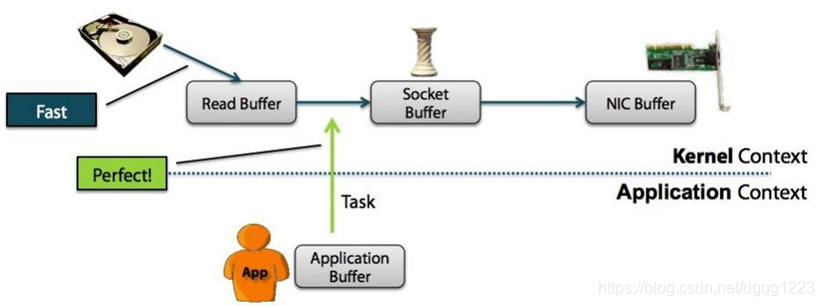
CPU不需要为数据在内存之间的拷贝消耗资源。而它通常是指计算机在网络上发送文件时,不需要将文件内容拷贝到用户空间(User Space)而直接在内核空间(Kernel Space)中传输到网络的方式。
- 正常方式: 在数据 -> Application Buffer -> Socket Buffer 过程中进行2次拷贝操作
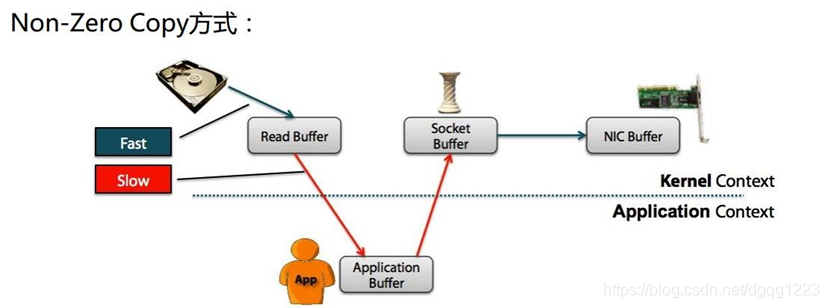
- 0拷贝方式: 数据不经过 Application Buffer(不再写入内存)
架构介绍
角色
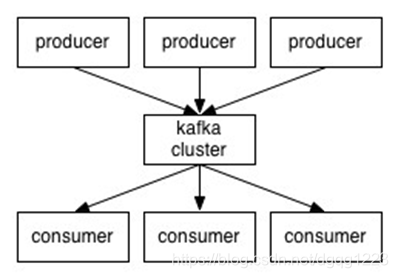
producer : 消息生产者
broker:kafka的节点 (kafka集群的server),broker之间不分主从关系,依赖zookeeper协调。broker负责处理消息读、写请求和存储消息
一个broker管理多个partition,一个partition只被一个broker管理topic:消息分类(消息队列/分类 )
- partition :一个topic被切分成多个partition分布在broker中,目的是并行消费partition提高消费效率。
partition分区内部强有序
- partition :一个topic被切分成多个partition分布在broker中,目的是并行消费partition提高消费效率。
consumer : 消息消费者,每个consumer 都有属于自己的consumer group ,同一个topic只能被消费者组中的一个consumer 消费
Consumer
消息消费者,向kafka broker取消息的客户端。每个消费者都要维护自己读取数据的offset。低版本0.9之前将offset保存在Zookeeper中,0.9及之后保存在Kafka的“__consumer_offsets”主题中。
消息写入
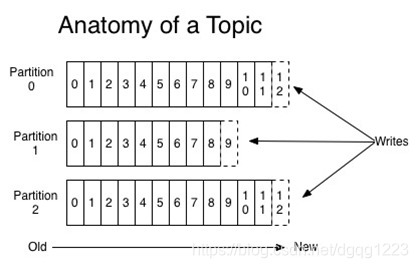
- 采用0拷贝消息直接写入文件中,并不存储在内存中。根据时间策略(默认一周)删除。
- producer通过轮询或消息中key的hash决定写往哪个partition中
- 在kafka中的每条消息都为KV结构,不指定Key时,Key为null。若key为null 则按照轮询的方式,若指定key则采用hash的方式分配
- 轮询的方式写入partition时,会以随机的方式写入一定条数的数据(消息)到partition中
- 除轮询和hash的方式写入partition,也可以自定义规则
强有序
- 每个partition中的内部消息都是强有序的,消费者按照写入消息顺序读取
- 其中每个消息都有一个序号 offset
- consumer 会并行读取多个partition的消息,所以读取消息的顺序不同按照原始数据的顺序消费(仅在partition中强有序读取)
消息存储与生产消费模型
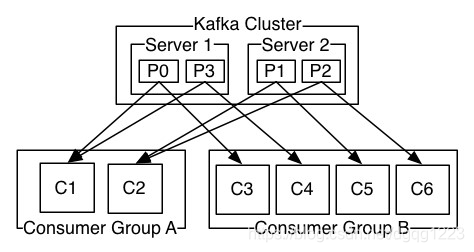
- Kafka Cluster : 图中指一个topic(消息队列)
- Server:图中指broker(kafka的节点)。P0、P1、P2、P3 为同一个topic的partiiton。Server1节点中保存了P0、P3 消息,Server2保存了P1、P2消息。
- Consumer Group : 消费者组。同一个消息只能被消费者组中的一个消费者消费(例如:C1和C2在同一个消费者组,C1消费了P0,那么C2不会消费P0 )。不同组消费同一个topic互不影响(例如:C1与C3为不同消费者组,C1,C3都可以消费P0),但是当C1读取P0中的消息没有读完退出,那么C2可以通过offset记录读取P0中剩余的消息
在0.8.2版本中Consumer自己维护消费记录(offset位置)存储到zookeeper中,0.9+版本后由kafka集群(broker)维护消费者offset
分布式
leader:在每个broker节点中都有leader角色负责管理中多个topic在该节点中的partition
关于partition副本:partition会产生副本到其他broker节点中,当lerder所在broker宕机时,其他节点的lerder会管理该broker中的partition(通过副本)
leader 均衡机制
通过创建topic以及指定3分区数2个副本数后写入数据,查看均衡信息
[root@node02 bin]# ./kafka-topics.sh --zookeeper node02:2181,node03:2181,node04:2181 --describe --topic tes
ttopic1Topic:testtopic1	PartitionCount:3	ReplicationFactor:2	Configs:
	Topic: testtopic1	Partition: 0	Leader: 2	Replicas: 2,0	Isr: 2,0
	Topic: testtopic1	Partition: 1	Leader: 0	Replicas: 0,1	Isr: 0,1
	Topic: testtopic1	Partition: 2	Leader: 1	Replicas: 1,2	Isr: 1,2
- Replicas : 副本存放的位置
- Isr: 启动集群后根据位置检查副本完整性位置
当某一个broker宕机时会根据宕机的Replicas顺序(副本优先的原则)重新选取leader,当broker从宕机恢复后会按照Replicas顺序恢复leader管理,自动均衡(默认开启)。auto.leader.rebalance.enable true
环境
- kafka_2.10-0.9.0.1.tgz
- CentOS6
- java 1.7
搭建步骤
解压 kafuka
tar xf kafka_2.10-0.9.0.1.tgz -C /opt/修改 config/server.properties 配置文件
broker.idbroker编号zookeeper.connecZK地址2.11版本中 需
#delete.topic.enable=true取消该行注释允许删除 topic
log.dirs=/tmp/kafka-logs修改log路径# Licensed to the Apache Software Foundation (ASF) under one or more # contributor license agreements. See the NOTICE file distributed with # this work for additional information regarding copyright ownership. # The ASF licenses this file to You under the Apache License, Version 2.0 # (the "License"); you may not use this file except in compliance with # the License. You may obtain a copy of the License at # # http://www.apache.org/licenses/LICENSE-2.0 # # Unless required by applicable law or agreed to in writing, software # distributed under the License is distributed on an "AS IS" BASIS, # WITHOUT WARRANTIES OR CONDITIONS OF ANY KIND, either express or implied. # See the License for the specific language governing permissions and # limitations under the License. # see kafka.server.KafkaConfig for additional details and defaults ############################# Server Basics ############################# # The id of the broker. This must be set to a unique integer for each broker. # broker编号 broker.id=0 ############################# Socket Server Settings ############################# listeners=PLAINTEXT://:9092 # The port the socket server listens on # 写消息的端口 #port=9092 # Hostname the broker will bind to. If not set, the server will bind to all interfaces #host.name=localhost # Hostname the broker will advertise to producers and consumers. If not set, it uses the # value for "host.name" if configured. Otherwise, it will use the value returned from # java.net.InetAddress.getCanonicalHostName(). #advertised.host.name=<hostname routable by clients> # The port to publish to ZooKeeper for clients to use. If this is not set, # it will publish the same port that the broker binds to. #advertised.port=<port accessible by clients> # The number of threads handling network requests num.network.threads=3 # The number of threads doing disk I/O num.io.threads=8 # The send buffer (SO_SNDBUF) used by the socket server socket.send.buffer.bytes=102400 # The receive buffer (SO_RCVBUF) used by the socket server socket.receive.buffer.bytes=102400 # The maximum size of a request that the socket server will accept (protection against OOM) socket.request.max.bytes=104857600 ############################# Log Basics ############################# # A comma seperated list of directories under which to store log files # 存储数据的路径 log.dirs=/kafka-logs # The default number of log partitions per topic. More partitions allow greater # parallelism for consumption, but this will also result in more files across # the brokers. num.partitions=1 # The number of threads per data directory to be used for log recovery at startup and flushing at shutdown. # This value is recommended to be increased for installations with data dirs located in RAID array. num.recovery.threads.per.data.dir=1 ############################# Log Flush Policy ############################# # Messages are immediately written to the filesystem but by default we only fsync() to sync # the OS cache lazily. The following configurations control the flush of data to disk. # There are a few important trade-offs here: # 1. Durability: Unflushed data may be lost if you are not using replication. # 2. Latency: Very large flush intervals may lead to latency spikes when the flush does occur as there w ill be a lot of data to flush.# 3. Throughput: The flush is generally the most expensive operation, and a small flush interval may lea d to exceessive seeks.# The settings below allow one to configure the flush policy to flush data after a period of time or # every N messages (or both). This can be done globally and overridden on a per-topic basis. # The number of messages to accept before forcing a flush of data to disk #log.flush.interval.messages=10000 # The maximum amount of time a message can sit in a log before we force a flush #log.flush.interval.ms=1000 ############################# Log Retention Policy ############################# # The following configurations control the disposal of log segments. The policy can # be set to delete segments after a period of time, or after a given size has accumulated. # A segment will be deleted whenever *either* of these criteria are met. Deletion always happens # from the end of the log. # The minimum age of a log file to be eligible for deletion log.retention.hours=168 # A size-based retention policy for logs. Segments are pruned from the log as long as the remaining # segments don't drop below log.retention.bytes. #log.retention.bytes=1073741824 # The maximum size of a log segment file. When this size is reached a new log segment will be created. log.segment.bytes=1073741824 # The interval at which log segments are checked to see if they can be deleted according # to the retention policies log.retention.check.interval.ms=300000 ############################# Zookeeper ############################# # Zookeeper connection string (see zookeeper docs for details). # This is a comma separated host:port pairs, each corresponding to a zk # server. e.g. "127.0.0.1:3000,127.0.0.1:3001,127.0.0.1:3002". # You can also append an optional chroot string to the urls to specify the # root directory for all kafka znodes. # zookeeper.connect=localhost:2181 zookeeper.connect=node02:2181,node03:2181,node04:2181分发配置好的kafka到其他节点,并修改 config/server.properties 中broker.id
sed -i -e 's/broker.id=.*/broker.id=1/' /opt/kafka_2.10-0.9.0.1/config/server.properties可以添加环境变量
启动kafka(需要先启动ZK)
nohup kafka-server-start.sh ./config/server.properties > kafka.log 2>&1 &
相关命令
可使用命令查看帮助手册 kafka-topics.sh --help
创建topic
kafka-topics.sh --zookeeper node02:2181,node03:2181,node04:2181 --create --replication-factor 2 --partitions 3 --topic testtopicreplication-factor:指定每个分区的复制因子(副本)个数,默认1个
partitions:指定当前创建的kafka分区数量,默认为1个
topic:指定新建topic的名称(主题名字)
查看topic列表
kafka-topics.sh --zookeeper node02:2181,node03:2181,node04:2181 --list查看topic描述(均衡信息)
kafka-topics.sh --zookeeper node02:2181,node03:2181,node04:2181 --describe --topic testtopic删除topic (执行命令后开始计时 7天后彻底删除,若想彻底删除需要手动去各节点log.dirs目录中删除、以及手动删除zookeeper
/brokers/topics、/config/topics、/admin/delete_topics中的元数据信息)kafka-topics.sh --zookeeper node02:2181,node03:2181,node04:2181 --delete --topic testtopic创建生产者(使用控制台方式)
kafka-console-producer.sh --broker-list node02:9092,node03:9092,node04:9092 --topic testtopic启动消费者(使用控制台方式)
kafka-console-consumer.sh --zookeeper node02:2181,node03:2181,node04:2181 --from-beginning --topic testtopicfrom-beginning 表示从头开始消费
查看所有消费者组
kafka-consumer-groups.sh --bootstrap-server c7node1:9092,c7node2:9092,c7node3:9092 --list查看消费者消费的offset位置信息
kafka-consumer-groups.sh --bootstrap-server c7node1:9092,c7node2:9092,c7node3:9092 --describe --group MyGroupId重置消费者组的消费offset信息 ,–reset-offsets –all-topics 所有offset。–to-earliest 最小位置。–execute 执行
kafka-consumer-groups.sh --bootstrap-server c7node1:9092,c7node2:9092,c7node3:9092 --group MyGroupId --reset-offsets --all-topics --to-earliest --execute