在Flutter中,一切为Widget。根据Widget是否可以动态更新,引入了State状态的概念。即StatelessWidget、StatefulWidget。
一、State生命周期
State是StatefulWidget内部持有的用来维护该Widget状态的对象。由StatefulWidget的createState()方法进行实例化。
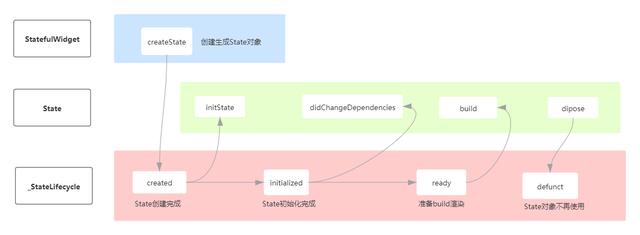
State生命周期
二、setState()执行流程
在Flutter中,Widget是不可变,要想刷新界面,得调用StatefulWidget中State对象的setState()方法。最终由Flutter的framework再重新生成一个Widget树。
而在Android中,View只创建一次,当要对view进行重绘时,调用invalid()方法。
setState()方法传入的是一个无参回调,它将通知framework,当前Widget内部的状态发生了改变,请求重新渲染。
在setState()方法里面,会进行以下判断:
@protected void setState(VoidCallback fn) { assert(fn != null);//1.回调不能为空 assert(() { //2.如果生命周期为defunct,说明该widget的状态已经dispose, //抛出异常 if (_debugLifecycleState == _StateLifecycle.defunct) { ...... } //3.如果State创建成功,但没有挂载成功(即与当前Widget的上下文关联起来),抛出异常 if (_debugLifecycleState == _StateLifecycle.created && !mounted) { ...... } return true; }()); //4.setState()里面的回调只能是同步执行,不能是异步操作 //因此如果是Future的,抛出异常。 final dynamic result = fn() as dynamic; assert(() { if (result is Future) { ...... }()); //5.将当前widget元素标记为需要rebuild. _element.markNeedsBuild(); }$2.1、markNeedsBuild
在Flutter中,Widget与Android中的View不同,Widget是不可变的,只能由内部的State对象来维护状态,最后通知framework来对widget进行重绘(重新构建)。因此在这里,系统引入了一个dirty(脏)的概念。
/// Returns true if the element has been marked as needing rebuilding. bool get dirty => _dirty; bool _dirty = true;而同时,在每一次的build()过后,系统都会将它置为false,为了方便下一次的状态更新,发起重建。
/// [rebuild] when the element needs updating. @override void performRebuild() { ...... Widget built; try { built = build(); ..... } catch (e, stack) { ...... } finally { // We delay marking the element as clean until after calling build() so // that attempts to markNeedsBuild() during build() will be ignored. _dirty = false; ....... }因此在markNeedsBuild()方法内部也做了多重判断,来确保当前需要rebuild的元素,已经被标记为dirty。只有dirty为true,widget树才会生效(就是确保只有一份有效的widget树)。
void markNeedsBuild() {//1.确保当前元素的状态生命周期是有效的,没有dipose assert(_debugLifecycleState != _ElementLifecycle.defunct); if (!_active) return; assert(owner != null); assert(_debugLifecycleState == _ElementLifecycle.active); ...... if (dirty) return; ///2.将当前元素dirty标记为true,加入到全局的脏链中 _dirty = true; ///3.准备为当前元素调度build //owner:为BuildOwner,主要是用于跟踪哪些widget需要重新构建(rebuild) owner.scheduleBuildFor(this); }$2.2、scheduleBuildFor
属于BuildOwner类中的方法,接收Element类型参数。主要作用是:将当前Element添加到脏链中,以便在WidgetsBinding.drawFrame调用buildScope,能遍历脏链中的Element,进行重建。
void scheduleBuildFor(Element element) { //1.判断当前element是否不为null以及dirty是否为true等 .... //2.onBuildScheduled回调不为null,开始回调 if (!_scheduledFlushDirtyElements && onBuildScheduled != null) { .... //onBuildScheduled为回调函数,在BuildOwner实例化时传入 //而BuildOwner的实例化在WidgetsBinding初始化中完成 onBuildScheduled(); } //同时将当前element加入到脏链中 _dirtyElements.add(element); element._inDirtyList = true; ...... }$2.3、onBuildScheduled
onBuildScheduled为回调函数,在BuildOwner实例化时传入,而BuildOwner的实例化在WidgetsBinding初始化中完成。
// The glue between the widgets layer and the Flutter engine.mixin WidgetsBinding on BindingBase, ServicesBinding, SchedulerBinding, GestureBinding, RendererBinding, SemanticsBinding { @override void initInstances() { super.initInstances(); _instance = this; _buildOwner = BuildOwner(); //1.将_handleBuildScheduled方法传递给onBuildScheduled buildOwner.onBuildScheduled = _handleBuildScheduled; _handleBuildScheduled方法 void _handleBuildScheduled() { // If we're in the process of building dirty elements, then changes // should not trigger a new frame. ....... //2.其实这一切都是确保能准确的在下一帧中得到渲染。 ensureVisualUpdate(); } 跟Android屏幕刷新机制一样(我之前有写过一篇关于Android屏幕刷新机制(https://blog.csdn.net/u011153817/article/details/105861444)的博文),也是由垂直信号来控制渲染。
$2.4、ensureVisualUpdate
void ensureVisualUpdate() { switch (schedulerPhase) { case SchedulerPhase.idle: case SchedulerPhase.postFrameCallbacks: ///1.用于调度新帧 scheduleFrame(); return; case SchedulerPhase.transientCallbacks: case SchedulerPhase.midFrameMicrotasks: case SchedulerPhase.persistentCallbacks: return; } }void scheduleFrame() { .... ///1.确保帧回调已被注册 ///当Vysnc到达时,只有被注册的回调才会被调用,整个调用链才会生效, ///最终实现widget tree的rebuild. ensureFrameCallbacksRegistered(); ///2.由window安排下一帧,这里与Flutter底层交互 //void scheduleFrame() native 'Window_scheduleFrame'; window.scheduleFrame(); _hasScheduledFrame = true; }