一、引入PartitionerClass
之前借助WordCount程序,对MapReduce的原理有了一定了叙述:WordCount程序详解传送门。
Map和Reduce是完成数据处理的两个先后步骤:Map函数将数据读入,做切分处理之后,以key、value的键值对传送出去,Reduce接收此键值对,进行统计处理。在Map和Reduce之间还有一个中间过程,对数据进行一些处理,今天就来窥探其一-----PartitionerClass。

MapReduce程序每个Reduce可以产生一个输出文件,Partitioner 组件可以对Map处理后的键值对 按Key值 进行分区,从而将不同分区的 Key 交由不同的 Reduce 处理。在MapReduce程序中可以在主函数中动态地设置Reduce数量。使用语句job.setNumReduceTasks(num); 之间在调用Job类的成员函数即可,传入参数即为需要设置的Reduce数量。下面看一下源码中关于此函数的定义:
/**
   * Set the number of reduce tasks for the job.
   * @param tasks the number of reduce tasks
   * @throws IllegalStateException if the job is submitted
   */
  public void setNumReduceTasks(int tasks) throws IllegalStateException {
    ensureState(JobState.DEFINE);
    conf.setNumReduceTasks(tasks);
}二、设置Reduce数量(默认PartitionerClass的作用)
下面通过实例来说明PartitionerClass以及setNumReduce的使用。
例子:手机用户数据流量统计
通过用户上网日志对用户的流量使用情况进行统计,数据格式如下,每一项使用"\t"分割,每行数据第2列为用户手机号,最后两列分别为用户的上传流量和下载流量。

1、程序即输出结果
使用MapReduce进行数据处理,并在main主函数中设置Reduce数量,程序和执行结果如下:
package ypx.datacount;

import java.io.IOException;
import java.util.HashMap;
import java.util.Map;

import org.apache.hadoop.conf.Configuration;
import org.apache.hadoop.fs.FileSystem;
import org.apache.hadoop.fs.Path;
import org.apache.hadoop.io.LongWritable;
import org.apache.hadoop.io.Text;
import org.apache.hadoop.mapreduce.Job;
import org.apache.hadoop.mapreduce.Mapper;
import org.apache.hadoop.mapreduce.Partitioner;
import org.apache.hadoop.mapreduce.Reducer;
import org.apache.hadoop.mapreduce.lib.input.FileInputFormat;
import org.apache.hadoop.mapreduce.lib.output.FileOutputFormat;


public class DataCount {

	public static class DCMapper extends Mapper<LongWritable, Text, Text, DataBean> {
		@Override
		protected void map(LongWritable k1, Text v1, Context context)
				throws IOException, InterruptedException {
			String [] lines = v1.toString().split("\t");		//按行读入数据,然后用“\t”分割成字符串数组,存入lines
			//此时每行数据的每一项都被存入了lines字符串组,下面语句取出需要的数据项,本程序中为第 1、8、9项
			//取出数据后封装在类DataBean中,作为map的value值输出
			String telNo = lines[1];
			Long upPayLoad = Long.parseLong(lines[8]);
			Long downPayLoad = Long.parseLong(lines[9]);
			//词句DataBean实例化对象语句可以写在map函数之前,这样可以避免每次map函数
			//处理数据时都产生bean对像,造成内存垃圾
			DataBean bean = new DataBean(telNo,upPayLoad,downPayLoad);
			//context.write(new Text(telNo),new DataBean(telNo,upPayLoad,downPayLoad));
			context.write(new Text(telNo), bean);
		}
	}

	public static class DCReducer extends Reducer<Text, DataBean, Text, DataBean> {
		@Override
		protected void reduce(Text k2, Iterable<DataBean> v2s, Context context)
				throws IOException, InterruptedException {
			long up_sum = 0;			//定义上行流量总和变量
			long down_sum = 0;			//定义下行流量总和变量
			//Redecu函数的功能实现部分,循环取出DataBean类数组中的对象,对每个对象进行操作
			for (DataBean dataBean : v2s) {
				up_sum += dataBean.getUpPayLoad();
				down_sum += dataBean.getDownPayLoad();
			}
			String telno = k2.toString();
			context.write(k2, new DataBean(telno,up_sum,down_sum));
		}
	}

	final static String INPUT_PATH  = "hdfs://192.168.42.130:9000/input/DataCount";
	final static String OUTPUT_PATH = "hdfs://192.168.42.130:9000/output/DataCount";

	public static void main(String[] args) throws IOException, ClassNotFoundException, InterruptedException {

		Configuration conf = new Configuration();

		Path path = new Path(OUTPUT_PATH);
		FileSystem fileSystem = path.getFileSystem(conf);
		if (fileSystem.exists(new Path(OUTPUT_PATH))) {
			fileSystem.delete(new Path(OUTPUT_PATH),true);
		}

		Job job = Job.getInstance(conf);
		job.setJarByClass(DataCount.class);

		job.setMapperClass(DCMapper.class);
		job.setReducerClass(DCReducer.class);

		job.setOutputKeyClass(Text.class);
		job.setOutputValueClass(DataBean.class);

		FileInputFormat.setInputPaths(job, new Path(INPUT_PATH));
		FileOutputFormat.setOutputPath(job, new Path(OUTPUT_PATH));

               //********设置Reduce数量*************//
		job.setNumReduceTasks(5);
		//*****************************//

               job.waitForCompletion(true);
	}
}
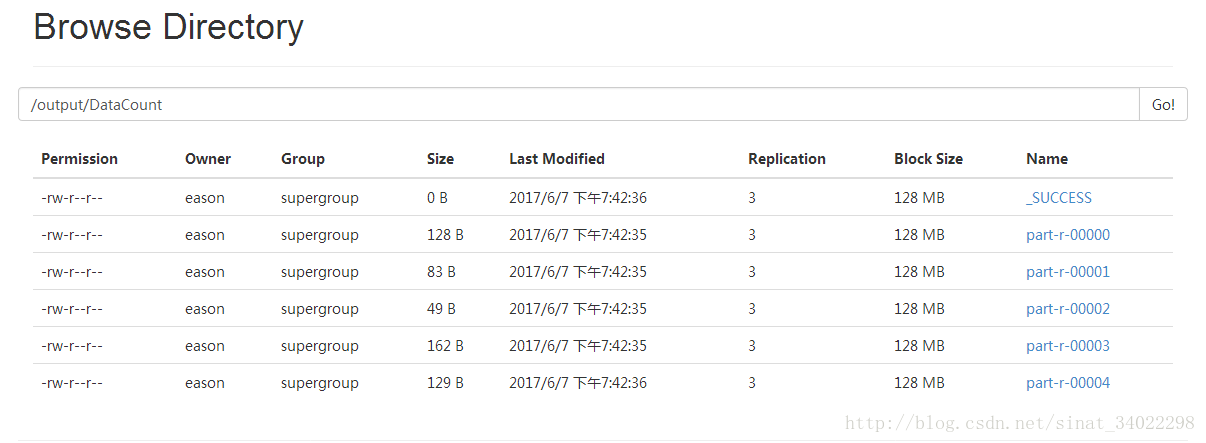
通过浏览器可以看到,在hdfs的输出文件夹中,输出文件分成了5部分,这5部分的大小不一样,程序把map输出的键值对按照默认的方法分成5部分,即HashPartitioner类,把键值对通过key值进行哈希映射,分为5种不同的映射值,分发给不同的Reduce进行处理,最后输出到不同的文件中。
2、HashPartitioner类源码
public class HashPartitioner<K, V> extends Partitioner<K, V> {

  /** Use {@link Object#hashCode()} to partition. */
  public int getPartition(K key, V value,
                          int numReduceTasks) {
    return (key.hashCode() & Integer.MAX_VALUE) % numReduceTasks;
  }

}
可以看到函数返回值为int型,即为通过hash函数计算后得到的值。这里的numReduceTasks就是程序中自己设置的Reduce数量,此程序中值为5,对numReduceTasks求余也是为了将所有数据映射到5个最终的输出文件中。
三、自定义类(重载PartitionerClass)
如果想要按照自己的意图对map处理后的键值对进行分区,则必须按照自己的业务逻辑重写Partitioner类。这里按手机号的前三位将数据分为4个区,重写代码如下:
/*==========================================*/
	public static class ServicePreviderPartitioner extends Partitioner<Text, DataBean> {
		//定义映射表,用来给随后代码写映射关系
		private static Map<String, Integer> providerMap = new HashMap<String, Integer>();
		//静态块
		static {
			providerMap.put("135", 1);
			providerMap.put("136", 1);
			providerMap.put("137", 1);
			providerMap.put("138", 1);
			providerMap.put("139", 1);
			providerMap.put("150", 2);
			providerMap.put("159", 2);
			providerMap.put("183", 3);
			providerMap.put("182", 3);
		}

		@Override
		public int getPartition(Text key, DataBean value, int numPartitions) {
		     String account = key.toString();
            String sub_acc = account.substring(0, 3);  //取出手机号的前三位
            Integer code = providerMap.get(sub_acc);
			if (code == null) {
				code = 0;
			}
			// 返回一个int类型,为分区号
			return code;
		}
	}
	/*==========================================*/
重写的 Partitioner类中,返回值为int型的code,即数据的分区号。按手机号的前三位将数据分为4个区(第四种为其他类型,code值为0),按照此方法的输出文件如下:
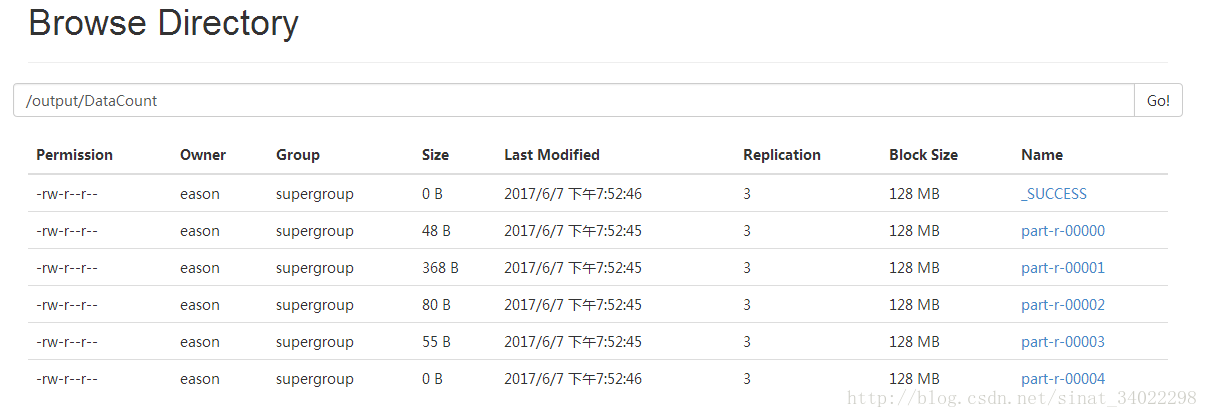
可以看到输出文件还是5个,这是由于主函数中Reduce的数量定义为5。因为自定义的Partitioner类只有4个分区,所以这里只有四个文件是有内容的,最后一个文件大小为0B。也可以看到所有的文件大小与之前按照默认分区方法(HashPartitioner)得到的文件大小均不相同。
四、其他 Partitioner
查看 Partitioner 的 API 可以看到 Partitioner 的 4 个实现类:
BinaryPartitioner, HashPartitioner, KeyFieldBasedPartitioner, TotalOrderPartitioner