文章目录
JAVA网络编程最基础的两个类
InetAddress 类
| java.net.InetAddress 类是 Java 对 IP 地址(包括 IPv4 和 IPv6)的高层表示。大多数其他网络类都要用到这个类,包括 Socket、ServerSocket、URL、DatagramSocket,DatagramPacket等。 |
常用方法:
import java.net.InetAddress;
import java.net.UnknownHostException;

public class InetAddressDemo {

	public static void main(String[] args) throws UnknownHostException {

		/*
		 * InetAddress类
		 *
		 * 实际上它会建立与本地 DNS 服务器的一个连接,来查找名字和数字地址(如果你之前查找过这个主机,
		 * 这个信息可能会在本地缓存,如果是这样,就不需要再建立网络连接)。
		 * 如果 DNS 服务器找不到这个地址,这个方法会抛出一个 UnknownHostException 异常
		*/

		// 通过域名获取地址信息
		InetAddress wInetAddress = InetAddress.getByName("www.baidu.com");
		System.out.println(wInetAddress);

		// 通过url获取地址信息
		InetAddress wInetAddress2 = InetAddress.getByName("14.215.177.39");
		System.out.println(wInetAddress2);

		// 一个域名可能有多个地址信息
		InetAddress[] wInetAddressArr = InetAddress.getAllByName("www.baidu.com");
		for (InetAddress inetAddress : wInetAddressArr) {
			System.out.println(inetAddress);
		}

		// 根据url字节数组,得到地址信息
		byte[] bytes = {(byte)192, (byte) 168, 1, 122};
		InetAddress wInetAddress3 = InetAddress.getByAddress(bytes);
		System.out.println(wInetAddress3);
	}
}
Networklnterface 类
| 由于 NetworkInterface 对象表示物理硬件和虚拟地址网络接口。 |
常用方法:
import java.net.InetAddress;
import java.net.NetworkInterface;
import java.net.SocketException;
import java.net.UnknownHostException;
import java.util.Enumeration;

public class NetworklnterfaceDemo {

	public static void main(String[] args) throws UnknownHostException, SocketException {

		/*
		 * NetworkInterface
		 * 表示物理硬件和虚拟地址网络接口
		 */

		// 获取当前虚拟地址网络接口
		InetAddress wInetAddress = InetAddress.getByName("127.0.0.1");
		NetworkInterface wNetworkInterface = NetworkInterface.getByInetAddress(wInetAddress);
		System.out.println(wNetworkInterface);

		System.out.println("--------------------------");

		// 打印所有的物理硬件和虚拟地址网络接口等
		Enumeration<NetworkInterface> wNetworkInterfaceEnum = NetworkInterface.getNetworkInterfaces();
		while (wNetworkInterfaceEnum.hasMoreElements()) {

			NetworkInterface networkInterface = wNetworkInterfaceEnum.nextElement();
			System.out.println(networkInterface + "------------------------");

			Enumeration<InetAddress> wInetAddressEnum = networkInterface.getInetAddresses();
			while (wInetAddressEnum.hasMoreElements()) {
				System.out.println(networkInterface.getDisplayName() + "===" + wInetAddressEnum.nextElement());
			}
		}
	}
}
BIO(阻塞式IO)
| 传统 BIO 通信模型,采用 BIO 通信模型的服务端,通常由一个独立的 Acceptor 线程负责监听客户端的连接,它接收到客户端连接请求之后为每个客户端创建一个新的线程进行链路处理,处理完成后,通过输出流返回应答给客户端,线程销毁。即典型的一请求一应答模型,同时数据的读取写入也必须阻塞在一个线程内等待其完成。 问题:该模型最大的问题就是缺乏弹性伸缩能力,当客户端并发访问量增加后,服务端的线程个数和客户端并发访问数呈 1:1 的正比关系,线程数量快速膨胀后,系统的性能将急剧下降。 改进:为了改进这种一连接一线程的模型,我们可以使用线程池来管理这些线程,实现 1 个或多个线程处理 N 个客户端的模型,这种方式通常被称为“伪异步 I/O 模型” |
代码示例
客户端
import java.io.IOException;
import java.io.ObjectInputStream;
import java.io.ObjectOutputStream;
import java.net.InetSocketAddress;
import java.net.Socket;

public class SimpleClientDemo {

	public static void main(String[] args) throws IOException {

		Socket wSocket = null;
		ObjectOutputStream outputStream = null;
		ObjectInputStream inputStream = null;

		try {
			wSocket = new Socket();
			wSocket.connect(new InetSocketAddress("127.0.0.1",10001));

			outputStream = new ObjectOutputStream(wSocket.getOutputStream());
			inputStream = new ObjectInputStream(wSocket.getInputStream());

			outputStream.writeUTF("Lee");
			outputStream.flush();

			String response = inputStream.readUTF();
			System.out.println(response);
		} catch (Exception e) {
			e.printStackTrace();
		} finally {
			if (null != wSocket) {
				wSocket.close();
			}
			if (null != outputStream) {
				outputStream.close();
			}
			if (null != inputStream) {
				inputStream.close();
			}
		}
	}
}
服务端
import java.io.*;
import java.net.InetSocketAddress;
import java.net.ServerSocket;
import java.net.Socket;
import java.util.concurrent.LinkedBlockingDeque;
import java.util.concurrent.ThreadPoolExecutor;
import java.util.concurrent.TimeUnit;

public class SimpleServerDemo {

	private static final ThreadPoolExecutor mExecutor;

	static {
		mExecutor = new ThreadPoolExecutor(5, 10, 1000, TimeUnit.SECONDS, new LinkedBlockingDeque<>(10));
	}

	public static void main(String[] args) throws IOException {

		ServerSocket wServerSocket = new ServerSocket();
		wServerSocket.bind(new InetSocketAddress(10001));
		System.out.println("Server is Started");

		while (true) {
			mExecutor.execute(new ServerTask(wServerSocket.accept()));
		}
	}

	private static class ServerTask implements Runnable {

		private Socket mSocket;

		ServerTask(Socket mSocket) {
			this.mSocket = mSocket;
		}

		@Override
		public void run() {

			try(ObjectInputStream inputStream = new ObjectInputStream(mSocket.getInputStream());
				ObjectOutputStream outputStream = new ObjectOutputStream(mSocket.getOutputStream())) {

				String message = inputStream.readUTF();
				System.out.println("Accept client message" + message);

				outputStream.writeUTF("Accept Success message:" + message);
				outputStream.flush();

			} catch (IOException e) {
				e.printStackTrace();
			}
		}
	}
}
使用场景
RPC (Remote Procedure Call ——远程过程调用),它是一种通过网络从远程计算机程序上请求服务,而不需要了解底层网络的技术。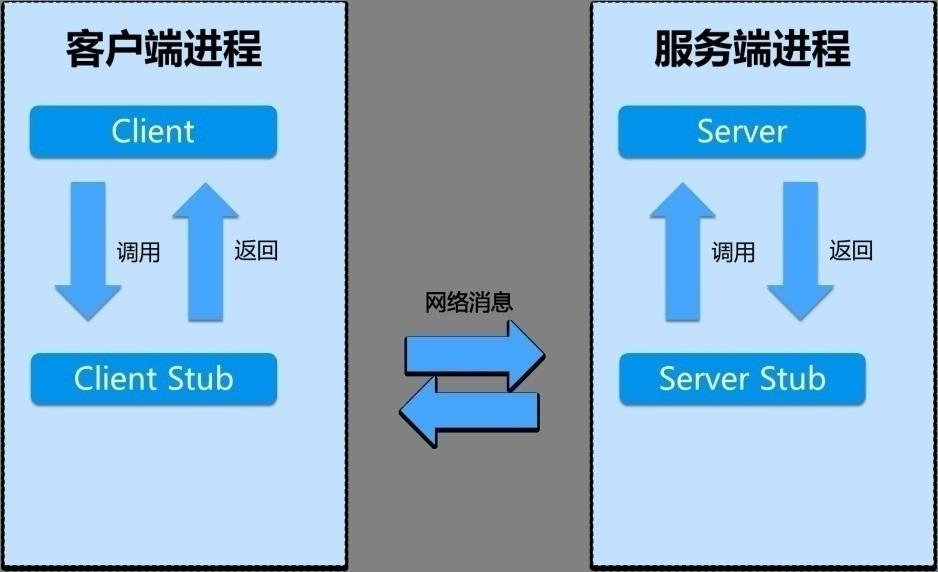
应用框架
Dubbo、Spring Cloud、Thrift等
NIO(非阻塞式IO)
| Java NIO 和 IO 之间第一个最大的区别是,IO 是面向流的,NIO 是面向缓冲区的。 NIO是非阻塞式的,一个线程请求写入一些数据到某通道,但不需要等待它完全写入,这个线程同时可以去做别的事情。线程通常将非阻塞 IO 的空闲时间用于在其它通道上执行 IO 操作,所以一个单独的线程现在可以管理多个输入和输出通道(channel)。 |
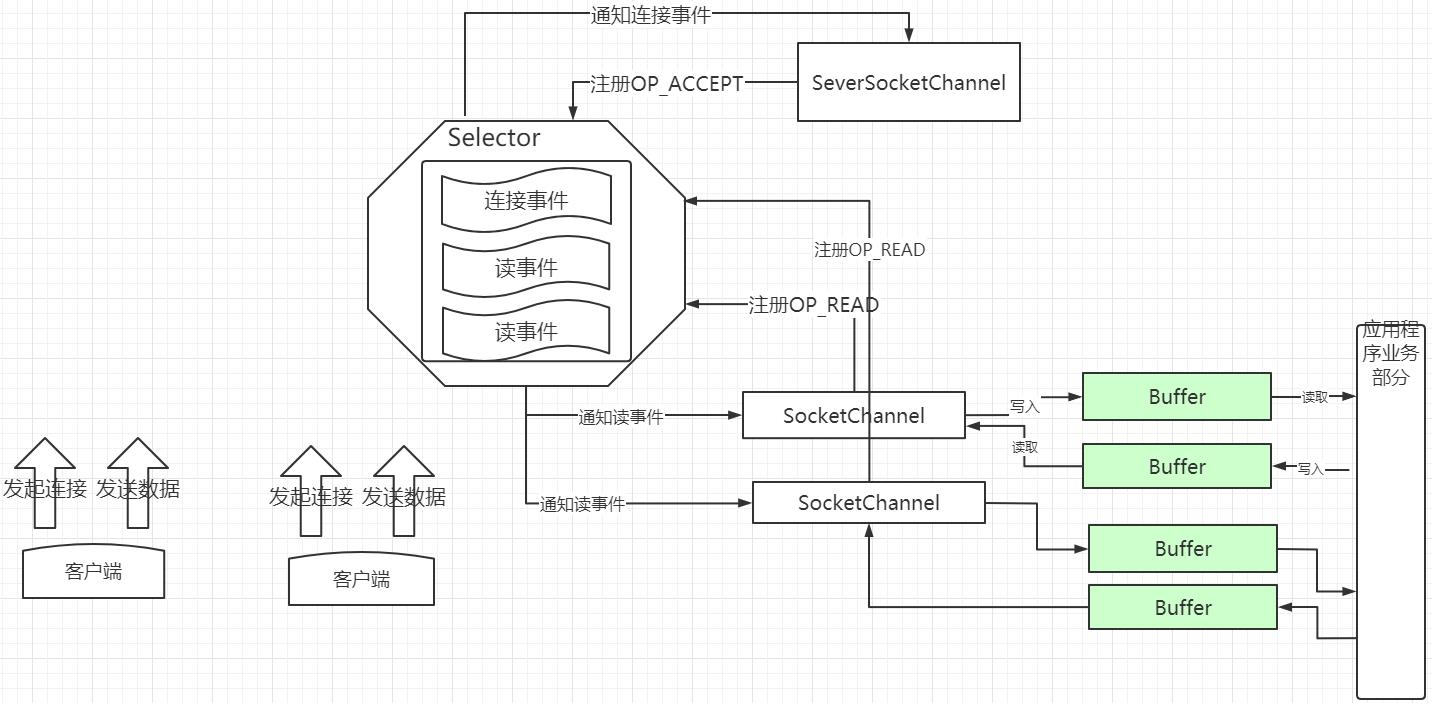
NIO三个核心组件
- Selector。 选择器允许一个单独的线程来监视多个输入通道,你也可以注册多个通道使用一个选择器(Selectors),然后使用一个单独的线程来操作这个选择器,进而“选择”通道。
- Channel。通道,被建立的一个应用程序和操作系统交互事件、传递内容的渠道。
- 所有被 Selector(选择器)注册的通道,只能是继承了 SelectableChannel 类的子类
- ServerSocketChannel:应用服务器程序的监听通道。只有通过这个通道,应用程序才能向操作系统注册支持“多路复用 IO”的端口监听。同时支持 UDP 协议和 TCP 协议。
- ScoketChannel:TCP Socket 套接字的监听通道,一个 Socket 套接字对应了一个客户端 IP:端口 到 服务器 IP:端口的通信连接。
- buffer。缓存区,Buffer 用于和 NIO 通道进行交互。数据是从通道读入缓冲区,从缓冲区写入到通道中的。缓冲区本质上是一块可以写入数据,然后可以从中读取数据的内存( 其实就是数组)。 这块内存被包装成 NIO Buffer 对象,并提供了一组方法,用来方便的访问该块内存。.
- capacity属性,作为一个内存块,Buffer 有一个固定的大小值,
- position属性,当你写数据到 Buffer 中时,position 表示当前能写的位置。
- limit属性,在写模式下,Buffer 的 limit 表示你最多能往 Buffer 里写多少数据。 写模式下,limit 等于 Buffer 的 capacity。切换 Buffer 到读模式时, limit 表示你最多能读到多少数据。因此,当切换 Buffer 到读模式时,limit 会被设置成写模式下的 position 值。
NIO三个核心组件的关系图
SelectionKey
SelectionKey是一个抽象类,表示selectableChannel在Selector中注册的标识.每个Channel向 Selector 注册时,都将会创建一个SelectionKey。SelectionKey 将 Channel 与 Selector 建立了关系,并维护了 channel 事件。
SelectionKey的四种事件:
| 操作类型 | 就绪条件及说明 |
| OP_READ | 当操作系统读缓冲区有数据可读时就绪。并非时刻都有数据可读,所以一般需要注册该操作,仅当有就绪时才发起读操作,有的放矢,避免浪费 CPU。 |
| OP_WRITE | 当操作系统写缓冲区有空闲空间时就绪。一般情况下写缓冲区都有空闲空间,小块数据直接写入即可,没必要注册该操作类型,否则该条件不断就绪浪费 CPU;但如果是写密集型的任务,比如文件下载等,缓冲区很可能满,注册该操作类型就很有必要,同时注意写完后取消注册。 |
| OP_CONNECT | 当 SocketChannel.connect()请求连接成功后就绪。该操作只给客户端使用。 |
| OP_ACCEPT | 当接收到一个客户端连接请求时就绪。该操作只给服务器使用。 |
代码示例
服务端
public class NioServer {

	private static NioServerHandler mNioServerHandler;

	private static NioServerHandlerOfWrite mNioServerHandlerOfWrite;

	public static void main(String[] args) {

		mNioServerHandlerOfWrite = new NioServerHandlerOfWrite(Constrants.DEFAULT_PORT);
		new Thread(mNioServerHandlerOfWrite, "Server").start();
	}
}


public class NioServerHandler implements Runnable{

	private Integer port;

	private volatile boolean startTag;

	private static ServerSocketChannel mServerSocketChannel;
	private static Selector mSelector;

	NioServerHandler(Integer port) {
		this.port = port;

		try {
			mSelector = Selector.open();
			mServerSocketChannel = ServerSocketChannel.open();
			// 非阻塞模式, NIO
			mServerSocketChannel.configureBlocking(false);
			// 服务端绑定端口
			mServerSocketChannel.socket().bind(new InetSocketAddress(port));
			startTag = true;
			System.out.println("服务器已启动, 端口号:" + port);
			// 注册接收事件
			mServerSocketChannel.register(mSelector, SelectionKey.OP_ACCEPT);
		} catch (IOException e) {
			e.printStackTrace();
		}
	}

	@Override
	public void run() {

		while (startTag) {

			try {
				// 1秒刷一次selector
				mSelector.select(1000);
				// 获得当前所有的事件集
				Set<SelectionKey> wSelectionKeySet = mSelector.selectedKeys();
				Iterator<SelectionKey> iterator = wSelectionKeySet.iterator();
				while (iterator.hasNext()) {
					SelectionKey wSelectionKey = iterator.next();
					iterator.remove();
					handleInput(wSelectionKey);
				}
			} catch (IOException e) {
				e.printStackTrace();
			}
		}
	}

	/**
	 * 处理
	 *
	 * @param pSelectionKey
	 */
	private void handleInput(SelectionKey pSelectionKey) throws IOException {

		if (pSelectionKey.isValid()) {

			// 连接事件
			if (pSelectionKey.isAcceptable()) {

				// 得到对应关注的Channel  连接事件是被ServerSocketChannel关注
				ServerSocketChannel wServerSocketChannel = (ServerSocketChannel) pSelectionKey.channel();
				SocketChannel wSocketChannel = wServerSocketChannel.accept();
				System.out.println("与端口号:" + port + "客户端建立了连接");
				// 非阻塞模式, NIO
				wSocketChannel.configureBlocking(false);

				// 注册读事件
				wSocketChannel.register(mSelector, SelectionKey.OP_READ);
			}

			// 读事件
			if (pSelectionKey.isReadable()) {
				// 得到对应关注的Channel  读事件是被SocketChannel关注
				SocketChannel wSocketChannel = (SocketChannel) pSelectionKey.channel();
				// 分配一个1024的缓存区
				ByteBuffer wByteBuffer = ByteBuffer.allocate(1024);
				// 读数据,存到ByteBuffer中
				int readBytes = wSocketChannel.read(wByteBuffer);
				if (readBytes > 0) {
					wByteBuffer.flip();
					byte[] bytes = new byte[wByteBuffer.remaining()];
					// 将缓存区的数据存到bytes中
					wByteBuffer.get(bytes);
					String wMessage = new String(bytes, "UTF-8");
					System.out.println("Accept client message: " + wMessage);

					// 响应信息
					String wResult = Constrants.response(wMessage);
					doWrite(wSocketChannel, wResult);

				} else if (readBytes < 0) {
					pSelectionKey.cancel();
					wSocketChannel.close();
				}
			}
		}
	}

	/**
	 * 写数据
	 *
	 * @param pSocketChannel
	 * @param pMessage
	 * @throws IOException
	 */
	private void doWrite(SocketChannel pSocketChannel,
						 String pMessage) throws IOException {

		byte[] bytes = pMessage.getBytes(StandardCharsets.UTF_8);
		ByteBuffer wByteBuffer = ByteBuffer.allocate(bytes.length);
		wByteBuffer.put(bytes);
		wByteBuffer.flip();
		pSocketChannel.write(wByteBuffer);
	}

	public void stop() {
		startTag = false;
	}
}
客户端
public class NioClient {

	private static NioClientHandler mNioClientHandler;

	private static boolean sendMessage(String pMessage) {
		try {
			mNioClientHandler.sendMessage(pMessage);
		} catch (IOException e) {
			e.printStackTrace();
		}
		return true;
	}

	public static void main(String[] args) throws InterruptedException {

		mNioClientHandler = new NioClientHandler(Constrants.DEFAULT_SERVER_IP, Constrants.DEFAULT_PORT);
		new Thread(mNioClientHandler, "Client").start();
		Thread.sleep(1000);
		// 发送消息
		sendMessage("Lee");
	}
}


public class NioClientHandler implements Runnable{

	private Integer port;
	private String ip;

	private volatile boolean startTag;

	private static SocketChannel mSocketChannel;
	private static Selector mSelector;

	NioClientHandler(String ip, Integer port) {
		this.ip = ip;
		this.port = port;

		try {
			mSocketChannel = SocketChannel.open();
			mSelector = Selector.open();
			// 非阻塞模式, NIO
			mSocketChannel.configureBlocking(false);
		} catch (IOException e) {
			e.printStackTrace();
		}
	}

	@Override
	public void run() {

		// 连接
		doConnect();

		while (startTag) {
			try {
				// 1秒刷一次selector
				mSelector.select(1000);
				// 获得当前所有的事件集
				Set<SelectionKey> wSelectionKeySet = mSelector.selectedKeys();
				Iterator<SelectionKey> iterator = wSelectionKeySet.iterator();
				while (iterator.hasNext()) {
					SelectionKey wSelectionKey = iterator.next();
					iterator.remove();
					handleInput(wSelectionKey);
				}
			} catch (IOException e) {
				e.printStackTrace();
			}
		}
	}

	private void handleInput(SelectionKey pSelectionKey) throws IOException {

		if (pSelectionKey.isValid()) {

			// 得到对应关注的Channel  读事件是被SocketChannel关注
			SocketChannel wSocketChannel = (SocketChannel) pSelectionKey.channel();

			// 连接事件
			if (pSelectionKey.isConnectable()) {
				// 连接是否结束
				if (wSocketChannel.finishConnect()) {
					mSocketChannel.register(mSelector, SelectionKey.OP_READ);
				} else {
					stop();
					System.exit(1);
				}
			}

			// 读事件
			if (pSelectionKey.isReadable()) {
				// 分配一个1024的缓存区
				ByteBuffer wByteBuffer = ByteBuffer.allocate(1024);
				// 读数据,存到ByteBuffer中
				int readBytes = wSocketChannel.read(wByteBuffer);
				if (readBytes > 0) {
					wByteBuffer.flip();
					byte[] bytes = new byte[wByteBuffer.remaining()];
					// 将缓存区的数据存到bytes中
					wByteBuffer.get(bytes);
					String wMessage = new String(bytes, "UTF-8");
					System.out.println("Accept server message: " + wMessage);

				} else if (readBytes < 0) {
					pSelectionKey.cancel();
					wSocketChannel.close();
				}
			}
		}
	}

	private void doConnect() {
		try {
			// 客户端设置要连接的ip和port
			if (mSocketChannel.connect(new InetSocketAddress(ip, port))) {
				// 连接成功,则注册读事件
				mSocketChannel.register(mSelector, SelectionKey.OP_READ);
			} else {
				// 连接失败,则注册连接事件
				mSocketChannel.register(mSelector, SelectionKey.OP_CONNECT);
			}
			startTag = true;
		} catch (IOException e) {
			e.printStackTrace();
		}
	}

	/**
	 * 写数据
	 *
	 * @param pSocketChannel
	 * @param pMessage
	 * @throws IOException
	 */
	private void doWrite(SocketChannel pSocketChannel,
						 String pMessage) throws IOException {

		byte[] bytes = pMessage.getBytes(StandardCharsets.UTF_8);
		ByteBuffer wByteBuffer = ByteBuffer.allocate(bytes.length);
		wByteBuffer.put(bytes);
		wByteBuffer.flip();
		pSocketChannel.write(wByteBuffer);
	}

	public void sendMessage(String message) throws IOException {
		mSocketChannel.register(mSelector, SelectionKey.OP_READ);
		doWrite(mSocketChannel, message);
	}

	public void stop() {
		System.out.println("exit client");
		startTag = false;
	}
}
设置的常量
public class Constrants {

	public static final Integer DEFAULT_PORT = 10010;
	public static final String DEFAULT_SERVER_IP = "127.0.0.1";

	public static String response(String message) {
		return "Hello," + message + ", Now is" + (new Date().toString());
	}
}
版权声明:本文为a1530633034原创文章,遵循CC 4.0 BY-SA版权协议,转载请附上原文出处链接和本声明。