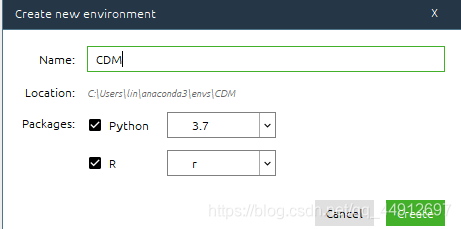
1.打开anaconda,创建新的虚拟环境,选中R和Python3.7
2.搜索rpy2包,选中并安装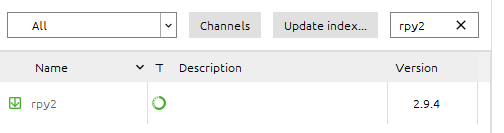
3.安装即可
4.打开虚拟环境对应的Jupyter
5.输入测试程序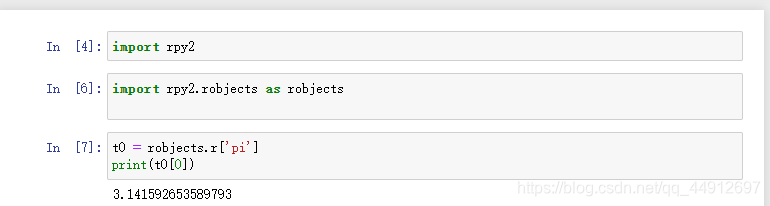
注:
未选中python3.7出现的错误: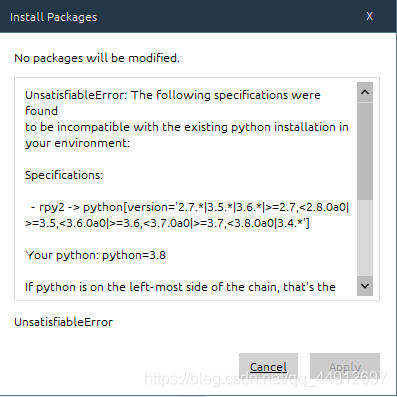
UnsatisfiableError: The following specifications were found
to be incompatible with the existing python installation in your environment:

Specifications:

 - rpy2 -> python[version='2.7.*|3.5.*|3.6.*|>=2.7,<2.8.0a0|>=3.5,<3.6.0a0|>=3.6,<3.7.0a0|>=3.7,<3.8.0a0|3.4.*']

Your python: python=3.8


If python is on the left-most side of the chain, that's the version you've asked for.
When python appears to the right, that indicates that the thing on the left is somehow
not available for the python version you are constrained to. Note that conda will not
change your python version to a different minor version unless you explicitly specify
that.
rpy2官方文档
版权声明:本文为qq_44912697原创文章,遵循CC 4.0 BY-SA版权协议,转载请附上原文出处链接和本声明。