功能分析:
初审阶段:主要对借款标的初审和复审迚行审核操作。
如图:该条借款为待审核状态
点击修改弹出消息框,信息回填,单选框通过/不通过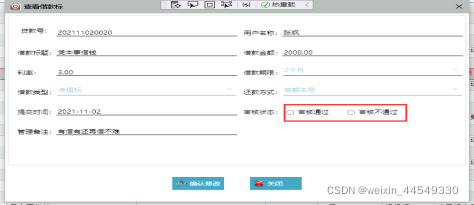
选中不通过时时状态改为不通过:
选中通过时时状态改为通过:
修改成功并弹出提示框: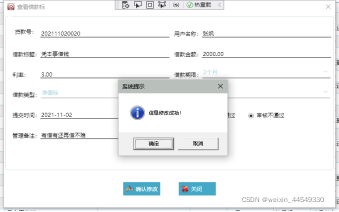
该功能所用到的数据表: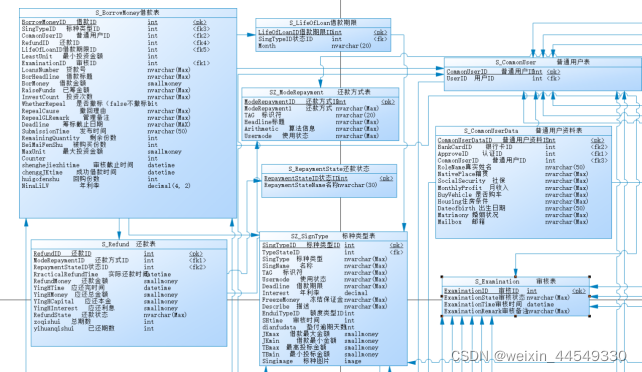
源码:
private void Window_Loaded(object sender, RoutedEventArgs e)
{
//数据回填
txt_borLine.Text = DRV.Row[“BorHeadline”].ToString().Trim();
txt_borNumber.Text = DRV.Row[“LoansNumber”].ToString().Trim();
txt_RoleName.Text = DRV.Row[“RoleName”].ToString().Trim();
txt_loansMoney.Text = DRV.Row[“BorMoney”].ToString().Trim();
txt_NinaLiLV.Text = DRV.Row[“NinaLiLV”].ToString().Trim();
txt_subTime.Text = DRV.Row[“SubmissionTime”].ToString().Trim();
txt_RepealGLRemark.Text = DRV.Row[“RepealGLRemark”].ToString().Trim();
cbo_SingType.SelectedValue = Convert.ToInt32(DRV.Row[“SingTypeID”]);
}
//执行修改
private void btnUpdate_Click(object sender, RoutedEventArgs e)
{
try
{
//(1)页面必填项
if (Convert.ToInt32(cbo_RepayState.SelectedValue) > 0 && Convert.ToInt32(cbo_RepayState.SelectedValue) > 0 && Convert.ToInt32(cbo_SingType.SelectedValue) > 0 &&
!string.IsNullOrEmpty(txt_RepealGLRemark.ToString().Trim()))
{
//(2)获取数据
int intRepayState = Convert.ToInt32(cbo_RepayState.SelectedValue);
int intBorTime = Convert.ToInt32(cbo_BorTime.SelectedValue);
int intSingType = Convert.ToInt32(cbo_SingType.SelectedValue);
int intBorrowMoney = Convert.ToInt32(DRV.Row[“BorrowMoneyID”]);//获取主页面表格选中行
bool BolExaminePass = (bool)examinePass.IsChecked;
string strRepealGLRemark = txt_RepealGLRemark.Text.Trim();
//(3)执行修改
if (BolExaminePass == true)
{
int intExaminationID = Convert.ToInt32(DRV.Row[“ExaminationID”]);
intExaminationID = 5;
int intCount = myClient.btnUpdate_Click(intRepayState, intBorTime, intSingType, strRepealGLRemark, intExaminationID, intBorrowMoney);
//(4)判断结果
if (intCount == -1)
{
MessageBox.Show(“信息修改重复!”, “系统提示”, MessageBoxButton.OKCancel, MessageBoxImage.Exclamation); //弹出确定对话框
}
else
{
MessageBoxResult dr = MessageBox.Show(“信息修改成功!”, “系统提示”, MessageBoxButton.OKCancel, MessageBoxImage.Asterisk); //弹出确定对话框
this.Close();
}
}
else
{
int intExaminationID = Convert.ToInt32(DRV.Row[“ExaminationID”]);
intExaminationID = 6;
int intCount = myClient.btnUpdate_Click(intRepayState, intBorTime, intSingType, strRepealGLRemark, intExaminationID, intBorrowMoney);
//(4)判断结果
if (intCount == -1)
{
MessageBox.Show(“信息修改重复!”, “系统提示”, MessageBoxButton.OKCancel,
MessageBoxImage.Exclamation); //弹出确定对话框
}
if (intCount > 0)
{
MessageBoxResult dr = MessageBox.Show(“信息修改成功!”, “系统提示”, MessageBoxButton.OKCancel, MessageBoxImage.Asterisk); //弹出确定对话框
this.Close();
}
}
}
else
{
MessageBox.Show(“请把页面数据填写完整!”, “系统提示”, MessageBoxButton.OK,
MessageBoxImage.Warning); //弹出确定对话框
}
}
catch (Exception)
{
MessageBox.Show(“数据异常!”, “提 示!”, MessageBoxButton.OK, MessageBoxImage.Warning);
}
}
执行的存储语句:
if(@type=‘btnUpdate_Click’)
begin
begin
update S_BorrowMoney
set ModeRepaymentID=@intModeRepaymentID,
LifeOfLoanID=@intLifeOfLoanID,
SingTypeID=@intSingTypeID,
RepealGLRemark=@strRepealGLRemark,
ExaminationID=@intExaminationID
where BorrowMoneyID=@intBorrowMoneyID
end
end