进行查看depot_tools工具的linux下的安装方式
主要是在
git clone https://chromium.googlesource.com/chromium/tools/depot_tools.git本身之前就是需要翻墙的,我是在windows下做的代理,然后将windows上的git通过设置代理以后下载的这个工具
然后传输到linux里进行下面的编译
在编译之前还需要设置这个路径为PATH中,在/etc/profile中最后设置
export PATH=$PATH:/mnt/hgfs/linuxwebrtc/depot_tools然后执行
source /etc/profile然后在下载的webrtc的目录中,进入src/build执行
cd src/build
./install-build-deps.sh
遇到错误
which: no lsb_release in (/usr/local/bin:/usr/local/sbin:/usr/bin:/usr/sbin:/bin:/sbin:/home/dayu/.local/bin:/home/dayu/bin:/mnt/hgfs/linuxwebrtc/depot_tools)
ERROR: lsb_release not found in $PATH
应该是没有安装lsb_release
我们验证一下是否安装过
lsb_release -a显示
-bash: lsb_release: command not found
解决方法:
yum install redhat-lsb -y安装完成以后再次执行lsb_release -a显示

说明该工具已经安装成功了
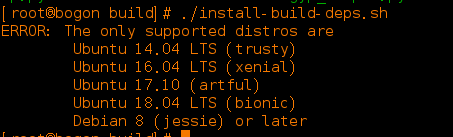
再次执行./install-build-deps.sh,它显示不支持我现在的CentOS7,我无语了,没办法换系统。
版权声明:本文为dqxiaoxiao原创文章,遵循CC 4.0 BY-SA版权协议,转载请附上原文出处链接和本声明。