Linux下忘记MySQL root密码解决方法,基于Ubuntu 12.04 LTS。
Linux下忘记MySQL root密码解决方法,,基于Ubuntu 12.04 LTS。
忘了mysql密码,从网上找到的解决方案记录在这里。
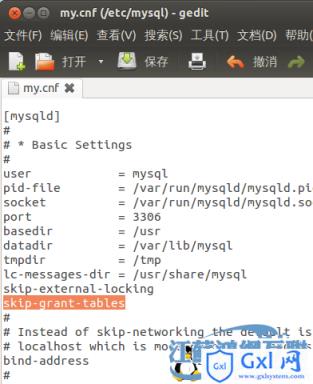
编辑mysql的配置文件/etc/mysql/my.cnf,在[mysqld]段下加入一行“skip-grant-tables”。
重启mysql服务
@ubuntu:~$ sudo service mysql restart
mysql stop/waiting
mysql start/running, process 18669
用空密码进入mysql管理命令行,切换到mysql库。
@ubuntu:~$ mysql
Welcome to the MySQL monitor. Commands end with ; or \g.
mysql> use mysql
Database changed
执行update user set password=PASSWORD("new_pass") where user='root'; 把密码重置为new_pass。退出数据库管理。
mysql> update user set password=PASSWORD("new_pass") where user='root';
Query OK, 0 rows affected (0.00 sec)
Rows matched: 4 Changed: 0 Warnings: 0
mysql>quit
回到vim /etc/mysql/my.cnf,把刚才加入的那一行“skip-grant-tables”注释或删除掉。
再次重启mysql服务sudo service mysql restart,使用新的密码登陆,修改成功。
@ubuntu:~$ mysql -uroot -pnew_pass
Welcome to the MySQL monitor. Commands end with ; or \g.
mysql>

本条技术文章来源于互联网,如果无意侵犯您的权益请点击此处反馈版权投诉
本文系统来源:php中文网