https 和 ssh 方式都报错
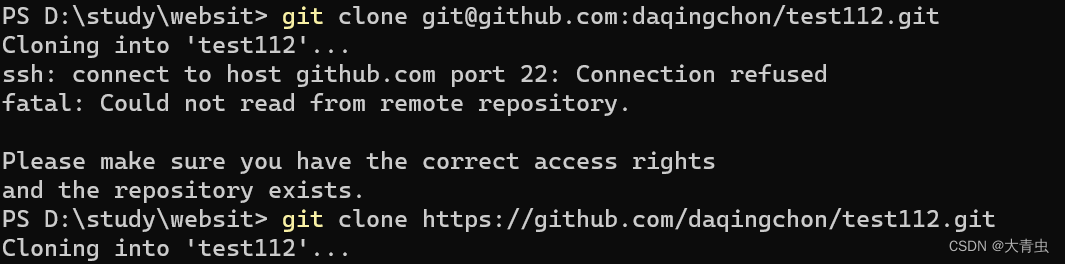
报错 :一 :ssh 方式克隆代码
ssh: connect to host github.com port 22: Connection refused
fatal: Could not read from remote repository.
Please make sure you have the correct access rights
and the repository exists.
报错:二 :htttps 方式克隆超时
同时推送 pull 也不行
ssh -T git@github.com 测试是否成功 ,如下成功 (如果上面情况都满足会失败):

1. 方法一 : 修改host文件(github访问慢 , 或者不能访问被墙 都可使用此方法测试)
找到host文件:
windows系统的hosts文件的位置如下:C:\Windows\System32\drivers\etc\hosts
mac/linux系统的hosts文件的位置如下:/etc/hosts
添加映射关系(在hosts中添加如下) :(站长工具 ping值检测 github.com)
52.69.186.44 github.com
199.232.5.194 github.global.ssl.fastly.net
2. 方法二 :(方法一测试成功后 ,可以不用)
修改本地网络环境 服务器dns地址 :
首选 8888
备用 114114114114
cmd刷新DNS解析缓存 ipconfig /flushdns
重新拉取代码成功!! 快测试起来吧
版权声明:本文为qq_30071431原创文章,遵循CC 4.0 BY-SA版权协议,转载请附上原文出处链接和本声明。