修改之后的样式为:
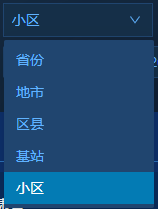
html代码为:

css代码为:
.midp_custom_report_system_tool_left_top_left_input_dropdown {
    background-color: #20456f !important;
    .ant-select-item-option  {
        color: #60b3ff;
        background: #20456f;
    }
    .ant-select-item-option-content {
        color: #60b3ff;
        font-weight: 400;
        font-size: 14px;
        font-family: '微软雅黑';
        font-style: normal;
    }
    .ant-select-item-option:focus {
        background-color: transparent;
        border: 0px !important;
    }
    .ant-select-item,
    .ant-select-item-option,
    .ant-select-item-option-selected {
        color: #fff !important;
        border: 0px !important;
    }
    .ant-select-item-option-active {
        background: #037bb4 !important;
        .ant-select-item-option-content {
            color: #fff !important;
        }
    }
}
版权声明:本文为qq_49975871原创文章,遵循CC 4.0 BY-SA版权协议,转载请附上原文出处链接和本声明。