遇到的情况
在做一些操作时需要权限校验,通过才会执行对应操作。
因为需要多次使用账号验证的表单,在vue2情况下,可以使用插件的方式: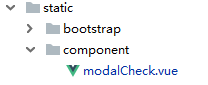
在此目录下,新建权限校验表单的.vue文件。
插件.vue文件
表单需要的基本元素:账号、密码、提交按钮、规则校验等。
<template>
  <div>
  // 基本元素
<el-dialog title="Authority verification" :visible.sync="dialogFormVisible">
  <el-form ref="form" :model="formValidate" :rules="ruleValidate">
    <el-form-item label="userName" :label-width="formLabelWidth">
      <el-input v-model="formValidate.userName" autocomplete="off"></el-input>
    </el-form-item>

    <el-form-item label="password" :label-width="formLabelWidth" prop="password">
      <el-input v-model="formValidate.password" autocomplete="off"></el-input>
    </el-form-item>

  </el-form>
  <div slot="footer" class="dialog-footer">
    <el-button @click="dialogFormVisible = false">Cancel</el-button>
    <el-button type="primary" @click="submmit(formValidate)">submit</el-button>
  </div>
</el-dialog>
  </div>
</template>
<script>
module.exports = {
    name: 'Modal',
    data() {
      return {
        form:{},
        formValidate:{
          userName:'',
          password:''
        },

        // 规则校验
        ruleValidate:{
          userName:[
            {required: true, message: 'Account cannot be empty', trigger: 'blur'},
          ],
          password:[
            { required: true, message: 'Password cannot be empty', trigger: 'blur' },
          ]
        },
        dialogTableVisible: false,
        dialogFormVisible: false,

        formLabelWidth: '120px',

      }
    },
    props:['visible'],// 传递给父级,父级需要用到这个值。
    methods:{
      // 将表单填入的数据传给RightPart.vue
      userNameChange:function() {
        this.$emit('userName', this.formValidate.userName)
      },
      passwordChange:function() {
        this.$emit('password', this.formValidate.password)

      },
	// 提交按钮
      submmit: function submmit(form){
        that = this;
            api = "/authorization/authorityCheck/";
            this.$refs["form"].validate((valid) => {
              if (valid) {
                  axios.post(api, this.formValidate).then(function (response) {
                  // 拿到的结果,直接交给父级处理。父级中的authResult()方法接收结果并继续下一步。
                    that.$parent.authResult(response)
                 })
              } else {
                that.$message.error(msg_must);
                return false;
              }
            });
      },

    },
    watch: {
      'visible': function (newVal) {
        this.dialogFormVisible = newVal
      },
      'dialogFormVisible': function(newVal){

        this.dialogFormVisible = newVal;
        this.$emit('update:visible', newVal);
    },
    }
  }
</script>
后端权限校验
后端校验有很多种方法,根据具体情况调整自己方法。
def authorityCheck(request):
    body = json.loads((request.body).decode()) # 接收到前端传到的值
    data = QueryDict('username={}&password={}'.format(body['userName'], body['password']),mutable=True) # 因为下面验证需要拿到QueryDict类型,此处把拿到的数据做处理。
    if request.method == "POST":
        form = AuthenticationForm(request, data=data)
    # 验证
    if form.is_valid():
      message = 'Success'
    else:
      message = 'Validation failed'

    context = {
        'message':message,
    }

    return HttpResponse(json.dumps(context))
父级网页
老版本的vue .html文件。
导入插件:
在 <script >中加入:
new Vue({ // 起位置标识作用
  el: '#app',i18n,
    components:{
            'modalcheck': httpVueLoader('../../static/component/modalCheck.vue'),
        },
在网页开头加入:
<div id="app"> // 起位置标识作用
         <modalcheck ref="certrequestmode":visible.sync="dialogFormVisible"></modalcheck>
原来的方法替换掉:
<el-button type="primary" @click="dialogFormVisible = true">{{ $t('message.tbl') }}</el-button>
点击dialogFormVisible时,打开校验表单。可在data中加dialogFormVisible :‘false’ 默认不打开校验表单。
在methods中加入接收插件传递值得方法:
authResult:function authResult(response){
        if (response.data.message == "Success") { // 插件传递的验证结果
            that.dialogFormVisible = false // 验证成功后关闭表单
            this.pull() // 执行校验成功之后的方法
        }else {
            that.$message.error(response.data.message)
              }

      },
版权声明:本文为m0_47812755原创文章,遵循CC 4.0 BY-SA版权协议,转载请附上原文出处链接和本声明。