在使用highEcarts中的饼图的时候,我们可能会遇到自己的想要展示的图例过多,在当前高度又不允许又这么多的图例展示出来 我们就可以将图例条目变成可以进行点击滑动的
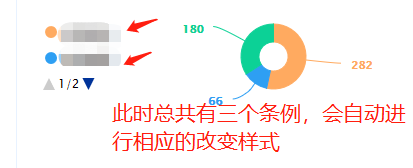 对于图例的样式可以使用legend中的一下方法,进行设置样式
下面是我的代码
var chart = Highcharts.chart('container',  {
	chart: {},
	title: {
		floating: true,
		text: null
	},
	tooltip: {
		pointFormat: '{series.name}: <b>{point.y}个</b>'
	},
	//legend中设置图例的样式
	**legend: {
		align: 'left',
		verticalAlign: 'middle',
		layout: 'vertical',
		itemMarginTop: 5,
		itemMarginBottom: 5,
	},**
	credits: {
		enabled: false
	},
	exporting: {
		enabled: false
	},
	plotOptions: {
		pie: {
			allowPointSelect: true,
			cursor: 'pointer',
			dataLabels: {
				enabled: true,
				format: '<b style="color:{point.color}">{point.y}</b>',
				style: {
					color: (Highcharts.theme && Highcharts.theme.contrastTextColor) || 'black'
				}
			},
			showInLegend: true
		}
	},
	series: [{
		type: 'pie',
		innerSize: '45%',
		name: '个数',
		borderColor: null,
		data: [{
			name: '在跟商机',
			y: 282,
			color: '#FFAA60'
		},
			   {
				   name: '成交商机',
				   y: 66,
				   color: '#2E9FF3'
			   },
			   {
				   name: '丢单商机',
				   y: 180,
				   color: '#0CD196'
			   }]
	}]
});
//这个是将图盛放的盒子,高度此时是不够三个图例进行显示的
**<div id="container" style="width:400px;height:110px"></div>**
版权声明:本文为weixin_43709908原创文章,遵循CC 4.0 BY-SA版权协议,转载请附上原文出处链接和本声明。