绪论
没开POP3/SMTP服务的只能通过网页发送邮件,开通后,可以通过Java代码程序发送邮件。(这儿以网易邮箱为例)
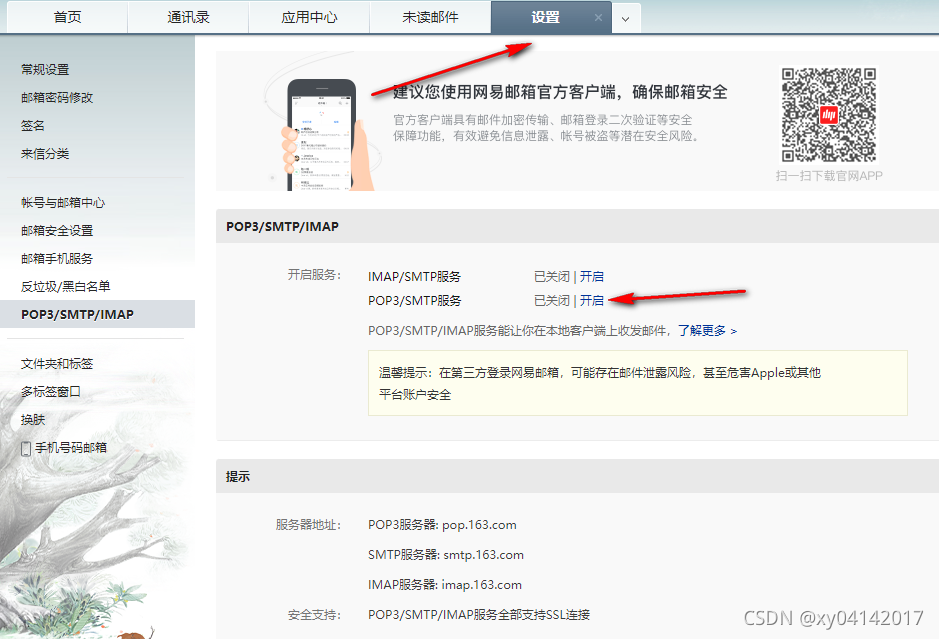
第一步 开启POP3/SMTP服务
第二步 生成授权
授权码切记保密
第三步 创建springboot项目
1. 添加依赖
<!--邮箱依赖-->
<dependency>
    <groupId>org.springframework.boot</groupId>
    <artifactId>spring-boot-starter-mail</artifactId>
</dependency>
2. 设置application.yml(或者是application.properties)
spring:
  mail:
    host: smtp.163.com //网易邮箱必须填这个  qq邮箱为  smtp.qq.com
    username: xxx  //发件人的邮箱
    password: xxx  //刚刚生成的授权码
    default-encoding: utf-8
    properties:
      mail:
        smtp:
          auth: true
          starttls:
            enable: true
            required: true
3. 拷贝API
import org.springframework.beans.factory.annotation.Autowired;
import org.springframework.beans.factory.annotation.Value;
import org.springframework.mail.SimpleMailMessage;
import org.springframework.mail.javamail.JavaMailSender;
import org.springframework.web.bind.annotation.RequestMapping;
import org.springframework.web.bind.annotation.RequestParam;
import org.springframework.web.bind.annotation.RestController;

import java.util.Random;

@RestController
public class MailController {
    @Autowired
    private JavaMailSender javaMailSender;

    //发件人邮箱
    @Value("${spring.mail.username}")
    private String fromEmail;

    public void sendMail(String subject, String text, String email){
        SimpleMailMessage mailMessage = new SimpleMailMessage();
        //收件人
        mailMessage.setTo(email);  //收件人邮箱也可以为其他,如qq邮箱
        //发件人
        mailMessage.setFrom(fromEmail);
        //设置标题
        mailMessage.setSubject(subject);
        //设置正文
        mailMessage.setText(text);
        //发送邮件
        javaMailSender.send(mailMessage);
    }

    @RequestMapping("/send")
    public String send(@RequestParam("email") String email){
        String code = "";
        for (int i = 0; i < 6; i++) {
            code += new Random().nextInt(10);  //生成6位数随机验证码
        }
        sendMail("邮件标题", "邮件内容", "收件人邮箱");  //收件人邮箱作为参数是为了从前端获取
        return code;  //返回验证码
    }
}
4. 测试
http://ip:port/send?email=123456789@qq.com
版权声明:本文为weixin_43490763原创文章,遵循CC 4.0 BY-SA版权协议,转载请附上原文出处链接和本声明。