常用方法
var date = new Date();

date .getYear(); //获取当前年份(2位)

date .getFullYear(); //获取完整的年份(4位)

date .getMonth(); //获取当前月份(0-11,0代表1月)

date .getDate(); //获取当前日(1-31)

date .getDay(); //获取当前星期X(0-6,0代表星期天)

date .getTime(); //获取当前时间(从1970.1.1开始的毫秒数)

date .getHours(); //获取当前小时数(0-23)

date .getMinutes(); //获取当前分钟数(0-59)

date .getSeconds(); //获取当前秒数(0-59)

date .getMilliseconds(); //获取当前毫秒数(0-999)

date .toLocaleDateString(); //获取当前日期

var mytime=date .toLocaleTimeString(); //获取当前时间

date .toLocaleString( ); //获取日期与时间


// 获取当前月份
var nowMonth = date.getMonth() + 1;

// 获取当前是几号
var strDate = date.getDate();

// 添加分隔符“-”
var seperator = "-";

// 对月份进行处理,1-9月在前面添加一个“0”
if (nowMonth >= 1 && nowMonth <= 9) {
   nowMonth = "0" + nowMonth;
}

// 对月份进行处理,1-9号在前面添加一个“0”
if (strDate >= 0 && strDate <= 9) {
   strDate = "0" + strDate;
}

// 最后拼接字符串,得到一个格式为(yyyy-MM-dd)的日期
var nowDate = date.getFullYear() + seperator + nowMonth + seperator + strDate;

// 获取的是前一天日期
var time = (new Date).getTime() - 24 * 60 * 60 * 1000;
var yesday = new Date(time); // 获取的是前一天日期
年月日时分秒转时间戳
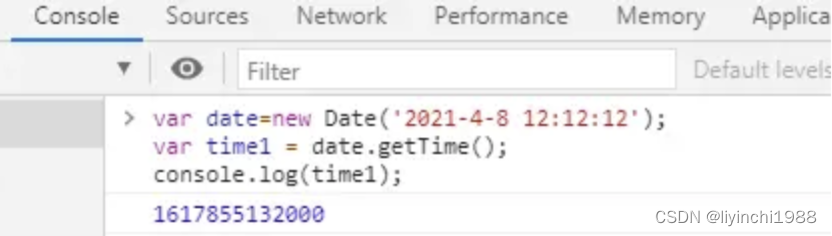
1、date.getTime()
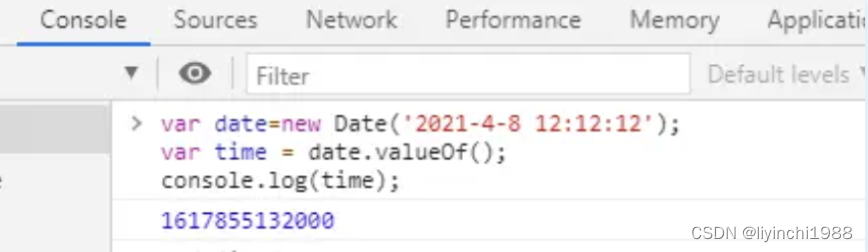
2、date.valueOf()
3、Date.parse(date)
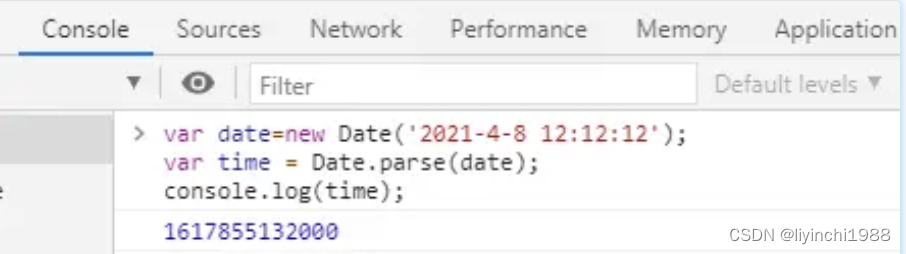
第一、第二种:会精确到毫秒
第三种:只能精确到秒,毫秒用000替代
注意:获取到的时间戳除以1000就可获得Unix时间戳,就可传值给后台得到。
4.时间戳转年月日时分秒
// 时间戳转年月日
getYMDHMS(timestamp) {
			var date = new Date(); //时间戳为10位需*1000,时间戳为13位的话不需乘1000
			var Y = date.getFullYear() + '-';
			var M = (date.getMonth() + 1 < 10 ? '0' + (date.getMonth() + 1) : date.getMonth() + 1) + '-';
			var D = (date.getDate() < 10 ? '0' + date.getDate() : date.getDate()) + ' ';
			var h = (date.getHours() < 10 ? '0' + date.getHours() : date.getHours()) + ':';
			var m = (date.getMinutes() < 10 ? '0' + date.getMinutes() : date.getMinutes()) + ':';
			var s = (date.getSeconds() < 10 ? '0' + date.getSeconds() : date.getSeconds());

				var strDate = Y + M + D + h + m + s;
				return strDate;
},
5.当前时间往前推30天、7天、3天
this.getData(-30);//前推30天
this.getData(-7);//前推7天
this.getData(-3);//前推3天


getData(day){
    var today=new Date()
    var targetday=today.getTime() +1000*60*60*24* day
    today.setTime(targetday)
    var tYear=today.getFullYear()
    var tMonth=today.getMonth()
    var tDate=today.getDate()
    tMonth=this.doHandMonth(tMonth+1)
    tDate=this.doHandMonth(tDate)
    return tYear +"-" + tMonth+"-"+tDate
}


doHandMonth(month){
    var m=month
    if(month.toString().length==1){
    m="0"+month
    }
    return m
}
6.获取最近七天日期
//返回最近七天的日期
	getday2() {
		let days = [];
		for(let i=0; i<=24*6;i+=24){		//今天加上前6天
			let dateItem=new Date(Date.getTime() - i * 60 * 60 * 1000);	//使用当天时间戳减去以前的时间毫秒(小时*分*秒*毫秒)
			let y = dateItem.getFullYear();	//获取年份
			let m = dateItem.getMonth() + 1;	//获取月份js月份从0开始,需要+1
			let d= dateItem.getDate();	//获取日期
			m = this.addDate0(m);	//给为单数的月份补零
			d = this.addDate0(d);	//给为单数的日期补零
			let valueItem= y + '-' + m + '-' + d;	//组合
			days.push(valueItem);	//添加至数组
		}
		console.log('最近七天日期:',days);

		return days;
	},

	//给日期加0
	addDate0(time) {
		if (time.toString().length == 1) {
			time = '0' + time.toString();
		}
		return time;
	},

7.时间戳转 年-月-日 星期 小时
/*
时间戳转日期
@param time  时间戳
*/
			timeStamp(time) {
				const dates = new Date(time)
				const year = dates.getFullYear()
				const month = dates.getMonth() + 1
				const date = dates.getDate()
				const day = dates.getDay()
				const hour = dates.getHours()
				const min = dates.getMinutes()
				const days = ['日', '一', '二', '三', '四', '五', '六']
				return {
					allDate: `${year}/${this.strFormat(month)}/${this.strFormat(date)}`, //注:此处ios系统如"-"分割无法显示,只能用"/"分割符
					date: `${this.strFormat(month)}-${this.strFormat(date)}`, //返回的日期 07-01
					day: `星期${days[day]}`, //返回的礼拜天数  星期一
					hour: this.strFormat(hour) + ':' + this.strFormat(min) //返回的时钟 08:00
				}
			},
			getData(day) {
				var today = new Date()
				var targetday = today.getTime() + 1000 * 60 * 60 * 24 * day
				today.setTime(targetday)
				var tYear = today.getFullYear()
				var tMonth = today.getMonth()
				var tDate = today.getDate()
				tMonth = this.doHandMonth(tMonth + 1)
				tDate = this.doHandMonth(tDate)
				return tYear + "-" + tMonth + "-" + tDate
			},
			doHandMonth(month) {
				var m = month
				if (month.toString().length == 1) {
					m = "0" + month
				}
				return m
			},
8.计算两个日期(年月日时分秒)相差结果:天小时分钟
//计算两个时间差  返回天小时分钟
function timediff(begin_time, end_time){
  //年月日时分秒转换为时间戳
  let beginTime = (new Date(begin_time).getTime()) / 1000;
  let endTime = (new Date(end_time).getTime()) / 1000;
  var starttime = ''
  var endtime = ''
  if (beginTime < endTime) {
    starttime = beginTime;
    endtime = endTime;
  } else {
    starttime = endTime;
    endtime = beginTime;
  }
  //计算天数
  var timediff = endtime - starttime;
  var days = parseInt(timediff / 86400);
  //计算小时数
  var remain = timediff % 86400;
  var hours = parseInt(remain / 3600);
  //计算分钟数
  var remain = remain % 3600;
  var mins = parseInt(remain / 60);
  var res = days + '天' + hours + '小时' + mins + '分';
  return res;
}
利用两个日期值(年月日时分秒,如:2022-02-28 10:57:12与2022-02-18 16:25:40),先对此格式日期转换为时间戳格式,再通过换算,得到两个日期差值:10天5小时26分。
调用方式
timediff(2022-02-28 10:57:12, 2022-02-18 16:25:40);如果需要返回秒数,则添加计算秒数代码:
//计算秒数
var secs = $remain % 60;
//返回结果
var res = days + '天' + hours + '小时' + mins + '分' + secs + '秒';
9.比较时间大小以
当前时间与未来时间进行比较,使用时间戳比较大小
10.年月日时分秒转时间戳
var date = new Date('2021-11-22');var date=new Date("2022-09-21 19:37:00")
console.log(date.valueOf())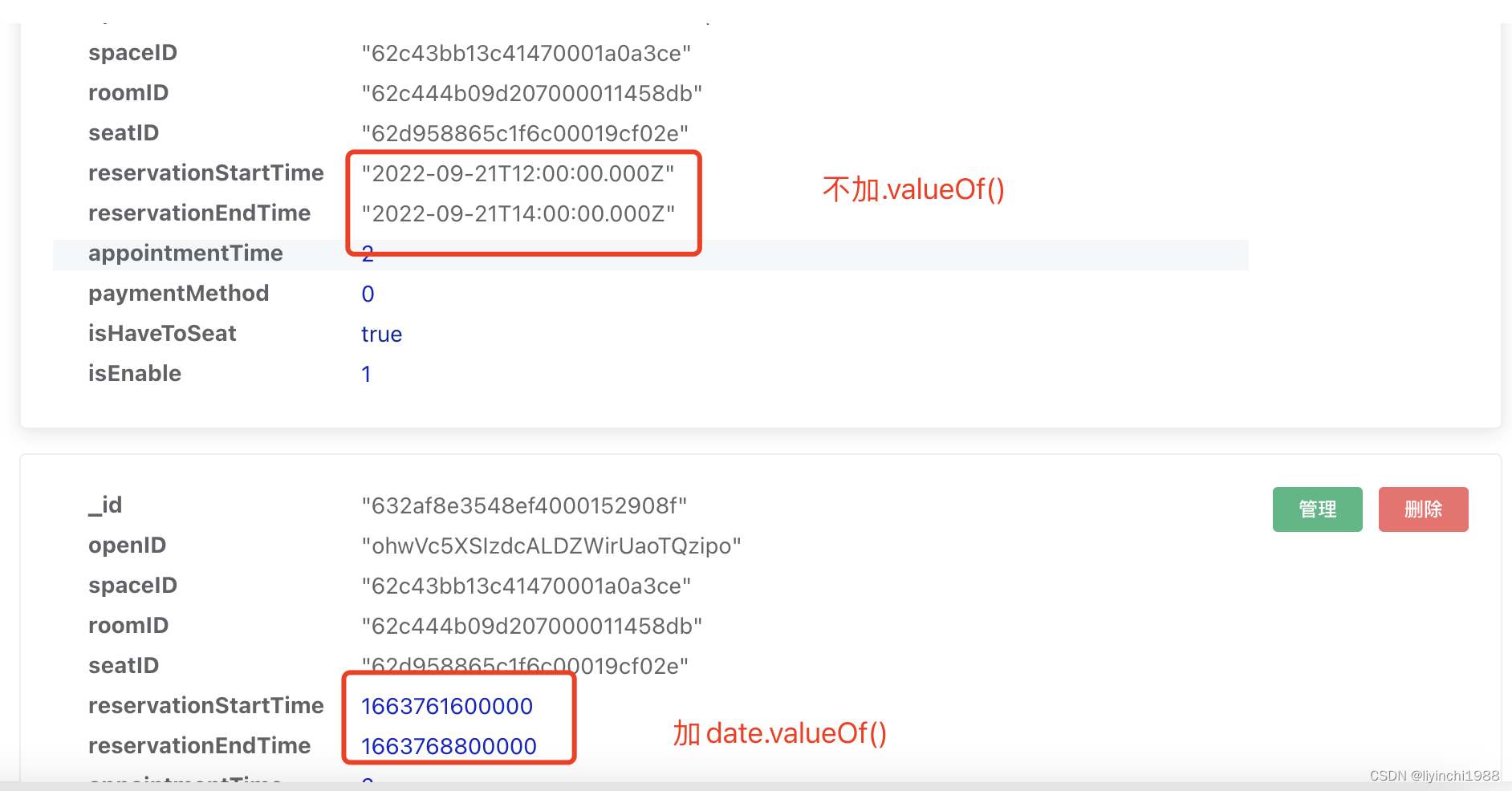
版权声明:本文为u013302168原创文章,遵循CC 4.0 BY-SA版权协议,转载请附上原文出处链接和本声明。