原始代码:
import csv
from matplotlib import pyplot as plt
from datetime import datetime
filename = 'sitka_weather_2018_simple.csv'
with open(filename) as f:
    reader = csv.reader(f)
    header_row = next(reader)
    #从文件获取最高气温
    dates,highs = [],[]
    for row in reader:
        current_date = datetime.strptime(row[2],"%Y-%m-%d")
        dates.append(current_date)
        high = int(row[5])
        highs.append(high)
    print(highs)
    #根据数据绘制图形
    fig = plt.figure(dpi=128,figsize = (10,6))
    plt.plot(dates,highs,c='red')
    #设置图形格式
    plt.title("Daily high temperatures,2018",fontsize = 24)
    plt.xlabel('',fontsize =16)
    plt.ylabel('Temperature (F)',fontsize =16)
    fig.autofmt_xdate()
    plt.tick_params(axis='both',which='major',labelsize=16)
    plt.show()
错误信息:
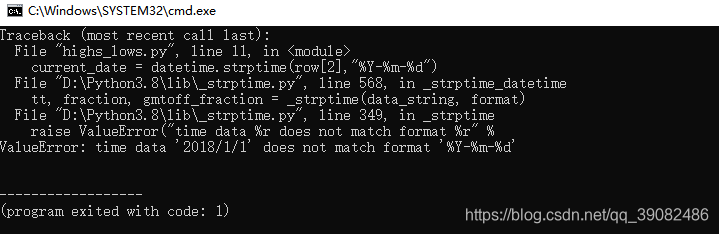
原因:
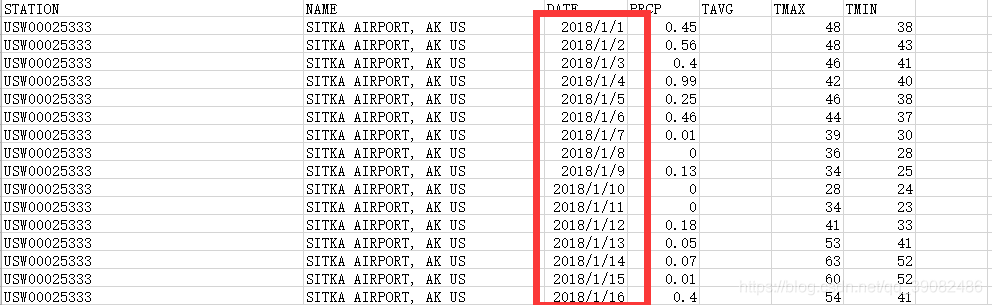
数据存储的分隔符为/则对应的参数格式分隔符亦必须与其保持一致,最好用记事本打开CSV文件查看存储的日期格式
解决方法:
正确代码:
for row in reader:
	current_date = datetime.strptime(row[2],"%Y/%m/%d")
	dates.append(current_date)
	high = int(row[5])
	highs.append(high)
运行结果:

版权声明:本文为qq_39082486原创文章,遵循CC 4.0 BY-SA版权协议,转载请附上原文出处链接和本声明。