给新电脑配置开发环境,遇到这个问题
Could not resolve all artifacts for configuration ‘:classpath’.
把百度谷歌搜到的方法基本都试过:
- 搭梯子
- 使用阿里云的代理
- 使用mavenLocal()
等等
都不行!!!
在近乎绝望的状态下,看到这个网站https://jfrog.com/jcenter-http/
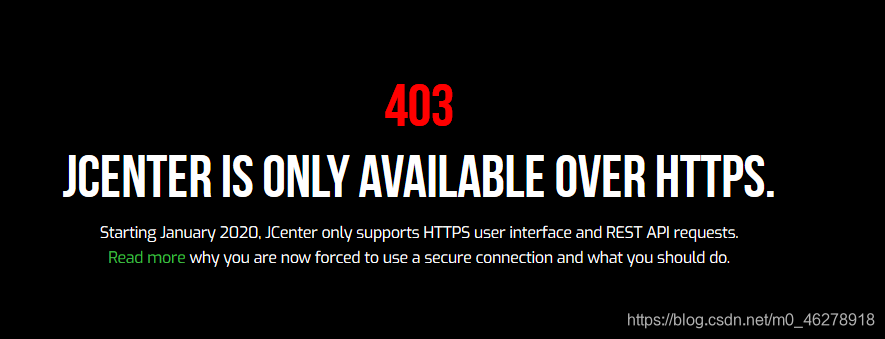
嗯?有戏?
改了一下,再点击Sync Now,还真行了!!!
先把原先的配置文件发下:
buildscript {
    repositories {
        maven {
            url 'https://maven.google.com/'
            name 'Google'
        }
        mavenCentral()
        jcenter(){ url 'http://jcenter.bintray.com/'}
        google()
    }
    dependencies {
        classpath 'com.android.tools.build:gradle:3.5.0'
        classpath 'com.github.dcendents:android-maven-gradle-plugin:1.4.1'
        classpath 'com.novoda:bintray-release:0.9.1'
        classpath 'com.jakewharton:butterknife-gradle-plugin:10.1.0'
        // NOTE: Do not place your application dependencies here; they belong
        // in the individual module build.gradle files
    }
}

allprojects {
    repositories {
        jcenter()
        maven {
            url 'https://maven.google.com/'
            name 'Google'
        }
        mavenCentral()
        jcenter(){ url 'http://jcenter.bintray.com/'}
        maven { url 'https://jitpack.io' }
        google()
    }
}

task clean(type: Delete) {
    delete rootProject.buildDir
}
将jcenter()里面的http换为https即可
buildscript {
    repositories {
        maven {
            url 'https://maven.google.com/'
            name 'Google'
        }
        mavenCentral()
        jcenter(){ url 'https://jcenter.bintray.com/'}
        google()
    }
    dependencies {
        classpath 'com.android.tools.build:gradle:3.5.0'
        classpath 'com.github.dcendents:android-maven-gradle-plugin:1.4.1'
        classpath 'com.novoda:bintray-release:0.9.1'
        classpath 'com.jakewharton:butterknife-gradle-plugin:10.1.0'
        // NOTE: Do not place your application dependencies here; they belong
        // in the individual module build.gradle files
    }
}

allprojects {
    repositories {
        jcenter()
        maven {
            url 'https://maven.google.com/'
            name 'Google'
        }
        mavenCentral()
        jcenter(){ url 'https://jcenter.bintray.com/'}
        maven { url 'https://jitpack.io' }
        google()
    }
}

task clean(type: Delete) {
    delete rootProject.buildDir
}
这是我的公众号,欢迎关注支持下,谢谢!

版权声明:本文为m0_46278918原创文章,遵循CC 4.0 BY-SA版权协议,转载请附上原文出处链接和本声明。