JAVA启动后,经过JVM各级ClassLoader来加载各个类到内存。
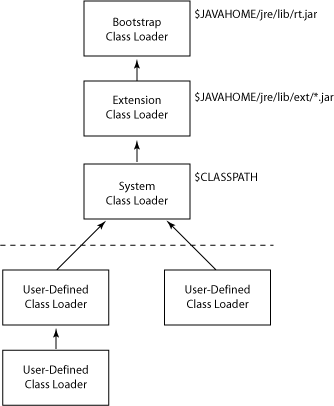
JVM的ClassLoader分三层,分别为Bootstrap ClassLoader,Extension ClassLoader,System ClassLoader。
Bootstrap ClassLoader是启动类加载器,它是用C++编写的,从%jre%/lib目录中加载类。
Extension ClassLoader是扩展类加载器,从%jre%/lib/ext目录加载类。
System ClassLoader,系统类加载器,它会从系统环境变量配置的classpath来查找路径。
情形一 重新jre/lib中的jar包
在windows系统上,我们可以安装多个JDK和JRE。设想一种情形: 我们设定当前JVM启动的是C:\Program Files (x86)\Java\jre1.7.0_85, 但是我们想读取在C:\Program Files (x86)\Java\jre1.8.0_60目录下\lib下deploy.jar,并通过com.sun.deploy.util.SecurityBaseline.getDeployVersion()输出当前的deployVersion。
在了解类加载机制后,我们知道lib/deploy.jar是通过启动类加载器加载的,在JVM启动后,如何去加载另一个指定目录中的deply.jar呢?
方法之一是利用写一个简单的main方法,利用命令行机制,java -cp ;C:/Program Files (x86)/Java/jre1.8.0_60/lib/deploy.jar 去加载这个main方法,具体如下
package H1;
import com.sun.deploy.util.SecurityBaseline;
public class GetDeploymentVersionMain {
public static void main(String args[]) {
System.out.println(com.sun.deploy.util.SecurityBaseline.getDeployVersion());
}
}
如何去用java调用shell命令呢?
packageH1;importjava.io.BufferedReader;importjava.io.File;importjava.io.InputStreamReader;public classTestGetDeployVersionMain{public staticString getDeployVersion(String testJREHome) {
File javaFile= new File(testJREHome, "/bin/java");
File deployJar= new File(testJREHome, "/lib/deploy.jar");
Process process= null;
String deployVersion= null;
String classpath= System.getProperty("user.dir");try{
process= Runtime.getRuntime().exec(new String[] {javaFile.getAbsolutePath(), "-cp", ";" + deployJar.getAbsolutePath()+";"+classpath+"/bin/", "H1.GetDeploymentVersionMain"});
}catch(Exception e) {throw new RuntimeException("fail to execute command");
}
System.out.println("before read deploy version...");
System.out.println("the stream is: " +process.getInputStream());try (BufferedReader in = new BufferedReader(newInputStreamReader(process.getInputStream()))) {
String line= null;while ((line = in.readLine()) != null) {
System.out.println(line);if (line.matches("^(\\d+\\.)+\\d+")) {
deployVersion=line;
}
}
System.out.println("deployVersion=" +deployVersion);returndeployVersion;
}catch(Exception e) {return "error_version";
}
}public static voidmain(String args[]) {
TestGetDeployVersionMain.getDeployVersion("c:/PROGRA~2/Java/JRE18~1.0_6");
}
}
执行结果:
c:\ws\TestProject\src>java -cp ;c:/PROGRA~2/Java/JRE18~1.0_6/lib/deploy.jar H1.TestGetDeployVersionMain
before read deploy version...
11.60.2.19
deployVersion=11.60.2.19
情形二 加载自定义类中的jar包
在程序运行的时候,如何动态加载自定义的jar包中的类呢?
步骤一 定义一个类
package com.test;
public class Utils {
public void printUtils(){
System.out.println("hello world");
}
}
使用命令jar cvf Utils.jar com/test/Utils.class 将Utils.class构建jar包
步骤二 定义加载方法
public static void loadUtilSJAR() throws MalformedURLException, ClassNotFoundException, InstantiationException, IllegalAccessException{
String class_path = "com.test.Utils";// Jar中的所需要加载的类的类名
String jar_path = "file://c:/Utils.jar";// jar所在的文件的URL
ClassLoader cl = new URLClassLoader(new URL[] { new URL(jar_path) });// 从Jar文件得到一个Class加载器
Class> c = cl.loadClass(class_path);// 从加载器中加载Class
Utils util = (Utils) c.newInstance();// 从Class中实例出一个对象
util.printUtils();
}
使用main调用这个方法,类名可以为TestDeployVersion
c:\ws\TestProject\src>java -cp ;c:/Utils.jar TestDeployVersion
hello world
方法三 使用自定义的classloader
具体可参考 http://kalanir.blogspot.jp/2010/01/how-to-write-custom-class-loader-to.html
public class JarClassLoader extends ClassLoader {
private String jarFile = "jar/test.jar"; //Path to the jar file
private Hashtable classes = new Hashtable(); //used to cache already defined classes
public JarClassLoader() {
super(JarClassLoader.class.getClassLoader()); //calls the parent class loader's constructor
}
public Class loadClass(String className) throws ClassNotFoundException {
return findClass(className);
}
public Class findClass(String className) {
byte classByte[];
Class result = null;
result = (Class) classes.get(className); //checks in cached classes
if (result != null) {
return result;
}
try {
return findSystemClass(className);
} catch (Exception e) {
}
try {
JarFile jar = new JarFile(jarFile);
JarEntry entry = jar.getJarEntry(className + ".class");
InputStream is = jar.getInputStream(entry);
ByteArrayOutputStream byteStream = new ByteArrayOutputStream();
int nextValue = is.read();
while (-1 != nextValue) {
byteStream.write(nextValue);
nextValue = is.read();
}
classByte = byteStream.toByteArray();
result = defineClass(className, classByte, 0, classByte.length, null);
classes.put(className, result);
return result;
} catch (Exception e) {
return null;
}
}
}