关键词:Actuator JMX
Spring Boot Actuator帮助监控和管理正在线上运行的项目。用户可以通过调用提供的HTTP接口或JMX查看项目的一些属性信息,比如健康状况、项目的配置、项目中的Bean等。
Spring Boot官网介绍:《Spring Boot Actuator》
█ 使用
(1)引入依赖:
<dependencies>
    <dependency>
        <groupId>org.springframework.boot</groupId>
        <artifactId>spring-boot-starter-web</artifactId>
    </dependency>
    <dependency>
        <groupId>org.springframework.boot</groupId>
        <artifactId>spring-boot-starter-actuator</artifactId>
    </dependency>
</dependencies>
(2)配置application.yml
server:
  port: 8080
(3)启动Spring Boot项目
(4)通过HTTP访问接口获取项目信息,请求接口:http:localhost:8080/actuator/

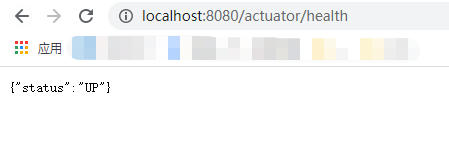
通过访问/autuator接口,可以查看当前暴露出来的endpoint信息。其中的href中的值可以访问对应的endpoint信息,比如:http://localhost:8080/actuator/health获取当前Spring Boot项目环境中的配置信息:
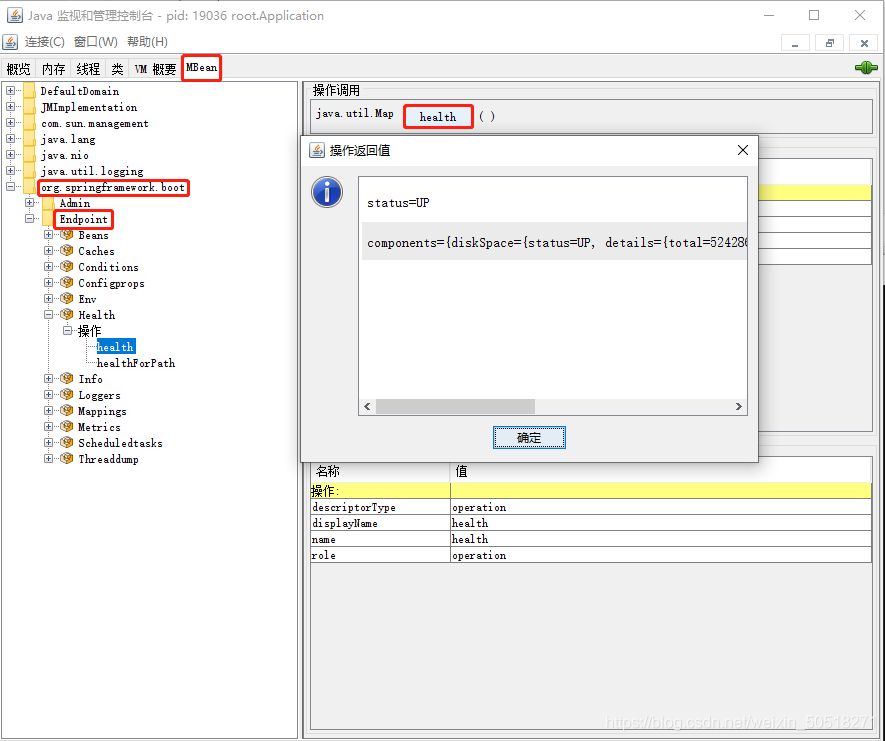
(4)通过Jconsole查看JMX获取项目信息:
█ Endpoints
Spring Boot通过Endpoint提供监控和管理的功能。Spring Boot默认提供了24种EndPoint。
(功能可用和暴露是两个概念,一个EndPoint需要同时满足可用和HTTP暴露或JMX暴露,才能通过HTTP或JMX的方式访问)
EndPoint通过id作为唯一标识,不能重复使用。
id | 对应的类 | 功能描述 | 默认可用 | JMX默认暴露 | HTTP默认暴露 |
health | HealthEndpoint | 展示项目的健康信息 | ✔ | ✔ | ✔ |
info | InfoEndpoint | 展示任意应用程序信息 | ✔ | ✔ | ✔ |
env | EnvironmentEndpoint | 暴露ConfigurableEnvironment中的属性 | ✔ | ✔ | ✘ |
beans | BeansEndpoint | 展示应用中所有的Spring Bean | ✔ | ✔ | ✘ |
mappings | MappingsEndpoint | 展示所有@RequestMapping中的路径 | ✔ | ✔ | ✘ |
caches | CachesEndpoint | 展示可用的缓存 | ✔ | ✔ | ✘ |
conditions | ConditionsReportEndpoint | 展示在配置和自动配置类上评估的条件,以及它们匹配或不匹配的原因。 | ✔ | ✔ | ✘ |
configprops | ConfigurationPropertiesReportEndpoint | 展示所有@ConfigurationProperties标注的配置信息 | ✔ | ✔ | ✘ |
loggers | LoggersEndpoint | 展示和修改应用中的loggers | ✔ | ✔ | ✘ |
metrics | MetricsEndpoint | 展示当前应用的指标信息 | ✔ | ✔ | ✘ |
scheduledtasks | ScheduledTasksEndpoint | 展示应用中的定时任务 | ✔ | ✔ | ✘ |
threaddump | ThreadDumpEndpoint | 执行一次线程分析 | ✔ | ✔ | ✘ |
shutdown | ShutdownEndpoint | 优雅停机,关闭服务,默认功能不可用 | ✘ | ✘ | ✘ |
auditevents | AuditEventsEndpoint | 暴露当前应用的audit event,需要存在一个类型是AuditEventRepository的bean | 需满足条件 | 需满足条件 | ✘ |
flyway | FlywayEndpoint | 显示已应用的所有Flyway数据库迁移,需要存在一个或多个Flyway类型的bean | 需满足条件 | 需满足条件 | ✘ |
httptrace | HttpTraceEndpoint | HTTP请求链路信息,需要存在一个HttpTraceRepository类型的bean | 需满足条件 | 需满足条件 | ✘ |
liquibase | LiquibaseEndpoint | 显示已应用的所有Liquibase数据库迁移,需要存在一个或多个Liquibase类型的bean | 需满足条件 | 需满足条件 | ✘ |
sessions | SessionsEndpoint | 允许从支持会话的Spring会话存储中检索和删除用户会话,需要基于servlet的web应用程序使用Spring Session | 需满足条件 | 需满足条件 | ✘ |
integrationgraph | IntegrationGraphEndpoint | 显示Spring集成图,需要引入依赖spring-integration-core | 需满足条件 | 需满足条件 | ✘ |
startup | 展示项目启动的时候ApplicationStartup收集的数据,需要SpringApplication配置BufferingApplicationStartup | 需满足条件 | 需满足条件 | ✘ |
如果是WEB应用,比如Spring MVC, Spring WebFlux, or Jersey,还提供了如下4个endpoint:
ID | 对应的类 | 功能描述 | 默认可用 | JMX默认可用 | HTTP默认可用 |
heapdump | HeapDumpWebEndpoint | 返回一个hprof heap dump 文件 | ✔ | 不支持 | ✘ |
jolokia | JolokiaEndpoint | 通过HTTP公开JMX bean,需要引入依赖jolokia-core | 需满足条件 | 不支持 | ✘ |
logfile | LogFileWebEndpoint | 返回日志文件的内容 | ✔ | 不支持 | ✘ |
prometheus | PrometheusScrapeEndpoint | 以Prometheus服务器可以获取的格式公开指标,需要引入依赖micrometer-registry-prometheus | 需满足条件 | 不支持 | ✘ |
说明:
(1)默认情况下,只有info与health以HTTP接口对外暴露,其他的HTTP服务默认关闭。可通过配置修改开启HTTP服务:
management:
  endpoints:
    web:
      exposure:
        include: beans
(2)配置暴露多个HTTP服务:
management:
  endpoints:
    web:
      exposure:
        include: beans,env
(3)配置暴露所有可用的HTTP服务
management:
  endpoints:
    web:
      exposure:
        include: '*'
(4)shutdown功能默认不可用
只有shutdown功能默认是关闭的,可通过配置开启shutdown功能:
management:
  endpoint:
    shutdown:
      enabled: true
(5)更改/actuator访问路径
/actuator是默认的HTTP访问路径,可通过配置更改:
management:
  endpoints:
    web:
      base-path: /myway
(6)management.endpoint.web是设置HTTP接口相关的配置,management.endpoint.jmx是设置JMX相关的配置。
management.endpoints.jmx.exposure.include=beans
management.endpoints.web.exposure.include=beans
(7)条件下功能可用
对于像auditevents这种的EndPoint,当满足条件的情况下才可用。auditevents需要具有AuditEventRepository类型的bean。创建AuditEventRepository类型的bean,Spring Boot提供了一个AuditEventRepository的实现类InMemoryAuditEventRepository:
@Configuration
public class AuditeventsConfiguration {

    @Bean
    public AuditEventRepository auditEventRepository() {
        return new InMemoryAuditEventRepository();
    }

}
█ 自定义Endpoints
Web Endpoints就是支持HTTP方式访问的Endpoints。
JMX Endpoints就是支持JMX方式访问的Endpoints。
- @EndPoint
使用@EndPoint创建同时支持HTTP与JMX访问的EndPoint。EndPoint通过id作为唯一标识,不能重复使用。
@Target(ElementType.TYPE)
@Retention(RetentionPolicy.RUNTIME)
@Documented
public @interface Endpoint {
   // EndPoint的标识,当通过HTTP访问的时候,就是访问路径,比如:beans或health
   String id() default "";
   // 是否可用与暴露,默认为true
   boolean enableByDefault() default true;

}
自定义EndPoint,HTTP访问路径:/actuator/appName:
/**
 * 使用@EndPoint注解自定义EndPoint
 *
 * 会同时支持JMX与HTTP访问
 *
 * @author javaerui
 * @Description:
 * @date 2020/12/10
 */
@Endpoint(id = "appName")
@Component // 使用@Component加入Spring 容器中,使该类能被加载到
public class CustomNameEndPoint {

    @ReadOperation // 可读操作,对应到HTTP的GET请求
    public String getAppName() {
        return "this is my app name";
    }
}- @WebEndpoint
使用@WebEndpoint创建只支持HTTP访问的EndPoint。
@Target(ElementType.TYPE)
@Retention(RetentionPolicy.RUNTIME)
@Documented
@Endpoint
// 通过WebEndpointFilter来过滤只支持HTTP访问
@FilteredEndpoint(WebEndpointFilter.class)
public @interface WebEndpoint {

   @AliasFor(annotation = Endpoint.class)
   String id();

   @AliasFor(annotation = Endpoint.class)
   boolean enableByDefault() default true;

}
自定义EndPoint,HTTP访问路径:/actuator/appName-web:
/**
 * 使用@WebEndPoint注解自定义EndPoint
 *
 * 只支持HTTP访问
 *
 * @author javaerui
 * @Description:
 * @date 2020/12/10
 */
@WebEndpoint(id = "appName-web")
@Component
public class CustomNameWebEndPoint {

    @ReadOperation
    public String getAppName() {
        return "this is my web app name";
    }

}- @JmxEndpoint
使用@JmxEndpoint创建只支持JMX访问的EndPoint。
@Target(ElementType.TYPE)
@Retention(RetentionPolicy.RUNTIME)
@Documented
@Endpoint
@FilteredEndpoint(JmxEndpointFilter.class)
public @interface JmxEndpoint {

   @AliasFor(annotation = Endpoint.class)
   String id() default "";

   @AliasFor(annotation = Endpoint.class)
   boolean enableByDefault() default true;

}
自定义EndPoint:
/**
 * 使用JmxEndpoint注解自定义EndPoint
 *
 * 只支持JMX访问
 *
 * @author javaerui
 * @Description:
 * @date 2020/12/10
 */
@JmxEndpoint(id = "appName-Jmx")
@Component
public class CustomNameJmxEndPoint {

    @ReadOperation
    public String getAppName() {
        return "this is my jmx app name";
    }

}- ControllerEndpoint
将Controller转换成Endpoint,此时只支持Web Endpoints,不支持JMX Endpoints。
@Target(ElementType.TYPE)
@Retention(RetentionPolicy.RUNTIME)
@Documented
@Endpoint
@FilteredEndpoint(ControllerEndpointFilter.class)
public @interface ControllerEndpoint {

   @AliasFor(annotation = Endpoint.class)
   String id();

   @AliasFor(annotation = Endpoint.class)
   boolean enableByDefault() default true;

}
自定义EndPoint,HTTP访问路径:/actuator/controller/info/name:
@RestController
@ControllerEndpoint(id = "controller")
@RequestMapping("/info")
public class EndPointController {

    @RequestMapping("/name")
    public String getName() {
        return "controller name";
    }

}- @ServletEndpoint
将Servlet转换成Endpoint,此时只支持Web Endpoints,不支持JMX Endpoints。
@Target(ElementType.TYPE)
@Retention(RetentionPolicy.RUNTIME)
@Documented
@Endpoint
@FilteredEndpoint(ServletEndpointFilter.class)
public @interface ServletEndpoint {

   @AliasFor(annotation = Endpoint.class)
   String id();

   @AliasFor(annotation = Endpoint.class)
   boolean enableByDefault() default true;

}- @ReadOperation
在EndPoint类中标记一个方法是可读操作,在Web Endpoints中通过GET请求访问,属性produces配置方法返回内容的media类型:
@Target(ElementType.METHOD)
@Retention(RetentionPolicy.RUNTIME)
@Documented
public @interface ReadOperation {

   String[] produces() default {};

}- @WriteOperation
在EndPoint类中标记一个方法是可写操作,在Web Endpoints中通过POST请求访问:
@Target(ElementType.METHOD)
@Retention(RetentionPolicy.RUNTIME)
@Documented
public @interface WriteOperation {

   String[] produces() default {};

}- @DeleteOperation
在EndPoint类中标记一个方法是可删除操作,在Web Endpoints中通过DELETE请求访问:
@Target(ElementType.METHOD)
@Retention(RetentionPolicy.RUNTIME)
@Documented
public @interface DeleteOperation {

   String[] produces() default {};

}- @EndpointExtension
对某个Endpoint扩展功能。
@Target(ElementType.TYPE)
@Retention(RetentionPolicy.RUNTIME)
@Documented
public @interface EndpointExtension {

  // 指定过滤器
   Class<? extends EndpointFilter<?>> filter();

   // 指定要对哪个Endpoint扩展
   Class<?> endpoint() default Void.class;

}
比如,Spring Boot提供的BeansEndpoint只提供了GET读操作,现在扩展一下提供DELETE删除操作:
/**
 *
 * @EndpointExtension的使用,对现有的EndPoint扩展
 *
 * 对Spring Boot提供的BeansEndpoint扩展
 *
 *
 * @author javaerui
 * @Description:
 * @date 2020/12/11
 */
@EndpointExtension(filter = CustomDiscovererEndpointFilter.class, endpoint = BeansEndpoint.class)
@Component
public class CustomExtension {

    @DeleteOperation
    public String deleteBean() {
        return "delete beans in BeansEndpoint";
    }

}
/**
*
* 自定义EndpointFilter
*
* Spring Boot默认提供的EndpointFilter几个具体实现类的访问权限是default,同包才能使用,故在外面是无法使用的
*
* @author javaerui
* @Description:
* @date 2020/12/11
*/
public class CustomDiscovererEndpointFilter extends DiscovererEndpointFilter {
// 要提供无参构造器,Spring根据无参构造器创建对象
public CustomDiscovererEndpointFilter() {
super(WebEndpointDiscoverer.class);
}
}(1)使用@ReadOperation注解标注的方法,在通过HTTP方式访问的时候,只支持GET请求方式,同理@WriteOperation只支持POST请求方式,@DeleteOperation只支持DELETE请求方式。
(2)HTTP请求时,GET请求会调用@ReadOperation标记的方法,POST请求会调用@WriteOperation标记的方法,DELETE请求会调用@DeleteOperation标记的方法。
@Endpoint(id = "opt")
@Component
public class CustomNameEndPointOfOperation {


    // HTTP get请求访问 /actuator/opt,返回
    @ReadOperation
    public String read() {
        return "read";
    }

    // HTTP post请求访问 /actuator/opt,返回
    @WriteOperation
    public String write() {
        return "write";
    }

    // HTTP delete请求访问 /actuator/opt,返回
    @DeleteOperation
    public String delete() {
        return "delete";
    }

}
(3)@ReadOperation、@WriteOperation、@DeleteOperation标注的方法可以添加参数。
/**
 *
 * 参数
 *
 * @author javaerui
 * @Description:
 * @date 2020/12/10
 */
@Endpoint(id = "param")
@Component
public class CustomNameWebEndPointWithParam {

    @ReadOperation
    public String read(String param) {
        return "read" + param;
    }

    @WriteOperation
    public String write(String param) {
        return "write" + param;
    }

    @DeleteOperation
    public String delete(String param) {
        return "delete" + param;
    }

}
对于@ReadOperation、@DeleteOperation是使用URL传参,即 /actuator/param?param=endpoint
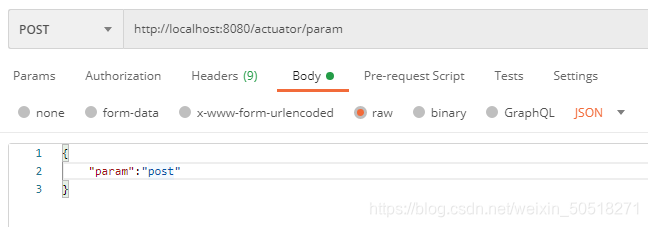
对于@WriteOperation是使用请求体方式传参:
(4)在同一个Endpoint中重复使用@*Operation。
在同一个Endpoint中重复使用同一个@*Operation注解,比如在同一个Endpoint中多次使用@ReadOperation。对于在WEB Endpoint和JMX Endpoint中情况不一样。
WEB Endpoint:
①默认情况下,使用两次@ReadOperation:
@WebEndpoint(id = "multi")
@Component
public class CustomWebEndPointOfMultiOpt {

    @ReadOperation
    public String getName() {
        return "name";
    }

    @ReadOperation
    public String getAge() {
        return "age";
    }


}
启动报错,不允许重复。
②指定不同的@ReadOperation中produces的值:
@ReadOperation(produces = "application/xml")
public String getName() {
    return "name";
}

// 默认为:produces={"application/vnd.spring-boot.actuator.v3+json","application/vnd.spring-boot.actuator.v2+json","application/json"}
@ReadOperation
public String getAge() {
    return "age";
}
启动成功,访问的时候,通过设置请求头:accept的值来区分,accept=application/xml返回name,accept=application/json返回age。
但是如果两个方法设置的produces具有包含关系,即一个是@ReadOperation(produces = "application/json"),一个是@ReadOperation(produces = {"application/xml","application/json"}),启动可以成功,但是访问接口会报错。因为程序分不清具体调用哪个方法。
JMX Endpoint:
①默认情况下,使用两次@ReadOperation:
@JmxEndpoint(id = "jmx-multi")
@Component
public class CustomJmxEndPointOfMultiOpt {

    @ReadOperation
    public String getName() {
        return "name";
    }

    @ReadOperation
    public String getAge() {
        return "age";
    }


}
启动成功。
②创建两个同名的方法,同时使用@ReadOperation:
@ReadOperation
public String getAge() {
    return "age";
}

@ReadOperation
public String getAge(String age) {
    return age;
}
启动报错,不允许重复使用。
对于WEB Endpoint和JMX Endpoint,对于重复使用Operation注解的判断条件是不一样的。JMX是根据方法名来判断重复的。详细的判断规则在《初识篇》中说明。