- 创建基于maven的java应用项目
命令:mvn archetype:generate "-DgroupId=com.companyname.bank" "-DartifactId=consumerBanking" "-DarchetypeArtifactId=maven-archetype-quickstart" "-DinteractiveMode=false"

DgroupId:组织名,公司网址的反写+项目名称
DartifactId:项目名+模块名
DarchetypeArtifactId:指定ArchetypeId,maven-archetype-quickstart,创建一个简单的 Java 应用
DinteractiveMode:是否使用交互模式
生成的文件夹结构如下: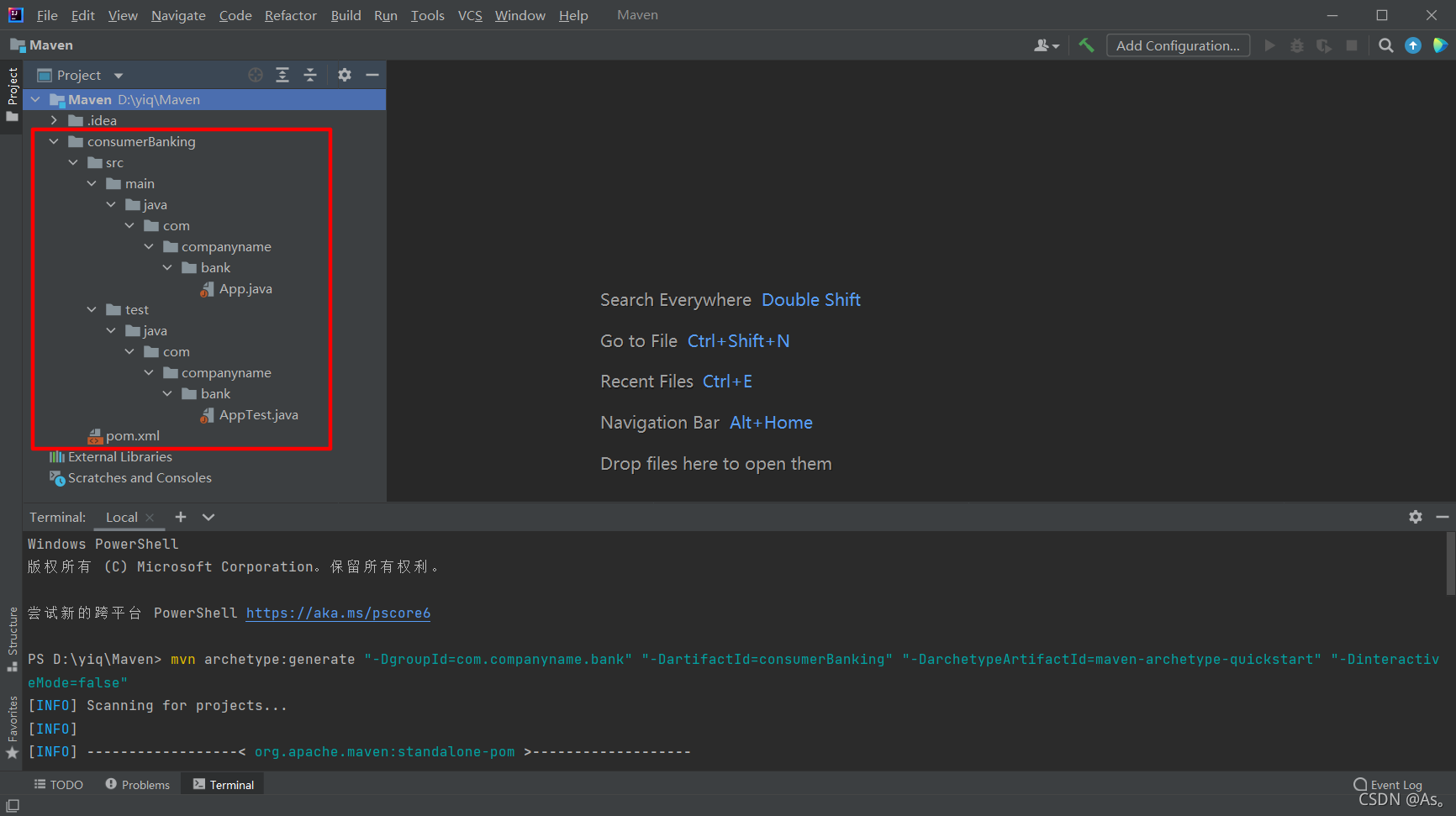
文件夹说明:
 1. consumerBanking:包含src文件夹和pom.xml
 2. src/main/java contains:java代码文件在包结构下(com/companyName/bank)
 3. src/main/test contains:测试代码文件在包结构下(com/companyName/bank)
 4. src/main/resources:包含了图片/属性/ 文件
在D:\yiq\Maven\consumerBanking\src\main\java\com\companyname\bank文件中,可以看到App.java文件
package com.companyname.bank;

/**
 * Hello world!
 *
 */
public class App
{
    public static void main( String[] args )
    {
        System.out.println( "Hello World!" );
    }
}
在D:\yiq\Maven\consumerBanking\src\test\java\com\companyname\bank文件中,可以看到AppTest.java
package com.companyname.bank;

import junit.framework.Test;
import junit.framework.TestCase;
import junit.framework.TestSuite;

/**
 * Unit test for simple App.
 */
public class AppTest
    extends TestCase
{
    /**
     * Create the test case
     *
     * @param testName name of the test case
     */
    public AppTest( String testName )
    {
        super( testName );
    }

    /**
     * @return the suite of tests being tested
     */
    public static Test suite()
    {
        return new TestSuite( AppTest.class );
    }

    /**
     * Rigourous Test :-)
     */
    public void testApp()
    {
        assertTrue( true );
    }
}
2.Maven构建和项目测试
进入D:\yiq\Maven\consumerBanking项目文件夹中,有一个pom.xml文件
<project xmlns="http://maven.apache.org/POM/4.0.0" xmlns:xsi="http://www.w3.org/2001/XMLSchema-instance"
  xsi:schemaLocation="http://maven.apache.org/POM/4.0.0 http://maven.apache.org/maven-v4_0_0.xsd">
  <modelVersion>4.0.0</modelVersion>
  <groupId>com.companyname.bank</groupId>
  <artifactId>consumerBanking</artifactId>
  <packaging>jar</packaging>
  <version>1.0-SNAPSHOT</version>
  <name>consumerBanking</name>
  <url>http://maven.apache.org</url>
  <dependencies>
    <dependency>
      <groupId>junit</groupId>
      <artifactId>junit</artifactId>
      <version>3.8.1</version>
      <scope>test</scope>
    </dependency>
  </dependencies>
</project>
在xml文件中,可以看到已添加junit单元测试框架;
打开控制台,进行到项目路径consumerBanking执行以下mvn命令开始构建项目
PS D:\yiq\Maven> cd consumerBanking
PS D:\yiq\Maven\consumerBanking> mvn clean package
[INFO] Scanning for projects...
[INFO]
[INFO] ----------------< com.companyname.bank:consumerBanking >----------------
[INFO] Building consumerBanking 1.0-SNAPSHOT
[INFO] --------------------------------[ jar ]---------------------------------
[INFO]
[INFO] --- maven-clean-plugin:2.5:clean (default-clean) @ consumerBanking ---
[INFO] Deleting D:\yiq\Maven\consumerBanking\target
[INFO]
[INFO] --- maven-resources-plugin:2.6:resources (default-resources) @ consumerBanking ---
[INFO] Using 'UTF-8' encoding to copy filtered resources.
[INFO] skip non existing resourceDirectory D:\yiq\Maven\consumerBanking\src\main\resources
[INFO]
[INFO] --- maven-compiler-plugin:3.1:compile (default-compile) @ consumerBanking ---
[INFO] Changes detected - recompiling the module!
[INFO] Compiling 1 source file to D:\yiq\Maven\consumerBanking\target\classes
[INFO]
[INFO] --- maven-resources-plugin:2.6:testResources (default-testResources) @ consumerBanking ---
[INFO] Using 'UTF-8' encoding to copy filtered resources.
[INFO] skip non existing resourceDirectory D:\yiq\Maven\consumerBanking\src\test\resources
[INFO]
[INFO] --- maven-compiler-plugin:3.1:testCompile (default-testCompile) @ consumerBanking ---
[INFO] Changes detected - recompiling the module!
[INFO] Compiling 1 source file to D:\yiq\Maven\consumerBanking\target\test-classes
[INFO]
[INFO] --- maven-surefire-plugin:2.12.4:test (default-test) @ consumerBanking ---
[INFO] Surefire report directory: D:\yiq\Maven\consumerBanking\target\surefire-reports
Downloading from central: https://repo.maven.apache.org/maven2/org/apache/maven/surefire/surefire-junit3/2.12.4/surefire-junit3-2.12.4.pom
Downloaded from central: https://repo.maven.apache.org/maven2/org/apache/maven/surefire/surefire-junit3/2.12.4/surefire-junit3-2.12.4.pom (1.7 kB at 522 B/s)
Downloading from central: https://repo.maven.apache.org/maven2/org/apache/maven/surefire/surefire-providers/2.12.4/surefire-providers-2.12.4.pom
Downloaded from central: https://repo.maven.apache.org/maven2/org/apache/maven/surefire/surefire-providers/2.12.4/surefire-providers-2.12.4.pom (2.3 kB at 3.6 kB/s)
Downloading from central: https://repo.maven.apache.org/maven2/org/apache/maven/surefire/surefire-junit3/2.12.4/surefire-junit3-2.12.4.jar
Downloaded from central: https://repo.maven.apache.org/maven2/org/apache/maven/surefire/surefire-junit3/2.12.4/surefire-junit3-2.12.4.jar (26 kB at 32 kB/s)

-------------------------------------------------------
 T E S T S
-------------------------------------------------------
Running com.companyname.bank.AppTest
Tests run: 1, Failures: 0, Errors: 0, Skipped: 0, Time elapsed: 0.014 sec

Results :

Tests run: 1, Failures: 0, Errors: 0, Skipped: 0

[INFO]
[INFO] --- maven-jar-plugin:2.4:jar (default-jar) @ consumerBanking ---
[INFO] Building jar: D:\yiq\Maven\consumerBanking\target\consumerBanking-1.0-SNAPSHOT.jar
[INFO] ------------------------------------------------------------------------
[INFO] BUILD SUCCESS
[INFO] ------------------------------------------------------------------------
[INFO] Total time:  7.098 s
[INFO] Finished at: 2021-09-05T22:09:17+08:00
[INFO] ------------------------------------------------------------------------
看到【BUILD SUCCESS】表示构建成功了,在自己的项目中创建的最终的jar文件;路径为:D:\yiq\Maven\consumerBanking\target\consumerBanking-1.0-SNAPSHOT.jar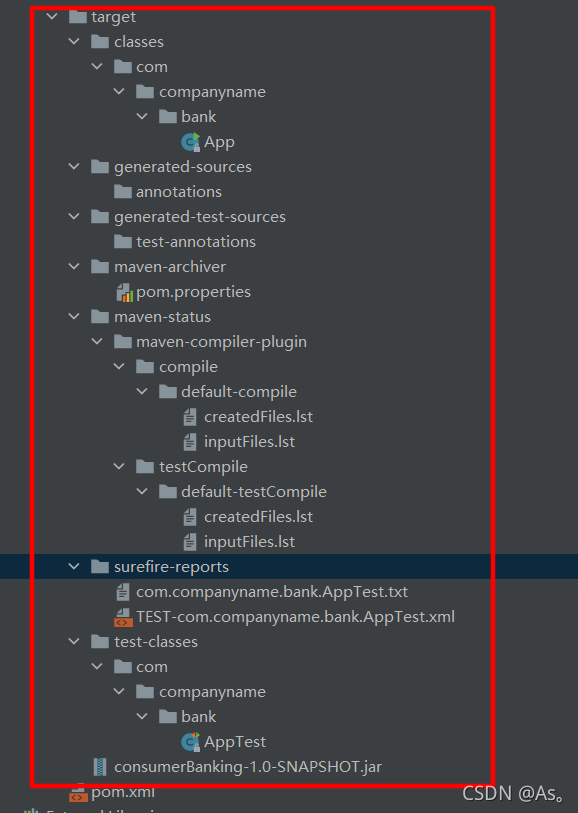
创建过程中关键的概念:
 1. 给了maven俩个目标,首先清理目标目录(clean);然后打包项目构建的输出为jar(package)文件
 2. 打包好的jar文件可以在D:\yiq\Maven\consumerBanking\target中获得,名称为:consumerBanking-1.0-SNAPSHOT.jar
 3. 测试报告存放在:D:\yiq\Maven\consumerBanking\target\surefire-reports文件夹中
 4. Maven编译源码文件以及测试源码文件
 5. 接着maven运行测试用例
 6. 最后maven创建项目包
版权声明:本文为Hedyqing原创文章,遵循CC 4.0 BY-SA版权协议,转载请附上原文出处链接和本声明。