问题描述:
Python使用Tkinter编写GUI,期望在其组件Label中显示图片(.png格式)报错: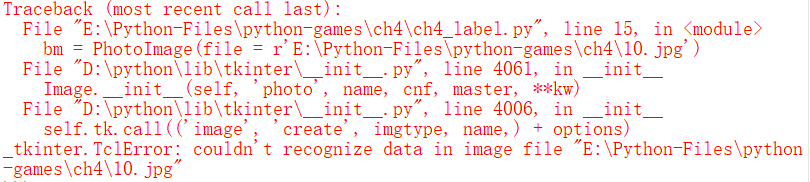
实例代码:
from tkinter import *

win = Tk()      # 创建窗口对象
win.title("我的窗口")   # 设置窗口标题
lab1 = Label(win, text = '你好', anchor = 'nw') # 创建Label组件
lab1.pack()     # 显示Label组件

# 显示内置的位图
lab2 = Label(win, bitmap = 'question')  # 创建显示疑问图标的Label组件
lab2.pack()     # 显示Label组件

# 显示自选的图片
bm = PhotoImage(file = r'E:\Python-Files\python-games\ch4\10.jpg')
lab3 = Label(win, image = bm)
lab3.bm = bm
lab3.pack()     # 显示Label组件
win.mainloop()
原因分析:
Tkinter仅支持3种文件格式,即GIF、PGM和PPM。
解决方案:
可以安装PIL模块,通过导入PIL模块,使用里面的函数实现。Python PIL支持GIF、JPEG、PCD、PNG、PPM、PSD等30多种图像文件格式。
修改后的代码如下:
from tkinter import *
from PIL import Image, ImageTk

win = Tk()      # 创建窗口对象
win.title("我的窗口")   # 设置窗口标题
lab1 = Label(win, text = '你好', anchor = 'nw') # 创建Label组件
lab1.pack()     # 显示Label组件

# 显示内置的位图
lab2 = Label(win, bitmap = 'question')  # 创建显示疑问图标的Label组件
lab2.pack()     # 显示Label组件

# 显示自选的图片
bm = ImageTK.PhotoImage(file = r'E:\Python-Files\python-games\ch4\10.jpg')
lab3 = Label(win, image = bm)
lab3.bm = bm
lab3.pack()     # 显示Label组件
win.mainloop()

参考文章:
版权声明:本文为username666原创文章,遵循CC 4.0 BY-SA版权协议,转载请附上原文出处链接和本声明。