前言
在前面三篇文章中,我们简单的搭建好了ILRuntime的使用环境,然而还并没有实现具体的功能。所以在这篇文章中我们首先简单的实现下UI模块相关的功能。(暂时不考虑AB包系统,对象池系统等等,同时本篇先是简单的实现UI显示以及跳转,更多的功能在后续进行补充)
GitHub地址:https://github.com/luckyWjr/ILRuntimeDemo 方便代码查看(由于代码量比较多,下面只会贴出部分代码,感兴趣的同学还是直接看工程吧~有什么更好的意见欢迎提出指正)
思路
在实现代码前,我们首先要清楚我们的需求,UI系统的功能大致有加载UI,显示UI,跳转UI,UI层级管理等等。
通常我们会把一个完整的界面当成一个整体(一个prefab),比如登陆页面,主页面,商城页面等等,它们可以都继承于一个基类(暂定为UIPanel),主要功能就是显示隐藏界面,获取界面内的组件等等。
在一些界面中往往有些组件需要我们单独管理的,比如用户信息栏,商城物品的Item等,它们也可以都继承于一个基类(暂定为UIView,同时UIPanel继承于UIView),主要功能就是加载prefab,数据的显示等。
然后我们建立两个管理器,UIPanelManager和UIViewManager分别进行管理。UIPanelManager主要管理界面的显示隐藏和跳转,UIViewManager主要维护UIView的生命周期。
由于我们生成一个UIPanel的子类就需要加载对应的Prefab,比如要显示登陆界面,我们要实例化LoginPanel,同时加载LoginPanel.prefab,那么我们如何在实例化UIPanel的时候就得知其对应的Prefab是哪个呢,我们可以使用Attribute功能来实现,在每个UIPanel中进行配置对应的prefab的名称,具体代码看下文。
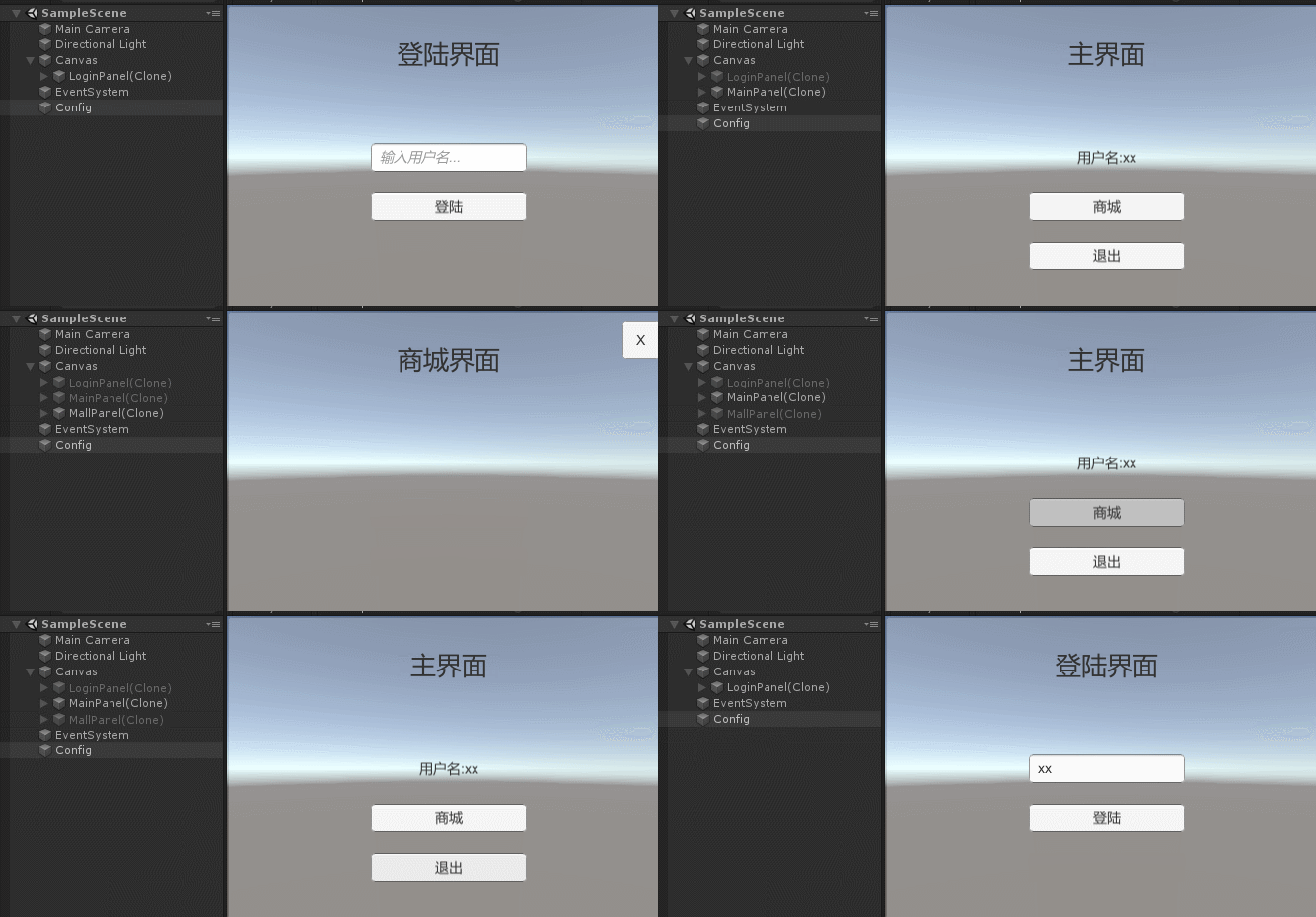
简单效果如图
代码实现
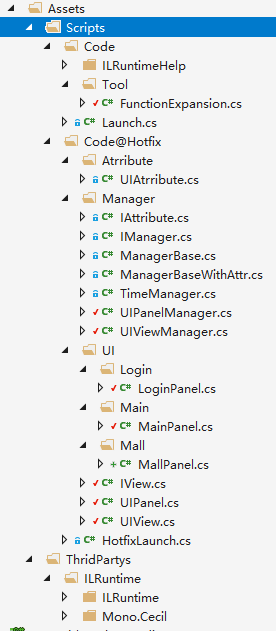
由于UI系统的逻辑后期变动会比较大,也容易出BUG,更新也会很频繁,所以我们将这部分的相关代码全部放在Hotfix部分,以便后续维护更新。目录结构大致如下
首先创建一个IView接口,用于生命周期
namespace Hotfix.UI
{
    public interface IView

    {
        //初始化,只在prefab被创建的时候执行一次
        void Init();
        //每次界面显示的时候执行
        void Show();
        void Update();
        void LateUpdate();
        void FixedUpdate();
        //界面被隐藏的时候执行,再次显示会调用Show方法
        void Hide();
        //销毁的时候执行
        void Destroy();
    }
}
然后创建UIView类实现IView接口,主要功能是加载和销毁gameobject,并在Show和Hide方法中进行显示和隐藏。
namespace Hotfix.UI
{
    public class UIView : IView
    {
        //需要加载的prefab的路径,也作为唯一标识符
        public string url { private set; get; }

        public GameObject gameObject { private set; get; }
        public Transform transform { private set; get; }
        public RectTransform rectTransform { private set; get; }

        //是否加载完成
        public bool isLoaded { get { return gameObject != null; } }

        //是否显示
        public bool isVisible
        {
            get
            {
                return isLoaded && gameObject.activeSelf;
            }
            set
            {
                if (isLoaded)
                    gameObject.SetActive(value);
            }
        }

        //若为true,将在下一帧销毁gameobject
        internal bool isWillDestroy;

        public UIView(string url)
        {
            this.url = url;
        }

        public virtual void Init()
        {
            isVisible = false;
        }

        public virtual void Show()
        {
            isVisible = true;
        }

        ......

        public virtual void Hide()
        {
            isVisible = false;
        }

        public virtual void Destroy()
        {
            isWillDestroy = true;
            if (isVisible)
            {
                Hide();
            }
        }

        //销毁gameobject
        public void DestroyImmediately()
        {
            if (!isWillDestroy)
            {
                Destroy();
            }
            GameObject.Destroy(gameObject);
            gameObject = null;
            transform = null;
            rectTransform = null;
        }

        //加载prefab
        public virtual void Load(Action callback = null)
        {
            gameObject = GameObject.Instantiate(Resources.Load(url)) as GameObject;
            if (gameObject != null)
            {
                transform = gameObject.transform;
                rectTransform = gameObject.GetComponent<RectTransform>();

                Init();
                callback?.Invoke();
            }
        }
    }
}
然后编写UIPanel,继承于UIView
namespace Hotfix.UI
{
    public class UIPanel : UIView
    {
        //UIPanel间的自定义传递数据
        public object data;

        //前一个UIPanel,用于隐藏自己的时候,Show前者
        public UIPanel previousPanel;

        public UIPanel(string url) : base(url)
        {
        }

        public override void Destroy()
        {
            base.Destroy();
            previousPanel = null;
        }
    }
}
接着我们编写UIViewManager,用于管理UIView,主要用于生成和获取UIView,管理所有UIView的生命周期
using Hotfix.UI;
using System;
using System.Collections.Generic;

namespace Hotfix.Manager
{
    public class UIViewManager : ManagerBase<UIViewManager>
    {
        //存放所有在场景中的UIView
        List<UIView> m_UIViewList;

        public override void Init()
        {
            base.Init();
            m_UIViewList = new List<UIView>();
        }

        public override void Update()
        {
            base.Update();

            for (int i = 0; i < m_UIViewList.Count; i++)
            {
                //销毁UIView
                if (m_UIViewList[i].isWillDestroy)
                {
                    m_UIViewList[i].DestroyImmediately();
                    m_UIViewList.RemoveAt(i);
                    i--;
                    continue;
                }

                if (m_UIViewList[i].isVisible)
                {
                    m_UIViewList[i].Update();
                }
            }
        }

        ......


        //创建UIView
        public UIView CreateView(Type type, params object[] args)
        {
            UIView view = Activator.CreateInstance(type, args) as UIView;
            m_UIViewList.Add(view);
            return view;
        }

        public void DestroyAll()
        {
            for (int i = 0; i < m_UIViewList.Count; i++)
                m_UIViewList[i].Destroy();
        }
    }
}
接下来是比较重要的一点了,在前面的UIView当中,我们通过url这个路径来加载prefab,那么我们实例化一个UIPanel的时候,比如LoginPanel,MainPanel,我们如何仅仅通过Type知道每个UIPanel对应的prefab,即url的值。
我们的解决思路是使用自定义的Attribute,叫ManagerAtrribute,里面会有个string的值用于存储最基础的自定义数据。同时对于用于这类Attribute的类,他们的管理器也要进行特殊处理。
using System;
namespace Hotfix.Manager
{
    public interface IAttribute
    {
        //检测符合IAttribute的类
        void CheckType(Type type);
        //获取Attribute信息
        AttributeData GetAtrributeData(string attrValue);
        //生成被管理类的实例,管理类为T,被管理的类为T2
        T2 CreateInstance<T2>(string attrValue) where T2 : class;
        //获取被管理类的构造函数参数
        object[] GetInstanceParams(AttributeData data);
    }
}
namespace Hotfix.Manager
{
public class AttributeData
{
public ManagerAttribute attribute;
public Type type;
}
public class ManagerAttribute : Attribute
{
public string value { get; protected set; }
public ManagerAttribute(string value)
{
this.value = value;
}
}
public class ManagerBaseWithAttr<T, V> : ManagerBase<T>, IAttribute where T : IManager, new() where V : ManagerAttribute
{
protected Dictionary<string, AttributeData> m_atrributeDataDic;
protected ManagerBaseWithAttr()
{
m_atrributeDataDic = new Dictionary<string, AttributeData>();
}
public virtual void CheckType(Type type)
{
var attrs = type.GetCustomAttributes(typeof(V), false);
if (attrs.Length > 0)
{
var attr = attrs[0];
if (attr is V)
{
var _attr = (V)attr;
SaveAttribute(_attr.value, new AttributeData() { attribute = _attr, type = type });
}
}
}
public AttributeData GetAtrributeData(string attrValue)
{
AttributeData classData = null;
m_atrributeDataDic.TryGetValue(attrValue, out classData);
return classData;
}
public void SaveAttribute(string name, AttributeData data)
{
m_atrributeDataDic[name] = data;
}
public T2 CreateInstance<T2>(string attrValue) where T2 : class
{
var data = GetAtrributeData(attrValue);
if (data == null)
{
Debug.LogError("没有找到:" + attrValue + " -" + typeof(T2).Name);
return null;
}
if (data.type != null)
{
object[] p = GetInstanceParams(data);
if (p.Length == 0)
return Activator.CreateInstance(data.type) as T2;
else
return Activator.CreateInstance(data.type, p) as T2;
}
return null;
}
public virtual object[] GetInstanceParams(AttributeData data)
{
return new object[] { data.attribute.value };
}
}
}
然后我们的UIPanelManager会继承于上面的ManagerBaseWithAttr,同时创建一个UIAttribute继承于ManagerAttribute,我们的UIPanel的构造函数参数会对应UIAttribute的参数(如有需要可以在子类Attribute中添加其他自己需要的参数,然后在子类ManagerBaseWithAttr中改写GetInstanceParams方法)
下面是我们的UIPanelManager的代码,目前的主要功能就是生成,显示,隐藏和销毁UIPanel。
namespace Hotfix.Manager
{
    public class UIPanelManager : ManagerBaseWithAttr<UIPanelManager, UIAttribute>
    {
        public UIPanel currentPanel;//当前显示的页面

        Dictionary<string, UIPanel> m_UIPanelDic;//存放所有存在在场景中的UIPanel
        Transform m_UICanvas;

        public override void Init()
        {
            base.Init();
            m_UIPanelDic = new Dictionary<string, UIPanel>();
            m_UICanvas = GameObject.Find("Canvas").transform;
        }

        public void ShowPanel<T>() where T : UIPanel
        {
            ShowPanel<T>(null, null);
        }

        public void ShowPanel<T>(Action<T> callback) where T : UIPanel
        {
            ShowPanel(callback, null);
        }

        public void ShowPanel<T>(object data) where T : UIPanel
        {
            ShowPanel<T>(null, data);
        }

        //显示一个UIPanel,参数为回调和自定义传递数据
        public void ShowPanel<T>(Action<T> callback, object data) where T : UIPanel
        {
            string url = GetUrl(typeof(T));
            if (!string.IsNullOrEmpty(url))
            {
                LoadPanel(url, data, () =>
                {
                    var panel = ShowPanel(url);
                    callback?.Invoke(panel as T);
                });
            }
        }

        //显示UIPanel
        UIPanel ShowPanel(string url)
        {
            if (m_UIPanelDic.TryGetValue(url, out UIPanel panel))
            {
                panel = m_UIPanelDic[url];
                if (!panel.isVisible)
                {
                    currentPanel?.Hide();
                    panel.previousPanel = currentPanel;
                    panel.Show();
                    currentPanel = panel;
                }
                else
                    Debug.Log("UIPanel is visible:" + url);
            }
            else
                Debug.LogError("UIPanel not loaded:" + url);
            return panel;
        }

        //加载UIPanel对象
        public void LoadPanel(string url, object data, Action callback)
        {
            if (m_UIPanelDic.TryGetValue(url, out UIPanel panel))
            {
                if (panel.isLoaded)
                    callback?.Invoke();
            }
            else
            {
                panel = CreatePanel(url);
                if (panel == null)
                    Debug.LogError("UIPanel not exist: " + url);
                else
                {
                    panel.data = data;
                    m_UIPanelDic[url] = panel;
                    panel.Load(() =>
                    {
                        if (panel.isLoaded)
                        {
                            panel.rectTransform.SetParentAndResetTrans(m_UICanvas);
                            callback?.Invoke();
                        }
                        else
                            m_UIPanelDic.Remove(url);
                    });
                }
            }
        }

        //实例化UIPanel对象
        UIPanel CreatePanel(string url)
        {
            var data = GetAtrributeData(url);
            if (data == null)
            {
                Debug.LogError("Unregistered UIPanel, unable to load: " + url);
                return null;
            }
            var attr = data.attribute as UIAttribute;
            var panel = UIViewManager.Instance.CreateView(data.type, attr.value) as UIPanel;

            或者
            //var panel = CreateInstance<UIPanel>(url);
            //UIViewManager.Instance.AddUIView(panel as UIView);
            return panel;
        }

        //隐藏当前显示的UIPanel
        public void HidePanel()
        {
            currentPanel.Hide();
            //显示上一层页面
            if (currentPanel.previousPanel != null && currentPanel.previousPanel.isLoaded)
            {
                currentPanel.previousPanel.Show();
                currentPanel = currentPanel.previousPanel;
            }
        }

        public void DestroyPanel<T>()
        {
            UnLoadPanel(GetUrl(typeof(T)));
        }

        void UnLoadPanel(string url)
        {
            if (m_UIPanelDic.TryGetValue(url, out UIPanel panel))
            {
                panel.Destroy();
                m_UIPanelDic.Remove(url);
            }
            else
                Debug.LogError("UIPanel not exist: " + url);
        }

        void UnLoadAllPanel()
        {
            foreach(var panel in m_UIPanelDic.Values)
                panel.Destroy();
            m_UIPanelDic.Clear();
        }

        //根据UIPanel的Type获取其对应的url
        string GetUrl(Type t)
        {
            foreach (var keyPairValue in m_atrributeDataDic)
                if (keyPairValue.Value.type == t)
                    return keyPairValue.Key;
            Debug.LogError($"Cannot found type({t.Name})");
            return null;
        }

        public override void OnApplicationQuit()
        {
            UnLoadAllPanel();
        }
    }
}
然后就是我们的UIPanel了,继承于UIView
namespace Hotfix.UI
{
    public class UIPanel : UIView
    {
        //UIPanel间的自定义传递数据
        public object data;

        //前一个UIPanel,用于隐藏自己的时候,Show前者
        public UIPanel previousPanel;

        public UIPanel(string url) : base(url)
        {
        }

        public override void Destroy()
        {
            base.Destroy();
            previousPanel = null;
        }
    }
}
最后我们就可以编写我们需要的UI界面的对应UIPanel了,例如登陆界面的LoginPanel,我们会添加UIAttribute来配置其prefab的路径(demo中就简单的丢在了Resources目录下),然后在Init方法中去找到我们需要使用到的控件,show方法中可以做一些界面每次显示的时候需要的操作,数据的显示。等等
using Hotfix.Manager;
using UnityEngine.UI;

namespace Hotfix.UI
{
    [UI("LoginPanel")]
    public class LoginPanel : UIPanel
    {
        Button m_loginBtn;
        InputField m_userNameInput;

        public LoginPanel(string url) : base(url)
        {
        }

        public override void Init()
        {
            base.Init();
            m_loginBtn = transform.Find("LoginButton").GetComponent<Button>();
            m_userNameInput = transform.Find("UserNameInputField").GetComponent<InputField>();

            m_loginBtn.onClick.AddListener(OnClick);
        }

        void OnClick()
        {
            UIPanelManager.Instance.ShowPanel<MainPanel>(m_userNameInput.text);
        }
    }
}
注:由于代码量较多,剩下的代码有兴趣的还是看GitHub的工程。
由于添加了ManagerBaseWithAttr类,在HotfixLaunch类中也要进行相应的处理,同时也暂时在其中显示第一个界面
namespace Hotfix
{
    public class HotfixLaunch
    {
        static List<IManager> m_managerList = new List<IManager>();

        public static void Start(bool isHotfix)
        {
            ......

            //获取hotfix的管理类,并启动
            foreach (var t in allTypes)
            {
                try
                {
                    if (t != null && t.BaseType != null && t.BaseType.FullName != null)
                    {
                        ......
                        else if (t.BaseType.FullName.Contains(".ManagerBaseWithAttr`"))
                        {
                            Debug.Log("加载管理器-" + t);
                            var manager = t.BaseType.BaseType.GetProperty("Instance").GetValue(null, null) as IManager;
                            m_managerList.Add(manager);
                            attributeManagerList.Add(manager as IAttribute);
                            continue;
                        }
                    }
                }
                ......
            }

            //遍历所有类和ManagerBaseWithAttr管理器,找出对应的被ManagerBaseWithAttr管理的子类。例如UIPanelManager和LoginPane的关系
            foreach (var t in allTypes)
                foreach (var attr in attributeManagerList)
                    attr.CheckType(t);

            .....

            UIPanelManager.Instance.ShowPanel<LoginPanel>(null);
        }
        ......
    }
}