1、首先在qt的pro文件中添加2行宏定义,boost头文件目录INCLUDEPATH,boost链接库目录LIBS。

(1)“Boost默认启用自动链接功能,而且是静态链接。它会根据当前的编译器预定义宏判断是否是DEBUG,什么版本的编译器,然后自动链接libXXX-vc100-mt-gd-1_52.lib这样的文件。其中lib的代表着是静态LIB库文件,vc100指编译器版本(在VS2008中它会自动链接vc90这样的文件),gd代表debug,release,没有gd选项。这样的自动链接功能非常烦恼,当升级了VS时,要重新用新编译器编译Boost库。
如果要开启自动链接功能,而且是动态链接的话,定义 BOOST_ALL_DYN_LINK。这样它就自动链接 XXX-vc100-mt-gd-1_52.lib.
在附加预定义宏 加 BOOST_ALL_NO_LIB ,这样就关闭了BOOST的自动链接LIB的功能。然后把需要的lib库在附加库里手动加入。”
以上描述摘抄自https://www.cnblogs.com/tlm1992/p/3388450.html
所以就有了这2个宏的由来,我在使用过程中也发现如果不定义这2个宏,有时候链接时会出现一些错误。
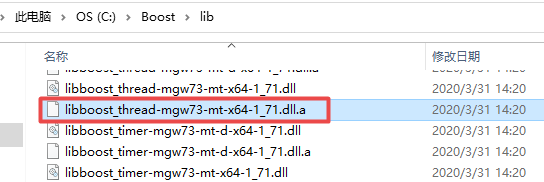
(2)为啥链接库名称是boost_thread-mgw73-mt-x64-1_71.dll,因为boost生成的lib全名是libboost_thread-mgw73-mt-x64-1_71.dll.a,-l参数需要掐头lib,去尾.a,所以剩下中间boost_thread-mgw73-mt-x64-1_71.dll。

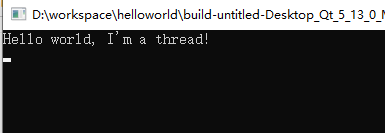
运行结果:
.pro代码:
QT -= gui

#关闭BOOST的自动连库
DEFINES += BOOST_ALL_NO_LIB=1
#BOOST使用动态库
DEFINES += BOOST_ALL_DYN_LINK=1

CONFIG += c++11 console
CONFIG -= app_bundle

# The following define makes your compiler emit warnings if you use
# any Qt feature that has been marked deprecated (the exact warnings
# depend on your compiler). Please consult the documentation of the
# deprecated API in order to know how to port your code away from it.
DEFINES += QT_DEPRECATED_WARNINGS

# You can also make your code fail to compile if it uses deprecated APIs.
# In order to do so, uncomment the following line.
# You can also select to disable deprecated APIs only up to a certain version of Qt.
#DEFINES += QT_DISABLE_DEPRECATED_BEFORE=0x060000    # disables all the APIs deprecated before Qt 6.0.0

SOURCES += \
        main.cpp

LIBS += -LC:/Boost/lib \
        -lboost_thread-mgw73-mt-x64-1_71.dll

INCLUDEPATH += C:/Boost/include/boost-1_71

# Default rules for deployment.
qnx: target.path = /tmp/$${TARGET}/bin
else: unix:!android: target.path = /opt/$${TARGET}/bin
!isEmpty(target.path): INSTALLS += target
main.cpp代码:
#include <QCoreApplication>
#include <boost/thread.hpp>
#include <QDebug>

void hello()
{
    qDebug() << "Hello world, I'm a thread!";
}

int main(int argc, char *argv[])
{
    QCoreApplication a(argc, argv);

    boost::thread thrd(&hello);
    thrd.join();

    return a.exec();
}
若对你有帮助,欢迎点赞、收藏、评论,你的支持就是我的最大动力!!!
同时,阿超为大家准备了丰富的学习资料,欢迎关注公众号“超哥学编程”,即可领取。