请求路径:http://localhost:8081/coll-web/a/test/path
一、网络路径
1、URI、URL
URL:包括ip端口的请求全路径
URI:不包括ip和端口
@Controller
@RequestMapping(value= "${adminPath}/test")public class TestController extendsBaseController {
@RequestMapping(value= "path")public String path(Model model, HttpServletRequest request, HttpServletResponse response) throwsException {
System.out.println("uri-----"+request.getRequestURI()); ///coll-web/a/test/path
System.out.println("url-----"+request.getRequestURL()); // http://localhost:8081/coll-web/a/test/path
}
}
二、文件路径
1、ContextPath、ServletPath
ContextPath:项目根路径
ServletPath:servlet路径
@RequestMapping(value = "path")public String path(Model model, HttpServletRequest request, HttpServletResponse response) throwsException {
System.out.println("1-----"+request.getContextPath()); ///coll-web
System.out.println("2-----"+request.getServletPath()); ///a/test/path
}
2、ServletContext
@RequestMapping(value = "path")public String path(Model model, HttpServletRequest request, HttpServletResponse response) throwsException {
ServletContext servletContext=request.getServletContext();
System.out.println("3---"+servletContext.getContextPath()); ///coll-web
System.out.println("4---"+servletContext.getRealPath("")); //null
System.out.println("5---"+servletContext.getRealPath("/")); //null
System.out.println("6---"+servletContext.getRealPath("static/favicon.ico"));
//C:\Users\pluto\AppData\Local\Temp\tomcat-docbase.6106731299044632940.8081\static\favicon.ico
System.out.println("---"+servletContext.getRealPath("/static/favicon.ico"));
//C:\Users\pluto\AppData\Local\Temp\tomcat-docbase.6106731299044632940.8081\static\favicon.ico
System.out.println("7---"+servletContext.getRealPath("config/beetl.properties"));
//C:\Users\pluto\AppData\Local\Temp\tomcat-docbase.6106731299044632940.8081\config\beetl.properties
System.out.println("---"+servletContext.getRealPath("/config/beetl.properties"));
//C:\Users\pluto\AppData\Local\Temp\tomcat-docbase.6106731299044632940.8081\config\beetl.properties
}
3、ClassLoader
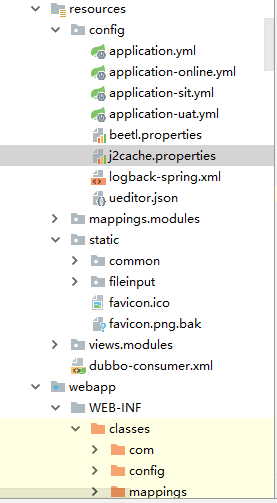
classLoader.getResource("").getPath():获取当前环境下的classes文件路径
@RequestMapping(value = "path")public String path(Model model, HttpServletRequest request, HttpServletResponse response) throwsException {
ClassLoader classLoader= this.getClass().getClassLoader();
System.out.println("8---"+classLoader.getResource("").getPath());
///C:/Develop/Idea/workspace2/coll-web/jeesite-web/src/main/webapp/WEB-INF/classes/
System.out.println("9---"+classLoader.getResource("static/favicon.ico").getPath());
///C:/Develop/Idea/workspace2/coll-web/jeesite-web/src/main/webapp/WEB-INF/classes/static/favicon.ico
System.out.println("10---"+classLoader.getResource("config/beetl.properties").getPath());
///C:/Develop/Idea/workspace2/coll-web/jeesite-web/src/main/webapp/WEB-INF/classes/config/beetl.properties//System.out.println("11---"+classLoader.getResource("/").getPath());//报错//System.out.println("12---"+classLoader.getResource("/static/favicon.ico").getPath());//报错//System.out.println("13---"+classLoader.getResource("/config/beetl.properties").getPath());//报错
}
三、通过classLoader加载配置文件
@RequestMapping(value = "path")public String path(Model model, HttpServletRequest request, HttpServletResponse response) throwsException {//加载配置文件方式一:
FileInputStream fis = new FileInputStream(classLoader.getResource("config/j2cache.properties").getPath());
Properties prop=newProperties();
prop.load(fis);
System.out.println(prop);//properties里的k v键值对//根据key获取value
System.out.println("14---"+prop.get("redis.namespace")); //jeesite
System.out.println("15---"+prop.getProperty("redis.namespace")); //jeesite//加载配置文件方式二:
InputStream is = classLoader.getResourceAsStream("config/j2cache.properties");
Properties prop2=newProperties();
prop2.load(is);
System.out.println(prop2);
System.out.println("16---"+prop2.get("redis.namespace")); //jeesite
System.out.println("17---"+prop2.getProperty("redis.namespace")); //jeesite
return "modules/sysLogin";
}
四、绝对路径
1.客户端以绝对路径访问服务端的资源
为了便于描述,我们假设虚拟项目路径为coll-web
客户端绝对路径跳转
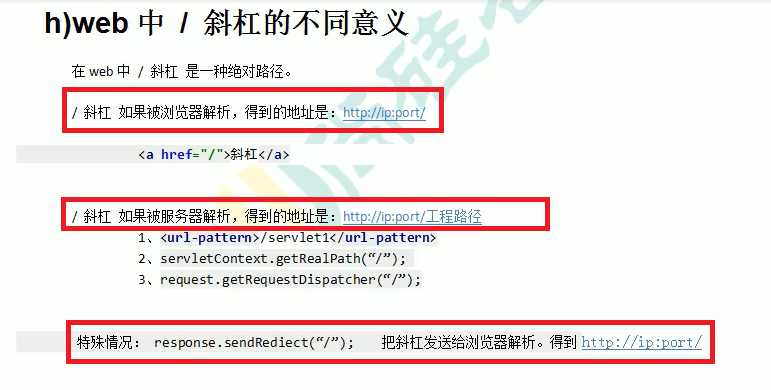
以/开头,表示绝对路径 客户端访问服务端的资源,如果没有写虚拟项目路径,服务器不知道你访问的是哪个web项目!所以报错404找不到该资源.正确写法是加上/test
请求重定向
比如请求重定向Redirect,也是在客户端访问服务端,如果使用绝对路径,也必须指定虚拟项目路径
//写是虚拟项目路径
response.sendRedirect("/test/xxx.jsp");//使用getContextPath()方法动态的获取当前项目的虚拟路径, 开发中建议使用这种动态的获取方式
response.sendRedirect(request.getContextPath() + "/xxx.jsp");
2.服务端以绝对路径访问服务端的资源
比如请求转发Forward,就是服务端访问本项目下在其他资源,所以/后面可以省略虚拟项目路径,直接写资源路径
request.getRequestDispatcher("/test/xxx.jsp").forward(request, response);//服务端访问同一个项目中其他资源可以省略项目路径
request.getRequestDispatcher("/xxx.jsp").forward(request, response);
总结:客户端访问服务端资源,以绝对路径访问,用/开头,那么必须指定虚拟项目路径,否则服务器不知道访问的资源在哪个web项目中,所以会报错404.
而服务端访问服务端的资源以绝对路径可以省略虚拟项目路径
五、相对路径
相对路径只有一种写法,那就是以./开头,并且./可以省略不写!而./的含义是指:当前资源的所在目录
比如web下xxx/A.jsp中和form表单提交到src下com/zuoyueer/servlet/B.java
我们假设该B.java的资源路径为/B 也就是@WebServlet(urlPatterns = "/B", name = "B")
A.jsp的全路径是:localhost:8080/test/xxx/A.jsp
B.java的全路径是:localhost:8080/test/B
可以看出:
A的相对地址是:localhost:8080/test/xxx/
B的相对地址是:localhost:8080/test/
分析:
A.jsp提交到B.java, 也就是A要访问B,
如果使用./只能访问到localhost:8080/test/xxx/下的资源无法访问到B.java
那么就可以使用../来访问上一级目录,这样就能访问到localhost:8080/test/下的B.Java资源了
值得注意的是../不能省略,如果要访问上一级的上一级目录那么可以使用../../同样不能省略
六、web中 / 总结