? 优质资源分享 ?
| 学习路线指引(点击解锁) | 知识定位 | 人群定位 |
|---|---|---|
| ? Python实战微信订餐小程序 ? | 进阶级 | 本课程是python flask+微信小程序的完美结合,从项目搭建到腾讯云部署上线,打造一个全栈订餐系统。 |
| ?Python量化交易实战? | 入门级 | 手把手带你打造一个易扩展、更安全、效率更高的量化交易系统 |
简介
Github:https://github.com/spf13/cobra
Star:26.5K
Cobra是一个用Go语言实现的命令行工具。并且现在正在被很多项目使用,例如:Kubernetes、Hugo和Github CLI等。通过使用Cobra,我们可以快速的创建命令行工具,特别适合写测试脚本,各种服务的Admin CLI等。
比如 Mattermost 项目,就写了很多 Admin CLI: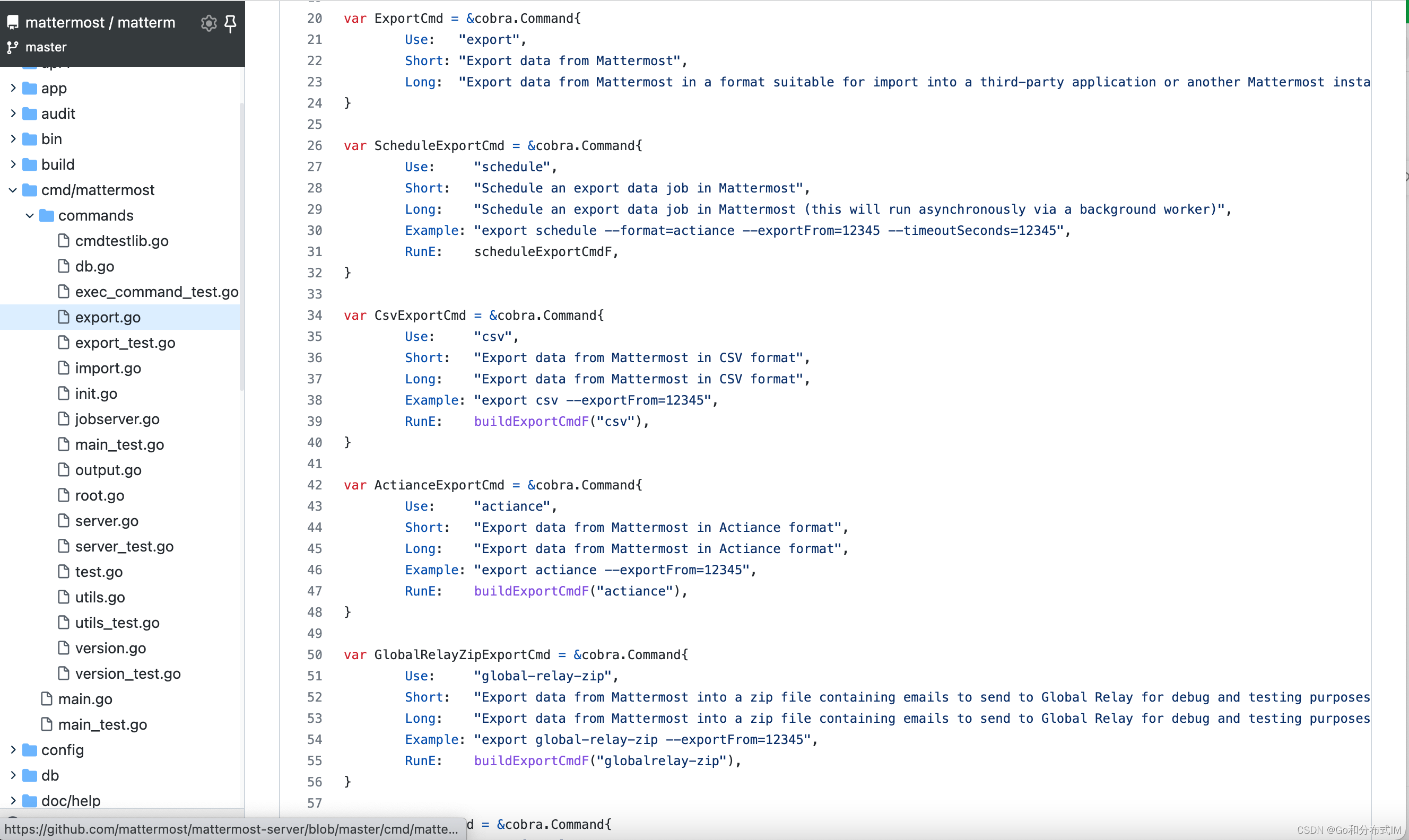
为什么需要cobra
我们看一个简单的demo
使用前
| 123456789101112131415161718192021222324252627282930 | package main import (``"flag"``"fmt"``) func main() {``flag.Parse() args := flag.Args()``if len(args) <= 0 {``fmt.Println(``"Usage: admin-cli [command]"``)``return``} switch args[0] {``case "help"``:``// ...``case "export"``:``//...``if len(args) == 3 { // 导出到文件``// todo``} else if len(args) == 2 { // 导出...``// todo``}``default``:``//...``}``} |
使用后
| 123456789101112131415161718192021222324252627282930313233343536373839404142434445464748495051525354 | package main import (``"fmt"``"github.com/spf13/cobra"``"os"``) // rootCmd represents the base command when called without any subcommands``var rootCmd = &cobra.Command{``Use: "api"``,``Short: "A brief description of your application"``,``Long: A longer description ,``} // 命令一``var mockMsgCmd = &cobra.Command{``Use: "mockMsg"``,``Short: "批量发送测试文本消息"``,``Long: ``,``Run: func``(cmd *cobra.Command, args []string) {``fmt.Println(``"mockMsg called"``)``},``} // 命令二``var exportCmd = &cobra.Command{``Use: "export"``,``Short: "导出数据"``,``Long: ``,``Run: func``(cmd *cobra.Command, args []string) {``fmt.Println(``"export called"``)``},``} func Execute() {``err := rootCmd.Execute()``if err != nil {``os.Exit(1)``}``} func init() {``rootCmd.Flags().BoolP(``"toggle"``, "t"``, false, "Help message for toggle"``) rootCmd.AddCommand(mockMsgCmd)``rootCmd.AddCommand(exportCmd) exportCmd.Flags().StringP(``"out"``, "k"``, "./backup"``, "导出路径"``)``} func main() {``Execute()``} |
运行:
| 1234567891011121314151617 | $ go run main.go``A longer description Usage:``api [``command``] Available Commands:``completion Generate the autocompletion script for the specified shell``export 导出数据``help Help about any command``mockMsg 批量发送测试文本消息 Flags:``-h, --help help for api``-t, --toggle Help message for toggle Use "api [command] --help" for more information about a command``. |
发现了吗?你不用再处理各种参数组合了,从此释放了出来,只需要写自己的业务逻辑即可!
基本概念
Cobra由三部分组成:
- 命令(Commands ):代表行为。命令是程序的中心点,程序的每个功能都应该可以通过命令进行交互,一个命令可以有任意个子命令。
- 参数(Args):命令的参数
- 标志(Flags):修饰命令。它修饰命令该如何完成。
官方推荐命令格式为:
| 1 | $ .``/appName command args --Flag |
如 hugo server --port=1313 :
- appName: hugo
- command: server
- flag: port
安装
Go pkg
添加依赖
| 1 | $ go get -u github.com``/spf13/cobra``@latest |
导入即可:
| 1 | import "github.com/spf13/cobra" |
命令行工具
建议安装命令行工具 cobra-cli ,以方便快速创建cobra项目,增加command等。
| 12 | # 命令行工具``$ go install github.com``/spf13/cobra-cli``@latest |
安装完成之后,执行 cobra-cli --help (请确保GOBIN已配置),输出下列信息则代表成功:
| 1234567891011121314151617181920212223 | $ cobra-cli --help``Cobra is a CLI library for Go that empowers applications.``This application is a tool to generate the needed files``to quickly create a Cobra application. Usage:``cobra-cli [``command``] Available Commands:``add Add a command to a Cobra Application``completion Generate the autocompletion script for the specified shell``help Help about any command``init Initialize a Cobra Application Flags:``-a, --author string author name for copyright attribution (default "YOUR NAME"``)``--config string config file (default is $HOME/.cobra.yaml)``-h, --help help for cobra-cli``-l, --license string name of license for the project``--viper use Viper for configuration Use "cobra-cli [command] --help" for more information about a command``. |
入门实践
新建cobra命令行程序
安装了cobra-cli工具之后,执行 init 初始化创建项目:
| 1 | $ cobra-cli init |
此时,在当前目录自动生成如下文件:
| 1234 | ├── LICENSE``├── cmd``│ └── root.go``└── main.go |
main.go:
| 1234567 | package main import "tools/api/cmd" func main() {``cmd.Execute()``} |
| 1 | root.``go``(有删减): |
| 12345678910111213141516171819202122232425262728293031323334 | package cmd import (``"fmt" "github.com/spf13/cobra"``) // rootCmd represents the base command when called without any subcommands``var rootCmd = &cobra.Command{``Use: "api"``,``Short: "A brief description of your application"``,``Long: A longer description ,``//Run: func(cmd *cobra.Command, args []string) {``// fmt.Println("api called")``//},``} // Execute adds all child commands to the root command and sets flags appropriately.``// This is called by main.main(). It only needs to happen once to the rootCmd.``func Execute() {``err := rootCmd.Execute()``if err != nil {``os.Exit(1)``}``} func init() {``// 全局flag``// rootCmd.PersistentFlags().StringVar(&cfgFile, "config", "", "config file (default is $HOME/.api.yaml)") // local flag,暂不知道用处``rootCmd.Flags().BoolP(``"toggle"``, "t"``, false, "Help message for toggle"``)``} |
此时运行,不用指定参数,会执行rootCmd,打印使用说明:
| 12 | $ go build $ .``/api |
输出:
| 1234567891011121314 | A longer description Usage:``api [``command``] Available Commands:``completion Generate the autocompletion script for the specified shell``help Help about any command Flags:``-h, --help help for api``-t, --toggle Help message for toggle Use "api [command] --help" for more information about a command``. |
命令构成
分析上面的默认输出:
- Available Commands:代表可以执行的命令。比如./api connect
- Flags:是参数。比如./api connect --ip=127.0.0.1:6379,–ip就是flag,127.0.0.1:6379就是flag的值。
新增命令
我们来新增一个命令试试,这也是命令行程序的魅力,通过不同的参数执行不同的动作。
语法:
| 1 | $ cobra-cli add [``command``] |
比如:
| 12 | $ cobra-cli add mock-msg``mockMsg created at /Users/xxx/repo/tools/api |
此时,在cmd下会多一个文件(mock_msg.go),内容如下:
| 1234567891011121314151617181920 | package cmd import (``"fmt" "github.com/spf13/cobra"``) var mockMsgCmd = &cobra.Command{``Use: "mockMsg"``,``Short: "A brief description of your command"``,``Long:mock msg command,``Run: func``(cmd *cobra.Command, args []string) {``fmt.Println(``"mockMsg called"``)``},``} func init() {``rootCmd.AddCommand(mockMsgCmd)``} |
再执行rootCmd:
| 12 | $ go build``$ .``/api |
会发现,多了一个命令:
| 123456 | // ...``Available Commands:``completion Generate the autocompletion script for the specified shell``help Help about any command``mockMsg A brief description of your command``// ... |
执行mocMsg命令:
| 123 | $ .``/api mockMsg mockMsg called |
此时,就可以在生成的 mock_msg.go: Run() 函数中,放你自己的业务逻辑代码了。
如何显示自己的命令用法
上面新增了一个命令mockMsg,通过 ./api help 打印了命令和help,但是 Use 里面指定的内容打印到哪里去了呢?
这个时候,需要针对Command在指定help,此时就能打印这个命令的具体用法了。
| 12345678910 | .``/api mockMsg help``批量生产mq消息 Usage:``benchmark mockmsg [flags] Flags:``-g, --goroutine int32 并发routine数量 (default 1)``-h, --help help for mockmsg``-p, --packet int32 每个routine一秒写入mq的数量 (default 20) |
| 1 | -g和-p是新增的2个flag: |
| 123456 | func init() {``mockmsgCmd.Flags().Int32P(``"goroutine"``, "g"``, 1, "并发routine数量"``)``mockmsgCmd.Flags().Int32P(``"packet"``, "p"``, 20, "每个routine一秒写入mq的数量"``) rootCmd.AddCommand(mockmsgCmd)``} |
获取这2个值:
| 1234567891011 | // mockmsgCmd represents the mockmsg command``var mockmsgCmd = &cobra.Command{``Use: "mockmsg"``,``Short: "批量生产mq消息"``,``Run: func``(cmd *cobra.Command, args []string) {``// 这里要写全名``g, _ := cmd.Flags().GetInt32(``"goroutine"``)``p, _ := cmd.Flags().GetInt32(``"packet"``)``fmt.Println(``"mockmsg called,flags:g="``, g, ",p="``, p, ",args:"``, args)``},``} |
执行:
| 12 | $ go run main.go mockmsg -p 322 -g 5 args1 args2``mockmsg called,flags:g= 5 ,p= 322 ,args: [args1 args2] |
总结
我们通过一个例子,介绍了使用cobra带来的好处。通过一个完整的入门实践,演示了创建项目、添加命令和使用的一些示例,希望对你有所帮助!
参考: