Fragment微信界面Tab标签切换案例
此案例共有1个Activity和4个Fragment。
效果图:
点击下方Tab标签,会显示4个不同的Fragment,对应微信4种界面。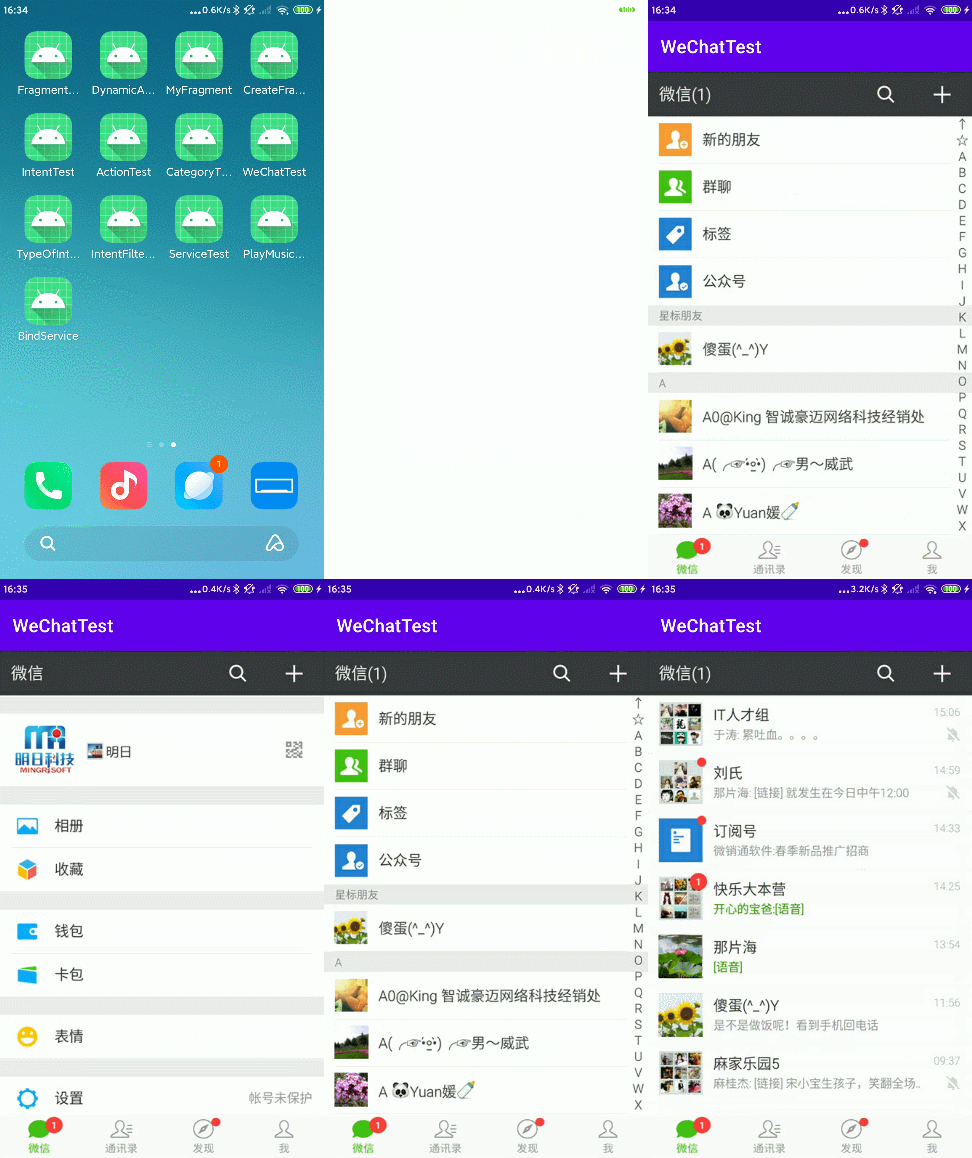
代码如下:
MainActivity.java
public class MainActivity extends AppCompatActivity implements View.OnClickListener {

    private ImageView imageView1;
    private ImageView imageView2;
    private ImageView imageView3;
    private ImageView imageView4;

    @Override
    protected void onCreate(Bundle savedInstanceState) {
        super.onCreate(savedInstanceState);
        setContentView(R.layout.activity_main);
        //初始化
        init();
        bindClick();

    }

    public void init() {
        imageView1 = findViewById(R.id.img1);
        imageView2 = findViewById(R.id.img2);
        imageView3 = findViewById(R.id.img3);
        imageView4 = findViewById(R.id.img4);
    }

    public void bindClick() {
        //绑定监听事件采用实现接口的方式
        imageView1.setOnClickListener(this);
        imageView2.setOnClickListener(this);
        imageView3.setOnClickListener(this);
        imageView4.setOnClickListener(this);
    }


    @Override
    public void onClick(View view) {
        //注册Fragment事务
        FragmentTransaction fragmentTransaction = getSupportFragmentManager().beginTransaction();
        Fragment f = null;
        switch (view.getId()) {
            case R.id.img1:
                f = new WeChatFragment();
                break;

            case R.id.img2:
                f = new MessageFragment();
                break;

            case R.id.img3:
                f = new FindFragment();
                break;

            case R.id.img4:
                f = new MeFragment();
                break;

            default:
                break;
        }
        //操作事务并提交
        fragmentTransaction.replace(R.id.fragment, f);
        fragmentTransaction.commit();
    }
}
WeChatFragment.java,四种Fragment写法相同,只需要重写onCreateView()方法,且只是返回的View对象不同
public class WeChatFragment extends Fragment {

    @Nullable
    @Override
    public View onCreateView(@NonNull LayoutInflater inflater, @Nullable ViewGroup container, @Nullable Bundle savedInstanceState) {
        return inflater.inflate(R.layout.fragment_wechat,null);
    }
}
MessageFragment.java
public class MessageFragment extends Fragment {

    @Nullable
    @Override
    public View onCreateView(@NonNull LayoutInflater inflater, @Nullable ViewGroup container, @Nullable Bundle savedInstanceState) {
        return inflater.inflate(R.layout.fragment_message,null);
    }
}
FindFragment.java
public class FindFragment extends Fragment {

    @Nullable
    @Override
    public View onCreateView(@NonNull LayoutInflater inflater, @Nullable ViewGroup container, @Nullable Bundle savedInstanceState) {
        return inflater.inflate(R.layout.fragment_find,null);
    }
}
MeFragment.java
public class MeFragment extends Fragment {

    @Nullable
    @Override
    public View onCreateView(@NonNull LayoutInflater inflater, @Nullable ViewGroup container, @Nullable Bundle savedInstanceState) {
        return inflater.inflate(R.layout.fragment_me,null);
    }
}
activity_main.xml
<?xml version="1.0" encoding="utf-8"?>
<RelativeLayout xmlns:android="http://schemas.android.com/apk/res/android"
    android:layout_width="match_parent"
    android:layout_height="match_parent">

    <fragment
        android:id="@+id/fragment"
        android:name="com.example.wechattest.WeChatFragment"
        android:layout_width="match_parent"
        android:layout_height="match_parent" />

    <LinearLayout
        android:layout_width="match_parent"
        android:layout_height="50dp"
        android:layout_alignParentBottom="true"
        android:orientation="horizontal">

        <ImageView
            android:id="@+id/img1"
            android:layout_width="wrap_content"
            android:layout_height="50dp"
            android:layout_weight="1"
            android:scaleType="fitXY"
            android:src="@drawable/bottom_1" />

        <ImageView
            android:id="@+id/img2"
            android:layout_width="wrap_content"
            android:layout_height="50dp"
            android:layout_weight="1"
            android:scaleType="fitXY"
            android:src="@drawable/bottom_2" />

        <ImageView
            android:id="@+id/img3"
            android:layout_width="wrap_content"
            android:layout_height="50dp"
            android:layout_weight="1"
            android:scaleType="fitXY"
            android:src="@drawable/bottom_3" />

        <ImageView
            android:id="@+id/img4"
            android:layout_width="wrap_content"
            android:layout_height="50dp"
            android:layout_weight="1"
            android:scaleType="fitXY"
            android:src="@drawable/bottom_4" />
    </LinearLayout>
</RelativeLayout>
fragment_wechat.xml
<RelativeLayout xmlns:android="http://schemas.android.com/apk/res/android"
    android:layout_width="match_parent"
    android:layout_height="match_parent">

    <ImageView
        android:layout_width="match_parent"
        android:layout_height="match_parent"
        android:scaleType="fitXY"
        android:src="@drawable/weixin" />

</RelativeLayout>
fragment_message.xml
<?xml version="1.0" encoding="utf-8"?>
<RelativeLayout xmlns:android="http://schemas.android.com/apk/res/android"
    android:layout_width="match_parent"
    android:layout_height="match_parent">

    <ImageView
        android:layout_width="match_parent"
        android:layout_height="match_parent"
        android:scaleType="fitXY"
        android:src="@drawable/tongxun" />

</RelativeLayout>
fragment_find.xml
<?xml version="1.0" encoding="utf-8"?>
<RelativeLayout xmlns:android="http://schemas.android.com/apk/res/android"
    android:layout_width="match_parent"
    android:layout_height="match_parent">

    <ImageView
        android:layout_width="match_parent"
        android:layout_height="match_parent"
        android:scaleType="fitXY"
        android:src="@drawable/faxian" />

</RelativeLayout>
fragment_me.xml
<?xml version="1.0" encoding="utf-8"?>
<RelativeLayout xmlns:android="http://schemas.android.com/apk/res/android"
    android:layout_width="match_parent"
    android:layout_height="match_parent">

    <ImageView
        android:layout_width="match_parent"
        android:layout_height="match_parent"
        android:scaleType="fitXY"
        android:src="@drawable/wo" />

</RelativeLayout>
版权声明:本文为weixin_42456748原创文章,遵循CC 4.0 BY-SA版权协议,转载请附上原文出处链接和本声明。