比赛因为疫情凉了,没事干写写文章吧
视频效果:https://www.bilibili.com/video/BV1qU4y157dV
啥也不说先上图片看效果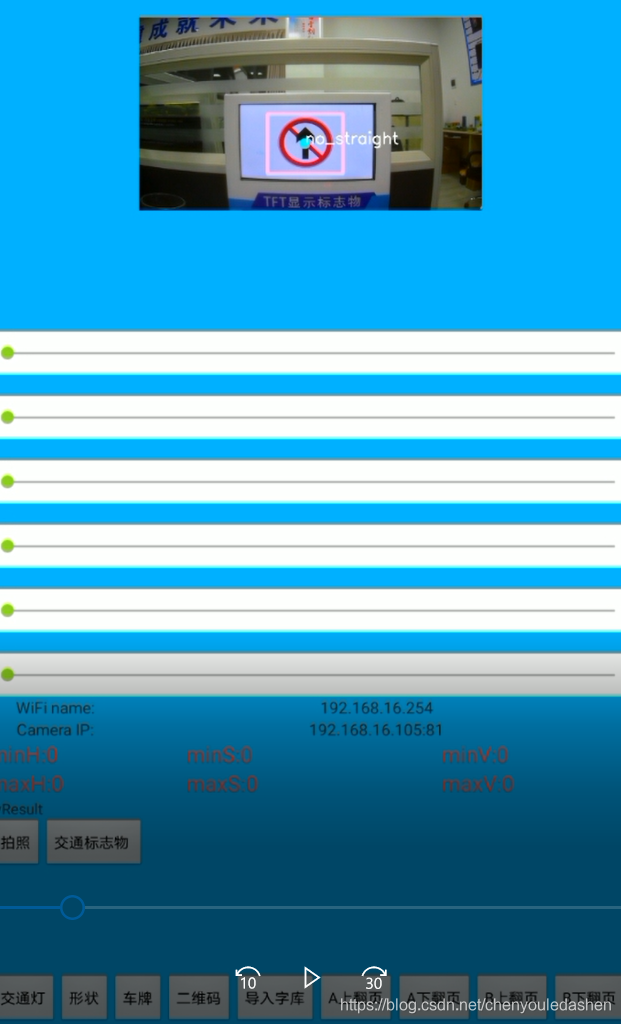
项目介绍:Android端从摄像头中获取的含有交通标志物图片进行识别。
交通标志物包括:直行、掉头、左转、右转、禁止通行、禁止直行
项目实现步骤:
1、准备图片 每种标志物的图片120张就足够
2、通过EasyDL物体检测去训练图片
3、训练完后EasyDL可以下载一个对应的应用例程
4、将应用例程迁移到自己的程序里面
步骤一
如何获取图片呢?
可以通过摄像头录到的视频来一帧一帧的把图片给提取出来。
python+opencv来实现。
直接上代码:
import cv2
cap=cv2.VideoCapture("turnright (11).avi")#输入视频
isOpened=cap.isOpened
i=0
while(isOpened):
    if i==10:
        break
    else:
        i=i+1
    (flag,frame)=cap.read()
    fileName='turnright'+str(i)+'.jpg'#照片名字
    print(fileName)
    if flag==True:
        cv2.imwrite(fileName,frame,[cv2.IMWRITE_JPEG_CHROMA_QUALITY,100])#输出照片
上面代码自行测试调试理解
步骤二
百度大脑训练图片,网站操作视频来训练图片
https://ai.baidu.com/easydl/vision/
训练完成后
步骤三
下载训练好的SDK
通过官方文档调试
步骤四
阅读API文档移植到自己的程序里面
只需要从例程中移植出TestInferDetectionTask类
/**
 * 通用arm 物体检测
 */
public class TestInferDetectionTask{
    private static final int NUM_OF_RUNS = 1;
    private static final int NUM_OF_API_CALLS = 1;
    private static final float CONFIDENCE = 0.5f;
    private static final String TAG = "TestInferDetectionTask";
    private static final String SERIAL_NUM = "BC57-01EC-32B2-BF02";

     public static Rect rect=null;
    public static String TrafficFlag() {
        String resString = null;
        try {
            for (int i = 0; i < NUM_OF_RUNS; i++) {
                /* 以下逻辑请放在同一个线程里执行,比如使用ThreadHandler */
                /* 1. 准备配置类,初始化Manager类。可以在onCreate或onResume中触发,请在非UI线程里调用 */
                InferConfig config = new InferConfig(XcApplication.getContext().getAssets(), "infer");
                InferManager manager = new InferManager(XcApplication.getContext(), config, SERIAL_NUM);

                /* 2.1 准备图片,作为Bitmap输入 */
                InputStream is = XcApplication.getApp().getAssets().open("test.jpg");
                Bitmap image = BitmapFactory.decodeStream(is);
                is.close();

                /* 2.2 推理图片及解析结果 */
                List<DetectionResultModel> models_results = null;
                String resStr = "";
                for (int j = 0; j < NUM_OF_API_CALLS; j++) {
//                    models_results = manager.detect(image, CONFIDENCE);
                    models_results = manager.detect(MainActivity.bitmap, CONFIDENCE);

                    // 在模型销毁前可以不断调用。但是不支持多线程。

                    // 解析结果
                    if (models_results != null) {
                        if (models_results.size() > 0) {
                            resStr += models_results.get(0).getLabel() + ", " + models_results.get(0).getConfidence();
                            resString = models_results.get(0).getLabel();
                        }
                    }
                    Log.e(TAG, "识别结果: " + resStr);
                    Log.e(TAG, "识别结果: " + resString);
                    rect=models_results.get(0).getBounds();
                    Log.e(TAG, "外包围矩形:"+rect);
                    Log.e(TAG, "外包围矩形上:"+models_results.get(0).getBounds().top);
                    Log.e(TAG, "外包围矩形左:"+models_results.get(0).getBounds().left);
                    Log.e(TAG, "外包围矩形右:"+models_results.get(0).getBounds().right);
                    Log.e(TAG, "外包围矩形下:"+models_results.get(0).getBounds().bottom);
                    Log.e(TAG, "外包围矩形宽:"+models_results.get(0).getBounds().width());
                    Log.e(TAG, "外包围矩形高:"+models_results.get(0).getBounds().height());
                }
                /* 3. 销毁模型。可以在onDestroy或onPause中触发,请在非UI线程里调用 */
                manager.destroy();

            }

        } catch (Exception e) {
            e.printStackTrace();
            Log.e(TAG, "错误: ");
        }
        return resString;
    }

    //识别结果转换
    //直行0x01 左转0x02  右转0x03  掉头0x04  禁止直行0x05  禁止通行0x06
    public static int trafficFlag(String res){
        int which=1;
        if (res!=null){
            if (res.equals("go_straight")){
                Log.e(TAG, "识别直行");
                which=1;
            }else if (res.equals("turn_left")){
                Log.e(TAG, "识别左转");
                which=2;
            } else if (res.equals("turn_right")){
                Log.e(TAG, "识别右转");
                which=3;
            }else if (res.equals("turn_around")){
                Log.e(TAG, "识别掉头");
                which=4;
            }else if (res.equals("no_straight")){
                Log.e(TAG, "识别禁止直行");
                which=5;
            }else if (res.equals("no_turn")){
                Log.e(TAG, "识别禁止通行");
                which=6;
            }
        }
        return which;
    }
}
这期间肯定会遇到各种各样的问题,但是你只能查官方文档和google或百度,不断地遇到问题不断地解决问题。你我之间都是从零开始。
版权声明:本文为chenyouledashen原创文章,遵循CC 4.0 BY-SA版权协议,转载请附上原文出处链接和本声明。