JAVA 实现 Word转PDF
需要的包 SaveAsPDFandXPS + jacob
- 先安装SaveAsPDFandXPS
- 打开 jacob-1.19.zip
把jacob.jar 放到项目下 , 然后 这里注意把两个后缀为dll的文件放到 jre目录bin的里面,必须放进去,不然会报错(java.lang.NoClassDefFoundError)。
注意 jacob 不要有版本冲突。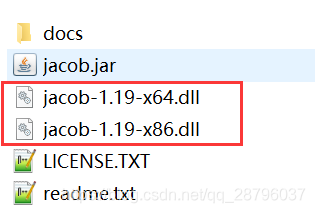
代码
package utils.report;


import java.io.File;

import com.jacob.activeX.ActiveXComponent;
import com.jacob.com.ComThread;
import com.jacob.com.Dispatch;
import com.jacob.com.Variant;

public class WordToPdf {

	private static final int wdFormatPDF = 17;// PDF 格式

	public static void wordToPDF() {

		ActiveXComponent app = null;
		Dispatch doc = null;
		try {
			app = new ActiveXComponent( "Word.Application" );
			app.setProperty( "Visible", new Variant( false ) );
			Dispatch docs = app.getProperty( "Documents" ).toDispatch();
			// 转换前的文件路径
			String startFile = "C:/Users/Desktop/aaaab24.docx";
			// 转换后的文件路劲
			String overFile = "C:/Users/Desktop/我是结果3.pdf";
			doc = Dispatch.call( docs, "Open", startFile ).toDispatch();
			File tofile = new File( overFile );
			if( tofile.exists() ) {
				tofile.delete();
			}
			Dispatch.call( doc, "SaveAs", overFile, wdFormatPDF );
		} catch( Exception e ) {
			System.out.println( e.getMessage() );
		} finally {
			Dispatch.call( doc, "Close", false );
			if( app != null )
				app.invoke( "Quit", new Variant[] {} );
		}
		// 结束后关闭进程
		ComThread.Release();
	}

	public static void main( String[] args ) {
		wordToPDF();
	}
}
另外一种方法效果可能不太好
使用 aspose 相关包
包链接
SaveAsPDFandXPS
1:首先需要引入相关的jar
word转pdf需要引入 aspose-words-15.8.0-jdk16.jar
excel转pdf需要引入aspose-cells-8.5.2.jar
2:引入License.xml文件(备注:此License文件只能破解Word版本),将其放入src文件目录下
<License>
<Data>
<Products>
<Product>Aspose.Total for Java</Product>
<Product>Aspose.Words for Java</Product>
</Products>
<EditionType>Enterprise</EditionType>
<SubscriptionExpiry>20991231</SubscriptionExpiry>
<LicenseExpiry>20991231</LicenseExpiry>
<SerialNumber>8bfe198c-7f0c-4ef8-8ff0-acc3237bf0d7</SerialNumber>
</Data>
<Signature>sNLLKGMUdF0r8O1kKilWAGdgfs2BvJb/2Xp8p5iuDVfZXmhppo+d0Ran1P9TKdjV4ABwAgKXxJ3jcQTqE/2IRfqwnPf8itN8aFZlV3TJPYeD3yWE7IT55Gz6EijUpC7aKeoohTb4w2fpox58wWoF3SNp6sK6jDfiAUGEHYJ9pjU=</Signature>
</License>
3.代码
package utils.report;

import java.io.File;
import java.io.FileOutputStream;
import java.io.InputStream;

import com.aspose.cells.Workbook;
import com.aspose.words.Document;
import com.aspose.words.License;

/**
* Word或Excel 转Pdf 帮助类
* 备注:需要引入 aspose-words-15.8.0-jdk16.jar / aspose-cells-8.5.2.jar
*/
public class WordToPdf {

	private static boolean getLicense() {
		boolean result = false;
		try {
			InputStream is = WordToPdf3.class.getClassLoader().getResourceAsStream( "License.xml" ); // license.xml应放在..\WebRoot\WEB-INF\classes路径下
			License aposeLic = new License();
			aposeLic.setLicense( is );
			result = true;
		} catch( Exception e ) {
			e.printStackTrace();
		}
		return result;
	}

	/**
	* @param wordPath 需要被转换的word全路径带文件名
	* @param pdfPath 转换之后pdf的全路径带文件名
	*/
	public static void doc2pdf( String wordPath, String pdfPath ) {
		if( !getLicense() ) { // 验证License 若不验证则转化出的pdf文档会有水印产生
			return;
		}
		try {
			long old = System.currentTimeMillis();
			File file = new File( pdfPath ); // 新建一个pdf文档
			FileOutputStream os = new FileOutputStream( file );
			Document doc = new Document( wordPath ); // Address是将要被转化的word文档
			doc.save( os, com.aspose.words.SaveFormat.PDF );// 全面支持DOC, DOCX, OOXML, RTF HTML, OpenDocument, PDF, EPUB, XPS, SWF 相互转换
			long now = System.currentTimeMillis();
			os.close();
			System.out.println( "共耗时:" + ( ( now - old ) / 1000.0 ) + "秒" ); // 转化用时
		} catch( Exception e ) {
			e.printStackTrace();
		}
	}

	/**
	* @param excelPath 需要被转换的excel全路径带文件名
	* @param pdfPath 转换之后pdf的全路径带文件名
	*/
	public static void excel2pdf( String excelPath, String pdfPath ) {
		if( !getLicense() ) { // 验证License 若不验证则转化出的pdf文档会有水印产生
			// return;
		}
		try {
			long old = System.currentTimeMillis();
			Workbook wb = new Workbook( excelPath );// 原始excel路径
			FileOutputStream fileOS = new FileOutputStream( new File( pdfPath ) );
			wb.save( fileOS, com.aspose.cells.SaveFormat.PDF );
			fileOS.close();
			long now = System.currentTimeMillis();
			System.out.println( "共耗时:" + ( ( now - old ) / 1000.0 ) + "秒" ); // 转化用时
		} catch( Exception e ) {
			e.printStackTrace();
		}
	}

	public static void main( String[] args ) {
		// word 和excel 转为pdf
		String filePaths = "D:/logs/Java.doc";
		String fileName = "123";
		String pdfPath = "D:/logs/" + fileName + ".pdf";
		doc2pdf( "C:/Users/Desktop/aaaab24.docx", "C:/Users/Desktop/2.pdf" );// filePaths需要转换的文件位置 pdfPath为存储位置
		String excel2pdf = "D:/logs/excel.xlsx";
		excel2pdf( excel2pdf, pdfPath );
	}
生成的pdf效果没第一种好
版权声明:本文为qq_28796037原创文章,遵循CC 4.0 BY-SA版权协议,转载请附上原文出处链接和本声明。