导入import android.widget.Switch
Android studio 只有import单个包的快捷键:Alt+Enter。没有Eclipse下的快速导入包的快捷键Ctrl+Shift+O。
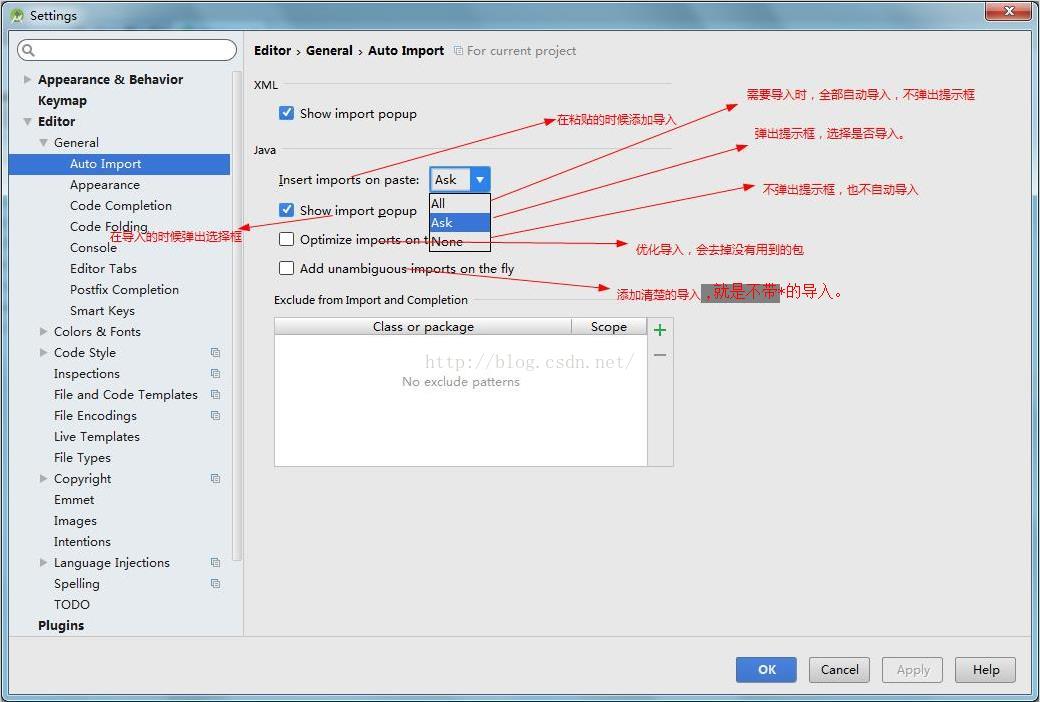
但Android studio设置里有一项Auto Import自动导入功能。设置过程如下:
Android studio --> File--> Settings --> Editor --> General--> Auto Import:然后设置如下:
---------------------
Switch相关属性
android:showText:设置on/off的时候是否显示文字,boolean
android:splitTrack:是否设置一个间隙,让滑块与底部图片分隔,boolean
android:switchMinWidth:设置开关的最小宽度
android:switchPadding:设置滑块内文字的间隔
android:switchTextAppearance:设置开关的文字外观,暂时没发现有什么用…
android:textOff:按钮没有被选中时显示的文字
android:textOn:按钮被选中时显示的文字
android:textStyle:文字风格,粗体,斜体写划线那些
android:track:底部的图片
android:thumb:滑块的图片
---------------------
xml
<Switch
        android:id="@+id/switch_bt_on_off"
        android:layout_width="wrap_content"
        android:layout_height="wrap_content"
        android:textOn="关"
        android:textOff="开"
        android:switchMinWidth="40dp"
        android:track="@drawable/switch_track"
        android:thumb="@android:color/transparent" />
---------------------
监听
switchComponent = (Switch)findViewById(R.id.switch_bt_on_off);
        switchComponent.setOnCheckedChangeListener(new OnCheckedChangeListener() {
            @Override
            public void onCheckedChanged(CompoundButton compoundButton, boolean isChecked) {
                if(isChecked){
                    Log.d("Bt_log","蓝牙开");
                }else{
                    Log.d("Bt_log","蓝牙关");
                }
            }
        });
版权声明:本文为qq_35480064原创文章,遵循CC 4.0 BY-SA版权协议,转载请附上原文出处链接和本声明。