在linux下面,让man命令显示彩色, 会比较醒目而且方便查看内容。不同的发行版,配置稍微有点差别。
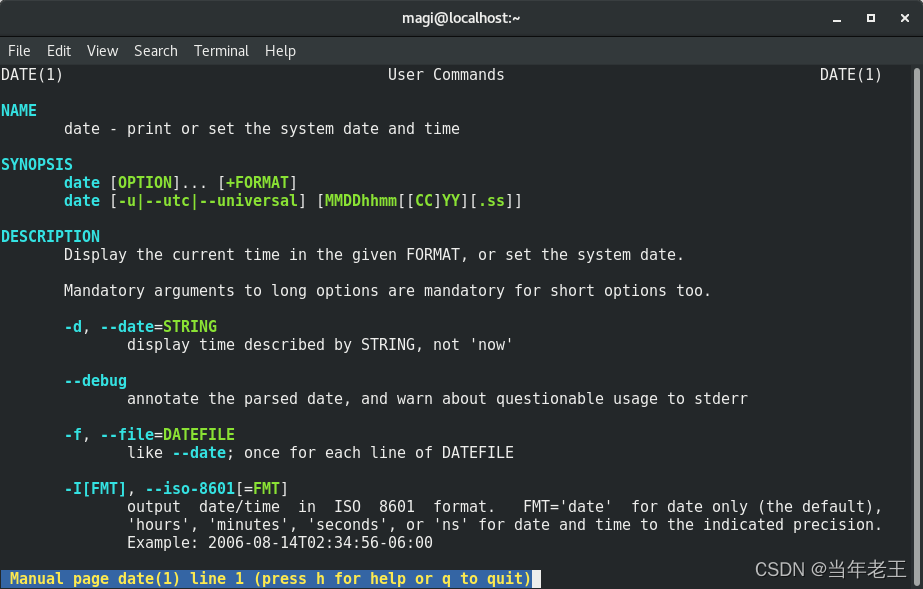
在不改变 man命令的分页,也就是仍然采用 less命令分页的情况下,可以在
/etc/bashrc 或者 /etc/bash.bashrc的末尾加入如下代码来显示彩色:
1) Debian 10 等:
#man color
export LESS=-R
export LESS_TERMCAP_mb=$'\E[1;31m'     # begin blink
export LESS_TERMCAP_md=$'\E[1;36m'     # begin bold
export LESS_TERMCAP_me=$'\E[0m'        # reset bold/blink
export LESS_TERMCAP_so=$'\E[01;44;33m' # begin reverse video
export LESS_TERMCAP_se=$'\E[0m'        # reset reverse video
export LESS_TERMCAP_us=$'\E[1;32m'     # begin underline
export LESS_TERMCAP_ue=$'\E[0m'        # reset underline
2) CentOS/Fedora系列:
#man for color
export LESS_TERMCAP_mb=$'\E[1;31m'     # begin bold
export LESS_TERMCAP_md=$'\E[1;36m'     # begin blink
export LESS_TERMCAP_me=$'\E[0m'        # reset bold/blink
export LESS_TERMCAP_so=$'\E[01;44;33m' # begin reverse video
export LESS_TERMCAP_se=$'\E[0m'        # reset reverse video
export LESS_TERMCAP_us=$'\E[1;32m'     # begin underline
export LESS_TERMCAP_ue=$'\E[0m'        # reset underline
export GROFF_NO_SGR=1                  # for konsole and gnome-terminal
3) ArchLinux系列:
man() {
    env LESS_TERMCAP_mb=$(printf "\e[1;31m") \
        LESS_TERMCAP_md=$(printf "\e[1;31m") \
        LESS_TERMCAP_me=$(printf "\e[0m") \
        LESS_TERMCAP_se=$(printf "\e[0m") \
        LESS_TERMCAP_so=$(printf "\e[1;44;33m") \
        LESS_TERMCAP_ue=$(printf "\e[0m") \
        LESS_TERMCAP_us=$(printf "\e[1;32m") \
        man "$@"
}
4) Ubunt系列:
# Highlight the color man manual
export LESS_TERMCAP_mb=$'\E[01;31m'
export LESS_TERMCAP_md=$'\E[01;31m'
export LESS_TERMCAP_me=$'\E[0m'
export LESS_TERMCAP_se=$'\E[0m'
export LESS_TERMCAP_so=$'\E[01;44;33m'
export LESS_TERMCAP_ue=$'\E[0m'
export LESS_TERMCAP_us=$'\E[01;32m'
5)其它的:
# for color man page

man() {
    LESS_TERMCAP_md=$'\e[01;31m' \
    LESS_TERMCAP_me=$'\e[0m' \
    LESS_TERMCAP_se=$'\e[0m' \
    LESS_TERMCAP_so=$'\e[01;44;33m' \
    LESS_TERMCAP_ue=$'\e[0m' \
    LESS_TERMCAP_us=$'\e[01;32m' \
    command man "$@"
}
man() {
    LESS_TERMCAP_md=$'\e[01;31m' \
    LESS_TERMCAP_me=$'\e[0m' \
    LESS_TERMCAP_us=$'\e[01;32m' \
    LESS_TERMCAP_ue=$'\e[0m' \
    LESS_TERMCAP_so=$'\e[45;93m' \
    LESS_TERMCAP_se=$'\e[0m' \

    command man "$@"
}
6) 适用于 Fish shell:
$ vi ~/.config/fish/config.fish

set -xU LESS_TERMCAP_md (printf "\e[01;31m")
set -xU LESS_TERMCAP_me (printf "\e[0m")
set -xU LESS_TERMCAP_se (printf "\e[0m")
set -xU LESS_TERMCAP_so (printf "\e[01;44;33m")
set -xU LESS_TERMCAP_ue (printf "\e[0m")
set -xU LESS_TERMCAP_us (printf "\e[01;32m")
版权声明:本文为yinqingwang原创文章,遵循CC 4.0 BY-SA版权协议,转载请附上原文出处链接和本声明。