package com.example.simpletest;

import android.content.Context;
import android.graphics.Color;
import android.util.AttributeSet;
import android.util.DisplayMetrics;
import android.util.Log;
import android.view.Gravity;
import android.view.MotionEvent;
import android.view.View;
import android.view.ViewConfiguration;
import android.view.WindowManager;
import android.widget.FrameLayout;
import android.widget.ImageView;

import androidx.core.view.ViewCompat;

public class FloatButtonLayout extends FrameLayout {
    public static final String TAG = "FloatButtonLayout";

    private ImageView mFloatBtn;
    private int touchSlop;
    private float touchDownX = 0;
    private float touchDownY = 0;
    private float lastTouchX = 0;
    private float lastTouchY = 0;
    private boolean isDragging;
    private boolean isTouchDownInFloatBtn = false;

    private int mFloatBtnTop;
    private int mFloatBtnLeft;
    private int mFloatBtnOffsetTop;
    private int mFloatBtnOffsetLeft;

    private int width;
    private int screenWidth = getScreenWidth();
    private float leftSideX = 0;
    private float rightSideX = 0;

    public FloatButtonLayout(Context context) {
        super(context);
        init(context);
    }

    public FloatButtonLayout(Context context, AttributeSet attrs) {
        super(context, attrs);
        init(context);
    }

    public FloatButtonLayout(Context context, AttributeSet attrs, int defStyleAttr) {
        super(context, attrs, defStyleAttr);
        init(context);
    }

    private void init(Context context) {
        int btnSize = dp2px(context, 60);
        mFloatBtn = new ImageView(context);
        mFloatBtn.setImageResource(R.mipmap.ic_launcher_round);
        mFloatBtn.setBackgroundColor(Color.parseColor("#00000000"));
        mFloatBtn.setOnClickListener(new OnClickListener() {
            @Override
            public void onClick(View v) {
                Log.i(TAG, "onClick: ");
            }
        });
        LayoutParams floatBtnLp = new LayoutParams(btnSize, btnSize);
        floatBtnLp.gravity = Gravity.BOTTOM | Gravity.END;
        floatBtnLp.bottomMargin = dp2px(context, 50);
        floatBtnLp.rightMargin = dp2px(context, 30);
        addView(mFloatBtn, floatBtnLp);
        touchSlop = ViewConfiguration.get(context).getScaledTouchSlop();
    }

    public static int dp2px(Context context, int dp) {
        return (int) (context.getResources().getDisplayMetrics().density * dp + 0.5);
    }

    @Override
    protected void onLayout(boolean changed, int left, int top, int right, int bottom) {
        super.onLayout(changed, left, top, right, bottom);
        mFloatBtn.getTop();
        mFloatBtnTop = mFloatBtn.getTop();
        mFloatBtnLeft = mFloatBtn.getLeft();
        applyOffsets();

        int[] location = new int[2];
        mFloatBtn.getLocationOnScreen(location);
        rightSideX = location[0];
        leftSideX = screenWidth - rightSideX;
    }

    public void applyOffsets() {
        ViewCompat.offsetTopAndBottom(mFloatBtn, mFloatBtnOffsetTop - (mFloatBtn.getTop() - mFloatBtnTop));
        ViewCompat.offsetLeftAndRight(mFloatBtn, mFloatBtnOffsetLeft - (mFloatBtn.getLeft() - mFloatBtnLeft));
    }

    @Override
    public boolean onInterceptTouchEvent(MotionEvent event) {
        float x = event.getX(), y = event.getY();
        int action = event.getAction();
        if (action == MotionEvent.ACTION_DOWN) {
            isTouchDownInFloatBtn = isDownInFloatBtn(x, y);
            touchDownX = lastTouchX = x;
            touchDownY = lastTouchY = y;
        } else if (action == MotionEvent.ACTION_MOVE) {
            if (!isDragging && isTouchDownInFloatBtn) {
                int dx = (int) (x - touchDownX);
                int dy = (int) (y - touchDownY);
                if (Math.sqrt(dx * dx + dy * dy) > touchSlop) {
                    isDragging = true;
                }
            }

            if (isDragging) {
                int dx = (int) (x - lastTouchX);
                int dy = (int) (y - lastTouchY);
                int gx = mFloatBtn.getLeft();
                int gy = mFloatBtn.getTop();
                int gw = mFloatBtn.getWidth(), w = getWidth();
                int gh = mFloatBtn.getHeight(), h = getHeight();
                if (gx + dx < 0) {
                    dx = -gx;
                } else if (gx + dx + gw > w) {
                    dx = w - gw - gx;
                }

                if (gy + dy < 0) {
                    dy = -gy;
                } else if (gy + dy + gh > h) {
                    dy = h - gh - gy;
                }
                mFloatBtnOffsetLeft += dx;
                mFloatBtnOffsetTop += dy;
                applyOffsets();
            }
            lastTouchX = x;
            lastTouchY = y;
        } else if (action == MotionEvent.ACTION_CANCEL || action == MotionEvent.ACTION_UP) {
            isDragging = false;
            isTouchDownInFloatBtn = false;
            moveToScreenSide(x);
        }
        return isDragging;
    }

    private void moveToScreenSide(float x) {
        if (x < screenWidth / 2) {
            Log.d(TAG, "x : " + x + " , 目标位置没超过屏幕一半");
            setLeftAndRightOffset(-(int) (rightSideX - leftSideX + mFloatBtn.getWidth()));
        } else {
            Log.i(TAG, "x : " + x + " , 目标位置超过屏幕一半");
            setLeftAndRightOffset(0);
        }
    }

    private void setLeftAndRightOffset(int offset) {
        if (mFloatBtnOffsetLeft != offset) {
            mFloatBtnOffsetLeft = offset;
            applyOffsets();
        }
    }

    private boolean isDownInFloatBtn(float x, float y) {
        return mFloatBtn.getLeft() < x && mFloatBtn.getRight() > x &&
                mFloatBtn.getTop() < y && mFloatBtn.getBottom() > y;
    }

    @Override
    protected void onSizeChanged(int w, int h, int oldw, int oldh) {
        super.onSizeChanged(w, h, oldw, oldh);
        this.width = w;
    }

    @Override
    public boolean onTouchEvent(MotionEvent event) {
        float x = event.getX(), y = event.getY();
        int action = event.getAction();
        if (action == MotionEvent.ACTION_DOWN) {
            isTouchDownInFloatBtn = isDownInFloatBtn(x, y);
            touchDownX = lastTouchX = x;
            touchDownY = lastTouchY = y;
        } else if (action == MotionEvent.ACTION_MOVE) {
            if (!isDragging && isTouchDownInFloatBtn) {
                int dx = (int) (x - touchDownX);
                int dy = (int) (y - touchDownY);
                if (Math.sqrt(dx * dx + dy * dy) > touchSlop) {
                    isDragging = true;
                }
            }

            if (isDragging) {
                int dx = (int) (x - lastTouchX);
                int dy = (int) (y - lastTouchY);
                int gx = mFloatBtn.getLeft();
                int gy = mFloatBtn.getTop();
                int gw = mFloatBtn.getWidth(), w = getWidth();
                int gh = mFloatBtn.getHeight(), h = getHeight();
                if (gx + dx < 0) {
                    dx = -gx;
                } else if (gx + dx + gw > w) {
                    dx = w - gw - gx;
                }

                if (gy + dy < 0) {
                    dy = -gy;
                } else if (gy + dy + gh > h) {
                    dy = h - gh - gy;
                }
                mFloatBtnOffsetLeft += dx;
                mFloatBtnOffsetTop += dy;
                applyOffsets();
            }
            lastTouchX = x;
            lastTouchY = y;
        } else if (action == MotionEvent.ACTION_CANCEL || action == MotionEvent.ACTION_UP) {
            isDragging = false;
            isTouchDownInFloatBtn = false;
            moveToScreenSide(x);
        }
        return isDragging || super.onTouchEvent(event);
    }

    private int getScreenWidth() {
        DisplayMetrics metric = new DisplayMetrics();
        WindowManager wm = (WindowManager) getContext().getSystemService(Context.WINDOW_SERVICE);
        wm.getDefaultDisplay().getMetrics(metric);
        return metric.widthPixels;
    }
}
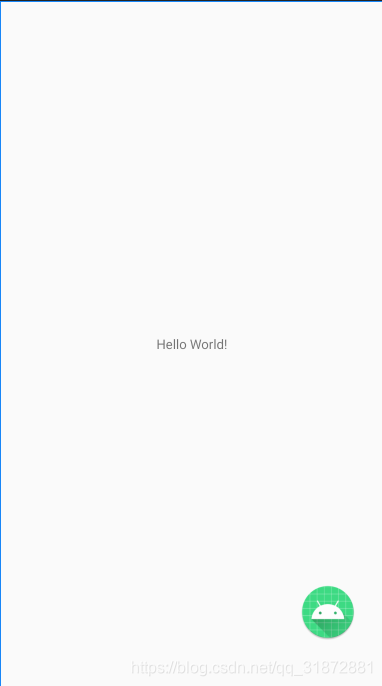
使用:
<?xml version="1.0" encoding="utf-8"?>
<FrameLayout xmlns:android="http://schemas.android.com/apk/res/android"
    android:layout_width="match_parent"
    android:layout_height="match_parent">

    <TextView
        android:layout_width="match_parent"
        android:layout_height="match_parent"
        android:gravity="center"
        android:text="Hello World!" />

    <!--悬浮按钮布局-->
    <com.example.simpletest.FloatButtonLayout
        android:layout_width="match_parent"
        android:layout_height="match_parent" />
</FrameLayout>
版权声明:本文为qq_31872881原创文章,遵循CC 4.0 BY-SA版权协议,转载请附上原文出处链接和本声明。