<?xml version="1.0" encoding="utf-8"?>
<!--协调者布局-->
<androidx.coordinatorlayout.widget.CoordinatorLayout xmlns:android="http://schemas.android.com/apk/res/android"
    xmlns:app="http://schemas.android.com/apk/res-auto"
    xmlns:tools="http://schemas.android.com/tools"
    android:layout_width="match_parent"
    android:layout_height="match_parent"
    tools:context=".Main2Activity">

    <!--通过协调者布局,取到滑动事件
        他可以让你定值当某个可滚动View的滚动手时发生变化时,其内部的子View实现何种动作-->
    <com.google.android.material.appbar.AppBarLayout
        android:layout_width="match_parent"
        android:id="@+id/app_bar"
        android:layout_height="300dp">
        <!--可折叠布局-->
        <!--滚动的方式app:layout_scrollFlags="scroll|exitUntilCollapsed" 退出时候折叠-->
        <com.google.android.material.appbar.CollapsingToolbarLayout
            android:layout_width="match_parent"
            app:layout_scrollFlags="scroll|exitUntilCollapsed"
            android:minHeight="50dp"
            app:collapsedTitleGravity="left"
            app:title="哈哈"
            app:expandedTitleGravity="bottom|right"
            app:contentScrim="@color/colorPrimary"
            android:layout_height="300dp">
            <ImageView
                android:layout_width="match_parent"
                android:layout_height="300dp"
                android:src="@drawable/dilireba"></ImageView>

            <androidx.appcompat.widget.Toolbar
                app:title="哈哈"
                android:id="@+id/bar"
                android:layout_width="match_parent"
                android:layout_height="50dp"></androidx.appcompat.widget.Toolbar>

        </com.google.android.material.appbar.CollapsingToolbarLayout>

    </com.google.android.material.appbar.AppBarLayout>

    <!--可滚动布局-->
    <!--行为产生联动behavior 死值@string/appbar_scrolling_view_behavior-->
    <androidx.core.widget.NestedScrollView
        android:layout_width="match_parent"
        app:layout_behavior="@string/appbar_scrolling_view_behavior"
        android:layout_height="wrap_content">

        <LinearLayout
            android:layout_width="match_parent"
            android:orientation="vertical"
            android:layout_height="wrap_content">
            <TextView
                android:layout_width="match_parent"
                android:layout_height="300dp"
                android:background="#ff0000"
                android:text="hahaha"></TextView>
            <ImageView
                android:layout_width="wrap_content"
                android:layout_height="400dp"
                android:src="@mipmap/ic_launcher"></ImageView>
        </LinearLayout>
    </androidx.core.widget.NestedScrollView>

    <!--    圆形风格按钮-->
    <com.google.android.material.floatingactionbutton.FloatingActionButton
        android:id="@+id/fab"
        android:layout_width="wrap_content"
        android:layout_height="wrap_content"
        app:layout_anchor="@id/app_bar"
        android:src="@mipmap/ic_launcher"
        app:layout_anchorGravity="bottom|right"
        android:layout_marginRight="10dp"
        android:layout_marginBottom="10dp"/>

</androidx.coordinatorlayout.widget.CoordinatorLayout>
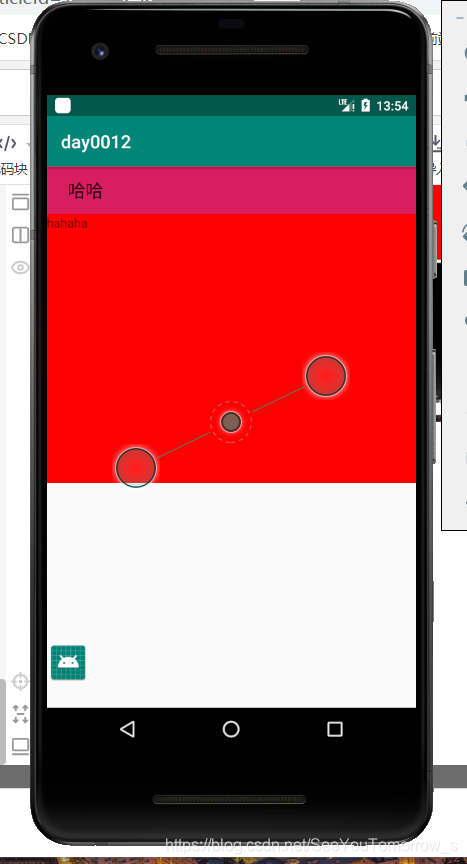
//效果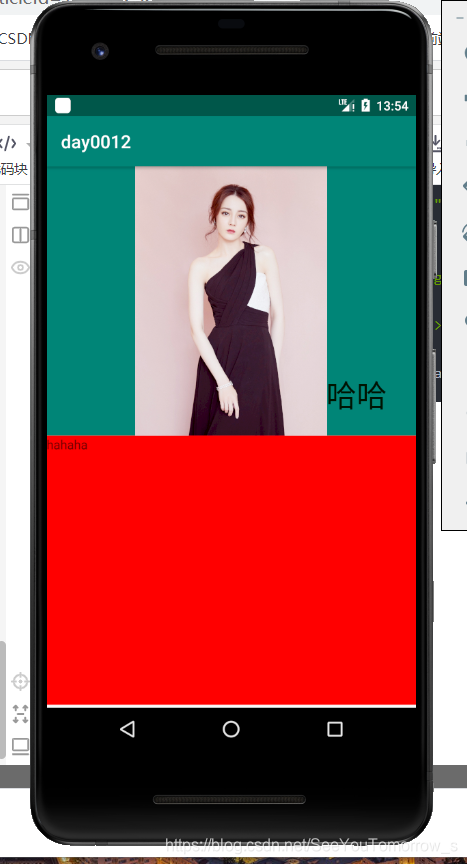
版权声明:本文为SeeYouTomorrow_s原创文章,遵循CC 4.0 BY-SA版权协议,转载请附上原文出处链接和本声明。