react-fileupload的安装
使用npm install react-fileupload --save 或 yarn react-fileupload 安装均可
使用方法
若在开发时用的是react@15.x的版本,直接引入一下代码即可使用
const FileUpload = require('react-fileupload');
...
render(){
	/*set properties*/
	const options={
		baseUrl:'http://127.0.0.1',
		param:{
			fid:0
		}
	}
	/*Use FileUpload with options*/
	/*Set two dom with ref*/
	return (
		<FileUpload options={options}>
			<button ref="chooseBtn">choose</button>
			<button ref="uploadBtn">upload</button>
		</FileUpload>
	)
}
但此代码并不适用于react@16.x的版本
属性值
react-fileupload的属性有很多,这里只对常用的属性进行介绍,其余属性详见github官网
- baseUrl:图片上传后提交的目标地址
- fileFieldName:为此类提交的图片起一个键名作为标识符
- dataType:回应的格式
- chooseAndUpload:是否在选择图片时自动提交
- uploadSuccess:成功提交后的回调函数
- uploadError:未能成功提交的回调函数
要注意的是,在chooseAndUpload属性为true的时候,提交按钮的ref值需要改成chooseAndUpload
以下是代码案例
import React, { Component } from 'react'
// 这里引入的是本地文件而不是下载的模块,是为了适配React@16.x的版本,这一块在后面会讲到
import FileUpload from './react-fileupload.jsx'

class FileUploader extends Component {
    constructor(props) {
        super(props)
        this.state = {

        }
    }

    render() {
        /*set properties*/
        const options={
            baseUrl: '/manage/product/upload.do',
            fileFieldName: 'upload_file',
            dataType: 'json',
            chooseAndUpload:true,
            uploadSuccess: (res)=>{
                this.props.onSuccess(res.data)
            },
            uploadError: (err)=>{
                this.props.onError(err.message||'上传失败')
            }
        }
        /*Use FileUpload with options*/
        /*Set two dom with ref*/
        return (
            <FileUpload options={options}>
                <button className="btn btn-xs btn-default" ref="chooseAndUpload">请选择图片</button>
            </FileUpload>
        )
    }
}
React@16.x的版本兼容
在上面提到,react-fileupload是基于react@15.x的版本开发的,而react的一大特点就是新版本对旧版本不兼容,这里给出在react@16.x版本下使用react-fileupload的方法
由于源代码就已经不兼容react@16.x,因此我们需要将源代码取出进行改写,首先找到node_modules里面react-fileupload的源码文件,即下图中的FileUpload.js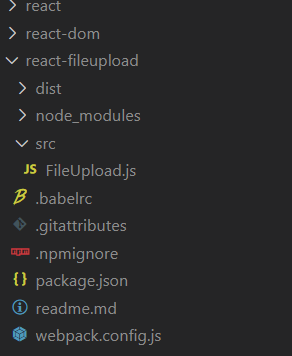
将FileUpload.js中的内容复制出来,并存放到本地目录的文件中,然后开始改写
这里我先给出我改好后的文件,直接复制到本地文件后引入即可使用,具体修改方法放到代码后面,需要安装prop-types,安装方法直接使用npm install prop-types --save 或 yarn add prop-types即可
import React from 'react'
import PT from 'prop-types';
const emptyFunction = function() {}
/*当前IE上传组的id*/
let currentIEID = 0
/*存放当前IE上传组的可用情况*/
const IEFormGroup = [true]
/*当前xhr的数组(仅有已开始上传之后的xhr)*/
let xhrList = []
let currentXHRID = 0
class FileUpload extends React.Component{
constructor(props){
super(props);
this.state={
chooseBtn: {}, //选择按钮。如果chooseAndUpload=true代表选择并上传。
uploadBtn: {}, //上传按钮。如果chooseAndUpload=true则无效。
before: [], //存放props.children中位于chooseBtn前的元素
middle: [], //存放props.children中位于chooseBtn后,uploadBtn前的元素
after: []
}
}
/*根据props更新组件*/
_updateProps(props) {
this.isIE = !(this.checkIE() < 0 || this.checkIE() >= 10)
const options = props.options
this.baseUrl = options.baseUrl //域名
this.param = options.param //get参数
this.chooseAndUpload = options.chooseAndUpload || false //是否在用户选择了文件之后立刻上传
this.paramAddToField = options.paramAddToField || undefined //需要添加到FormData的对象。不支持IE
/*upload success 返回resp的格式*/
this.dataType = 'json'
options.dataType && (options.dataType.toLowerCase() == 'text') && (this.dataType = 'text')
this.wrapperDisplay = options.wrapperDisplay || 'inline-block' //包裹chooseBtn或uploadBtn的div的display
this.timeout = (typeof options.timeout == 'number' && options.timeout > 0) ? options.timeout : 0 //超时时间
this.accept = options.accept || '' //限制文件后缀
this.multiple = options.multiple || false
this.numberLimit = options.numberLimit || false //允许多文件上传时,选择文件数量的限制
this.fileFieldName = options.fileFieldName || false //文件附加到formData上时的key,传入string指定一个file的属性名,值为其属性的值。不支持IE
this.withCredentials = options.withCredentials || false //跨域时是否使用认证信息
this.requestHeaders = options.requestHeaders || false //要设置的请求头键值对
/*生命周期函数*/
/**
* beforeChoose() : 用户选择之前执行,返回true继续,false阻止用户选择
* @param null
* @return {boolean} 是否允许用户进行选择
*/
this.beforeChoose = options.beforeChoose || emptyFunction
/**
* chooseFile(file) : 用户选择文件后的触发的回调函数
* @param file {File | string} 现代浏览器返回File对象,IE返回文件名
* @return
*/
this.chooseFile = options.chooseFile || emptyFunction
/**
* beforeUpload(file,mill) : 用户上传之前执行,返回true继续,false阻止用户选择
* @param file {File | string} 现代浏览器返回File对象,IE返回文件名
* @param mill {long} 毫秒数,如果File对象已有毫秒数则返回一样的
* @return {boolean || object} 是否允许用户进行上传 (hack:如果是obj{
* assign:boolean 默认true
* param:object
* }), 则对本次的param进行处理
*/
this.beforeUpload = options.beforeUpload || emptyFunction
/**
* doUpload(file,mill) : 上传动作(xhr send | form submit)执行后调用
* @param file {File | string} 现代浏览器返回File对象,IE返回文件名
* @param mill {long} 毫秒数,如果File对象已有毫秒数则返回一样的
* @return
*/
this.doUpload = options.doUpload || emptyFunction
/**
* uploading(progress) : 在文件上传中的时候,浏览器会不断触发此函数。IE中使用每200ms触发的假进度
* @param progress {Progress} progress对象,里面存有例如上传进度loaded和文件大小total等属性
* @return
*/
this.uploading = options.uploading || emptyFunction
/**
* uploadSuccess(resp) : 上传成功后执行的回调(针对AJAX而言)
* @param resp {json | string} 根据options.dataType指定返回数据的格式
* @return
*/
this.uploadSuccess = options.uploadSuccess || emptyFunction
/**
* uploadError(err) : 上传错误后执行的回调(针对AJAX而言)
* @param err {Error | object} 如果返回catch到的error,其具有type和message属性
* @return
*/
this.uploadError = options.uploadError || emptyFunction
/**
* uploadFail(resp) : 上传失败后执行的回调(针对AJAX而言)
* @param resp {string} 失败信息
*/
this.uploadFail = options.uploadFail || emptyFunction
/**
* onabort(mill, xhrID) : 主动取消xhr进程的响应
* @param mill {long} 毫秒数,本次上传时刻的时间
* @param xhrID {int} 在doUpload时会返回的当次xhr代表ID
*/
this.onabort = options.onabort || emptyFunction
this.files = options.files || this.files || false //保存需要上传的文件
/*特殊内容*/
/*IE情况下,由于上传按钮被隐藏的input覆盖,不能进行disabled按钮处理。
* 所以当disabledIEChoose为true(或者func返回值为true)时,禁止IE上传。
*/
this.disabledIEChoose = options.disabledIEChoose || false
this._withoutFileUpload = options._withoutFileUpload || false //不带文件上传,为了给秒传功能使用,不影响IE
this.filesToUpload = options.filesToUpload || [] //使用filesToUpload()方法代替
this.textBeforeFiles = options.textBeforeFiles || false //make this true to add text fields before file data
/*使用filesToUpload()方法代替*/
if (this.filesToUpload.length && !this.isIE) {
this.filesToUpload.forEach( file => {
this.files = [file]
this.commonUpload()
})
}
/*放置虚拟DOM*/
let chooseBtn, uploadBtn, flag = 0
const before = [], middle = [], after = []
if (this.chooseAndUpload) {
React.Children.forEach(props.children, (child)=> {
if (child && child.ref == 'chooseAndUpload') {
chooseBtn = child
flag++
} else {
flag == 0 ? before.push(child) : flag == 1 ? middle.push(child) : ''
}
})
} else {
React.Children.forEach(props.children, (child)=> {
if (child && child.ref == 'chooseBtn') {
chooseBtn = child
flag++
} else if (child && child.ref == 'uploadBtn') {
uploadBtn = child
flag++
} else {
flag == 0 ? before.push(child) : flag == 1 ? middle.push(child) : after.push(child)
}
})
}
this.setState({
chooseBtn,
uploadBtn,
before,
middle,
after
})
}
/*触发隐藏的input框选择*/
/*触发beforeChoose*/
commonChooseFile() {
const jud = this.beforeChoose()
if (jud != true && jud != undefined) return
this.refs['ajax_upload_file_input'].click()
}
/*现代浏览器input change事件。File API保存文件*/
/*触发chooseFile*/
commonChange(e) {
let files
e.dataTransfer ? files = e.dataTransfer.files :
e.target ? files = e.target.files : ''
/*如果限制了多文件上传时的数量*/
const numberLimit = typeof this.numberLimit === 'function' ? this.numberLimit() : this.numberLimit
if(this.multiple && numberLimit && files.length > numberLimit) {
const newFiles = {}
for(let i = 0; i< numberLimit; i++) newFiles[i] = files[i]
newFiles.length = numberLimit
files = newFiles
}
this.files = files
this.chooseFile(files)
this.chooseAndUpload && this.commonUpload()
}
/*执行上传*/
commonUpload() {
/*mill参数是当前时刻毫秒数,file第一次进行上传时会添加为file的属性,也可在beforeUpload为其添加,之后同一文件的mill不会更改,作为文件的识别id*/
const mill = (this.files.length && this.files[0].mill) || (new Date).getTime()
const jud = this.beforeUpload(this.files, mill)
if (jud != true && jud != undefined && typeof jud != 'object') {
/*清除input的值*/
this.refs['ajax_upload_file_input'].value = ''
return
}
if (!this.files) return
if (!this.baseUrl) throw new Error('baseUrl missing in options')
/*用于存放当前作用域的东西*/
const scope = {}
/*组装FormData*/
let formData = new FormData()
/*If we need to add fields before file data append here*/
if(this.textBeforeFiles){
formData = this.appendFieldsToFormData(formData);
}
if (!this._withoutFileUpload) {
const fieldNameType = typeof this.fileFieldName
/*判断是用什么方式作为formdata item 的 name*/
Object.keys(this.files).forEach(key => {
if(key == 'length') return
if(fieldNameType == 'function') {
const file = this.files[key]
const fileFieldName = this.fileFieldName(file)
formData.append(fileFieldName, file)
}else if(fieldNameType == 'string') {
const file = this.files[key]
formData.append(this.fileFieldName, file)
}else {
const file = this.files[key]
formData.append(file.name, file)
}
})
}
/*If we need to add fields after file data append here*/
if(!this.textBeforeFiles){
formData = this.appendFieldsToFormData(formData);
}
const baseUrl = this.baseUrl
/*url参数*/
/*如果param是一个函数*/
const param = typeof this.param === 'function' ? this.param(this.files) : this.param
let paramStr = ''
if (param) {
const paramArr = []
param['_'] = mill
Object.keys(param).forEach(key =>
paramArr.push(`${key}=${param[key]}`)
)
paramStr = '?' + paramArr.join('&')
}
const targeturl = baseUrl + paramStr
/*AJAX上传部分*/
const xhr = new XMLHttpRequest()
xhr.open('POST', targeturl, true)
/*跨域是否开启验证信息*/
xhr.withCredentials = this.withCredentials
/*是否需要设置请求头*/
const rh = this.requestHeaders
rh && Object.keys(rh).forEach(key =>
xhr.setRequestHeader(key, rh[key])
)
/*处理超时。用定时器判断超时,不然xhr state=4 catch的错误无法判断是超时*/
if(this.timeout) {
xhr.timeout = this.timeout
xhr.ontimeout = () => {
this.uploadError({type: 'TIMEOUTERROR', message: 'timeout'})
scope.isTimeout = false
}
scope.isTimeout = false
setTimeout(()=>{
scope.isTimeout = true
},this.timeout)
}
xhr.onreadystatechange = () => {
/*xhr finish*/
try {
if (xhr.readyState == 4 && xhr.status >= 200 && xhr.status < 400) {
const resp = this.dataType == 'json' ? JSON.parse(xhr.responseText) : xhr.responseText
this.uploadSuccess(resp)
} else if (xhr.readyState == 4) {
/*xhr fail*/
const resp = this.dataType == 'json' ? JSON.parse(xhr.responseText) : xhr.responseText
this.uploadFail(resp)
}
} catch (e) {
/*超时抛出不一样的错误,不在这里处理*/
!scope.isTimeout && this.uploadError({type: 'FINISHERROR', message: e.message})
}
}
/*xhr error*/
xhr.onerror = () => {
try {
const resp = this.dataType == 'json' ? JSON.parse(xhr.responseText) : xhr.responseText
this.uploadError({type: 'XHRERROR', message: resp})
} catch (e) {
this.uploadError({type: 'XHRERROR', message: e.message})
}
}
/*这里部分浏览器实现不一致,而且IE没有这个方法*/
xhr.onprogress = xhr.upload.onprogress = progress => {
this.uploading(progress, mill)
}
/*不带文件上传,给秒传使用*/
this._withoutFileUpload ? xhr.send(null) : xhr.send(formData)
/*保存xhr id*/
xhrList.push(xhr)
const cID = xhrList.length - 1
currentXHRID = cID
/*有响应abort的情况*/
xhr.onabort = () => this.onabort(mill, cID)
/*trigger执行上传的用户回调*/
this.doUpload(this.files, mill, currentXHRID)
/*清除input的值*/
this.refs['ajax_upload_file_input'].value = ''
}
/*组装自定义添加到FormData的对象*/
appendFieldsToFormData(formData){
const field = typeof this.paramAddToField == 'function' ? this.paramAddToField() : this.paramAddToField
field &&
Object.keys(field).map(index=>
formData.append(index, field[index])
)
return formData
}
/*iE选择前验证*/
/*触发beforeChoose*/
IEBeforeChoose(e) {
const jud = this.beforeChoose()
jud != true && jud != undefined && e.preventDefault()
}
/*IE需要用户真实点击上传按钮,所以使用透明按钮*/
/*触发chooseFile*/
IEChooseFile(e) {
this.fileName = e.target.value.substring(e.target.value.lastIndexOf('\\') + 1)
this.chooseFile(this.fileName)
/*先执行IEUpload,配置好action等参数,然后submit*/
this.chooseAndUpload && (this.IEUpload() !== false) &&
document.getElementById(`ajax_upload_file_form_${this.IETag}${currentIEID}`).submit()
e.target.blur()
}
/*IE处理上传函数*/
/*触发beforeUpload doUpload*/
IEUpload(e) {
const mill = (new Date).getTime()
const jud = this.beforeUpload(this.fileName, mill)
if(!this.fileName || (jud != true && jud != undefined) ) {
e && e.preventDefault()
return false
}
const that = this
/*url参数*/
const baseUrl = this.baseUrl
const param = typeof this.param === 'function' ? this.param(this.fileName) : this.param
let paramStr = ''
if (param) {
const paramArr = []
param['_'] = mill
param['ie'] === undefined && (param['ie'] = 'true')
for (const key in param) {
if(param[key] != undefined) paramArr.push(`${key}=${param[key]}`)
}
paramStr = '?' + paramArr.join('&')
}
const targeturl = baseUrl + paramStr
document.getElementById(`ajax_upload_file_form_${this.IETag}${currentIEID}`).setAttribute('action', targeturl)
/*IE假的上传进度*/
const getFakeProgress = this.fakeProgress()
let loaded = 0,
count = 0
const progressInterval = setInterval(() => {
loaded = getFakeProgress(loaded)
this.uploading({
loaded,
total: 100
},mill)
/*防止永久执行,设定最大的次数。暂时为30秒(200*150)*/
++count >= 150 && clearInterval(progressInterval)
},200)
/*当前上传id*/
const partIEID = currentIEID
/*回调函数*/
window.attachEvent ?
document.getElementById(`ajax_upload_file_frame_${this.IETag}${partIEID}`).attachEvent('onload', handleOnLoad) :
document.getElementById(`ajax_upload_file_frame_${this.IETag}${partIEID}`).addEventListener('load', handleOnLoad)
function handleOnLoad() {
/*clear progress interval*/
clearInterval(progressInterval)
try {
that.uploadSuccess(that.IECallback(that.dataType, partIEID))
} catch (e) {
that.uploadError(e)
} finally {
/*清除输入框的值*/
const oInput = document.getElementById(`ajax_upload_hidden_input_${that.IETag}${partIEID}`)
oInput.outerHTML = oInput.outerHTML
}
}
this.doUpload(this.fileName, mill)
/*置为非空闲*/
IEFormGroup[currentIEID] = false
}
/*IE回调函数*/
//TODO 处理Timeout
IECallback(dataType, frameId) {
/*回复空闲状态*/
IEFormGroup[frameId] = true
const frame = document.getElementById(`ajax_upload_file_frame_${this.IETag}${frameId}`)
const resp = {}
const content = frame.contentWindow ? frame.contentWindow.document.body : frame.contentDocument.document.body
if(!content) throw new Error('Your browser does not support async upload')
try {
resp.responseText = content.innerHTML || 'null innerHTML'
resp.json = JSON ? JSON.parse(resp.responseText) : eval(`(${resp.responseText})`)
} catch (e) {
/*如果是包含了<pre>*/
if (e.message && e.message.indexOf('Unexpected token') >= 0) {
/*包含返回的json*/
if (resp.responseText.indexOf('{') >= 0) {
const msg = resp.responseText.substring(resp.responseText.indexOf('{'), resp.responseText.lastIndexOf('}') + 1)
return JSON ? JSON.parse(msg) : eval(`(${msg})`)
}
return {type: 'FINISHERROR', message: e.message}
}
throw e
}
return dataType == 'json' ? resp.json : resp.responseText
}
/*外部调用方法,主动触发选择文件(等同于调用btn.click()), 仅支持现代浏览器*/
forwardChoose() {
if(this.isIE) return false
this.commonChooseFile()
}
/**
* 外部调用方法,当多文件上传时,用这个方法主动删除列表中某个文件
* TODO: 此方法应为可以任意操作文件数组
* @param func 用户调用时传入的函数,函数接收参数files(filesAPI 对象)
* @return Obj File API 对象
* File API Obj:
* {
* 0 : file,
* 1 : file,
* length : 2
* }
*/
fowardRemoveFile(func) {
this.files = func(this.files)
}
/*外部调用方法,传入files(File API)对象可以立刻执行上传动作,IE不支持。调用随后会触发beforeUpload*/
filesToUpload(files) {
if(this.isIE) return
this.files = files
this.commonUpload()
}
/*外部调用方法,取消一个正在进行的xhr,传入id指定xhr(doupload时返回)或者默认取消最近一个。*/
abort(id) {
id === undefined ?
xhrList[currentXHRID].abort() :
xhrList[id].abort()
}
/*判断ie版本*/
checkIE() {
const userAgent = this.userAgent;
const version = userAgent.indexOf('MSIE')
if (version < 0) return -1
return parseFloat(userAgent.substring(version + 5, userAgent.indexOf(';', version)))
}
/*生成假的IE上传进度*/
fakeProgress() {
let add = 6
const decrease = 0.3,
end = 98,
min = 0.2
return (lastTime) => {
let start = lastTime
if (start >= end) return start
start += add
add = add - decrease
add < min && (add = min)
return start
}
}
getUserAgent() {
const userAgentString = this.props.options && this.props.options.userAgent;
const navigatorIsAvailable = typeof navigator !== 'undefined';
if (!navigatorIsAvailable && !userAgentString) {
throw new Error('\`options.userAgent\` must be set rendering react-fileuploader in situations when \`navigator\` is not defined in the global namespace. (on the server, for example)');
}
return navigatorIsAvailable ? navigator.userAgent : userAgentString;
}
componentWillMount() {
this.userAgent = this.getUserAgent();
this.isIE = !(this.checkIE() < 0 || this.checkIE() >= 10)
/*因为IE每次要用到很多form组,如果在同一页面需要用到多个<FileUpload>可以在options传入tag作为区分。并且不随后续props改变而改变*/
const tag = this.props.options && this.props.options.tag
this.IETag = tag ? tag+'_' : ''
this._updateProps(this.props)
}
componentDidMount() {
}
componentWillReceiveProps(newProps) {
this._updateProps(newProps)
}
render() {
return this._packRender()
}
/*打包render函数*/
_packRender() {
/*IE用iframe表单上传,其他用ajax Formdata*/
let render = ''
if (this.isIE) {
render = this._multiIEForm()
} else {
const restAttrs = {
accept: this.accept,
multiple: this.multiple
}
render = (
<div className={this.props.className} style={this.props.style}>
{this.state.before}
<div onClick={(e)=>{this.commonChooseFile(e)}}
style={{overflow:'hidden',postion:'relative',display:this.wrapperDisplay}}
>
{this.state.chooseBtn}
</div>
{this.state.middle}
<div onClick={(e)=>{this.commonUpload(e)}}
style={{
overflow: 'hidden',
postion: 'relative',
display: this.chooseAndUpload ? 'none' : this.wrapperDisplay
}}
>
{this.state.uploadBtn}
</div>
{this.state.after}
<input type="file" name="ajax_upload_file_input" ref="ajax_upload_file_input"
style={{display:'none'}} onChange={(e)=>{this.commonChange(e)}}
{...restAttrs}
/>
</div>
)
}
return render
}
/*IE多文件同时上传,需要多个表单+多个form组合。根据currentIEID代表有多少个form。*/
/*所有不在空闲(正在上传)的上传组都以display:none的形式插入,第一个空闲的上传组会display:block捕捉。*/
_multiIEForm() {
const formArr = []
let hasFree = false
/* IE情况下,由于上传按钮被隐藏的input覆盖,不能进行disabled按钮处理。
* 所以当disabledIEChoose为true(或者func返回值为true)时,禁止IE上传。
*/
const isDisabled =
typeof this.disabledIEChoose === 'function' ? this.disabledIEChoose() : this.disabledIEChoose
/*这里IEFormGroup的长度会变,所以不能存len*/
for(let i = 0; i<IEFormGroup.length; i++) {
_insertIEForm.call(this,formArr,i)
/*如果当前上传组是空闲,hasFree=true,并且指定当前上传组ID*/
if(IEFormGroup[i] && !hasFree) {
hasFree = true
currentIEID = i
}
/*如果所有上传组都不是空闲状态,push一个新增组*/
(i==IEFormGroup.length-1) && !hasFree && IEFormGroup.push(true)
}
return (
<div className={this.props.className} style={this.props.style} id="react-file-uploader">
{formArr}
</div>
)
function _insertIEForm(formArr,i) {
/*如果已经push了空闲组而当前也是空闲组*/
if(IEFormGroup[i] && hasFree) return
/*是否display*/
const isShow = IEFormGroup[i]
/*Input内联样式*/
const style = {
position:'absolute',
left:'-30px',
top:0,
zIndex:'50',
fontSize:'80px',
width:'200px',
opacity:0,
filter:'alpha(opacity=0)'
}
/*是否限制了文件后缀,以及是否disabled*/
const restAttrs = {
accept: this.accept,
disabled: isDisabled
}
const input =
<input type="file" name={`ajax_upload_hidden_input_${i}`} id={`ajax_upload_hidden_input_${i}`}
ref={`ajax_upload_hidden_input_${i}`} onChange={(e)=>{this.IEChooseFile(e)}} onClick={(e)=>{this.IEBeforeChoose(e)}}
style={style} {...restAttrs}
/>
i = `${this.IETag}${i}`
formArr.push((
<form id={`ajax_upload_file_form_${i}`} method="post" target={`ajax_upload_file_frame_${i}`}
key={`ajax_upload_file_form_${i}`}
encType="multipart/form-data" ref={`form_${i}`} onSubmit={(e)=>{this.IEUpload(e)}}
style={{display:isShow? 'block':'none'}}
>
{this.state.before}
<div style={{overflow:'hidden',position:'relative',display:'inline-block'}}>
{this.state.chooseBtn}
{/*input file 的name不能省略*/}
{input}
</div>
{this.state.middle}
<div style={{
overflow:'hidden',
position:'relative',
display:this.chooseAndUpload?'none':this.wrapperDisplay
}}
>
{this.state.uploadBtn}
<input type="submit"
style={{
position:'absolute',
left:0,
top:0,
fontSize:'50px',
width:'200px',
opacity:0
}}
/>
</div>
{this.state.after}
</form>
))
formArr.push((
<iframe id={`ajax_upload_file_frame_${i}`}
name={`ajax_upload_file_frame_${i}`}
key={`ajax_upload_file_frame_${i}`}
className="ajax_upload_file_frame"
style={{
display: 'none',
width: 0,
height: 0,
margin: 0,
border: 0
}}
>
</iframe>
))
}
}
}
FileUpload.propTypes = {
options: PT.shape({
/*basics*/
baseUrl: PT.string.isRequired,
param: PT.oneOfType([PT.object, PT.func]),
dataType: PT.string,
chooseAndUpload: PT.bool,
paramAddToField: PT.oneOfType([PT.object, PT.func]),
wrapperDisplay: PT.string,
timeout: PT.number,
accept: PT.string,
multiple: PT.bool,
numberLimit: PT.oneOfType([PT.number, PT.func]),
fileFieldName: PT.oneOfType([PT.string, PT.func]),
withCredentials: PT.bool,
requestHeaders: PT.object,
/*specials*/
tag: PT.string,
userAgent: PT.string,
disabledIEChoose: PT.oneOfType([PT.bool, PT.func]),
_withoutFileUpload: PT.bool,
filesToUpload: PT.arrayOf(PT.object),
textBeforeFiles: PT.bool,
/*funcs*/
beforeChoose: PT.func,
chooseFile: PT.func,
beforeUpload: PT.func,
doUpload: PT.func,
uploading: PT.func,
uploadSuccess: PT.func,
uploadError: PT.func,
uploadFail: PT.func,
onabort: PT.func
}).isRequired,
style: PT.object,
className: PT.string
};
export default FileUpload;
修改方法
- 将源文件中
const FileUpload = React.createClass方式创建的类改为class FileUpload extends React.Component(记得删掉多余的小括号) - 使用yarn或npm命令安装prop-types,在类外面指定FileUpload的propTypes属性,
FileUpload.propTypes = {xxx},并将源文件中propTypes的属性内容剪切到FileUpload.propTypes中,然后删除源文件里面的propTypes - 最后由于从方法转化到了类,需要将源文件中多余的逗号删除
- 将修改好的文件引入,即可在react@16.x的版本里使用react-fileupload
这样就完成了源文件的修改,实现react@16.x版本的兼容问题
版权声明:本文为weixin_45578112原创文章,遵循CC 4.0 BY-SA版权协议,转载请附上原文出处链接和本声明。