出错解决安装

wget https://dlcdn.apache.org/httpd/httpd-2.4.53.tar.gz  #下载
tar -zxvf httpd-2.4.53.tar.gz  #解压缩
cd httpd-2.4.53/  #进入
./configure --prefix=/user/local/httpd/  #检查编译环境

报错,缺少APR,下载APR进行安装
APR官方下载地址
wget https://dlcdn.apache.org//apr/apr-1.7.0.tar.gz  #下载
wget https://dlcdn.apache.org//apr/apr-util-1.6.1.tar.gz  #下载
tar -zxvf apr-1.7.0.tar.gz  #解压
cd apr-1.7.0/  #进入
#安装apr
./configure --prefix=/usr/local/apr  #检查编译环境

报错,缺少gcc编译器,安装gcc
yum install gcc -y #安装gcc
继续APR编译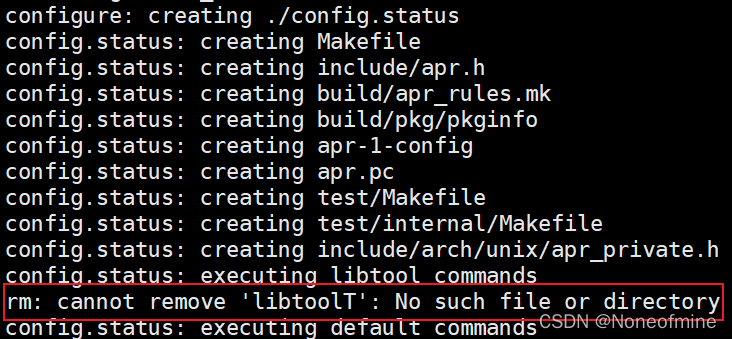
检查是否安装libtool,如未安装,执行安装
rpm -qa|grep libtool  #检查是否安装
yum install libtool -y  #安装libtool

之后继续安装,如依然报错,修改文件configure第31280行
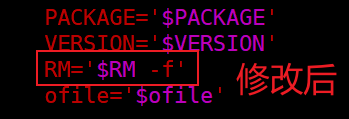
继续编译APR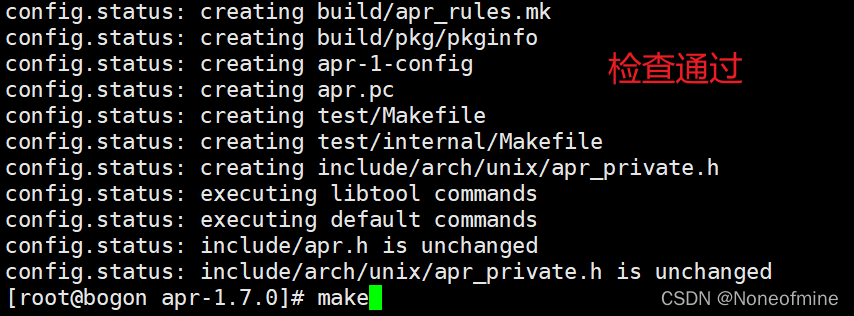
开始编译APR
make  #编译
make install  #编译安装
成功后安装apr-util
#安装apr-util
tar -zxvf apr-util-1.6.1.tar.gz  #解压
cd apr-util-1.6.1/  #进入apr-util
./configure --prefix=/usr/local/apr-util --with-apr=/usr/local/apr/bin/apr-1-config  #检查编译环境
make  #编译
报错,缺少expat包
安装expat包
yum install -y expat-devel*
继续编译安装apr-util
make && make install
继续检查HTTPd的编译环境
./configure --prefix=/usr/local/httpd
依然报错
添加apr和apr-util的路径
./configure --prefix=/usr/local/httpd --with-apr=/usr/local/apr/bin/apr-1-config --with-apr-util=/usr/local/apr-util/bin/apu-1-config

报错,缺少pcre
下载安装,pcre官网,pcre下载地址
wget https://github.com/PhilipHazel/pcre2/releases/download/pcre2-10.39/pcre2-10.39.tar.gz  #下载
tar -zxvf pcre2-10.39.tar.gz  #解压
./configure --perfix=/usr/local/pcre  #检查编译环境
make && make install  #编译安装
继续检查HTTPd的编译环境,添加pcre的路径
./configure --prefix=/usr/local/httpd --with-apr=/usr/local/apr/bin/apr-1-config --with-apr-util=/usr/local/apr-util/bin/apu-1-config --with-pcre=/usr/local/pcre/bin/pcre2-config
安装编译
make

报错,缺少libxml2-devel,安装
yum install -y libxml2-devel
重新删除编译安装apr,apr-util,httpd
顺畅安装
下载源码
#安装依赖文件
yum install gcc libtool expat-devel* libxml2-devel -y
#下载对应的安装包
cd /usr/src
wget https://dlcdn.apache.org/httpd/httpd-2.4.53.tar.gz
wget https://dlcdn.apache.org//apr/apr-1.7.0.tar.gz
wget https://dlcdn.apache.org//apr/apr-util-1.6.1.tar.gz
wget https://github.com/PhilipHazel/pcre2/releases/download/pcre2-10.39/pcre2-10.39.tar.gz
tar -zxvf apr-1.7.0.tar.gz
cd apr-1.7.0/
./configure --prefix=/usr/local/apr
make && make install
cd ..
tar -zxvf apr-util-1.6.1.tar.gz
cd apr-util-1.6.1/
./configure --prefix=/usr/local/apr-util --with-apr=/usr/local/apr/bin/apr-1-config
make && make install
cd ..
tar -zxvf pcre2-10.39.tar.gz
cd pcre2-10.39
./configure --prefix=/usr/local/pcre
make && make install
cd ..
tar -zxvf httpd-2.4.53.tar.gz
cd httpd-2.4.53/
./configure --prefix=/usr/local/httpd --with-apr=/usr/local/apr/bin/apr-1-config --with-apr-util=/usr/local/apr-util/bin/apu-1-config --with-pcre=/usr/local/pcre/bin/pcre2-config
make && make install
cd
设置防火墙
配置防火墙
firewall-cmd --permanent --add-service=http
或者将80端口配置到防火墙
firewall-cmd --permanent --add-port=80/tcp
重新启动防火墙
firewall-cmd --reload
启停HTTPD服务
方法一、
因为安装目录在 /usr/local/httpd下,因此命令为
/usr/local/httpd/bin/apachectl start
/usr/local/httpd/bin/apachectl stop
方法二、
设置连接
ln -s /usr/local/httpd/bin/* /usr/sbin/
httpd检测
httpd -t
启动或关闭服务
httpd -k start / stop
方法三、设置httpd为服务
cp /usr/local/httpd/bin/apcahectl /etc/init.d/httpd
ln -s /etc/rc.d/init.d/httpd /etc/rc.d/rc3.d/S61httpd

报错,配置httpd/conf/htttpd.conf文件,查找添加:
#ServerName www.example.com:80
ServerName localhost:80
之后重启
配置Apache
配置文件的内容:/usr/local/httpd/conf/httpd.conf
152行: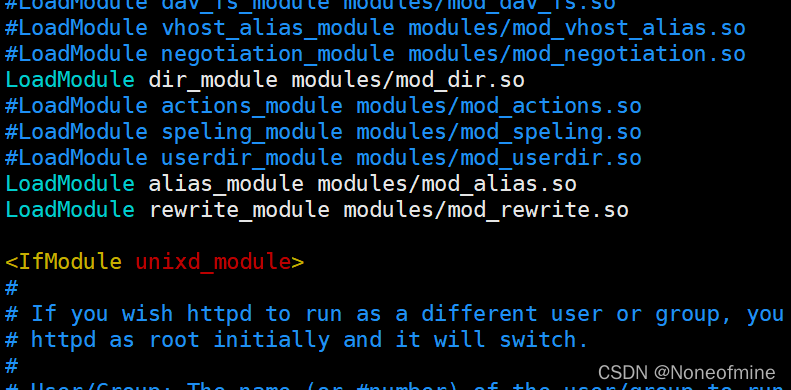
添加服务链接(195行)
修改发布主页目录(218行)
232行,239行:
添加php主页(252行)
编写测试网页
在/var/www/html/路径下编写index.html文件
<!DOCTYPE html>
<html>
<head>
<meta charset="utf-8">
</head>
<body>
    <h1>Test...</h1>
</body>
</html>
保存,之后使用打开http://localhost:80
能够打开就可以
参考
https://blog.csdn.net/qq_36700059/article/details/94547133
https://blog.csdn.net/IT_10/article/details/102880247
https://developer.aliyun.com/article/528230
https://blog.csdn.net/superbirds/article/details/52373102
https://jingyan.baidu.com/article/b907e627611f6b46e7891cb6.html
https://blog.csdn.net/szuwangjl/article/details/86486430
https://blog.csdn.net/luckily01/article/details/25572769
https://blog.csdn.net/weixin_44436677/article/details/122079984
https://blog.csdn.net/ljfrocky/article/details/45116227