今天学习了两个页面之间的数据传递,迫不及待的想的大家分享一下。
不要废话,请开始你的表演
不要急,我慢慢给你说
快点,我没时间
好,好,好
1.看图
完了!
完了?你是来骗点击量的吧!滚!!!!!!!~!
怎么可能,我还有后文。其实这是简单的入门,后面的都是建立在的基础上的。所以大家好好理解。
开始真正的表演:
1.首先建立两个页面,一个传递数据,一个接受数据。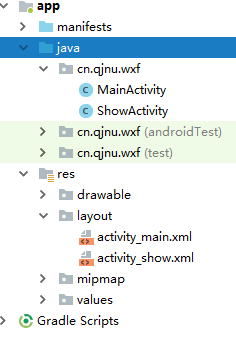
2.activity_main.xml
<?xml version="1.0" encoding="utf-8"?>
<LinearLayout xmlns:android="http://schemas.android.com/apk/res/android"
    xmlns:app="http://schemas.android.com/apk/res-auto"
    xmlns:tools="http://schemas.android.com/tools"
    android:layout_width="match_parent"
    android:layout_height="match_parent"
    android:orientation="vertical"
    android:padding="10dp"
    tools:context=".MainActivity">
    <ImageView
        android:id="@+id/imageView"
        android:layout_width="match_parent"
        android:layout_height="176dp"
        android:paddingTop="100dp"
        app:srcCompat="@drawable/qq" />
    <LinearLayout
        android:layout_width="match_parent"
        android:layout_height="wrap_content"
        android:paddingTop="50dp">
        <TextView
            android:layout_width="wrap_content"
            android:layout_height="wrap_content"
            android:textSize="24sp"
            android:text="用户名:"/>
        <EditText
            android:id="@+id/et_name"
            android:layout_width="match_parent"
            android:layout_height="wrap_content"
            android:hint="请输入用户名"
            android:inputType="text" />
    </LinearLayout>
    <LinearLayout
        android:layout_width="match_parent"
        android:layout_height="wrap_content"
        android:paddingTop="30dp"
        android:paddingBottom="30dp">
        <TextView
            android:layout_width="wrap_content"
            android:layout_height="wrap_content"
            android:textSize="24sp"
            android:text="密  码:"/>
        <EditText
            android:id="@+id/et_pwd"
            android:layout_width="match_parent"
            android:layout_height="wrap_content"
            android:hint="请输入密码"
            android:inputType="textPassword" />
    </LinearLayout>
    <Button
        android:id="@+id/login"
        android:layout_width="match_parent"
        android:layout_height="wrap_content"
        android:text="登录"/>
    <TextView
        android:layout_width="match_parent"
        android:layout_height="wrap_content"
        android:paddingTop="50dp"
        android:paddingLeft="250dp"
        android:text="忘记密码?"/>
</LinearLayout>
2.MainActivity.java
package cn.qjnu.wxf;
import android.content.Intent;
import android.support.v7.app.AppCompatActivity;
import android.os.Bundle;
import android.view.View;
import android.widget.Button;
import android.widget.EditText;

public class MainActivity extends AppCompatActivity {

    private EditText et_pwd;
    private  EditText et_name;
    private Button login;

    @Override
    protected void onCreate(Bundle savedInstanceState) {
        super.onCreate(savedInstanceState);
        setContentView(R.layout.activity_main);

        et_name = (EditText) findViewById(R.id.et_name);
        et_pwd = (EditText) findViewById(R.id.et_pwd);
        login = (Button) findViewById(R.id.login);

        login.setOnClickListener(new View.OnClickListener() {
            @Override
            public void onClick(View v) {
                passDate();
            }
        });
    }

    //数据传递
    public void passDate(){
        //创建Intent对象,启动第二个界面
        Intent intent = new Intent(this,ShowActivity.class);

        //上货(需要传递的数据)
        intent.putExtra("name",et_name.getText().toString().trim());
        intent.putExtra("pwd",et_pwd.getText().toString().trim());
        startActivity(intent);
    }
}
3.activity_shou.xml
<?xml version="1.0" encoding="utf-8"?>
<LinearLayout
    xmlns:android="http://schemas.android.com/apk/res/android"
    xmlns:app="http://schemas.android.com/apk/res-auto"
    xmlns:tools="http://schemas.android.com/tools"
    android:layout_width="match_parent"
    android:layout_height="match_parent"
    android:orientation="vertical"
    tools:context=".ShowActivity">

    <TextView
        android:id="@+id/tv_name"
        android:layout_width="match_parent"
        android:layout_height="wrap_content"
        android:paddingTop="20dp"
        android:textSize="26sp"
        android:text="用户名:"/>

    <TextView
        android:id="@+id/tv_pass"
        android:layout_width="match_parent"
        android:layout_height="wrap_content"
        android:textSize="26sp"
        android:paddingTop="20dp"
        android:text="密码:"/>
</LinearLayout>
3.ShowActivity.java
package cn.qjnu.wxf;
i
mport android.content.Intent;
import android.support.v7.app.AppCompatActivity;
import android.os.Bundle;
import android.widget.TextView;

public class ShowActivity extends AppCompatActivity {

    private TextView tv_name;
    private  TextView tv_pass;

    @Override
    protected void onCreate(Bundle savedInstanceState) {
        super.onCreate(savedInstanceState);
        setContentView(R.layout.activity_show);

        Intent intent = getIntent();

        String name = intent.getStringExtra("name");
        String pass = intent.getStringExtra("pwd");

        tv_name = (TextView) findViewById(R.id.tv_name);
        tv_pass = (TextView) findViewById(R.id.tv_pass);

        tv_name.setText("用户名:"+name);
        tv_pass.setText("密码:"+pass);
    }
}
总结:这是一个简单的数据传递,我们通过Intent来传递数据,在另一个界面也是通过Intent来接受传来的数据。
欢迎评论
喜欢关注!!!
版权声明:本文为weixin_43849104原创文章,遵循CC 4.0 BY-SA版权协议,转载请附上原文出处链接和本声明。