目录
前言
说起来条件编译,可能这个词有一点点陌生,但是如果之前接触过vue写法的话,那就很明白了;
就是v-if ,当满足对应的条件,展示对应的内容!
那么在React中的条件渲染当然采用的不是v-if,需要用自己React的条件渲染方式!
基础配置
<!DOCTYPE html>
<html lang="en">
<head>
    <meta charset="UTF-8">
    <title>Title</title>
</head>
<style>
    .other {
        color: #ff0000;
    }
</style>
<body>
<div id="app"></div>
<script src="https://cdn.staticfile.org/react/16.4.0/umd/react.development.js"></script>
<script src="https://cdn.staticfile.org/react-dom/16.4.0/umd/react-dom.development.js"></script>
<script src="https://cdn.staticfile.org/babel-standalone/6.26.0/babel.min.js"></script>
<script type="text/babel">
    const app = document.getElementById('app')

    class Demo extends React.Component {
        state = {
            type: 1
        }

        render() {
            const {type} = this.state
            return (
                <div>
                    {type}
                </div>
            );
        }
    }

    ReactDOM.render(<Demo/>, app)
</script>
</body>
</html>
页面展示

1. 声明一个函数,返回对应的内容
        //1. 第一种方法,声明函数返回dom
        showMsg = () => {
            let type = this.state.type
            if (type === 1) {
                return (<h2>第一种写法:type值等于1</h2>)
            } else {
                return (<h2 className="other">第一种写法:type值不等于1</h2>)
            }
        }
        render() {
            return (
                <div>
                    {this.showMsg()}
                </div>
            );
        }
页面展示:

2. 使用元素变量
        render() {
            const {type} = this.state
            //2. 第二种方法 声明变量 给变量赋值
            let test = null
            if (type === 1) {
                test = <h2>第二种写法:type值等于1</h2>
            } else {
                test = <h2 className="other">第二种写法:type值不等于1</h2>
            }
            return (
                <div>
                    {test}
                </div>
            );
        }
页面展示:

3. 使用三目运算符
        render() {
            const {type} = this.state
            return (
                <div>
                    {
                        //3. 第三种方法,利用三元运算符渲染需要渲染的变量
                        type === 1 ? <h2>第三种写法:type值等于1</h2> :
                        <h2 className="other">第三种写法:type值不等于1</h2>
                    }
                </div>
            );
        }
页面展示:

4. 使用与运算符&&
        render() {
            const {type} = this.state
            return (
                <div>
                    {type === 1 && <h2>第四种写法:type值等于1</h2>}
                    {type !== 1 && <h2 className="other">第四种写法:type值不等于1</h2>}
                </div>
            );
        }
页面展示:

总结
我这边开发中使用频率比较高的,应该是第三种和第四种: 三目运算符,用于一个值为真或者为假;与运算符用于写,多个类型值展示不同的内容
完整示例
<script type="text/babel">
    const app = document.getElementById('app')

    class Demo extends React.Component {
        state = {
            type: 1
        }
        //1. 第一种方法,声明函数返回dom
        showMsg = () => {
            let type = this.state.type
            if (type === 1) {
                return (<h2>第一种写法:type值等于1</h2>)
            } else {
                return (<h2 className="other">第一种写法:type值不等于1</h2>)
            }
        }

        render() {
            const {showMsg} = this
            const {type} = this.state
            //2. 第二种方法 声明变量 给变量赋值
            let test = null
            if (type === 1) {
                test = <h2>第二种写法:type值等于1</h2>
            } else {
                test = <h2 className="other">第二种写法:type值不等于1</h2>
            }

            return (
                <div>

                    {
                        //1. 第一种写法
                        showMsg()
                    }

                    {
                        // 2. 第二种写法
                        test
                    }
                    {
                        //3. 第三种方法,利用三元运算符渲染需要渲染的变量
                        type === 1 ? <h2>第三种写法:type值等于1</h2> : <h2 className="other">第三种写法:type值不等于1</h2>
                    }
                    {
                        // 4. 第四种方法,使用逻辑运算符
                        type === 1 && <h2>第四种写法:type值等于1</h2>
                    }
                    {type !== 1 && <h2 className="other">第四种写法:type值不等于1</h2>}
                </div>
            );
        }
    }

    ReactDOM.render(<Demo/>, app)
</script>
页面展示:
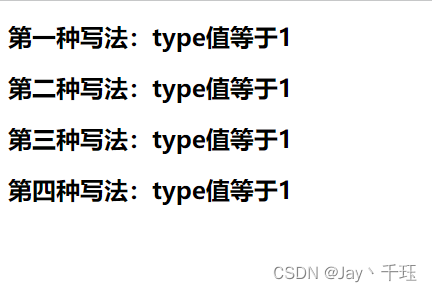
当我们随意改变state中的type值,只要不让 type ===1 就好,
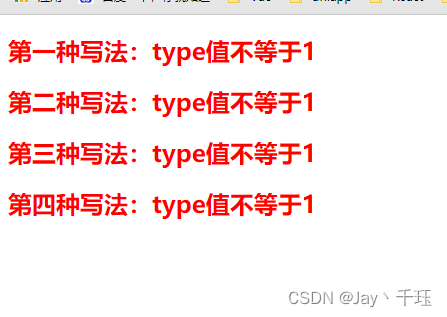
判断生效,问题不大
版权声明:本文为qq_42543244原创文章,遵循CC 4.0 BY-SA版权协议,转载请附上原文出处链接和本声明。