多队列网卡是一种技术,最初是用来解决网络IO QoS (quality of service)问题的,后来随着网络IO的带宽的不断提升,单核CPU不能完全处满足网卡的需求,通过多队列网卡驱动的支持,将各个队列通过中断绑定到不同的核上,以满足网卡的需求。同时也可以降低单个CPU的负载,提升系统的计算能力。
1.网卡多队列
1.1硬件是否支持网卡多队列
使用lspci -vvv命令查看网卡的参数。
Ethernet controller的条目内容,如果有MSI-X && Enable+ && TabSize > 1,则该网卡是多队列网卡,如图1.1所示。
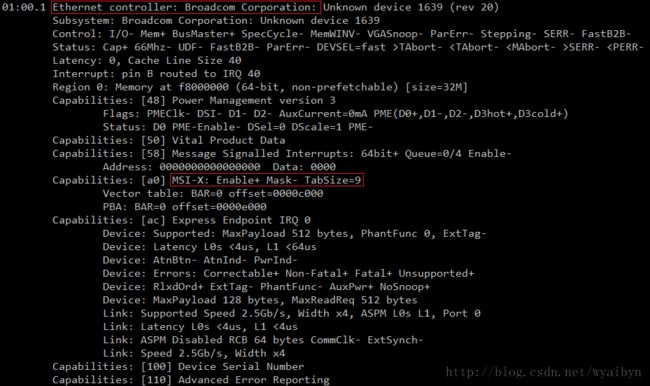
图1.1 lspci
Message Signaled Interrupts(MSI)是PCI规范的一个实现,可以突破CPU 256条interrupt的限制,使每个设备具有多个中断线变成可能,多队列网卡驱动给每个queue申请了MSI。MSI-X是MSI数组,Enable+指使能,TabSize是数组大小。 http://en.wikipedia.org/wiki/Message_Signaled_Interrupts
1.2如何打开网卡多队列
cat /etc/modprobe.conf查看网卡驱动。
broadcom网卡的驱动为e1000,默认打开网卡多队列。如图1.2。
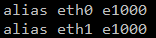
图1.2 broadcom e1000
intel网卡的驱动为igb,默认不打开网卡多队列,需要添加options igb RSS=8,8(不同网卡之间的配置用“逗号”隔开)。如图1.3。
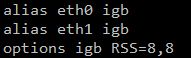
图1.3 intel igb
修改完驱动后需要重启。查看是否打开了网卡多队列,以broadcom网卡为例。cat /proc/interrupt | grep eth。产生了8个网卡队列,并且对应着不同的中断。如图1.4。
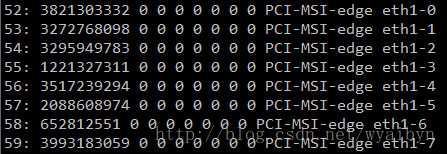
图1.4 打开网卡多队列
2.设置中断亲和性
2.1设置中断CPU亲和性方法
将中断52-59分别绑定到CPU0-7上。
echo "1" > /proc/irq/52/smp_affinity
echo "2" > /proc/irq/53/smp_affinity
echo "4" > /proc/irq/54/smp_affinity
echo "8" > /proc/irq/55/smp_affinity
echo "10" > /proc/irq/56/smp_affinity
echo "20" > /proc/irq/57/smp_affinity
echo "40" > /proc/irq/58/smp_affinity
echo "80" > /proc/irq/59/smp_affinity /proc/irq/${IRQ_NUM}/smp_affinity为中断号为IRQ_NUM的中断绑定的CPU核的情况。以十六进制表示,每一位代表一个CPU核。
1(00000001)代表CPU0
2(00000010)代表CPU1
3(00000011)代表CPU0和CPU1
2.2绑定脚本
摘自 https://code.google.com/p/ntzc/source/browse/trunk/zc/ixgbe/set_irq_affinity.sh
# setting up irq affinity according to /proc/interrupts
# 2008-11-25 Robert Olsson
# 2009-02-19 updated by Jesse Brandeburg
#
# > Dave Miller:
# (To get consistent naming in /proc/interrups)
# I would suggest that people use something like:
# char buf[IFNAMSIZ+6];
#
# sprintf(buf, "%s-%s-%d",
# netdev->name,
# (RX_INTERRUPT ? "rx" : "tx"),
# queue->index);
#
# Assuming a device with two RX and TX queues.
# This script will assign:
#
# eth0-rx-0 CPU0
# eth0-rx-1 CPU1
# eth0-tx-0 CPU0
# eth0-tx-1 CPU1
#
set_affinity()
{
MASK=$((1<
printf "%s mask=%X for /proc/irq/%d/smp_affinity\n" $DEV $MASK $IRQ
printf "%X" $MASK > /proc/irq/$IRQ/smp_affinity
#echo $DEV mask=$MASK for /proc/irq/$IRQ/smp_affinity
#echo $MASK > /proc/irq/$IRQ/smp_affinity
}
if [ "$1" = "" ] ; then
echo "Description:"
echo " This script attempts to bind each queue of a multi-queue NIC"
echo " to the same numbered core, ie tx0|rx0 --> cpu0, tx1|rx1 --> cpu1"
echo "usage:"
echo " $0 eth0 [eth1 eth2 eth3]"
fi
# check for irqbalance running
IRQBALANCE_ON=`ps ax | grep -v grep | grep -q irqbalance; echo $?`
if [ "$IRQBALANCE_ON" == "0" ] ; then
echo " WARNING: irqbalance is running and will"
echo " likely override this script's affinitization."
echo " Please stop the irqbalance service and/or execute"
echo " 'killall irqbalance'"
fi
#
# Set up the desired devices.
#
for DEV in $*
do
for DIR in rx tx TxRx
do
MAX=`grep $DEV-$DIR /proc/interrupts | wc -l`
if [ "$MAX" == "0" ] ; then
MAX=`egrep -i "$DEV:.*$DIR" /proc/interrupts | wc -l`
fi
if [ "$MAX" == "0" ] ; then
echo no $DIR vectors found on $DEV
continue
#exit 1
fi
for VEC in `seq 0 1 $MAX`
do
IRQ=`cat /proc/interrupts | grep -i $DEV-$DIR-$VEC"$" | cut -d: -f1 | sed "s/ //g"`
if [ -n "$IRQ" ]; then
set_affinity
else
IRQ=`cat /proc/interrupts | egrep -i $DEV:v$VEC-$DIR"$" | cut -d: -f1 | sed "s/ //g"`
if [ -n "$IRQ" ]; then
set_affinity
fi
fi
done
done
done
PS:从网上的资料来看,可以将一个中断绑定到多个CPU上。但是从实际操作情况,在我的服务器上只能将一个中断绑定到一个CPU上。设置绑定多个CPU无效。
3.参考
多队列简介 http://blog.csdn.net/turkeyzhou/article/details/7528182
linux内核对网卡驱动多队列的支持 http://blog.csdn.net/dog250/article/details/5303416
大量小包的CPU密集型系统调优案例一则 http://blog.netzhou.net/?p=181