IDEA开发环境下的servlet简单应用
实体类
package enty;

public class AccountBean {
    private String username;
    private String password;
    public String getUsername(){
        return username;
    }
    public String getPassword(){
        return password;
    }
    public void setUsername(String username){
        this.username=username;
    }
    public void setPassword(String password){
        this.password=password;
    }

}
Servlet类
package servlet;

import enty.AccountBean;

import javax.servlet.ServletException;
import javax.servlet.http.HttpServlet;
import javax.servlet.http.HttpServletRequest;
import javax.servlet.http.HttpServletResponse;
import javax.servlet.http.HttpSession;
import java.io.IOException;

public class CheckAccount extends HttpServlet {
    public void doGet(HttpServletRequest req, HttpServletResponse resp) throws ServletException, IOException {
       doGet(req,resp);
    }
    public void doPost(HttpServletRequest req, HttpServletResponse resp) throws ServletException, IOException{
        HttpSession session=req.getSession();
        AccountBean account=new AccountBean();
        String username=req.getParameter("username");
        String password=req.getParameter("password");
        if(username.equals("Andrew")&&password.equals("123456")) {
            account.setUsername(username);
            account.setPassword(password);
            session.setAttribute("account",account);
            resp.sendRedirect("success.jsp");
        }
        else
            resp.sendRedirect("error.jsp");
        return;
    }
}
将编译生成的.class文件放在WEB-INF\classes(classes目录自建)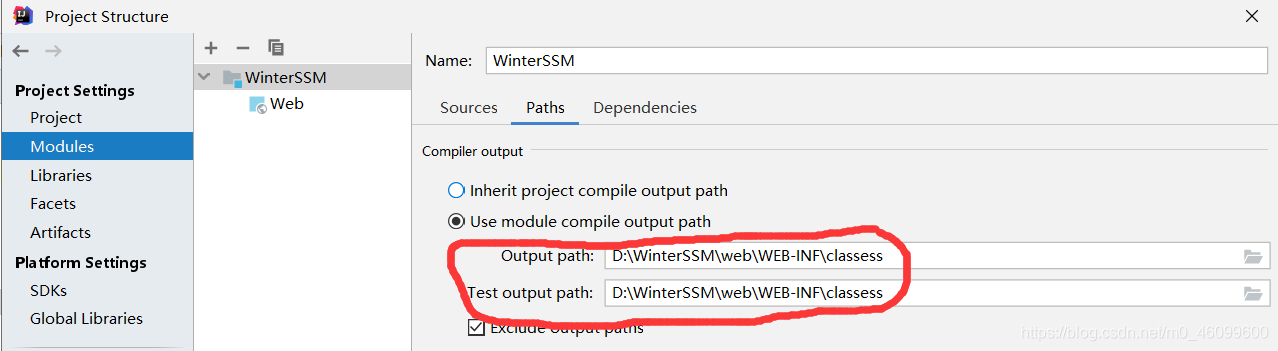
login.jsp
<%--
  Created by IntelliJ IDEA.
  User: 11723
  Date: 2021/1/14
  Time: 16:48
  To change this template use File | Settings | File Templates.
--%>
<%@ page contentType="text/html;charset=UTF-8" language="java" %>
<html>
<head>
    <title>Login</title>
</head>
<body>
<form action ="check.jsp" method="post">
    <center>
        用户名:
        <input type="text" name="username"/><br>

        密码:
        <input type="text" name="password"/><br>


        <input type="submit" />
    </center>
</form>
</body>
</html>
success.jsp
<%@ page import="enty.AccountBean" %><%--
  Created by IntelliJ IDEA.
  User: 11723
  Date: 2021/1/14
  Time: 16:41
  To change this template use File | Settings | File Templates.
--%>
<%@ page contentType="text/html;charset=UTF-8" language="java" %>
<html>
<head>
    <title>Success</title>
</head>
<body>
<%
    AccountBean account=(AccountBean)session.getAttribute("account");
    out.println("<h1>Welcome,"+account.getUsername()+"!<h1>");
%>
</body>
</html>
web.xml
<?xml version="1.0" encoding="UTF-8"?>
<web-app xmlns="http://xmlns.jcp.org/xml/ns/javaee"
         xmlns:xsi="http://www.w3.org/2001/XMLSchema-instance"
         xsi:schemaLocation="http://xmlns.jcp.org/xml/ns/javaee http://xmlns.jcp.org/xml/ns/javaee/web-app_4_0.xsd"
         version="4.0">
    <servlet>
        <servlet-name>CheckAccount</servlet-name>
        <servlet-class>servlet.CheckAccount</servlet-class>
    </servlet>
    <servlet-mapping>
        <servlet-name>CheckAccount</servlet-name>
        <url-pattern>/check.jsp</url-pattern>
    </servlet-mapping>
</web-app>
运行结果如下图

版权声明:本文为m0_46099600原创文章,遵循CC 4.0 BY-SA版权协议,转载请附上原文出处链接和本声明。