此弹窗用于给角色授权菜单、按钮权限,在树形节点中希望按钮节点能水平排列展示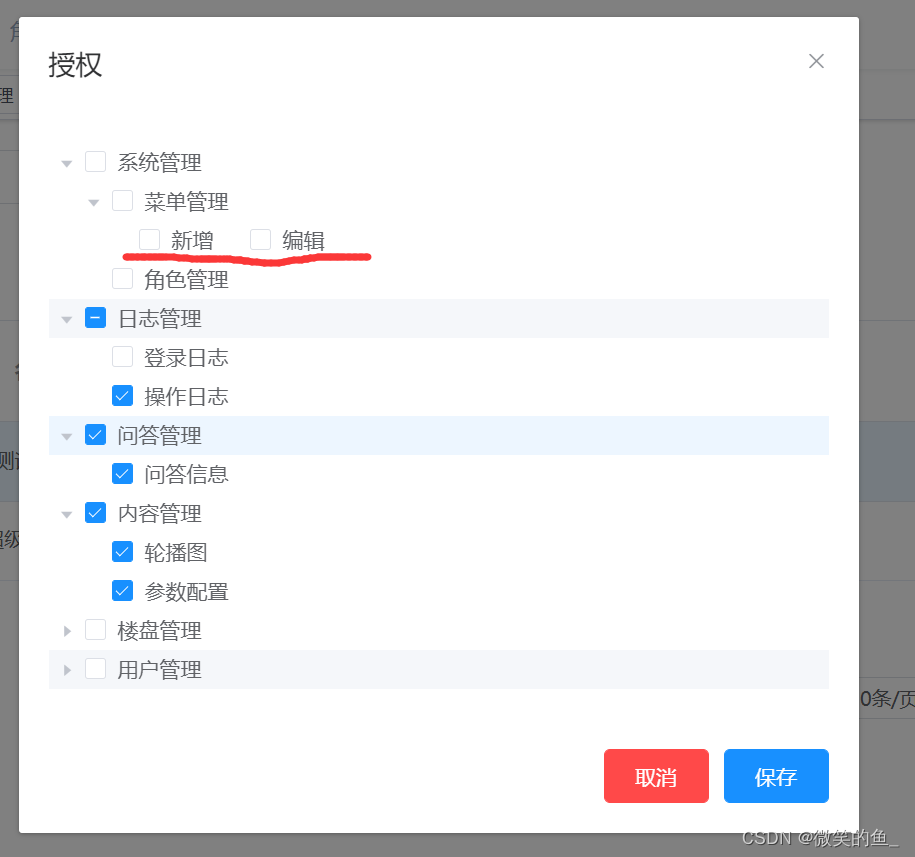
template: menuType ===2 用于判断是否是按钮节点,设置类名btn-node
<el-tree
  ref="tree"
  class="filter-tree"
  node-key="id"
  show-checkbox
  highlight-current
  default-expand-all
  :data="list">
  <span v-if="data.menuType === 2" class="btn-node" slot-scope="{ data }">
    <span>{{ data.menuName }}</span>
  </span>
  <span v-else class="custom-tree-node" slot-scope="{ data }">
    <span>{{ data.menuName }}</span>
  </span>
</el-tree>
method: changeTreeClass方法用于设置自定义样式,且必须在树形节点渲染完后调用
// 获取树形菜单
async getMenuTree() {
  this.listLoading = true
  const { data } = await this.$api.system.getMenuTreeList(this.infoObj.id)
  this.list = data
  this.listLoading = false
  this.getRoleMenuIds()
  setTimeout(() => {
    this.changeTreeClass()
  },0)
},
// 设置按钮节点水平排列
changeTreeClass() {
   var classDomList = document.getElementsByClassName('btn-node')
   for(let i=0;i<classDomList.length;i++) {
    // 给自定义class节点的父节点设置样式
     classDomList[i].parentNode.style.float = 'left'
     classDomList[i].parentNode.style.paddingLeft = 0
     classDomList[i].parentNode.parentNode.style.paddingLeft = '36px'
   }
 },
 // 获取授权的菜单id集合,回显已授权节点
async getRoleMenuIds() {
  this.listLoading = true
  const { data } = await this.$api.system.getRoleMenuIds(this.infoObj.id)
  this.menuIds = data.menuIds
  this.listLoading = false
  this.menuIds.forEach((i) => {
    var node = this.$refs['tree'].getNode(i);
    if(node.isLeaf){
      this.$refs['tree'].setChecked(node,true)
    }
  })
},
// 保存授权的节点
handleSubmit() {
  //获取所有选中的子节点
  let checkedKeys = this.$refs['tree'].getCheckedKeys()
  //获取所有选中的父节点(半选中)
  let hafCheckedKeys = this.$refs['tree'].getHalfCheckedKeys()
  //组合
  let menuIds = checkedKeys.concat(hafCheckedKeys)

  this.$api.system.authorRole(this.infoObj.id, menuIds).then(res => {
    if(res.code === 200) {
      this.$message.success('授权成功!')
    }else {
      this.$message.info('授权失败:' + msg)
    }
    this.getRoleMenuIds()
  })
}
版权声明:本文为qq_30907845原创文章,遵循CC 4.0 BY-SA版权协议,转载请附上原文出处链接和本声明。