
Error starting ApplicationContext. To display the conditions report re-run your application with 'debug' enabled.
2020-12-28 19:20:59.033 ERROR 8824 --- [           main] o.s.b.d.LoggingFailureAnalysisReporter   :

***************************
APPLICATION FAILED TO START
***************************

Description:

Failed to configure a DataSource: 'url' attribute is not specified and no embedded datasource could be configured.

Reason: Failed to determine a suitable driver class


Action:

Consider the following:
	If you want an embedded database (H2, HSQL or Derby), please put it on the classpath.
	If you have database settings to be loaded from a particular profile you may need to activate it (no profiles are currently active).
1、问题:
Failed to configure a DataSource: ‘url’ attribute is not specified and no embedded datasource could be configured.
Reason: Failed to determine a suitable driver class
2、这两句话翻译过来
无法配置数据源:没有设置指定’url’属性,并且无法配置任何数据源。
原因:无法确定合适的驱动程序类别
3、我绝对是设置了url和数据源的
阿里的druid数据库连接池,url也写的很全,但是就是有问题。
4、解决办法
我估计是spring 扫描不到这个数据源配置,然后我一点一点找错,试了一下午,程序感觉要崩溃了后来test都运行不了了,我就又新建了一个项目,导入依赖后挨个试到底是哪个配置出了问题。
终于,功夫不负有心人,我找到错误原因了!!!
mybatis需要mapper.xml文件,这个文件我一般放到Dao包下,扫描配置文件一般是扫描resources目录下的,所以需要手动配置xml文件在项目启动时候就导入进去,防止Not found mapper.xml
正是下面这行代码我也不知道具体原因为什么导入xml,我resources下的application.yaml内的数据源属性导入不进去呢?
我猜测是springboot一般管理资源文件都在resources目录下而且springboot是约定大于配置,但是我将文件放到java目录下,并自己在maven里面导入这个资源文件可能破坏了约定,可能springboot就以为我要自己管理文件了,就没有自动装配扫描到yaml下的配置源,从而报错。
解决办法
第一种:保留上面的段代码并自定义一个@Configurer标注的,自己手动配置数据源的全部属性,而不是springboot的自动装配。
第二种:删除上面的代码将mapper.xml放到resources目录下,全自动交给springboot管理
【注意】第二种,必须在resources目录下新建和java目录下的mapper.java一样的目录位置,这样运行项目时候才能将xml和java放在一个包下,Spring才能找到并自动装配。

项目启动生成看一下生成的target,确实在同一个目录下,这样就成功了。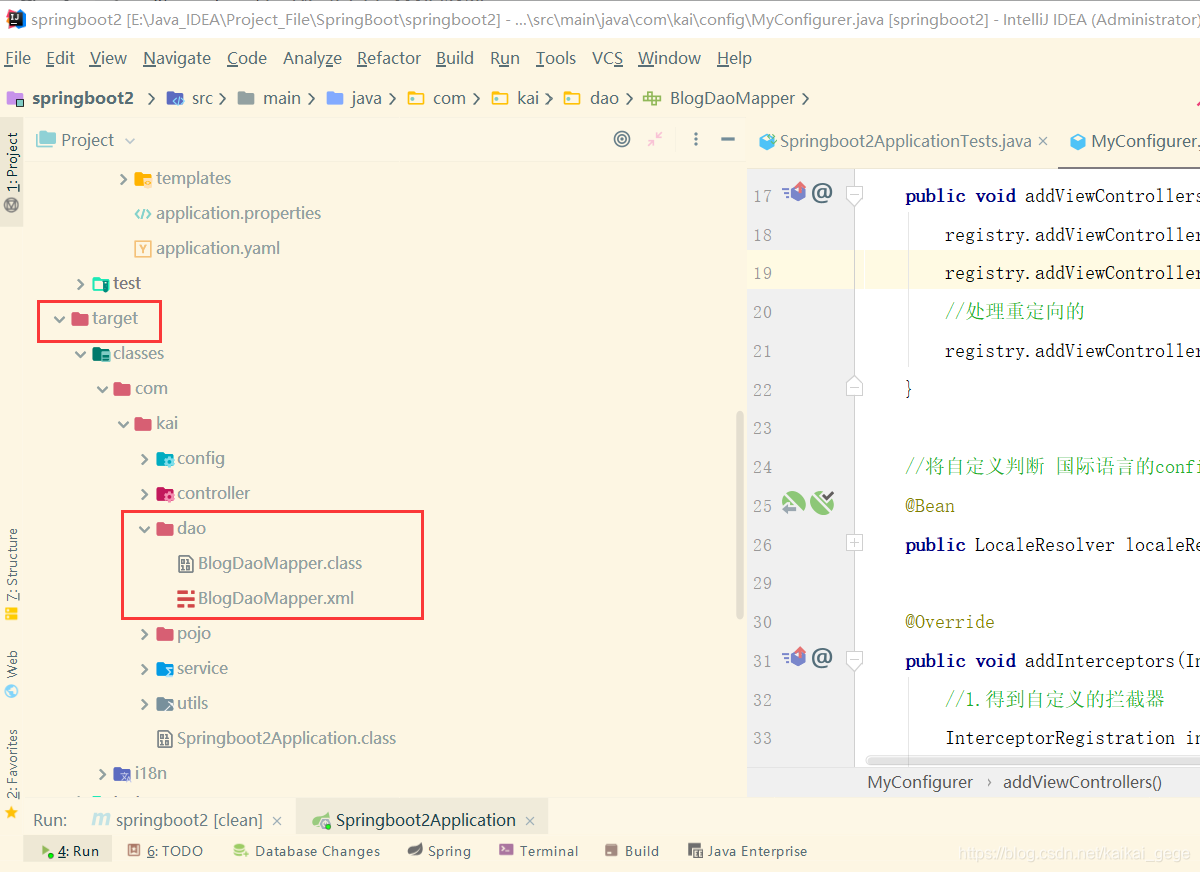
第三种
将这些配置文件先导入进去
        <resources>
            <!-- 防止找不到mybatis的mapper.xml文件,在项目启动时候就导入进去-->
            <resource>
                <directory>src/main/java</directory>
                <includes>
                    <include>**/*.xml</include>
                </includes>
                <filtering>true</filtering>
            </resource>

            <resource>
                <directory>src/main/resources</directory>
                <includes>
                    <include>**/*.xml</include>
                    <include>**/*.properties</include>
                    <include>**/*.yaml</include>
                </includes>
                <filtering>true</filtering>
            </resource>

        </resources>