修改后的样式

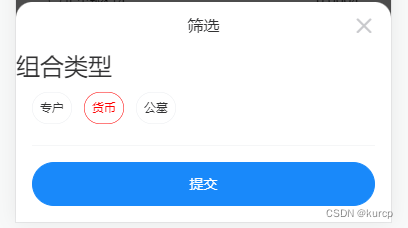
vant 官网样例
<van-field name="checkbox" label="复选框">
  <template #input>
    <van-checkbox v-model="checkbox" shape="square" />
  </template>
</van-field>
<van-field name="checkboxGroup" label="复选框组">
  <template #input>
    <van-checkbox-group v-model="checkboxGroup" direction="horizontal">
      <van-checkbox name="1" shape="square">复选框 1</van-checkbox>
      <van-checkbox name="2" shape="square">复选框 2</van-checkbox>
    </van-checkbox-group>
  </template>
</van-field>


export default {
  data() {
    return {
      checkbox: false,
      checkboxGroup: [],
    };
  },
};
vant 复选框只能修改图标的样式,将图标修改为button按钮即可
修改后代码
<van-field name="checkboxGroup" label="" class="checkstyle">
   <template #input>
      <van-checkbox-group v-model="Filtercriteria.checkboxGroup" direction="horizontal">
         <van-checkbox shape="square"  name="专户" style="margin-bottom:12px;">
            <template #icon="props">
               <van-button size="small" plain hairline round v-if="props.checked" color="red">专户</van-button>
               <van-button size="small" plain hairline round v-else>专户</van-button>
             </template>
         </van-checkbox>
         <van-checkbox shape="square"  name="货币" style="margin-bottom:12px;">
            <template #icon="props">
               <van-button size="small" plain hairline round v-if="props.checked" color="red">货币</van-button>
               <van-button size="small" plain hairline round v-else>货币</van-button>
             </template>
          </van-checkbox>
          <van-checkbox shape="square"  name="公墓" style="margin-bottom:12px;">
             <template #icon="props">
                <van-button size="small" plain hairline round v-if="props.checked" color="red">公墓</van-button>
                <van-button size="small" plain hairline round v-else>公墓</van-button>
              </template>
           </van-checkbox>
       </van-checkbox-group>
   </template>
</van-field>
<!-- <van-field name="checkboxGroup" label="" class="checkstyle">
        <template #input>
           <van-checkbox-group v-model="checkboxGroup" direction="horizontal">
              <van-checkbox shape="square" v-for="(item,index) in combinationtype" :key="index" :name="item.name" style="margin-bottom:12px;">
                 <template #icon="props">
                    <van-button size="small" plain hairline round v-if="props.checked" color="red">{{item.name}}</van-button>
                    <van-button size="small" plain hairline round v-else>{{item.name}}</van-button>
                 </template>
              </van-checkbox>
           </van-checkbox-group>
        </template>
     </van-field> -->


<style lang='less'>
.checkstyle{
  /deep/.van-checkbox__icon{
    height: 100%;
  }
}
</style>
单选框变按钮样式同理
<van-field name="radio">
   <template #input>
      <van-radio-group v-model="Filtercriteria.radio">
         <van-radio  name="专户" style="margin-bottom:12px;">
            <template #icon="props">
               <van-button size="small" plain hairline round  v-if="props.checked" color="red">专户</van-button>
               <van-button size="small" plain hairline round  v-else>专户</van-button>
             </template>
           </van-radio>
           <van-radio  name="货币" style="margin-bottom:12px;">
              <template #icon="props">
                 <van-button size="small" plain hairline round  v-if="props.checked" color="red">货币</van-button>
                 <van-button size="small" plain hairline round  v-else>货币</van-button>
               </template>
            </van-radio>
         </van-radio-group>
     </template>
  </van-field>

<style lang='less'>
/deep/ .van-radio__icon {
  height: 100% ;
}
</style>版权声明:本文为m0_59570698原创文章,遵循CC 4.0 BY-SA版权协议,转载请附上原文出处链接和本声明。