我想根据另一列的值,在一列上的数据框的红细胞中着色。
下面是一个例子:
df = pd.DataFrame([
  { 'color_A_in_red': True , 'A': 1 },
  { 'color_A_in_red': False , 'A': 2 },
  { 'color_A_in_red': True , 'A': 2 },
])
should give: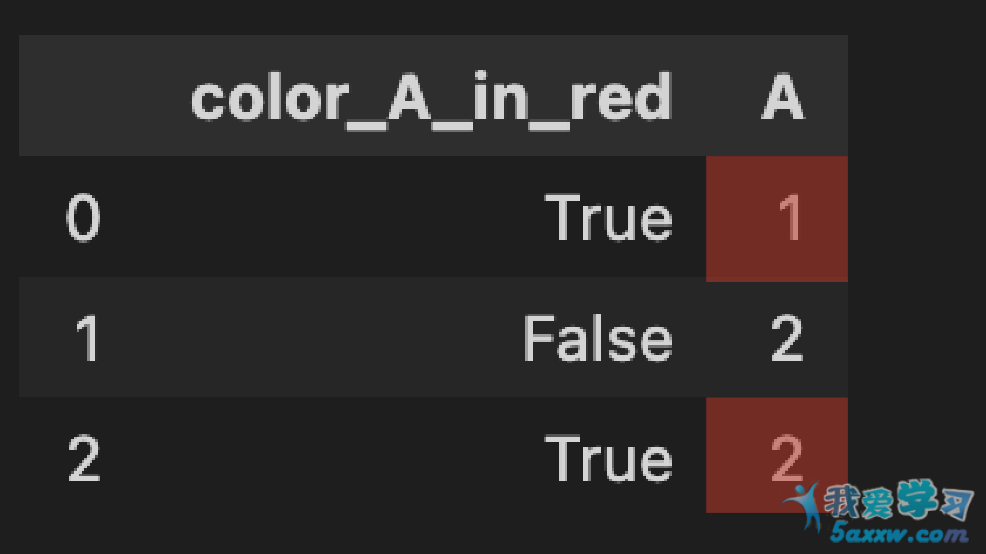
我知道如何将df的一个单元格涂成红色,但只基于这个单元格的值,而不是另一个单元格的值:
df_style = df.style
df_style.applymap(func=lambda x: 'background-color: red' if x == 2 else None, subset=['A'])
df_style
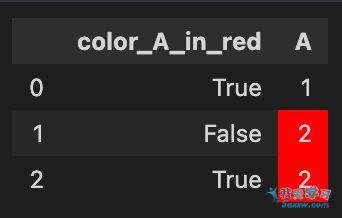
有没有一种方法可以根据另一列的值给数据框的单元格着色?
#############################
回答:
在这里,对样式的DataFrame使用自定义功能是最灵活的解决方案:
def highlight(x):
    c = f"background-color:red"
    #condition
    m = x["color_A_in_red"]
    # DataFrame of styles
    df1 = pd.DataFrame('', index=x.index, columns=x.columns)
    # set columns by condition
    df1.loc[m, 'A'] = c
    return df1


df.style.apply(highlight, axis=None)