第三方支付笔记:java接支付宝第三方支付
第一步:沙箱登录注册
支付宝官网的教程:https://opendocs.alipay.com/isv/009v0y
沙箱登录注册地址:https://open.alipay.com(因为是支付宝需支付宝扫码)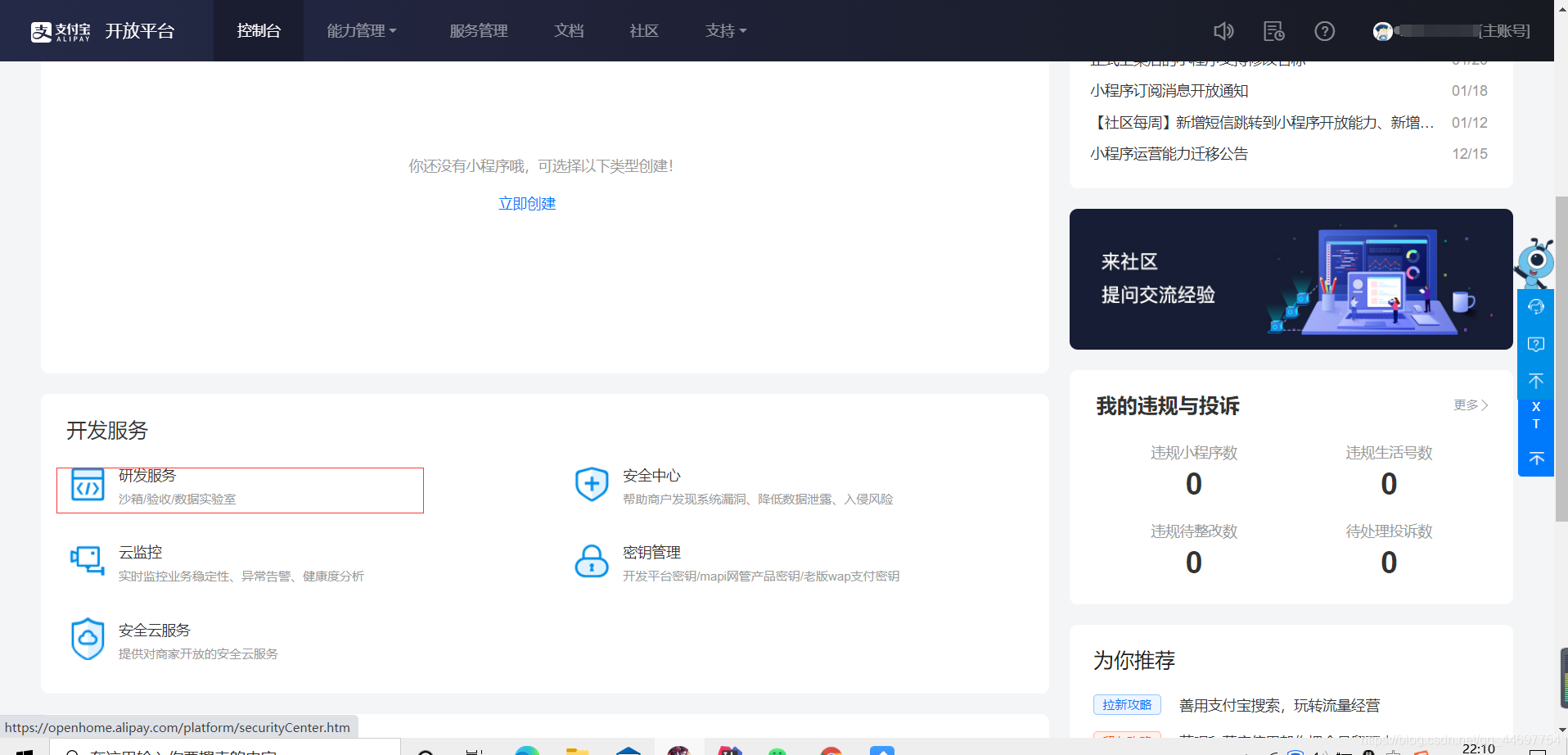
注册登录后,会进入控制台,点击研发服务。
进入看到沙箱,会看到自己的APPID等基本信息,java接入时需要。
第二步生成公钥私钥
支付宝公私钥的文档地址:https://opendocs.alipay.com/open/291/105971
因为比较勤奋,我点击第一个,无需下载
生成后将公钥放到的控制台,秘钥处(公钥,私钥都要保存)
连接第三方的基本信息搞定,接下来可以springboot进行测试
第三步springboot接入
网上代码测试:https://www.cnblogs.com/xifengxiaoma/p/10107635.html
主要依赖:
 <dependency>
            <groupId>com.alipay.sdk</groupId>
            <artifactId>alipay-sdk-java</artifactId>
            <version>3.1.0</version>
        </dependency>

        <!-- fastjson -->
        <dependency>
            <groupId>com.alibaba</groupId>
            <artifactId>fastjson</artifactId>
            <version>1.2.48</version>
        </dependency>

        <dependency>
            <groupId>org.springframework.boot</groupId>
            <artifactId>spring-boot-starter-web</artifactId>
        </dependency>
alipay.properties文件(需生成的公钥私钥,ID等):
支付宝接入环境配置文档:https://opendocs.alipay.com/open/200/105311
# 应用ID,您的APPID,收款账号既是您的APPID对应支付宝账号
appId:2021000117636117
# 商户私钥,您的PKCS8格式RSA2私钥
privateKey: (自己生成的私钥)
# 支付宝公钥,查看地址:https://openhome.com/platform/keyManage.htm 对应APPID下的支付宝公钥。
publicKey: (自己生成的公钥)
# 服务器异步通知页面路径需http://格式的完整路径,不能加?id=123这类自定义参数
#notifyUrl: http://外网ip:端口/error.html
## 页面跳转同步通知页面路径 需http://格式的完整路径,不能加?id=123这类自定义参数
#returnUrl: http://外网ip:端口/sccess.html
# 签名方式
signType: RSA2
# 字符编码格式
charset: utf-8
# 支付宝网关
gatewayUrl: https://openapi.alipaydev.com/gateway.do
# 支付宝网关
logPath: "C:\\"
model:
@Data
public class Alipay implements Serializable {

    /**
     * 商品订单号,必填
     */
    private String out_trade_no;

    /**
     * 商品标题
     */
    private String subject;


    /**
     * 付款金额,必填
     * 根据支付宝接口协议,必须使用下划线
     */
    private String total_amount;
    /**
     * 商品描述,可空
     */
    private String body;
    /**
     * 超时时间参数
     */
    private String timeout_express= "10m";
    /**
     * 产品编号
     */
    private String product_code= "FAST_INSTANT_TRADE_PAY";
}
AlipayProperties文件,主要是获取alipay.properties文件信息
@Component
public class AlipayProperties {

    public static final String APP_ID = "appId";
    public static final String PRIVARY_KEY = "privateKey";
    public static final String PUBLIC_KEY = "publicKey";
    public static final String NOTIFY_URL = "notifyUrl";
    public static final String RETURN_URL = "returnUrl";
    public static final String SIGN_TYPE = "signType";
    public static final String CHARSET = "charset";
    public static final String GATEWAY_URL = "gatewayUrl";
    public static final String LOG_PATH = "logPath";

    /**
     * 保存加载配置参数
     */
    private static Map<String, String> propertiesMap = new HashMap<String, String>();

    /**
     * 加载属性
     */
    public static void loadProperties() {

        PathMatchingResourcePatternResolver resolver = new PathMatchingResourcePatternResolver();
        try {
            Resource resources = resolver.getResource("classpath:alipay.properties");
            PropertiesFactoryBean propertiesFactoryBean = new PropertiesFactoryBean();
            propertiesFactoryBean.setLocation(resources);
            propertiesFactoryBean.afterPropertiesSet();
            Properties properties = propertiesFactoryBean.getObject();
            for (String key:properties.stringPropertyNames()) {
                propertiesMap.put(key,(String) properties.get(key));
            }
        } catch (IOException e) {
            e.printStackTrace();
        }catch (Exception e) {
            new Exception("配置文件加载失败");
        }
    }

    /**
     * 获取配置参数值
     * @param key
     * @return
     */
    public static String getKey(String key) {
        return propertiesMap.get(key);
    }

    public static String getAppId() {
        return propertiesMap.get(APP_ID);
    }

    public static String getPrivateKey() {
        return propertiesMap.get(PRIVARY_KEY);
    }

    public static String getPublicKey() {
        return propertiesMap.get(PUBLIC_KEY);
    }

    public static String getNotifyUrl() {
        return propertiesMap.get(NOTIFY_URL);
    }

    public static String getReturnUrl() {
        return propertiesMap.get(RETURN_URL);
    }

    public static String getSignType() {
        return propertiesMap.get(SIGN_TYPE);
    }

    public static String getCharset() {
        return propertiesMap.get(CHARSET);
    }

    public static String getGatewayUrl() {
        return propertiesMap.get(GATEWAY_URL);
    }

    public static String getLogPath() {
        return propertiesMap.get(LOG_PATH);
    }
}
PropertiesListener文件(配置监听,每次项目运行前读取alipay.properties文件信息)
/**
 * @Author: Lanys
 * @Description:
 * @Date: Create in 22:08 2021/4/10
 */

@Component
public class PropertiesListener  implements ApplicationListener<ApplicationStartedEvent> {
    @Override
    public void onApplicationEvent(ApplicationStartedEvent applicationStartedEvent) {
       AlipayProperties.loadProperties();
    }
}
controller:
**
 * 订单接口
 *
 * @author Louis
 * @date Dec 12, 2018
 */
@RestController()
@RequestMapping("order")
public class OrderController {

	@Autowired
	private PayService payService;

	/**
	 * 阿里支付
	 * @param tradeNo
	 * @param subject
	 * @param amount
	 * @param body
	 * @return
	 * @throws AlipayApiException
	 */
	@PostMapping(value = "alipay")
	public String alipay(String outTradeNo, String subject, String totalAmount, String body) throws AlipayApiException {
		Alipay alipayBean = new Alipay();
		alipayBean.setOut_trade_no(outTradeNo);
		alipayBean.setSubject(subject);
		alipayBean.setTotal_amount(totalAmount);
		alipayBean.setBody(body);
		return payService.aliPay(alipayBean);
	}
}
service:
/**
 * 支付服务
 * @author Louis
 * @date Dec 12, 2018
 */
public interface PayService {

	/**
	 * 支付宝支付接口
	 * @param alipayBean
	 * @return
	 * @throws AlipayApiException
	 */
	String aliPay(Alipay alipayBean) throws AlipayApiException;

}
Impl:
@Service
public class PayServiceImpl implements PayService {

	@Autowired
	private AlipayConfig alipayConfig;

	@Override
	public String aliPay(Alipay alipayBean) throws AlipayApiException {
		return alipayConfig.pay(alipayBean);
	}

}
接入:
/**
 * @Author: Lanys
 * @Description:
 * @Date: Create in 22:31 2021/4/10
 */

@Component
public class AlipayConfig {

    /**
     * 支付接口
     * @param alipayBean
     * @return
     * @throws AlipayApiException
     */
    public String pay(Alipay alipayBean) throws AlipayApiException {
        String serverUrl = AlipayProperties.getGatewayUrl();
        String appId = AlipayProperties.getAppId();
        String privateKey = AlipayProperties.getPrivateKey();
        String format = "json";
        String charset = AlipayProperties.getCharset();
        String alipayPublicKey = AlipayProperties.getPublicKey();
        String signType = AlipayProperties.getSignType();
        String returnUrl = AlipayProperties.getReturnUrl();
        String notifyUrl = AlipayProperties.getNotifyUrl();

        AlipayClient alipayClient = new DefaultAlipayClient(serverUrl, appId, privateKey, format, charset, alipayPublicKey, signType);
        AlipayTradePagePayRequest alipayOpenAppServiceApplyRequest = new AlipayTradePagePayRequest();
        alipayOpenAppServiceApplyRequest.setReturnUrl(returnUrl);
        alipayOpenAppServiceApplyRequest.setNotifyUrl(notifyUrl);
        alipayOpenAppServiceApplyRequest.setBizContent(JSON.toJSONString(alipayBean));
        String alipayTradePagePayResponse = alipayClient.pageExecute(alipayOpenAppServiceApplyRequest).getBody();
      return alipayTradePagePayResponse;
    }
}
html:
<!DOCTYPE html>
<html lang="en">
<head>
    <meta charset="UTF-8">
    <title>Title</title>
</head>
<body>
<H1>支付测试</H1>
<hr>
<div class="form-container">
	<form id="form" action="order/alipay" method="post">
	    *商户订单 :
	    <input type="text" name="outTradeNo" value="dzcp100010001"><br>
	    *订单名称 :
	    <input type="text" name="subject" value="华为手机"><br>
	    *付款金额 :
	    <input type="text" name="totalAmount" value="0.1" ><br>
	    *商品描述 :
	    <input type="text" name="body" value="华为P40手机 "><br>
	    <input type="button" value="支付宝支付" onclick="submitForm('order/alipay')">
	</form>
</div>
</body>
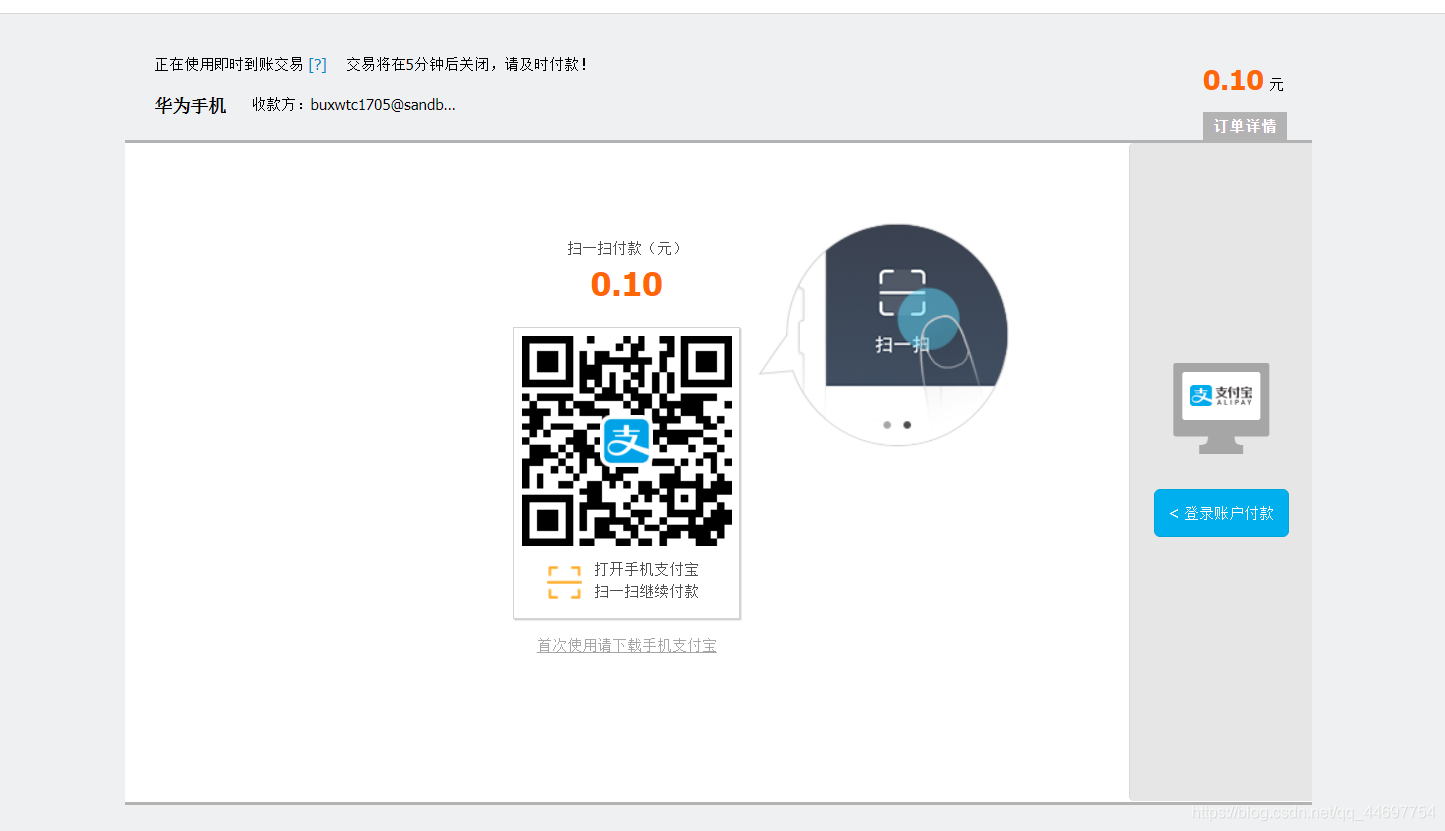
点击支付宝支付后
问题:

如果出现上面这种情况,关闭支付宝相关的页面(建议关闭浏览器重启重新访问自己的接口就可以了)
总结
此文章,借鉴https://www.cnblogs.com/xifengxiaoma/p/10107635.html该博主的文章充当笔记,代码方面,根据springboot框架可以把alipay.properties放入yml中,使用注解@ConfigurationProperties或@value实现。