docusaurus,类似于Vuepress,是一个静态站点生成工具。但不同的是,使用docusaurus可以在文档中轻易混入React组件,很适合写React相关组件的文档,而Vuepress则是适合混入Vue组件。
这就让我比较困惑,如果我想在我的博客中同时使用vue组件和react组件,二者都满足不了我的要求,于是决定自己摸索,在文档中同时使用两种组件
初步目的是想把Vue组件封装成react组件,再让docusaurus渲染这个组件,不用自己写底层,省下一笔不小的功夫
docusaurus官网的描述:
在 Markdown 中使用 JSX:
export const Highlight = ({children, color}) => (
  <span
    style={{
      backgroundColor: color,
      borderRadius: '2px',
      color: '#fff',
      padding: '0.2rem',
    }}>
    {children}
  </span>
);

<Highlight color="#25c2a0">Docusaurus green</Highlight> and <Highlight color="#1877F2">Facebook blue</Highlight> are my favorite colors.
I can write **Markdown** alongside my _JSX_!
可以得到如下渲染结果:

那么就有了一定思路,写一个方法,vue组件作为输入,返回react组件:
export const uvc = (vueComponent) => {
     return function() {
         return ( //这里一个返回一个jsx

         )
     }
}
那么接下来就要处理两件事情:
- 如何解析.vue文件
- 如何进行组件转换
解析.vue文件
Vue Loader 是一个 webpack 的 loader,它允许你以一种名为单文件组件 (SFCs)的格式撰写 Vue 组件
接下来我们需要写一个docusaurus插件,用于解析遇到的.vue文件
利用生命周期中的configureWebpack钩子:
module.exports = (content,options) => {
    return {
        name: 'docusaurus-plugin-usevue',
        configureWebpack(config, isServer, utils) {
            return {
                module: {
                    rules: [{
                        test: /\.vue$/,
                        use: ['vue-loader']
                    }]
                },
                plugins: [
                    new VueLoaderPlugin()
                ]
            }
        }
    }
}
进行组件转换
vue和react都是单页面应用,通过挂载dom节点渲染组件,我们可以利用这一点,让vue挂载渲染出来的react组件:
因为.vue文件已经被vue-loader转换了,所以可以直接用h函数渲染
在react组件渲染完毕后挂载vue的组件:
import React from 'react'
import Vue from 'vue'

export function uvc(test) {
    return class VueComponent extends React.Component {
        constructor(props) {
            super(props)
        }
        componentDidMount() {
            new Vue({
                el: `.app`,
                render: h => h(test)
            })
        }
        render() {
            return React.createElement("div", {
                className: app
            });
        }
    };
}
但是如果仅仅这个,全局都是唯一的.app类,只会有一个组件生效,那么就需要生成随机类名:
function randomCoding(){
    //创建26个字母数组
    let arr = ['A','B','C','D','E','F','G','H','I','J','K','L','M','N','O','P','Q','R','S','T','U','V','W','X','Y','Z'];
    let idvalue ='';
    const n = 16;
    for(let i=0;i<n;i++){
       idvalue+=arr[Math.floor(Math.random()*26)];
    }
    return idvalue;
}

export function uvc(test) {
    return class VueComponent extends React.Component {
        constructor(props) {
            super(props)
            this.state = {
                uuid: randomCoding()
            }
        }
        componentDidMount() {
            new Vue({
                el: `.${this.state.uuid}`,
                render: h => h(test)
            })
        }
        render() {
            return React.createElement("div", {
                className: this.state.uuid
            });
        }
    };
}
大功告成,测试结果:
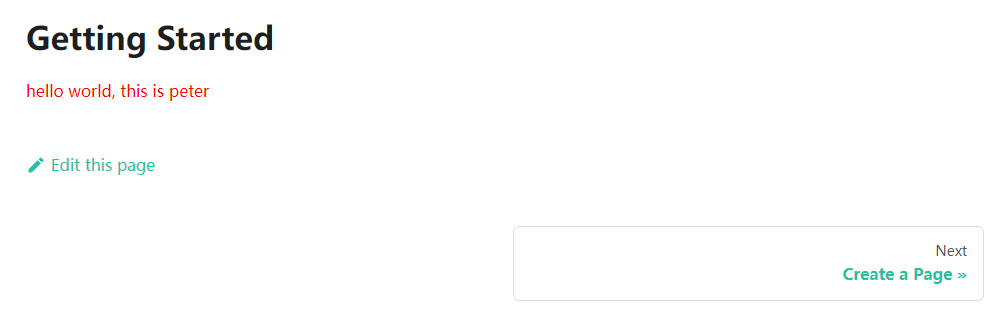
为了也方便其他人使用,将其发布到npm上,使用方法如下:
安装
yarn add docusaurus-plugin-usevue use-vue-component
插件引入
docusaurus.config.js:
module.exports = {
  // ...
    plugins: [
        [
            'docusaurus-plugin-usevue',
            {
                name: 'usevue'
            },
        ],
    ],
};
用法
directory structure:
+-- docs
|   +-- test.vue
|   +-- intro.mdx
test.vue:
<template>
    <div class="red">
        hello world, this is {{name}}
    </div>
</template>

<script>
export default {
    data() {
        return {
            name: 'peter'
        }
    }
}
</script>

<style>
    .red {
        color: red
    }
</style>
intro.mdx:
---
sidebar_position: 1
---

## Getting Started

import {uvc} from 'use-vue-component'   //导入uvc
import test from './text.vue'

export const HelloWorld = uvc(test)

<HelloWorld/>
看起来docusaurus的react组件用法很相似
局限
因为是随手写的,还存在许多不足
- 目前只支持Vue2组件,正在考虑引入Vue3的版本
- 待支持组件全局引入
- …
欢迎在评论区交流意见!
更多详情查看:
gitHub: docusaurus-plugin-usevue
gitHub: use-vue-component